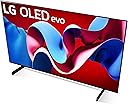
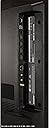
🔥 Elevate your viewing game with LG OLED evo C4 – where every pixel tells a story!
The LG 42-Inch OLED evo C4 Series Smart TV (2024) combines cutting-edge OLED technology with a lightning-fast 144Hz refresh rate and AI-powered α9 Gen7 processor. Designed for professionals and gamers alike, it delivers flawless picture quality with over 8 million self-lit pixels, Dolby Vision HDR, and immersive Dolby Atmos sound. Featuring four HDMI 2.1 ports, NVIDIA G-Sync, AMD FreeSync Premium, and a sleek flat design with Magic Remote and Alexa built-in, this TV offers a premium, future-proof entertainment hub powered by webOS 24 and backed by 5 years of software updates.


| ASIN | B0CVRXN6XZ |
| Additional Features | Amd freesync, Built-In Speaker, Flat, Game Mode, Nvidia G Sync |
| Annual Energy Consumption | 149 Kilowatt Hours Per Year |
| Antenna Location | Home Viewing |
| Aspect Ratio | 16:9 |
| Audio Input | HDMI |
| Audio Output Mode | Surround |
| Base Width | 28.3 Inches |
| Battery Type | AA |
| Best Sellers Rank | #6,170 in Electronics ( See Top 100 in Electronics ) #5 in OLED TVs |
| Bluetooth Version | 5.1 |
| Brand | LG |
| Built-In Media | E-Manual: Yes, Power Cable: Yes (attached), Quick Start Guide: Yes, Remote Control Battery: Yes (AA x 2EA), Remote: Magic Remote MR24 |
| Color | Black |
| Compatible Devices | Smartphone |
| Connectivity Technology | Bluetooth, Ethernet, HDMI, USB, Wi-Fi |
| Connector Type | Ethernet, HDMI, Optical, RS232C, USB |
| Content Sharing Direction | Mobile to TV |
| Contrast Ratio | High |
| Control Method | App, Remote, Voice |
| Controller Type | App Control, Remote Control, Voice Control |
| Customer Reviews | 4.5 out of 5 stars 1,604 Reviews |
| Display Backlight Configuration | Direct LED |
| Display Backlight Setting | Pixel Dimming |
| Display Backlight Technology | Self-Luminous |
| Display Language Options | English |
| Display Size Class | 42 Inches |
| Display Technology | OLED |
| HDR Format Supported | Dolby Vision, HDR10, HLG |
| Hardware Interface | Bluetooth, Ethernet, HDMI, S/PDIF, USB |
| Has Color Screen | Yes |
| Integrated Surround Sound Format | DTS:X, Dolby Atmos |
| Internet Applications | Apple TV and more., Disney Plus, HBO Max, Netflix, Prime Video |
| Item Dimensions D x W x H | 6.7"D x 36.69"W x 22.72"H |
| Item Weight | 22.3 Pounds |
| Item Weight Without Stand | 21.6 Pounds |
| Line Voltage | 100-240 VAC 50-60 Hz |
| Manufacturer | LG |
| Model Name | OLED42C4PUA |
| Model Number | OLED42C4PUA |
| Model Series | C4 |
| Model Year | 2024 |
| Motion Enhancement Technology | OLED Motion |
| Mounting Type | Wall Mount |
| Number of Audio Channels | 2.2 |
| Number of Batteries | 2 AA batteries required. (included) |
| Number of Component Inputs | 4 |
| Number of Component Outputs | 4 |
| Operating System | WebOS |
| Picture Quality Enhancement Technology | a9 AI Processor 4K Gen7 |
| Power Consumption | 80 Watts |
| Refresh Rate | 120 |
| Remote Control Technology | Bluetooth |
| Remote Required Battery Quantity | 2 |
| Remote Required Battery Size | AA |
| Resolution | 4K |
| Response Time | 0.1 Milliseconds |
| Screen Finish | Flat |
| Screen Mirroring Technology | AirPlay 2 |
| Screen Size | 42 Inches |
| Signal Format | digital |
| Speaker Description | Dolby Atmos, Down Firing, 2.2 Channel, AI Sound Pro |
| Speaker Maximum Output Power | 20 Watts |
| Special Feature | Amd freesync, Built-In Speaker, Flat, Game Mode, Nvidia G Sync |
| Specific Uses For Product | Entertainment, Gaming |
| Standby Power Shutoff | Energy Efficient |
| Total Number of HDMI Ports | 4 |
| Total USB 2.0 Ports | 3 |
| Total Usb Ports | 3 |
| Tuner Type | ATSC1.0 (Terrestrial), QAM (Cable) |
| UPC | 195174077351 |
| VESA Mount Standard | 300 x 200 mm |
| Video Encoding | H.265 (HEVC) or comparable advanced encoding format |
| Voltage | 120 Volts |
| Warranty Description | 1 Year Parts & Labor |
| Warranty Type | Limited |
| Wattage | 80 watts |
| Wireless Technology | Bluetooth, Wi-Fi |
R**S
Incredible monitor for M4 Mac Mini with one exception
I've been wanting a C series for a long time and finally got one. Mac Mini M4 Pro using a Highwings HDMI cable (ASIN B08M9HND4F). Picture quality is fantastic. Whites are white. Blacks are black. So much cleaner than my LG IPS display from 2020. Build quality appears to be great except I would have liked hex screw heads for the feet instead of the normal Phillips or JIS style. With the recent price drop I think this is a fantastic purchase. For functionality, WebOS, in my opinion is slow. Even basic settings takes a few seconds for the menu to come up. You are presented with various terms and agreements that you have to agree to. I've only agreed to two of them and so far there hasn't been any more nags. Unfortunately, I find the agreement terms to be less than desirable but I'm still keeping the tv. WebOS has your standard streaming service apps built in. Plex works well. Youtube works well. I haven't tried the other apps but I assume they function just as well. Sound quality is good. Nothing fancy. If sound is important and you won't be using headphones then grab a soundbar. HDMI audio does pass through from the Mac so that works. Bad part.. The Mac Mini M4 does not support HiDPI so those 4k resolutions are okay for graphics but text is not going to look good. I'm running it at 2560x1440 which is what I've been used to and have no is sues with blury text. I've also installed Better Display to help with quick tweaks for brightness and resolution if I want to do any quick changes. Overall I'm pretty happy with this purchase and would recommend the LG C4 and absolutely if you can find one on sale!
F**E
Pretty sweet as a gaming monitor
I bought the LG C4 as replace my 4k/120hz Acer Predator 43 inch monitor that inexplicably died on me after just four years of service. The LG is better in nearly every way. You don't get displayport but do you do get HDMI 2.1 which provides more than enough bandwidth for 4k/144hz with HDR. The clarity and deep blacks on this display are spectacular (as you might imagine an OLED would be). Being a TV it has more functionality than a monitor would, you have a tuner, you have apps, you have a full function remote you have wifi and ethernet. Ten or fifteen years ago, a serious PC gamer would've never gone with a TV over a proper monitor, the input lag was too much, the TV wasn't going to able to display triple digit framerates, etc. But times have changed and now higher end TVs can match or beat some "gaming" monitors in terms of refresh rate and input lag. The only downsides to this TV are that not all adjustments are available in every mode which can make your initial setup frustrating. And while HDR performance is overall good, this display doesn't get as bright as some of the best VA or IPS panels, but you also get much deeper blacks in exchange. In terms of value for money, as a computer monitor it's not bad at all. Dedicated OLED monitors (or even IPS/VA monitors) of this size are going to cost just as much if not more. As a TV though, where prices are generally lower, the price becomes harder to justify.
U**T
LG 48-Inch Class OLED evo C4 Series Smart TV
Just a fantastic monitor or TV. Picture is beautiful where blacks are pitch black, sound is great but since it is a monitor I am 3 feet from it so take that into consideration. Far as burn in, I use this at least 16 hours a day with many static items on the screen and I have not seen any evidence of it at all. I have not done anything to this LG monitor but to use it. I game on it, surf the web etc. Only thing I don't do is leave it on if I am not going to be using it for a bit. I would usually let my monitor go to screen saver, but with this LG I just turn it off. My only gripe is that when I start my PC, the LG doesn't automatically go to my PC screen, I must use the remote each time. Outside of that I find this an excellent value for an OLED.
R**L
65” LG C4
Simply put, this TV does it all. You watch movies? Play games? Concerned about how various content (SDR/HDR/gaming) look and perform? The LG C4 showcases it and does it perfectly. The form factor is incredibly thin and the TV is very well engineered. The HDR highlights pop off the screen. The contrast is perfect. The onboard sound system is not optimal, but lets be real… if your getting this TV you have a soundbar/surround setup in mind already. I have the Bose 900 soundbar with sub and surrounds and it sounds so good. Gaming on the PS5 with this TV is absolutely incredible and is a delight. Many reviewers complain of a brightness diminishment in the game optimizer, but this has never bothered me. If I wanted a brighter TV, it would be solely to sear my retinas into blindness. That being said, the game optimizer menu feels like it belongs in your games and like it is a part of your gaming console. It’s just intuitive. Play Returnal, Astro Bot, Horizon, or GOW and you will be grinning from ear to ear. At $1396 for the 65” inch variant, this is a no-brainer. Perhaps reviewers will suggest the Samsung S90D with a QD-OLED panel, but I will ask… would you sacrifice slightly enhanced color vibrancy for inferior image processing? The LG Alpha 9 gen 7 processor is pretty dang incredible. My previous TV was a Sony and I must say that LG has come a LONG way with their processing. It’s on par with Sony at this point. Samsung can’t say the same and at the end of the day, it’s the image quality that counts. The LG C4 has it. The LG G4 is alluring, but we’re reaching a point of diminishing returns. If slightly amped up HDR highlights are worth an extra $900, then you lost the value to performance game. This is TV most everybody should be looking at from a value to performance standpoint. The OS is smooth, but I opted for an Apple TV interface and it has been nothing short of incredible. With Quick Media Switching, everything you connect to this TV will be buttery smooth. Everything you do on this TV will be incredibly immersive. I have no buyer’s remorse and am incredibly happy with my purchase. You get 4 HDMI 2.1 inputs at 144hz if you’re a PC gamer. You get incredible SDR, HDR, and Dolby Vision/Atmos support. You can fine-tune settings on this TV by input setting or by viewing content medium until your heart is content. You get 5 years of OS updates. Tell me what there isn’t to like. Reviewers mention that off-angle viewing has a green tint, but this is overstated and I have not encountered it with my particular panel. So, I wouldn’t worry much about what they say. Get this TV, get a nice soundbar/surround setup, and get an Apple TV 4K and you will be enthralled, I promise.
M**M
Magnificent video screen, acceptable sound, miserable software
I've owned several LG televisions and have become a fan of the magnificent engineering that allows such a brilliant picture on a screen no thicker than a cellphone. The the prices keep coming down, making LG sets very affordable. The sound from the hidden inboard speakers is acceptable, but an add-on soundbar goes a long way toward upgrading the audio. Unfortunately, LG spoils the show by adding its clunky, buggy software that mucks up the viewing experience. Do yourself a favor and avoid connecting the TV to your household WiFi.
A**Y
Great TV and amazing picture, with a learning curve during setup.
The instructions for setting up the TV could be better. Eventually they make sense, but the illustrations (and that’s all you get—no words) are a bit vexing. Still, after I figured them out, they at least made sense. It’s just hard to translate the drawings into recognition of the correct parts involved. Once assembled (I’m using the included base not wall-mounting it), the rest of the job is fairly straightforward, but it takes some playing around with to get it the way you want it. I’m using it with a SONOS Beam sound bar and two paired One surround speakers and Sub, connected tot he eARC HDMI port, and you have to figure out which audio option to select to make that work. I’m not using cable, just streaming, so I had to sign up for all my streaming services to view content, all pretty standard stuff with a new set like this. The picture is really good, and I was surprised how good the TV’s own speaker were when I initially chose them instead of my SONOS setup.
J**E
My second 42" oled. (read for burn in warnings)
Background blurb and burn in story - First a little back ground for me. I fell in love with the 42" size for my desktop ages ago with the 43UF7600 ( have 36,000 screen on time for that monitor and I still use it). I use these 42" as desktop monitors for both productivity and immersion for games. I upgraded to the 42" oled C2 a few years ago and I loved that monitor but it had a crippling flaw. When using it for office task like word or and semi static content it would aggressively dim the screen and the only way to get it to return was to cause a full screen movement like minimizing a window. After a few weeks I took drastic measures and entered the service menu and shut that function off completely. I knew the risk and was very diligent (I owned plasma back in the day so I had good fundamentals). I took all the normal steps with a hidden taskbar, non static desktops, no desktop icons, etc. This worked really well for years until I was traveling for business and a power blip caused my computer to boot up unattended and sit on the windows login screen for a solid week. When I got back the damage was done, I tried everything, the automated cleaning over and over, endless loops of colors, you name it I ran it again and again. At last I admitted defeat and took my lumps and ordered the new C4. Build and visuals - The C4 builds on the already amazing line of LG oled. While it is not a major improvement over the C2 as specifications go it made small gains here and there. Peak brightness is up a touch and the HDR is a little more responsive and supports more standards. I have never been a refresh rate nut but the C4 does extend the range from 120hz into the 144hz range. IMO if you already own a C2 or C3 there is almost no reason to upgrade to this but at the same time there are no negatives. Silent software changes - So this to me is where the C4 made massive improvements and I don't see many people talking about this. So while the dimming feature is still there and leaving anything static on the screen will lower brightness the timer is longer and the sensitivity for movement is drastically improved. Now just moving the mouse or typing a new word will keep the screen awake or bring it back from diming. They have also added a post dimming step where the monitor will drop your content altogether and move into a screensaver mode. While I do like this mode I wish that it did not require a remote press to bring it out. Remote issues - Ok I am probably in the .5% here but I have four LG 42" screens that I use (two at the office and two at home) so a major pain point for me is remote control. I would love to be able to control my screens in synchrony as I turn them on and off. But LG wants you to bind the remote to the screen so while you can unbind them and get a dual on signal from one remote it only last for one boot as the remote will then forcibly rebind itself with the one screen and then no longer control both. As far as I can find there is not a real work around here but if I fand one I will update. Final thoughts - Overall if you are looking at the 42" for desktop use I recommend it without question. For office multitasking you can get the equivalent of four 21" 1080p windows open with no borders. throw one more 42" into the mix and now you are at eight windows. I can keep four chrome windows open for status monitors searches etc, outlook, teams, IED, and an internal app all open at once and have data immediately available at all times. For my workflow it is amazing and can keep up with my pace as I build and develop. For home use it is also amazing as you can have an immersive game play that is hard to achieve anywhere else. For photo and video editing it is also a joy to work with. All in I am in love with the 42" size and in that size LG is the market leader without question. No other screen comes close save for those that are using panels from LG and rebranding them.
B**Y
Incredible picture quality
I'd seen this OLED TV in stores and thought the image-quality was spectacular. Well, now I have mine and it is fantastic. The image quality is even better than I noticed in the stores, especially when a show or movie has Dolby Vision or HDR+ color accuracy. Everything seems perfectly lit on every scene, colors are spectacular, blacks are deep and inky and TRULY black, rather than a shade of gray. It turns on quickly. The sound is fine if you don't care for any bass but I bought an LG soundbar, too, which the TV works with perfectly. I would buy the same 77" LG OLED C4 if I had to.
Trustpilot
1 month ago
5 days ago