Buy anything from 5,000+ international stores. One checkout price. No surprise fees. Join 2M+ shoppers on Desertcart.
Desertcart purchases this item on your behalf and handles shipping, customs, and support to Italy.
🚀 Upgrade to the future-proof WiFi 7 powerhouse and never settle for slow again!
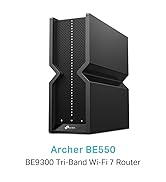
The TP-Link Archer BE550 is a cutting-edge WiFi 7 tri-band router delivering ultra-fast 9.2Gbps speeds, enhanced by 6 internal antennas for expansive coverage up to 2,000 sq. ft. It features five 2.5G WAN/LAN ports to surpass traditional gigabit limits, supports seamless mesh networking via EasyMesh, and includes advanced security with TP-Link HomeShield. Designed for professionals and tech-savvy users, it ensures stable, high-performance connectivity for streaming, gaming, and smart home setups.


| ASIN | B0CT94XNX3 |
| Antenna Location | Home |
| Antenna Type | Fixed |
| Best Sellers Rank | 3,687 in Computers & Accessories ( See Top 100 in Computers & Accessories ) 31 in Routers |
| Box Contents | Archer BE550 |
| Brand Name | TP-Link |
| Colour | Black |
| Compatible Devices | Laptop, Personal Computer, Smart Television, Tablet |
| Connectivity Protocol | Wi-Fi |
| Connectivity Range | 2000 Square Feet |
| Connectivity Technology | Wi-Fi |
| Control Method | App |
| Controller Type | App Control |
| Coverage | Maximized Coverage |
| Customer Reviews | 4.0 4.0 out of 5 stars (199) |
| Data Transfer Rate | 9214 Megabits Per Second |
| Frequency | 6 GHz |
| Frequency Band Class | Tri-Band |
| Has Internet Connectivity | Yes |
| Has Security Updates | Yes |
| Is Modem Compatible | Yes |
| LAN Port Bandwidth | 2500 Mbps |
| Manufacturer | TP-Link |
| Manufacturer Part Number | Archer BE550 |
| Maximum Upstream Data Transfer Rate | 9214 Megabits Per Second |
| Model Name | Archer BE550 |
| Model Number | Archer BE550 |
| Number of Antennas | 6 |
| Number of Ports | 5 |
| Operating System | RouterOS |
| Other Special Features of the Product | Wi-Fi 7, Multi-Link Operation, 2.5G Ports, EasyMesh-Compatibility, TP-Link HomeShield |
| Router Firewall Security Level | True |
| Router Network Type | Tri-Band |
| Security Protocol | WPA/WPA2/WPA3 (Likely includes WPA2) |
| Smart Home Compatibility | Smart Home Compatible |
| Unit Count | 1.0 count |
| Voltage | 12 Volts (DC) |
| Wi-Fi Generation | Wi-Fi 7 |
| Wireless Compability | 802.11.be |
S**.
Superb Wifi Router Replacement for Sky
Bought to replace a Sky fiber router and it doesn't disappoint: * Great wifi speed with no random drop outs (unlike the Sky router) * Great range covering all corners of our 3 storey house * VPN options for specific devices * Simple easy to use app for your phone * Rock solid stability, and been online since Day 1 for over 22 days now
M**E
Excellent Router! 👍🏼😁👍🏼
I bought this to replace my TP-Link AXE 5400 Router. I have a 2Gbps broadband contract and the Sagemcom standard, and Pro routers provided by YouFibre only gave me a maximun of 800-900Mbps, and lots of dropouts and disconnections. I now get a consistent max of about 1.7Gbps less than a meter from the router. About half of that 6 meters away. The claims about "entire home coverage" are of course pure fantasy. I have an extender about 6 meters away in an open plan kitchen, dining and living room to get good whole house coverage. Importantly, the BE550 is super reliable, great ping rates, with no dropouts or disconnections. I have only had to reboot it once (yesterday) since buying it in February
S**S
Router + mesh node is very good
I originally gave this router 2 stars because the range seemed to be worse than our Google router and 1 Google mesh node. This was surprising as the range stated is 2000 sq feet which should have been more than sufficient. I have since bought a powerful TP Link mesh node and we now have excellent speeds and range. Pros Easy and quick to setup, you don't need to be an expert. The 6ghz network has vastly improved the wifi speeds of my work laptop The Tether app is a little more insightful and useful than the Google home app Cons I was expecting the router alone to have a stronger signal than our Google router and mesh node, but it wasn't. But the router with the TP Link mesh node has created a superior range and speeds compared with our Google system. I seems to take a while to settle in. 2 days ago we couldn't 4k stream from our outbuilding at all. Last night the signal was strong. I will review again in 3 months time
A**R
Works but..
The router in general works well but... 1. The child website filtering appears to be broken with some strange websites being blocked. 2. Subscription required to get more advanced features which were on their older routers, this is just a disgusting money grab. 3. The web interface feels incomplete. For example, copying a device to reserve an IP address does not always copy the device name and then there is no way to change the name once reserved. 4. Why does it shut down and restart all the Wifi bands when I adjust one particular band. 5. The 5 and 6 GHz bands appear to slow when under load and does not give the expected performance even though connection to each band is >1900Mbps
M**.
full featured router
Needed to upgrade my current ancient router which was a TP-Link. Liked this as it had lots of new features that I currently do not need, such as 2.5Ghz ports and Wifi 7, but no doubt will do one day hopefully. Wanted good wifi range as current router did not transmit approx 10m very well through a 1910's cavity wall house, which I needed. Coupled with a wifi extender I now get virtually full speed i(i.e the max speed for my internet connection) internet at my desktop PC so I am happy. The other aspect of this router I liked as its square box fully enclosed package and not like other routers covered in multiple aerials which from previous experience got knocked and broken easily. Whilst this router has many advance features, none of them I use. Basically I have a WAN connection to the ISP's supplied modem/ router which then gets sent out via the WiFi on the BE550. Am I interested in the reporting, priority, data limits per a device - Not really Just wanted a future proof router with good WiFi which is what I got. Easy to integrate with the RE550 range extender so I could hard wire my Desktop to it. Both the router and extender can easily be monitored via the TP Link Teather app.
N**O
1/5 – Definitely NOT an upgrade. Looks great on paper, but performs worse than older TP-Link models.
I upgraded from a TP-Link Archer AX73 to this BE550, expecting better speeds and wider Wi-Fi coverage. The specs suggest it should be incredible: Wi-Fi 7, up to 9214 Mbps, and a 2.5Gbps port and LAN ports. But in real-world use, it’s honestly been a letdown. The key difference is the antennas: The BE550 has internal/hidden antennas, whereas the AX73 has six proper external high-gain antennas. And that matters. A lot. In my house (Victorian walls, two floors), the AX73 delivers strong, stable Wi-Fi everywhere — upstairs, downstairs, even into the garden. But the BE550 really struggled. Coverage dropped off sharply after just one or two rooms, speeds became inconsistent, and devices would occasionally disconnect. It feels like this router was designed for a small apartment or studio space, not an actual home with brick walls. (I barely got 20mbps on my phone and maybe 55mbps on macbook) After a couple of frustrating days, I’ve boxed the BE550 and instead ordered the Archer AX72 Pro, which has Wi-Fi 6 + a 2.5Gbps port — and if it performs anything like the AX73, it’ll be a far better fit for a full house. Pros: ✅ 2.5Gbps WAN/LAN for faster internet backhaul ✅ Clean, minimal design ✅ Easy setup Cons: ❌ Internal antennas = noticeably weaker range ❌ Struggles through real-world walls ❌ Worse performance than cheaper TP-Link models ❌ Not suitable for house-sized coverage Verdict: If you live in a flat or open-plan apartment, this might be fine. But for a house, especially with solid walls, stick to the Archer AX series (AX72 Pro / AX73 / AX5400 range). They simply perform better where it matters. Sometimes the newest isn’t the best — and in this case, the “upgrade” was actually a downgrade.
R**O
Ottimo direi. Attenzione solo al fatto che il setting per indicare il tag vlan è molto ben nascosto, mentre l'aggregazione automatica delle bande wifi può creare problemi ad alcuni device (basta separare le bande e funziona tutto comunque).
C**N
Buon prodotto, esattamente come descritto.
R**A
Il modem funziona bene, collegato in cascata al principale mi fa da access point. In WiFi7 a 6ghz, con un S24 Ultra e fibra 2.5gbps, sono arrivato tranquillamente a 2300mbps, che sono 2.3gbps che in WiFi sono ottimi. Frontalmente sono presenti dei LED, carini, ma non particolarmente utili.
Trustpilot
2 weeks ago
4 days ago