Buy anything from 5,000+ international stores. One checkout price. No surprise fees. Join 2M+ shoppers on Desertcart.
Desertcart purchases this item on your behalf and handles shipping, customs, and support to Italy.
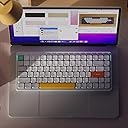
⌨️ Elevate your desk game with the Air75 V2 — where style meets unstoppable productivity.
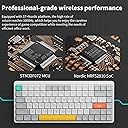
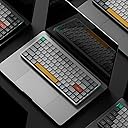
The nuphy Air75 V2 is a premium 75% wireless mechanical keyboard featuring a durable aluminum frame with a unique translucent bottom shell. It supports multi-device connectivity via Bluetooth 5.1, 2.4G wireless, and USB-C, allowing seamless switching between up to 4 devices. Equipped with Gateron Brown tactile switches and PBT keycaps, it delivers a refined typing experience. The keyboard boasts over 21 RGB lighting effects with dual side LED bars, a robust 4000mAh battery offering up to 220 hours of use without backlight, and full compatibility across Windows, Mac, and Linux systems — making it the ultimate tool for professionals who demand style, versatility, and endurance.


| ASIN | B0CMYYQDST |
| Additional Features | Backlit |
| Antenna Location | Gaming |
| Best Sellers Rank | #3,233 in Video Games ( See Top 100 in Video Games ) #277 in PC Gaming Keyboards #387 in Computer Keyboards |
| Brand | nuphy |
| Built-In Media | USB Cable |
| Button Quantity | 84 |
| Color | White |
| Compatible Devices | Laptop, PC, Tablet |
| Compatible Operating System Family | Windows |
| Connectivity Technology | 2.4GHz , Bluetooth, USB-C |
| Customer Reviews | 4.2 out of 5 stars 705 Reviews |
| Enclosure Material | Acrylonitrile Butadiene Styrene, Aluminum |
| Generation | 2 |
| Global Trade Identification Number | 06976604912855 |
| Hand Orientation | Right |
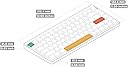
| Item Dimensions L x W x H | 12.46"L x 5.22"W x 0.53"H |
| Item Weight | 0.6 Kilograms |
| Keyboard Backlighting Color Support | RGB |
| Keyboard Description | Support windows/mac OS/Linux system |
| Keyboard Layout | QWERTY |
| Language | English |
| Manufacturer | nuphy |
| Mechanical Keyboard Switch Model | Gateron Brown |
| Mfr Part Number | AIR75V2-WH-BR |
| Model Name | Air75 V2 |
| Model Number | Air75 V2 |
| Number of Batteries Required | 1 |
| Number of Keys | 84 |
| Number of Sections | 1 |
| Power Source | Battery Powered |
| Recommended Uses For Product | Gaming |
| Special Feature | Backlit |
| Style Name | Contemporary |
| Switch Type | Tactile |
| Theme | RGB |
| Total USB 2.0 Ports | 1 |
| Unit Count | 1.0 Count |
| Water Resistance Level | Not Water Resistant |
R**A
Keychron K3 Pro vs Nuphy Air75 v2 - Only one CLEAR winner: Air75 v24
TLDR Between the K3 Pro and Air75 v2, I much prefer the Nuphy Air75 v2 because of its superior build quality, better typing sound, reliability, and overall typing experience. With the Keychron K3 Pro, I found myself wondering if there was another keyboard that had a more refined typing experience. I am completely satisfied with the Air75 v2 after almost a month of use, and would definitely recommend this to anyone in the market for a new wireless mechanical keyboard. It’s a pleasure to type on and you won’t regret it! Background: I was in the market for a new mechanical keyboard, and my criteria were: (1) Smaller footprint for portability and to save room on my desk (2) Must provide great typing experience both in terms of tactile feedback and sound (3) Must have good battery life (4) Must have reliable bluetooth/wireless connection (5) Aesthetically pleasing to look at This review compares the two 75% layout keyboards I have tried: Keychron K3 Pro vs. Nuphy Air75 V2, and why I ultimately decided on keeping the latter. I ordered BROWN switches for both keyboards. BUILD QUALITY Both keyboards are well built, with an aluminum base/housing. Both the K3 and the Air75 come with PBS keycaps, which feel and sound much more substantial than ABS keycaps which feel and sound like cheap plastic. - K3 features a floating keycap design with no bezels on the board, meaning the keys are quite exposed. Picking up the K3 keyboard to move it makes me feel uncomfortable, as my fingers are pulling up at the sides of the keys, making me feel like it could damage the mechanisms overtime. The Air75 V2 has an aluminum housing featuring a thin bezel around the keyboard, which feels much better to pick up. - Key rattling is minimal on K3 but present, and it makes it feel just a little cheaper compared to the Air75 V2, which has no obvious key rattle. I’m sure the rattle on the K3 can be addressed by reapplying lube to your switches, but if you are looking for something with good sound and typing experience fresh out of the box, you’ll find that in the Nuphy Air75 v2. SOUND & TYPING EXPERIENCE If you are switching from a cheaper consumer keyboard like the Apple Magic Keyboard or other budget-friendly mechanical keyboards, you will find it a pleasant upgrade to both the K3 and Air75. However, comparing the two keyboards side by side, the Air75 sounds better to me and the difference was immediately obvious. K3’s sound compared to the Air75 is brighter, more hollow, and less refined. Because of there is a little play on some of the keycaps, there’s a slight rattle here and there, making the keys sound brighter and cheaper. Air75’s sound is solid, thocky, and solid. For the most part, the keys don’t have any real discernible rattle, so you’re not hearing anything else when you type besides that solid keystroke. Because the rattle really comes from the switches themselves, it is impossible to get a prelubed keyboard that’s “perfect”; you are bound to find a key or two that has just a little bit of rattle here and there, but nothing significant. If you happen to find a key that sounds off or doesn’t give the right kind of feedback, I suggest either reapplying lube to the switch, or switching out the actual switch itself for another (quick fix) and the problem can be resolved easily. I did not expect the typing sound and experience to be that drastic between Nuphy’s Air75 v2 and Keychron’s K3 Pro, but it really was apparent and made for a much more pleasant typing experience on the Air75. WIRELESS CONNECTIVITY This one is huge. The K3’s bluetooth capability was not reliable at all. Out of the box on Day 1, I was experiencing connectivity issues where the keyboard would suddenly disconnect, and would take a minute before it would reconnect again. It was interfering with my Apple Magic Mouse, which was also connected wirelessly to my MacBook Pro via Bluetooth. The Air75, however, has not given me any issues via Bluetooth at all, and has been consistently reliable through hours of use. WAKE-UP TIME FROM SLEEP MODE Similarly, the K3’s wakeup time took longer after it automatically went into sleep mode, which means your initial keystrokes are not recognized as quickly. Over time, this presents a productivity issue if you have to consistently wait for the keyboard to wake up before you start working. The Air75 wakes up immediately upon the first keystroke, which is a much more pleasant experience and it means I can get to work quicker. It has never had issues waking up and being connected wirelessly via bluetooth. SWITCHES I ordered BROWN switches for both the Keychron K3 Pro and the Nuphy Air75, which in theory should give the same typing experience. However, there is a more noticeable “bump” and tactile feedback from the brown switches on the Nuphy Air75 V2. Nuphy also ships with a collection of their different switches for you to try. After trying the other switches out, I find myself gravitating towards the Aloe switches, which are quieter and feel much more weightless. I ended up ordering a batch of Aloe switches directly from Nuphy, which I am excited to receive in a few months (the long shipping times directly from Nuphy is because they ship from China). The Gateron Browns feel good with a solid sound and gentle but noticeable bump/tactile feedback, but I feel like I will enjoy an even quieter and linear typing experience for faster typing speeds. LIGHTING EFFECTS The backlights on the K3 were decent, but mine was the white-color only. The backlights on the Air75 are brighter, and came in RGB, which I have been enjoying. The colors are rich, saturated, and the transitions are buttery and smooth. I like that there are two LED indicators on the side of the keyboard, which are multi-functional and indicate whether Caps Lock is engaged (left), connectivity (left) and keyboard battery status (right).
B**K
Great Mechanical board for a decent price!
Got this for a new work from home setup and wanted a smaller keyboard that's wireless to go between my work laptop and personal laptop. I've used "gamer" mechanicals for years and wanted to try something new and get some clicky tactile blue keys. This thing ticked a lot of my boxes. I was suspicious of going Gadeon Blue switches instead of Cherry MX Blues that I've tested before. But these feel great! Pros: - OEM PBT keycaps feel great. - Typing feels fluid and similar spacing to a laptop which I like for fast typing. -Quality is solid, even as plastic frame, clear back is cool to look at. - Comes with one of all the other types of switches to test out and can hot swap the switches. - Mac to PC switch is nice to have. - Cable is nice quality, comes with a cool holder for the 2.4g USB stick. - Side LED's look cool and are functional. - Amazing form factor on desk. Stores away nicely. - Great packaging and instructions. Cons: - Occasionally you can double tap a key without resetting the switch to click (Gadeon Blues). Might be an issue with other tactile keys too. - Key puller could be better quality. Switch side puller is nice though. - No neutral colors in packaging for enter, esc, and space bar. Only all red and yellow and all teal + yellow. (not a problem if you go aftermarket keycaps) - USB cable is not neutral or black, it's the standard gray and teal colors. Same with dongle. - Fn key for lighting and other settings is kind of confusing at first. - Lighting does not feel super bright even at max brightness. North facing LED's on non shine through caps. - Ports and switches are teal on the front edge of the keyboard. Wish they were gray or black to be more neutral. Overall, this is a stout keyboard for the price and out of the box performance. Much better to type on than my Corsair K95 with Cherry MX Browns. Glad I went with this over some of the other competitors in this price point with how much stuff you get out of the box. PS: If you want tactile feel without the audible click, get the moss green switches. From testing them I liked those the most other than the Gadeon Blue. The wisteria don't feel super tactile to me.
J**L
Moss switches are loud and clacky
This is an excellent low-profile mechanical keyboard. Very solidly constructed, nice design touches like the two stage floppy feet and the dongle storage on the cable, and trimode connectivity works flawlessly. It's not especially creamy feeling or sounding, but it's a well-built and worthy choice. I appreciate that Nuphy offers the Air v2 with switch options beyond the usual red and brown. I love tactility so I chose the Moss switches. The tactile bump is right at the top, but what was most noticeable were the loud clacks that accompanied every bottom-out and top-out. It was so bothersome that I bought Gateron KS-33 Chocolates separately to replace the Moss switches. The Chocolates' tactile bump is less pronounced than the Moss and it's a bit lighter in force, but the sound is subdued to an acceptable level.
A**G
ABSOLUTELY AMAZING KEYBOARD!!! | Sturdy, High Quality, Transportable and Aesthetic.
First, a little backstory. Prior to this keyboard, I had only ever used small sized keyboards. My personal laptop is a surface which has an exceptionally small keyboard. And my old Bluetooth keyboard is a very compact size one. I wanted a higher quality, more sturdy keyboard, and dust began to search to find a very quality one. I spoke to a friend, who has the 100% version of this exact keyboard. I immediately fell in love with the back keys, the clickiness, an overall aesthetic appeal of this keyboard. However, I still wanted a smaller version as it was too big for me. So, I opted for the 75% version. There is a smaller one, but that one does not have the function keys, which were essential to me. This one does, and thus is perfect. The size is still a bit big for me. I have very big hands, but my fingers type close together. The only issue I faced with this keyboard, is that because of its size and my newness to the keyboard, I make constant typing errors. However, this is a very individual level problem, and there are no actual defects or manufacturing issues with the keyboard. The keyboard is definitely a bit pricey, but it feels great, looks great and works great. It is a bit heavy, but not to the point where it’s hard to carry by hand or bag. I charge this keyboard once when I first got it and never since. I used it decently regularly, and always made to turn it off after use. But, it also has an auto off feature. It has not died yet and battery is still going strong. Keyboard overall is very easy to use. Connect to my laptop and PC instantly once I turn it on. Backlit LEDs and very bright, especially at night - video doesn’t do justice. I especially love that it has multiple LED cycle options. I chose the one that lights up on individual keys that are pressed. Overall, I’m very pleased and happy with this keyboard. I would recommend to anybody else that might be looking for a high-quality keyboard.
S**G
Double Typing Issue
The lifespan of a switch is approximately 5 months. After 5 months, the majority of the keys began to double-type and glitch. For a while, I resorted to removing the keys and swapping the switches until I gave up. It’s a nice-looking keyboard, but the quality control is poor.
R**8
Wow - Love this keyboard!
This is an outstanding keyboard. Has a great tactile feel while typing and so comfortable to use. I have tried so MANY of the keyboards available including some that are much much more expensive and this one by far stands out at the top of all. I use a keyboard most all day and night, but I am not a gamer. I also find that I can type much faster on this keyboard. I also have a Keychron on another system which is great but this Nuphy is even better. I am a a Mac user and the fact that this keyboard also has the correct control keys in the expected place for Mac users is also super helpful. Also like that it has a physical Mac mode switch on it. Highly recommended!
B**N
Fun, bite-size keyboard
I love this keyboard! I have a few much more expensive keyboards from Keychron and I still find myself pulling this keyboard out occasionally. The thin form factor and switches make it super fun to use, with a great typing sound and good responsiveness for gaming. The Bluetooth can be rather short-range, but I've never had any issues with the wifi dongle/USB adapter, and wired mode works just fine. The battery life is exceptional - I find that I rarely need to charge the keyboard even when I leave it on wireless mode for several days. The backlight LEDs are just OK - they're not super bright, but they also don't need to be!
M**E
Great keyboard as long you use it wired.
I've always been a fan of mechanical keyboards, but after using Logi MX series for years I had trouble with the longer keystrokes and don't particularly like the need to use a wrist rest. When low profile keyboards started getting popular I decided to try this one. I got the black version with cowberry switches and really like the feel and sound of the keys. After about a month of use I can say the keycaps feel really good and so far show no signs of wear. It's heavy enough to stay put whether typing for work or 'spirited' gaming sessions. It has some blemishes though, one that makes this keyboard a 'pass' if you intend to use it in wireless mode. First, the super thin rubber feet tear off fairly quickly. I move my keyboard away on my desk to use it as a workspace, then pull it toward me to use the keyboard. Within the first week one of the feet 'rolled' off. I glued it back on, and since then two of the others have done so as well. They look nice and have a nice feel, but tear off too easily. Second, and unfortunately it was past the return window before I learned this, it absolutely stinks in any kind of wireless mode. Whether in BT mode or using the included dongle it tends to drop keystrokes at random times. I thought it was me simply having trouble moving back to a mechanical keyboard, but last week the battery finally went low so I plugged it in. It didn't miss another keystroke! So I have experimented with it, using different bluetooth dongles, high quality extension cables to put the included wireless dongle within a foot of the keyboard, different PCs, even moving my PC to the desk right next to the board and plugging the dongle into the PC directly.. and it drops keystrokes no matter what I do. Wired it works perfectly, but if you are a fairly fast touch typist it's extremely annoying to have a keyboard that just ignores keystrokes. So if you like mechanical low profile keyboards, and you intend to use it wired.. this is a very satisfying keyboard. It's 'thocky', key tension is very even, the keys are very easy on your fingers and if you like RGB it has some cool modes, although you might want to upgrade to shine through keys for that purpose. If you want it for wireless use though, look elsewhere.. in my experience it's wireless mode, whether bluetooth or included RF, works poorly. Update 3-30-2024 Because the stock rubber feet kept coming off, I finally ordered a set of generic keyboard feet from here on Amazon. They feel similar to the originals, but are much wider. These give the keyboard an even more sturdy feel while in use, with no worries about the feet coming off. Now if only something could be done to fix the wireless connectivity...
B**C
Great keyboard
Good build quality. Battery lasts for one week with a bit of RGB on. A big plus is that you can switch between multiple devices you use with FN key + keys from 1 to 4 and it also works while it is charging. I've replaced a Logitech G915 with this NuPhy Air75 V2 because the buttons to switch between wireless and BT on G915 can just die and you can't replace them. They are touch buttons built into the keyboard. So you can't switch between wireless and BT anymore and if you plug the cable it does not switch to wire mode either. Well I won't have these issues with NuPhy :D.
W**.
Täglicher Begleiter
Mein Dailydriver, egal wo ich bin.
D**D
Un pò cara
Ottima tastiera un pò cara, però la consiglio a chi cerca una tastiera compatta, ma cha ha tutte le funzionalità.
A**R
NuPhy Air 75 V2 - unikajcie jak ognia
Klawiatura sama w sobie jest świetna, ale sądząc po opiniach wszystkich użytkowników, WSZYSTKIE te klawiatury mają problem z zacinaniem się klawiszy. Próbowałem wymieniać przełączniki na inne – nie pomaga. Cały internet jest zalany zgłoszeniami tego problemu. Aktualizowałem firmware na wszystkie możliwe wersje – zarówno starsze, jak i nowsze – próbowałem resetować i tak dalej, i tak dalej. Kontaktowałem się z supportem NuPhy – odmawiają pomocy, bo nie widzą zamówień złożonych przez Amazon, ha. A sprzedawcą był właśnie Amazon.
B**O
Excelente teclado.
Después de mucho investigar, encontré que este teclado es una de las mejores opciones para teclados mecánicos, y al tener teclas "Low-Profile" su tamaño se ajusta muy bien a mis preferencias. Este teclado no decepciona, la sensación al escribir es muy buena y tienes posibilidad de escoger los switches que mas se acomoden a tus gustos, en mi caso escogí los Switches Cafes, pero el producto viene con 4 switches que puedes probar y comprarlos aparte en su página web. Creo que el único detalle es que el Software es algo complejo y no muy amigable, pero una vez que lo entendí no tuve problemas para configurar ciertas teclas de mi teclado. En resumen, es una gran opción para alguien que quiere empezar a meterse al mundo de los Teclados Mecánicos, solo si me gustaría que hubiera la opción de teclado en Español. Si encuentro alguna falla modificare esta reseña.
Trustpilot
5 days ago
2 days ago