


🎮 Elevate your console game with PC-grade precision—because winning is a lifestyle.
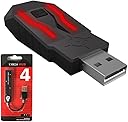
The XIM Technologies 1005 Apex Precision Mouse and Keyboard Adaptor transforms your Xbox and PlayStation consoles into a PC-grade gaming powerhouse. Featuring advanced Smart Translator technology, it delivers flawless 1-to-1 input precision with zero lag, customizable settings via a wireless smartphone app, and a built-in USB hub for multiple peripherals. Designed for both desktop and living room setups, it’s the ultimate tool for serious gamers demanding precision and flexibility.
| ASIN | B079SS1CCR |
| Best Sellers Rank | 53,345 in PC & Video Games ( See Top 100 in PC & Video Games ) 30 in PlayStation 4 Adapters |
| Brand | XIM Technologies |
| Brand Name | XIM Technologies |
| Cable Length | 9 Inches |
| Colour | Red |
| Compatible Devices | Gaming Console |
| Compatible devices | Gaming Console |
| Connector Type | Micro USB |
| Connector type | Micro USB |
| Customer Reviews | 3.7 out of 5 stars 8,549 Reviews |
| Global Trade Identification Number | 00713482999860 |
| Item Dimensions | 15 x 10 x 2 centimetres |
| Item Weight | 68 g |
| Item dimensions L x W x H | 15 x 10 x 2 centimetres |
| Manufacturer | XIM Technologies |
| Model Number | 432038 |
| Number of Items | 1 |
| Number of Ports | 3 |
| Package Quantity | 1 |
| Power Plug Type | No Plug |
| Product Finish Type | Matte |
| Specific Uses For Product | Video Game Console |
| Specific uses for product | Video Game Console |
| UPC | 713482999860 781055985343 |
| Unit Count | 1.0 count |
| Warranty Type | Limited |
P**R
Best on the market, easily.
I always played my shooter games on a pc and I got used to using a keyboard and mouse to play. When I had a choice to build a new pc and spend more than 1200£ I started looking for an alternative. Xim Apex was a great choice. It is as good as people say it is. Things I like about it: 1. It's easy to set up and use. But be aware it's not plug and play. I did my research and I learned how to set it before the package arrived. It's easy when You know what to do. 2. Xim Apex offers brilliant performance, there is zero input lag 99,9% of the time. Every button on the keyboard and every move of the mouse works instantly. That's a great thing to have in a dynamic shooter game. 3. The customization options for each game are very detailed allowing You to get the settings done exactly like You want them. Put enough time and effort into making the settings and enjoy the rewarding game. Things I don't like: 1. Nothing to say here to be honest. I got the best thing available on the market to make sure I'm happy with the quality.
J**D
Awesome piece of kit!
Admittedly this item isn't cheap BUT I have to say its been worth every penny. My son started gaming on his laptop about 12 months ago and really got used to playing with a keyboard and mouse. He recently bought Black Ops 4 and the PC servers seemed to be awful and really laggy. Plus all of his friends are playing on Xbox. So he wanted to return to Xbox gaming but really wanted to use the K&M still. We did some investigation and came across the Xim Apex. I was dubious at first as it was expensive, but now stand corrected. It's brilliant! Easy to set up and just seems to work like a dream! He has played both RDR2 and BOps4 and they both work very well. Excellent piece of kit!
S**N
Exceptional functionality and ease of use
1. Connected it to my laptop so I can update the firmware. Done in less than 1 minute. 2. Connect it to the PS4 Pro and download the XIM Manager on my phone. 3. Link the app and the actual XIM together and get started. As far as functionality, the product is briliant in the purest sense of the word. I play BF 1 abd BF V with it and its milion years better than with the controller. I was a PC Gamer for 15 years and I can assure you that the feel of M&K on the PS4 is the same as on the PC. PS: Make sure you read the info about every game before you actual load any config. The XIM Manager will let you know what settings you need to do in-game. Do that and you are 100% going to have a blasting experience.
R**T
I love this thing
It's a great product, and very easy to setup, with a variety of options for usage outside of just Keyboard and Mouse. I've tried it in a couple of games, and while some work great, like Siege, some don't like Halo 5. However this is a limitation of the game and not the actual product, games that use aim acceleration or aim assist without the option of turning those off like in Halo 5 will not work well with the Xim Apex
A**H
Not for high end gaming
This is not complicated to program and tutorials are amazingly good. However, the product itself is limited. I am avid fps gamer and wanted to try this out instead of modified controller (like elite or ps4 top ends). It was a waste of time. It works perfectly but there is a noticable lag even with full hud customisation. I have a gaming monitor with low latency and gaming keyboard with gaming mouse. Everything is listed as compatible but still the lag in fps for high end players is too much. If you are looking for an advantage with keyboard and mouse look somewhere else. Also, please be aware that some games are now able to detect the xim chipset which is licensed from MS and is legitimate. However, due to the toxic game industry being as it is, you could be in trouble in some games. Your MS account is safe anyway as this does not count as a mod. Not sure about PS. Do your research and try on temp account before going full fledge mnk on controller games.
D**N
Game changer
Been a PC gamer for well over 20 years. Opted to get an XBOX X to play Red Dead Redemption 2 then started to fill out my game collection with the odd FPS title. I was doing ok but long term felt frustrated the controller wouldn’t allow me to do what I wanted. A mate recommended the Xim APEX to me. Took a while for me to actually go for it but I’m so glad that I made the leap. The difference is night and day. It isn’t the same as playing on PC but it is very very close in some titles. Some games respond better to the Xim than others but it really does make a difference. I’m a new user though and there are extensive customisable features and an active community to offer advice or share setups. Build quality is fine, I read somewhere someone said their APEX didn’t fit into the USB slot and the tolerance was quite poor. I can’t say I have had any issues with mine at all. Great bit of Kit!
B**R
Confusing product.
NEW FEEDBACK So after hours of messing around with the configs and sensitivities I finally found a sweet spot for certain games except for 3rd person shooters and man it does feel close to playing on a pc. I would have thought the input lag is noticeable but it really isn’t so I give it a 5/5 after finding the right setup. In my old feed back I was in patient and wanted to get straight playing and at first it was confusing when using the app but after messing around you get the hang of it. OLD FEEDBACK 👇🏼 I rate a 3 because it was so god damn complicated when setting up there no instructions and for me to get it to work I had to change my PS4 connection in the settings from Via BlueTooth to usb cable. The apex manager is very confusing and frustrating. And I couldn’t use mine out of the box with my mouse because of my DPI to low and there no way for me to edit my DPI/Mouse Poll as I don’t own a computer at the moment as I’m in the middle of building one. However I hardly noticed the input lag I’m sure this product is amazing once you found your perfect settings etc..
S**Y
Works better than I expected
As a long term PC player who hasn't touched a controller for about a decade who recently picked up a xb1 to play red dead this is a life saver, I am an extremely average player with a mouse and trying to play with a controller again after so long has been an exercise in frustration, once you have set this up (which takes a few hours to get it dialed in just right) I am very happy with how it works. I hold the controller with my left hand for movement and aim with the mouse and can finally enjoy the game without half my shots ending up in trees or having to use dead eye as a crutch. You can even use it with one of the mmo style mice with the numpad and map the buttons to what ever you like. I use it with a razer naga but I would think it will work with any mouse with built in memory. If you're on the fence and concerned about it not working to a satisfactory level I say get it.
Trustpilot
3 weeks ago
3 days ago