We remain fully operational. Our teams are working around the clock to ensure your deliveries continue safely.

DOWNLOAD THE APP


Customer Services
Copyright © 2025 Desertcart Holdings Limited
DOWNLOAD THE APP


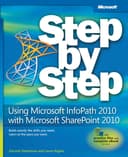
Using Microsoft InfoPath 2010 With Microsoft SharePoint 2010 Step by Step [Shadravan, Darvish, Rogers, Laura] on desertcart.com. *FREE* shipping on qualifying offers. Using Microsoft InfoPath 2010 With Microsoft SharePoint 2010 Step by Step Review: Your search for a book that covers using InfoPath 2010 with SharePoint 2010 is over - I have followed Laura Rogers and Darvish Shadravan for a while now and have always enjoyed seeing them speak at various conferences and events. So, when a client approached me with this book wanting to know if they should buy it, I told them yes without hesitation or having even read it. After flipping through the first few chapters I just knew that I had to buy a copy for myself as well. Laura and Darvish have written an excellent book focused around using InfoPath 2010 with SharePoint 2010, something that has been needed for some time in my opinion. I really liked the layout and the approach the authors chose for conveying the information. It is divided into 14 chapters which start with the basics and slowly ramps the reader up into more advanced topics. The explanations and pace of the book is excellent. At no time when I read the book did I feel as if they took me down a path of learning and then left me hanging while they went on to another topic. There is a nice mixture between text and exercises within the book. While this book could be used a go to for information when needed, I would suggest going through the entire book cover to cover first. Laura and Darvish have explained everything very well. But you have to remember that the book chapters do build upon each other. So if you were to flip through the book looking for something you will most likely find it but if you don't have a background in InfoPath or SharePoint you may just miss a an important concept that they wrote in an earlier section. As I wrote earlier this is a great book with a lot of good information on using InfoPath 2010 with SharePoint 2010. It reads very easily and if you have a free weekend with access to a SharePoint 2010 site and InfoPath 2010 installed you will probably be able to work through the reading and the exercises pretty easily. That said however do not get me wrong and think that this is a basic book. Laura and Darvish do go into the more complex areas of using the software as well. Such as adding logic and rules, integrating with SharePoint workflows, InfoPath Forms Services, Dashboards, and advanced functions. So this is not a lightweight book. It's their easy writing style (almost as if they were sitting next to you talking you through the content) which makes it such a good resource. Chapter Highlights: Chapter 1 - Office Backstage in InfoPath, Understand how to create an XML file, Create an InfoPath form, Add, data connections to a form. Chapter 2 - Choosing a form template, Understanding form compatibility levels, learn what the document information panel is (--did you know that you can customize this?), run the Design Checker. Chapter 3 - Use Page Layout templates, add tables to forms, understand data binding, work with InfoPath Controls. Chapter 4 - Insert a custom page design template, use available controls for a form, customize a travel request list using InfoPath, use calculations in a form. Chapter 5 - Work with the InfoPath Rules Task Pane, add conditions to Rules, Using Rules with Picture Buttons, Create Forms with Wizard-style interfaces. Chapter 6 - Create a time off request form, set up Submit button actions, Concatenate field names to create a file name, publish a form as a content type. Chapter 7 - Add a SharePoint list data connection to a drop down control, work with Data Connection Libraries, Use the External Item Picker control. Chapter 8 - Create a simple feedback form, configure the InfoPath Form Web Part, learn about Web Part connections, create an input parameter. Chapter 9 - Add data from a web service to your forms, Work with form load rules, create an event registration form. Chapter 10 - Integrate InfoPath forms in workflows, customize an initiation form to look more polished, update forms when fields change, use task actions in workflows to generate a task form in the workflow. Chapter 11 - Create a time off request form, create an approval section on the approvals view, create a SharePoint Designer workflow to send emails, create multiple rules on a single submit button. Chapter 12 - Understand InfoPath Form Services in SharePoint Central Admin, Learn how to use Fiddler to monitor browser forms, analyze the effects of attachments on form performance. Chapter 13 - Work with custom views, learn to apply conditional formatting to views, add buttons to SharePoint pages for creating new forms, add Key Performance Indicators that report metrics from your forms, utilize the Content Query Web Part to surface information. Chapter 14 - Utilize the Rule Inspector to analyze all rules inside a form, learn how to modify the toolbar, create multiple default values in a form, work with the Translate function to manipulate text in case-sensitive form fields. Review: Classroom in a Book! - This book is very detailed and, using the downloadable examples, basically walks you through building InfoPath forms while explaining the theory behind each option. It has been an excellent resource for me at work since I had to "jump in the deep end" and update all of our forms for electronic input into SharePoint lists. Please note, the book is as it's title proclaims, a step by step guide. Although a seasoned InfiPath user may find a great tip or two in this book it is not written for seasoned users. The author also reiterates this in the beginning of the book. In contrast, if you are a beginner and want a quick fix without the why to build upon your knowledge base the book may seem a little slow for your taste (see the first 5 words in my review). The book I very well written and one that I keep in my "classroom in a book" section. Many thanks to the authors, Mr. Shadravan and Ms. Rogers!
| ASIN | 0735662061 |
| Best Sellers Rank | #5,897,729 in Books ( See Top 100 in Books ) #111 in SharePoint Guides #1,737 in Computer Operating Systems (Books) #3,539 in Enterprise Applications |
| Customer Reviews | 4.3 4.3 out of 5 stars (71) |
| Dimensions | 7.5 x 1.5 x 9 inches |
| Edition | 1st |
| ISBN-10 | 9780735662063 |
| ISBN-13 | 978-0735662063 |
| Item Weight | 1.64 pounds |
| Language | English |
| Print length | 446 pages |
| Publication date | November 15, 2011 |
| Publisher | Microsoft Pr |
J**N
Your search for a book that covers using InfoPath 2010 with SharePoint 2010 is over
I have followed Laura Rogers and Darvish Shadravan for a while now and have always enjoyed seeing them speak at various conferences and events. So, when a client approached me with this book wanting to know if they should buy it, I told them yes without hesitation or having even read it. After flipping through the first few chapters I just knew that I had to buy a copy for myself as well. Laura and Darvish have written an excellent book focused around using InfoPath 2010 with SharePoint 2010, something that has been needed for some time in my opinion. I really liked the layout and the approach the authors chose for conveying the information. It is divided into 14 chapters which start with the basics and slowly ramps the reader up into more advanced topics. The explanations and pace of the book is excellent. At no time when I read the book did I feel as if they took me down a path of learning and then left me hanging while they went on to another topic. There is a nice mixture between text and exercises within the book. While this book could be used a go to for information when needed, I would suggest going through the entire book cover to cover first. Laura and Darvish have explained everything very well. But you have to remember that the book chapters do build upon each other. So if you were to flip through the book looking for something you will most likely find it but if you don't have a background in InfoPath or SharePoint you may just miss a an important concept that they wrote in an earlier section. As I wrote earlier this is a great book with a lot of good information on using InfoPath 2010 with SharePoint 2010. It reads very easily and if you have a free weekend with access to a SharePoint 2010 site and InfoPath 2010 installed you will probably be able to work through the reading and the exercises pretty easily. That said however do not get me wrong and think that this is a basic book. Laura and Darvish do go into the more complex areas of using the software as well. Such as adding logic and rules, integrating with SharePoint workflows, InfoPath Forms Services, Dashboards, and advanced functions. So this is not a lightweight book. It's their easy writing style (almost as if they were sitting next to you talking you through the content) which makes it such a good resource. Chapter Highlights: Chapter 1 - Office Backstage in InfoPath, Understand how to create an XML file, Create an InfoPath form, Add, data connections to a form. Chapter 2 - Choosing a form template, Understanding form compatibility levels, learn what the document information panel is (--did you know that you can customize this?), run the Design Checker. Chapter 3 - Use Page Layout templates, add tables to forms, understand data binding, work with InfoPath Controls. Chapter 4 - Insert a custom page design template, use available controls for a form, customize a travel request list using InfoPath, use calculations in a form. Chapter 5 - Work with the InfoPath Rules Task Pane, add conditions to Rules, Using Rules with Picture Buttons, Create Forms with Wizard-style interfaces. Chapter 6 - Create a time off request form, set up Submit button actions, Concatenate field names to create a file name, publish a form as a content type. Chapter 7 - Add a SharePoint list data connection to a drop down control, work with Data Connection Libraries, Use the External Item Picker control. Chapter 8 - Create a simple feedback form, configure the InfoPath Form Web Part, learn about Web Part connections, create an input parameter. Chapter 9 - Add data from a web service to your forms, Work with form load rules, create an event registration form. Chapter 10 - Integrate InfoPath forms in workflows, customize an initiation form to look more polished, update forms when fields change, use task actions in workflows to generate a task form in the workflow. Chapter 11 - Create a time off request form, create an approval section on the approvals view, create a SharePoint Designer workflow to send emails, create multiple rules on a single submit button. Chapter 12 - Understand InfoPath Form Services in SharePoint Central Admin, Learn how to use Fiddler to monitor browser forms, analyze the effects of attachments on form performance. Chapter 13 - Work with custom views, learn to apply conditional formatting to views, add buttons to SharePoint pages for creating new forms, add Key Performance Indicators that report metrics from your forms, utilize the Content Query Web Part to surface information. Chapter 14 - Utilize the Rule Inspector to analyze all rules inside a form, learn how to modify the toolbar, create multiple default values in a form, work with the Translate function to manipulate text in case-sensitive form fields.
V**I
Classroom in a Book!
This book is very detailed and, using the downloadable examples, basically walks you through building InfoPath forms while explaining the theory behind each option. It has been an excellent resource for me at work since I had to "jump in the deep end" and update all of our forms for electronic input into SharePoint lists. Please note, the book is as it's title proclaims, a step by step guide. Although a seasoned InfiPath user may find a great tip or two in this book it is not written for seasoned users. The author also reiterates this in the beginning of the book. In contrast, if you are a beginner and want a quick fix without the why to build upon your knowledge base the book may seem a little slow for your taste (see the first 5 words in my review). The book I very well written and one that I keep in my "classroom in a book" section. Many thanks to the authors, Mr. Shadravan and Ms. Rogers!
W**G
For the Beginner to Advanced Student of InfoPath and SharePoint
This is a terrific step by step guide. Even the more advanced users reviewed and used a few of the shortcuts we found in the book. You can read the chapters that apply to you without having to read the entire book. I highly recommend this book as a step by step guide to InfoPath with SharePoint.
J**8
Using Microsoft InfoPath 2010 with Microsoft SharePoint 2010 Step by Step
An excellent book! It is worth every penny. Laura Rogers is famous online for providing great SharePoint solutions. This book continues the same tradition. The step by step approach makes it easy and fun to learn InfoPath 2010. Thanks again for writing this informative book.
D**8
Microsoft InfoPath 2010 Step By Step
I got the Kindle version and love it. The images are clear and concise. I am viewing this Kindle book on a Windows 7 Laptop with external monitor. This book assumes you know nothing about the InfoPath which I don't, even though I have used Microsoft Office products since before Office '95. It gives and over view of what InfoPath does and how and why to add or do different things when designing forms using it. I consider this book to be very thorough. The book is very easy to read in simple language that I find reads quickly. I have read to chapter 3 and have not found anything that was not exactly what is in version 2010. I highly recommend this Kindle version of this book. There is also a "Hot link" embedded in the book to the Microsoft WEB site for Downloading the Practice Files and eBook. The Step by Step series are very good having had several of them for other Microsoft Office programs.
M**M
This must be a bootlegged copy
They sent a copy! I would not have minded so much but the book was poorly copied. I can barely see the text in the figures. As a novice, the figures are essential.
C**E
Focused on learning
Combining Infopath and Sharepoint was my goal and this book taught me how to do that in a fast track way. I could not believe that I went cover to cover in a short amount of time and learned so much! Now it will be a great reference book! I had a small question and Laura Rodgers answered it via Twitter. I now will be following her for sure!
M**E
Easy to follow
I have always enjoyed reading Laura Rogers blog and her tutorials so I was excited to see that she worked on this book. It is the main reason that I purchased the book. The steps are simple and easy to follow. I was most interested in the custom workflows and I was glad to see a chapter dedicated to setting up these workflows in SP Designer. I am working on a few custom InfoPath forms and workflows which the book has helped me tremendously. The book also comes with a digital version so I am able to do quick searches to find what I need.
D**O
Very good Fundalmental book to get you started. Go for the ebook. The graphics are crystal clear, better than hard copy. Format is good. Very handy for beginners and easy step by step learning.
P**Y
I know both Laura Rogers and Darvish Shadravan having presented many times at the same conferences as they do. I always try and attend their sessions, as they cover material that complements mine. I learn much from both of them and this book provides an easy to follow format of using InfoPath with SharePoint 2010. As with all step-by-step books, it is tutorial based and takes the reader from the basics to more advanced techniques. Laura and Darvish have a wealth of practical knowledge that they have accumulated over the years by working with business, and this shows in the book, by explaining concepts in an easy to understand format, and is filled with gems and workarounds. I highly recommend purchasing this book, if you are an intermediate to advance power use of SharePoint, and want to do more than you can do with the browser.
D**E
Although this book doesn't hold all the answers it's a brilliant first step guide to Infopath...well worth buying
C**R
I've read a number of Step by Step books and they always help with the idiosyncrasies of SharePoint 2010. This Step by Step book on InfoPath 2010 is very easy to read and gives an easy to understand overview of building and deploying a variety of InfoPath 2010 forms. A really worthwhile purchase.
Trustpilot
1 month ago
1 month ago