🎮 Elevate your desk game with retro flair and futuristic control!
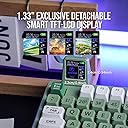
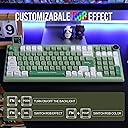
The EPOMAKER RT100 is a premium 97-key gasket-mount mechanical keyboard featuring a detachable smart TFT-LCD display, a 360° customizable knob, and hot-swappable Kailh sockets with custom EPOMAKER switches. It supports triple connectivity modes—Bluetooth 5.0, 2.4GHz wireless, and USB-C wired—powered by a robust 5000mAh battery for extended use. Designed for gamers, coders, and keyboard enthusiasts, it offers south-facing RGB lighting with per-key customization, ergonomic MDA-profile PBT keycaps, and a compact layout that maximizes desk space without sacrificing functionality.


| ASIN | B0BQJF5G4X |
| Additional Features | Backlit, Ergonomic, Hotkeys and Media Keys, Rechargeable, Volume Roller |
| Antenna Location | Gaming, Programming |
| Best Sellers Rank | #4,581 in Video Games ( See Top 100 in Video Games ) #383 in PC Gaming Keyboards |
| Brand | EPOMAKER |
| Built-In Media | Keycap Puller, USB Cable |
| Button Quantity | 97 |
| Color | RT100 Retro |
| Compatible Devices | PC |
| Connectivity Technology | BT, USB-C |
| Customer Reviews | 3.9 out of 5 stars 2,083 Reviews |
| Enclosure Material | Plastic |
| Hand Orientation | Right |
| Is Electric | Yes |
| Item Dimensions L x W x H | 12.99"L x 4.57"W x 0.98"H |
| Item Weight | 1.42 Kilograms |
| Keyboard Backlighting Color Support | RGB |
| Keyboard Description | Gaming |
| Keyboard Layout | QWERTY |
| Manufacturer | EPOMAKER |
| Model Name | RT100 |
| Model Number | RT100 |
| Number of Keys | 97 |
| Power Source | Battery Powered |
| Recommended Uses For Product | Gaming, Programming |
| Series Number | 100 |
| Special Feature | Backlit, Ergonomic, Hotkeys and Media Keys , Rechargeable, Volume Roller |
| Style Name | Classic |
| Switch Type | Custom EPOMAKER Switch |
| Theme | Retro |
| Total USB 2.0 Ports | 1 |
| Unit Count | 1.0 Count |
| Warranty Description | 1 year warranty |
A**R
This is the best Keyboard I've ever owned!
I'm writing on this keyboard now! It's so buttery smooth and quiet! My dad approves of it! (He sits like 50 feet from me) I used to run on a Cherry MX Brown keyboard for the longest time. I loved it, but I also got sort of fed up with it in the long run. My dad was getting very annoyed by the keyboard and thus I was hunting around for finding a new keyboard I would enjoy owning for a long time. Hence how I found this keyboard. At first I discovered this keyboard and brand from LLT and then HypoTech's review on it. This is how I was sold on the product in the first place. Once I got mine, I fell in love with this thing instantly, so did my dad! LOL. So how does it feel to use? It's premium without the premium price tag. That's basically the honest answer. It's that good! Yes, it's fully plastic but what keyboard out there isn't? But it's also got some heft to it, just like the old 90's keyboards of the day were. I can tell they made sure this thing dampens any and all sound coming out of it so it doesn't sound like a hollowed out shell of whatever it's supposed to be. Once you get it, you will see what I mean. These switches are just incredible for what they are. They're a linear switch and it makes typing just a dream to type on. Just typing all of this text is so satisfying that I want to keep on typing on it. So I will...... ANYWAYS..... These are a type of Linear switch that knocks a lot of noise out of the switch so it's smooth and quiet in operation. It's so smooth in fact, you barely have to touch your fingers on it to actuate the response and feel so quick to type on and feel like a typing god. It's so incredible to use that it just blows my mind how amazing this thing feels. Especially now after typing this far into this review on it. I will admit, I'm not perfect. I had to backspace a million times because I do fat finger from time to time. So it's not going to prevent that. (I did the same thing even on the MX browns...) How does it feel to press on the switches? It's like touching the best button in existence, nice and clean to press and it's very soft. Like a pillow with a soft touch. When you press down hard, it just feels solid and smooth. It's got instant response to your inputs. No matter how light or heavy you press the buttons, they respond instantly. The springs in the switch are "Light" but over time that lightness starts to feel heavier as you go. So you'll start to feel where the switches activate even with the lightest of touches, it just makes typing quick and clean.... except if you're a typo master or a fat finger writer like I am where you hit the backspace a lot to clean up your horrid typing... Speaking of which, if you're a gamer. BUY THIS! It may not be a high end switch keyboard but trust me, that doesn't matter. This keyboard is perfect for the average person to Twitch Stream user who is recording content on their channels (Even a YouTuber). This thing just makes gaming so comfy. I do not want you to skip this product just because it MAY not have the best and fastest switch actuation out there. Trust me, it doesn't make any difference, your mouse makes more of the difference over a keyboard. Believe me, there is nothing out there that makes your gaming THAT much better. (Except if you're using a junky low grade low cost keyboard.... yeah, nothing is topping that trashy product. It's cheap for a reason, buy something with better quality. Anything that runs smoother is already a better product vs a garbage made one) Now, how this thing works in the function part is rather interesting to say the least. It's not bad to use, but some functions I don't know for sure how it works yet. Even Epomaker's Manual is vague in some areas. So do your homework on this board. Recommend you watch HypoTech's video on this keyboard before you think of buying it, it's a quirky thing. That's for sure, but the experience makes up for it. This product DOES have a nice little TV display. It's cute, but a novelty item. So don't buy it ONLY for the screen. Trust me, you'll be disappointed in it. Epomaker has made this thing just that, a novelty to play around with and nothing else. I mean it DOES work, but it's a hassle to make it useable at the moment. Hopefully they figure out what they're trying to achieve with it, it's like they made it an afterthought and thought it looked cool to put on it. I do wish they figured it out with the design when they did it and not afterwards....(It's firmware and driver related. Get it on their website for this keyboard if you're interested to playing around with it. Word of advice, it's not that impressive to use. Software is somewhat annoying to figure out, but it's about the only way you'll get any functional use out of it. So get it and then program it however you like on it) Final thoughts, do I recommend this? 100%, BUT it may not be your cup of tea. This doesn't come native with Micro buttons, but you can map them on this just like any other keyboard. It's not useless, the function command does make this keyboard rather cool to mess around with once you program it to do certain commands on it. The play button and volume control is a nice feature, but it's not 100% necessary on this board to be put on there. But hey, it's for those who actually want or need it for some reason... it works. That's about all I say about it. It's not a standout feature or anything, it does what it needs to do. Anyways, enough of this small but long essay about it. Go buy it already, you'll love it. Trust me!
P**.
It sounds relaxing to me.
I purchased this like new . I like the retro look and the quality of the keyboard. I also like the sounds of the switches. One of the switches was faulty , so i ordered a new kit and replaced it. Now it runs great.
M**Y
Do not waste your money, returned within a day.
I purchased this keyboard after seeing it sponsored in LTT’s recent video featuring this keyboard, for the price and the features I couldn’t pass it up, screen is super cool, right? Lord Jesus Christ was I wrong. I got it and I will say the keyboard felt amazing (wistera linear switch’s) and that’s where the good things I have to say about this keyboard stop. I plug it in using the included cable anddd, nada. The keyboard “bootlooped” turning on and off again with the screen claiming it was connected to windows but windows didn’t recognize the keyboard and windows would eventually would say “USB device not recognized” I figure alright strange maybe a defective cable. Nope. I tried 3 other cables I had and all were the same story. I thought it could have been my usb ports, also was not the case didn’t matter wether I used my front panel usb 2.0 or 3.0 ports or my mobo 3.0 ports. The keyboard DID work with Bluetooth and the usb transmitter/receiver but there’s 2 problems with that. For one YOU CANT UPDATE THE FIRMWARE UNLESS THE KEYBOARD IS CONNECTED WITH A CABLE. That’s just genius right? And it gets better, the screen cannot have animations or gifs put onto it unless IT IS ALSO CONNECTED WITH A CABLE. So great I’m stuck only using the keyboard in wireless mode and unable to add animations/gifs. But it gets worse. For me, the function key did not work at all, I couldn’t change the brightness/color settings and other misc settings on the keyboard unless I used the (shitty) driver/software. And I couldn’t factory reset the damn thing either, since the key binds need the function key to do that. On the screen, the date did not work, the temperature units were stuck on Celsius even when you selected Fahrenheit. The cpu usage wouldn’t work unless the driver/software was run in administrator and set up every time you restart your computer. I am not the only person to experience these types of problems if not worse problems. Do a quick google search of “Epomaker RT100 problems” and see for yourself. It sucks that in concept, this keyboard is awesome but in execution, it’s god awful. It’s really an alibaba keyboard rebranded by a drop shipping company and peddled to people that don’t know any better. I wish I had known before buying this keyboard but I leave this as a warning to people looking to buy ANYTHING Epomaker. DONT BUY EPOMAKER.
V**H
Update: Many keys fell out, but attractive and thocky, display works on replacement
Update 2: The replacement keyboard arrived and the display works. However, the "-" key in the keypad was not plugged in when I opened the box and the PgUp and PgDn keys fell out before I could plug in the keyboard. As with the first keyboard, the keys were easy to plug in, but check the contacts to make sure they are not bent first. Regarding the display, it is greatly hindered by what is the worst keyboard software I have ever seen. While it shows the time and date, the CPU utilization does not seem to reflect the actual values. The local temperature also does not update regularly, if at all. The software consumes a percent or two of CPU usage by itself. I tried setting up a macro, but I could not get the macro to play back. Again, the keyboard software is absolutely terrible. If Epomaker is not going to fix the software, the company should make it open source or release firmware so that VIA can be used instead. Truly, the Epomaker software is stunningly bad. The green LEDs for numlock, capslock, and scrlk, are dim and hard to see, unlike the battery light. I forgot to mention earlier that the keyboard comes with a high quality, nice looking USB cable. The box also includes a transparent, plastic keyboard cover, although it doesn't fit with the monitor attached. Because the keyboard software is so terrible, limiting the display's usefulness and making it difficult to configure macros, and because three keys fell out on the replacement keyboard and four were loose with the original, I have to keep my rating at four stars despite how much I otherwise like the keyboard. Update: The display did not work at all, so I requested a replacement keyboard from Amazon. Given that so many keys fell out upon unboxing, it's likely that the package had been abused, although the keyboard box looks okay. Otherwise, I really like the keyboard and will give it five stars if the replacement is fully functional. The tactile switches are the best I have ever used, smooth with a well-defined tactile bump that is much better than regular brown switches. The keys deliver a satisfying thock, although they could be too loud for confined working conditions. I think this is my favorite keyboard layout now; I still have the numpad and all the key functions, but the keyboard is only the width of a TKL keyboard. A knob is a must-have. If there is anything else negative, it is that the keys bottom out a little too unforgivingly, but I have grown used to it. === Original review: I bought the green keyboard with tactile switches. I have not tried the display yet (it is supposedly a hassle to get it working right), but four keys fell out of the keyboard between unboxing and setting up the keyboard on my desk. The PgDn key was already out of its socket when I opened the box. One of the switches had a bent pin that I had to straighten before plugging the key back in place. The keys seem to be working, but it would be unsurprising if others will need to be reseated. The spacebar is much higher on one end than the other. I'm thinking about asking Amazon for a replacement because keys should not just fall out of the keyboard when you pick it up. Otherwise, the keyboard is very attractive and "thocky". The tactile keys are smooth with a distinct tactile feel. Although it is plastic, the keyboard feels well-built (but the keys randomly falling out destroys the impression of quality). The keyboard is fairly loud. I like the highly legible, textured dye-sublimated PBT keycaps. Be aware these are not shine-through, so the RGB lighting doesn't help a lot in the dark. If so many keys hadn't already fallen out of the keyboard, I'd give it 5 stars even without testing the display yet.
R**S
Stylish, Quiet, and Built to Last — A Fantastic Work Keyboard
After going through three different keyboards for work, I stumbled upon this one through a recommended product list. At first, I was hesitant — I’m not typically a fan of mechanical keyboards because of how loud and clacky they tend to be. But this one pleasantly surprised me. From the moment I unboxed it, I was impressed. The color scheme is gorgeous and fits perfectly with my office aesthetic, which is a mix of soft greens and whites. It’s also got a nice weight to it — not overly heavy, but definitely sturdy enough to stay in place without sliding around while typing. It doesn't feel cheap or hollow like some other keyboards I’ve tried. The switches are what really won me over. They're quiet for a mechanical board, producing more of a soft “bubble” sound than a sharp click. Typing feels responsive and smooth, and I’ve experienced no lag whatsoever when using the direct wired connection. I prefer to keep it wired for consistency, but my coworker bought the same model and uses it exclusively with Bluetooth — and they’ve had zero connectivity issues. One minor drawback is the small display screen included with the keyboard. While it does a great job showing a customizable image (which is honestly a fun and aesthetic touch), it doesn’t reliably display the correct date or time, even after attempts to sync or adjust it. Not a dealbreaker by any means, but worth noting if you're looking for full functionality. In terms of durability, this keyboard has truly held up. I use it heavily — five days a week, eight hours a day — and after two years of constant use, the keys still feel great and the lettering hasn’t faded at all. The multifunctional button on the top right is also a nice touch for quick play/pause and volume control, which I use often during meetings or focused work sessions. All in all, this has been the best keyboard I’ve ever used for work. If anything ever happened to it, I wouldn’t hesitate for a second to buy another. It’s functional, stylish, and built to last — highly recommend.
C**0
It’s way quieter in person than on video
Sea Salt Silent switches, RT100, in purple. My video does not begin to say how quiet this keyboard is. Yes, there is SOME noise but almost nothing in comparison to any of the keyboard I currently own. After some trial and error, I got the Bluetooth to work. For some reason, it refused to connect to my work laptop. It could be a security thing but I got other Bluetooth to connect flawlessly. Because this is a smaller keyboard than what I am used to, I need to reprogram my muscle memory. Don’t buy this because it has a cute screen. It resets every time it’s disconnected or when I change something. Not a fan of it but it’s cute to have. Gimmick-y but funny to put funny gifs. It takes 5 minutes to put one on that screen. So it’ll take you a while if you just want to “try” it out.
B**B
Great Typing experience, frustrating connectivity issues, key switch quality control issues
TL;DR: Really great typing experience; but with some significant flaws. Good Stuff: The version I got was the retro white with Wisteria Tactile switches. The Color-scheme of the keyboard is great and I overall really like the look. Combined with the decently-sized battery, the weight of the keyboard is pretty hefty which helps keep it solidly in place and it feels really solidly built. The switches feel great and the overall typing experience is my favorite of my ever-growing mechanical keyboard collection (Black Alps switches, Cherry MX Blue, Cherry MX Green, Unicomp Buckling spring.. the list goes on). Battery life is also good, especially without the screen attachment, and switching between devices is generally really fast and the fact that it has an extra switch for Mac and Windows layouts is a great feature. So lots of good stuff going for it; especially if you can get it on sale it can be a great value. However, there are some pretty major issues: - Software/Drivers: As others have noted, the drivers/application that allow you to use the screen are completely terrible if you're actually able to get them working at all. You need to manually run the application as administrator every time you start your computer if you want the screen to display PC temps, but even then it only works inconsistently. The outdoor temperature can also be set up in the app but just doesn't work. And finally even if everything was working, the software is super slow and, at least with Windows 11, needs to be run in Windows 7 compatibility mode to detect the keyboard. Speaking of weird compatibility, this goes to the cable too... - Hardware: The included USB cable looks really cool and feels solid, but it isn't. The cable fits VERY loosely in the computer's port (any usb port) and will disconnect with the slightest movement; I've actually needed to use a velcro-tie around it and another cable so that the cable is supported and wont dislodge. There's also a really annoying (and weird) USB cable compatibility issue. The included cable does NOT work in a USB 2.0 port on any computer I own, in any manner, even if just using it as a "wired" keyboard. If I want to use the screen, I cannot use my desktop's USB 3.1 Gen 2 ports either, as the software ONLY sees the screen if I use on the PC's USB 3.1 Gen 1 ports! - Switches: I love the feel of the switches and they definitely give the tactile experience I was wanting. That said, they seem to have some quality control issues. I've already had 2 switches start to fail; the first stopped registering key presses, and so I swapped it out for one being used for an F# key I never press. Now another switch is starting to trigger double-presses. This keyboard is only a few months old and having multiple switches fail is, frankly, unacceptable. This is so close to an amazing keyboard but it misses the mark with poor quality control and abysmal software and drivers. I still really enjoy using the keyboard now that I've figured out the compatibility quirks, but time will tell if it can withstand my very moderate usage long-term.
D**A
When a Keyboard Wants to Be Wireless Whether You Like it or Not
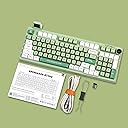
The Epomaker RT100 is a decent prebuilt keyboard given its price point in terms of build and features, but it proved unreliable in my evaluation. Despite being plugged in and the wireless mode being turned off, the low battery indicator would randomly flash on and the keyboard would become unresponsive, disrupting my gaming sessions. This is unacceptable for a wired keyboard and I cannot recommend the RT100 as a result. The RT100 comes in a white cardboard box and includes a user manual, a thick USB-C to USB-A cable, and a combination keycap and switch puller. The cable uses premium materials and hardware. The RT100 has a beige case with medium bezels and rounded corners. While the color scheme is intended to resemble early personal computer peripherals, the form factor reminds me more of premium office keyboards from the 2000s. Its USB-C port is discreetly recessed 3/4 of the way down the back right of the keyboard. Switches that control the keyboard’s wireless functionality and swap between Windows and Mac compatibility are located nearby the USB-C port. There are four white LED indicators nested between the alpha keys and the numpad which correspond to Num Lock, Caps Lock, Windows Key lock, and a low power indicator from top to bottom. The RT100 feels substantial in the hand. The bottom of the board has two nested sets of retractable feet to raise the typing angle. Both sets of feet have antiskid rubber pads. Three rubber bumpers are located along the bottom edge of the case’s underside. Behind a removable panel is a secondary USB-C port, which is used for the mini-LCD screen, and a storage slot for the 2.4 GHz wireless receiver. The RT100 omits the Insert, Home, End, Menu, Print Screen, Scroll Lock, Pause/ Break keys and Numpad Delete keys. These keys can be accessed through other keys in combination with the function key. To accommodate the arrow keys, the right Alt, Windows, and Control keys are 1U in size, while the right Shift key is horizontally compressed and the right Control key is shifted left .Additionally, the 0 key is 1U and shifted right on the Numpad. My greatest problem with the RT100’s layout is that the Delete key is positioned too far up and to right for my pinky to reach easily without removing my hand from the board. The keycaps are PBT with a high, MDA profile — not ideal for me, as I prefer a lower profile. The walls are thick and the legends are sharply defined with consistent font thickness. The RT100’s stabilizers are good out of the box. The spacebar could benefit from more lubricant but it is still one of the better sounding spacebars I have heard on a prebuilt keyboard. The keyboard advertises a gasket mount design, which provides a fairly comfortable typing experience, though the key response is not overly soft or bouncy. The RT100 advertises the use of poron foam and bottom case foam. The keyboard does have the stereotypical marble-y sound associated with foam. Despite the foam, it still sounds mildly hollow. My board came with Epomaker Flamingo switches. Flamingos are a dual spring linear switch with a 47 gf actuation and a 60gf bottom out. They use polycarbonate housings and POM stems. The Flamingo switches are very smooth and I am interested in trying them in a more premium keyboard. The RT100 features a glossy black plastic knob with RGB LED backlighting. The knob has defined steps and audible clicks but has very little resistance. The knob feels substantially cheaper than the rest of the keyboard, and the aesthetic contrast between the knob and the rest of the keyboard is jarring. The LED backlighting is full RGB. The backlighting is bright, and the LEDs are south-facing. There are a variety of different lighting effects, and the direction, speed, and brightness of the light effects can be adjusted. Furthermore, Epomaker’s software allows for rebinding all keys except Function and Escape. I am hesitant to grant Epomaker’s software administrator permissions required for the mini-LCD screen to access real-time system temperature and CPU usage data. I used the RT100 in wired mode, but I also tested that it connected wirelessly via 2.4 GHz and Bluetooth.
Trustpilot
1 month ago
1 month ago