We remain fully operational. Our teams are working around the clock to ensure your deliveries continue safely.

DOWNLOAD THE APP


Copyright © 2025 Desertcart Holdings Limited
DOWNLOAD THE APP
Buy anything from 5,000+ international stores. One checkout price. No surprise fees. Join 2M+ shoppers on Desertcart.
Desertcart purchases this item on your behalf and handles shipping, customs, and support to Italy.
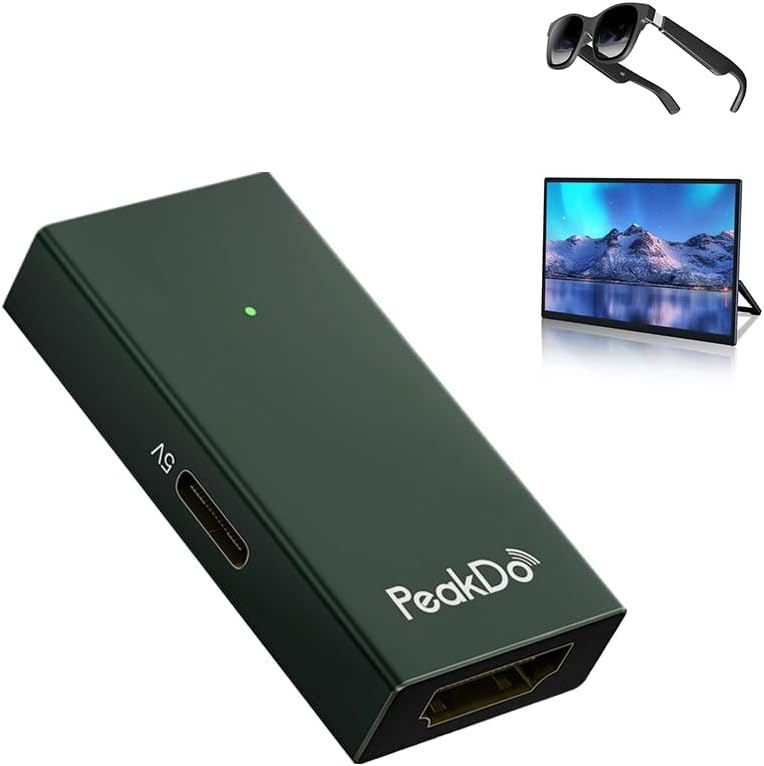
🎮 Elevate your AR & gaming setup with flawless 4K clarity and zero lag!
The PeakDo HDMI to USB-C Adapter delivers seamless 4K@60Hz video output from HDMI sources to USB-C AR glasses and portable monitors. Compatible with leading AR devices like XREAL and Rokid, it offers plug-and-play simplicity in a sleek, lightweight aluminum design optimized for heat dissipation. Perfect for immersive gaming, professional presentations, and interactive collaboration, this adapter ensures crisp visuals and reliable performance on the go.




| ASIN | B0C854HLRM |
| Best Sellers Rank | #424 in Audio & Video Connectors & Adapters |
| Brand | PeakDo |
| Color | Dark Green |
| Compatible Devices | Gaming Console |
| Connector Type | HDMI |
| Customer Reviews | 4.1 4.1 out of 5 stars (235) |
| Finish | Hdmi |
| Input Voltage | 5 Volts |
| Item Weight | 0.64 Ounces |
| Manufacturer | PeakDo |
| Number of Items | 1 |
| Number of Ports | 1 |
| Package Quantity | 1 |
| Power Plug Type | Type B - 3 pin (North American) |
| Unit Count | 1.0 Count |
| Warranty Description | 1 year |
M**I
Real-World Review: Using the PeakDo HDMI to USB-C Adapter for Interactive Meeting Room Setup
Real-World Review: Using the PeakDo HDMI to USB-C Adapter for Interactive Meeting Room Setup In a meeting room setup, a seamless way was needed to mirror and interact with content from a SMART 85-inch wall-mounted screen to a RICOH 15.6-inch portable touch monitor. The goal was to allow the audience to engage directly with the presentation using the RICOH’s stylus-enabled touchscreen. The PeakDo HDMI to USB-C Adapter turned out to be the perfect bridge. Setup Overview: - Source: SMART Board (HDMI output) - Display: RICOH 15.6” Portable Monitor (USB-C input with touch support) - Adapter: PeakDo HDMI to USB-C ✅ What Worked Well: - Plug-and-Play Simplicity: No drivers or configuration needed. The adapter instantly mirrored the SMART screen’s content to the RICOH monitor. - Touch Interaction: The RICOH’s stylus and touch features worked flawlessly, allowing participants to annotate, navigate slides, and interact with content in real time. - High-Quality Video: The adapter maintained a crisp 1080p/4K signal with no lag or flickering—ideal for presentations and collaborative sessions. - Compact & Portable: Its small size made it easy to integrate into our cable management system without clutter. ⚠️ Things to Note: - Power Matters: For consistent performance, especially with touch-enabled monitors, make sure the adapter is powered via USB-C PD (Power Delivery). - Cable Quality: Using high-quality HDMI and USB-C cables helped maintain signal integrity and responsiveness. 📝 Final Thoughts: The PeakDo HDMI to USB-C Adapter proved to be a reliable and efficient solution for enhancing interactivity in our meeting room. It enabled a dynamic, two-way communication setup where the presenter and audience could collaborate directly on the RICOH screen using the stylus—without any technical hiccups. Highly recommended for professional environments where content sharing and interactivity are key.
M**C
Great product, it got a little warm but not hot, great video quality
I thought this product was going to be bulkier, but it is small indeed. People said it gets hot, but in my experience it just got slightly warm. I also read people complained about video quality, but it works great with my XReal One AR glasses (which are 1080p, so the fact that it does not supports 4K does not affect me). I tested it with my XBox Series X and played a 4K game, of course my XReal One glasses do not support 4K (nor this HDMI to USB-C adapter) but the video was as gorgeous as it could be on 1080p. I cannot speak to longevity, I just got it a few days ago, but so far I am very happy with this product. And thanks to its small size, I can even carry it in my AR glasses case along with the cables (see picture, the PeakDo can be seen in the small cables pocket of the glasses case). NOTE: If you are using this with XReal One glasses, make sure to properly configure the audio protocol on the XReal One, otherwise you get video but not audio.
T**Y
Works with xreal+xbox but
Very happy that this allows my xreal glasses to display my xbox series x! Does require reset rather often. Have to unplug usb (power not glasses) and hdmi. then replug the USB power side followed by the hdmi to kick it back into gear. Small, but consistent, annoyance. Update: seems to be less of an issue for the last month or so. Whether the problem remains active or not these are easy to recommend.
T**E
Works with xreal air, with minor caveat
I'll get straight to the point most are looking for: Yes, it fully works with the xreal air. However, there is one caveat to this I encountered. If you get the latest firmware update through official channels, you will be unable to get audio. It's supposed to allow you to hold the brightness down button for 3 seconds to switch into HDMI audio mode, which is what's needed to get audio from this adapter. However, on the latest firmwares, this feature is not working. Unsure if they intentionally broke it to try to get you to use their official adapter or if they are just incompetent at writing firmware. In any case, if you search for "xreal air unofficial firmware changer" on google, you can find a third party site that lets you change to other older firmwares. And sure enough, the one labeled "Windows Beta" works flawlessly with HDMI audio. TL;DR for those using this with xreal air, to get audio working: 1. Search "xreal air unofficial firmware changer" on google, you'll find a site to change firmware. Use "Windows Beta" as your choice during the process 2. Once that firmware is flashed, connect this adapter, get a video signal 3. Hold Brightness Down button for 3 seconds until you hear the beep to switch to HDMI audio mode 4. To change volume, hold the display on/off button for 3 seconds. Do the same to switch back to brightness controls. Once I figured out the workarounds and how it works, it's been a great addition to my xreal to connect PCs and consoles.
F**O
Works with Luma Ultra, but no Spacewalker support
It does give display to my Viture Luma Ultras, but the Spacewalker app (Used for floating stationary display that does not follow head, as well as the 2D to 3D) does not pick up that the glasses are connected to PC. I ultimately got these glasses to play my PC with, and have yet to find a way to get Spacewalker to recognize them without a Native Display Alt Mode Type C Port....Was hoping this was the solution, it was not.
I**A
Not for VR glasses
I have VR glasses from TayNeo. When I plug them into my phone, I do not get a mirror of my phone screen; I instead have to use my phone as a trackpad and activate apps within the separate screen viewable from within my VR glasses. The purpose of this device was to avoid that problem. The purpose of that device was to help mirror my phone to the glasses directly. It did not work. Plugging in my VR glasses into this device worked exactly the same as flagging them into my phone directly. So, if you need a device to help mirror your phone screen onto VR glasses from a phone that does not directly support the mirror feature, this device is not for you, even though its description said that it was.
R**B
Works really well, finally got my ar glasses to work, with this to mu laptop. Time for large screen Gaming without the large screen
K**L
It works great with xreal video glasses with xbox source and laptop. To avoid problems, follow the following connection rules. Set the source resolution to 1080p at 60 hertz. A separate power supply of at least 2A / 5V must be used. First, connect the external power supply to the adapter, then the video glasses or monitor, and finally the HDMI cable to the source - this is mandatory. It is also very important what HDMI cable is used, those for high speed cause problems. The old generation of cables work better.
أ**د
جالي منتج اخر غير هذا المنتج الذي طلبته واشتريت غيره من امزون اول امس واستلمته امس
M**D
Highly recommended
P**R
The product is a tiny box which acts as a connector and has no 4k capability. My Xreal glasses show poor video quality with this . Wouldn't recommend
Trustpilot
4 days ago
1 day ago