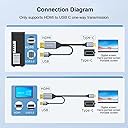
🔗 Connect in style, stream in 4K—because your setup deserves the best.
This 6.6ft HDMI to USB-C cable converts HDMI 2.0 signals to USB-C with support for up to 4K@60Hz resolution, ensuring high-quality video output. It features a male-to-male interface requiring no drivers, and includes a USB power adapter for stable signal transmission. Compatible with MacBook Pro, Mac Air, Microsoft Surface, and Nreal Air, it offers a reliable, plug-and-play solution for professionals seeking crisp visuals and streamlined connectivity.


| ASIN | B0BNX61QNV |
| Best Sellers Rank | #351 in HDMI Cables |
| Customer Reviews | 4.3 4.3 out of 5 stars (586) |
| Date First Available | December 3, 2022 |
| Item Weight | 3.52 ounces |
| Item model number | WJESOG-717994489277 |
| Manufacturer | WJES Technology |
| Package Dimensions | 6.65 x 6.42 x 1.06 inches |
M**R
Confirmed to work with Xreal One Pro AR glasses
I can confirm this works with the Xreal One Pro glasses. Some reviews on the internet says it only works with the DisplayPort version, this is incorrect. This HDMI version works flawlessly. I am using it with a RTX 4080. I did also order a small USB-C to C female adapter, as this cable is very very stiff and uncomfortable to wear with the glasses. Using the adapter, you can continue to use the original USB cable provided by Xreal, for additional comfort. For anyone wondering which adapter I purchased, it's this one: https://www.amazon.co.uk/dp/B0BC3FDL35?ref=ppx_yo2ov_dt_b_fed_asin_title&th=1 Note that the positioning of the adapter matters, if it doesn't work, flip it around either horizontally or vertically until you get it right. I'd advise to mark it somehow which the correct side is.
Δ**Μ
Excellent for the XReal Air 2 Pro
Got this as a recommendation from reddit to be compatible with the XReal Air 2 Pro AR glasses, and oh it works perfectly!, 120hz 1080p without an issue, not a single drop in quality when connecting via this cable as opposed to using the original xreal cable. Works great with a 4080, as the 4080 I have only has 1 HDMI output its kind of a chore to swap around from my monitor to the cable but so far the cable fits snuggly and does not move even if I tug on it a bit due to sudden head movement. The usb cable coming off of the HDMI end fits perfectly into the back of the motherboard with adequate length still left on it to accommodate longer runs. Main connection to the glasses via the Type-C port is also perfect, fitting exactly into the glasses without leaving any extra length on the connector that would be exposed. Overall a great cable wish I got a little longer one but it is great!
N**L
Worked as advertised
This adapter is perfect for laptops with limited video output. Worked out the box.
P**R
Quality Product - But Does Not Work with Xbox
Good quality product however not compatible for my use case. I bought this to connect my Xbox Series X to Xreal Air 2 AR Glasses, the USB powered connected is needed for the display to work as a standard HDMI to USB C cable will not work with Xreal products. Whilst the display and sound came through nice and clear when connected to my PC, it only produced a square format pixelated mess on my Xbox Series X. Speaking to the supplier they advised that Xbox SX requires some decoding that is not supported. Digging a bit deeper it seems Xbox SX internal convert Display Port to HDMI port which may be the source of the problem. Vendor, refunded.
J**N
Use with Viture Pro XR with no native USB-C port
I bought this as I don't have a native usb-c port on my cab/motherboard. A straight DP to USB-C WON'T WORK as you'll need power for the glasses. The additional USB-A on this serves as your power input. You'll also need a USB-C to USB-C coupler as the cable output is male. I tried 2 other cables before I got the glasses to work. Highly recommended, cable was delivered on time and in perfect condition.
L**S
Defective, works occasionally but glitches
Was really hopeful for this product but unfortunately my Studio Display glitches out. Tried updating NVIDIA drivers, booting in safe mode but the issue still persists. Unplugging the USB-A end seems to resolve the issue but annoying that I need to do that each time I turn on the PC.
N**N
Gets the job done
Really awesome for letting my AR glasses work while being able to charge them, just be careful as like all cabling too much movement can cause instability in the cables themselves as I had with my first set of these..
Z**T
The only DP to USB-C cable that worked reliably with my VITURE Luma Pro
I purchased this cable specifically to connect my VITURE Luma Pro glasses to a desktop system equipped with a dedicated GPU. After trying multiple similar adapters and cables that failed to deliver full functionality, this is the only one that worked properly and consistently. Using this cable, I’m able to fully utilise the glasses’ features, including 3D mode, immersive 3D and multi-screen functionality. With other cables, these features either did not activate correctly or were unstable. With this one, the connection has been reliable and performs exactly as described. In my setup (NVIDIA RTX 5070 Ti Laptop GPU), signal transmission has been stable, with no dropouts or quality issues. Image clarity and responsiveness are as expected, and overall data transmission quality has been fully satisfactory. Build quality is excellent. The connectors feature an aluminium housing with gold-plated contacts, and the overall construction feels solid and durable. The cable length is sufficient for desktop use – slightly longer than I personally need, but practical for most setups. Two minor drawbacks: the cable is somewhat stiff and could be more flexible, and the price is slightly on the higher side. However, considering that this was the only cable that delivered full compatibility and functionality in my case, the cost is justified. Important note: the HDMI version of this product does not provide the same level of functionality with this device. Overall, this has proven to be a reliable and well-built solution for connecting a dedicated GPU system to USB-C display devices such as the VITURE Luma Pro.
A**W
I wanted to connect my desktop PC to my monitor, which has USB-C inputs that act like a dock (receiving Displayport & USB signals over USB-C to connect the display & USB devices attached to it). It's exceedingly rare to come across desktop PC components with the DP over USB-C required to do this (RIP Virtualink). This cable worked perfectly to deliver DP (from the GPU) & USB (from the motherboard) signals over USB-C to the monitor! I no longer have to worry about finding motherboards with Thunderbolt ports to do this.
A**X
Works with Apple Studio Display connected to RTX 4000 Mobile Ada via HDMI.
R**U
I have been searching and trying many cables to connect my virture luma pro glass to my desktop PC that do not have thunderbold or displayport over usbc. This cable works. The USB-A cable that provide power also allow data to pass thru. Which allow the immerse3d and spacewalk app on my desktop pc running windows11 able to detect and communicate the Virture Luma Pro spectacle. You however need thunderbold USBC female to USBC female to join the USBC of this cable to the Virture Luma Glass.
A**.
Why I bought this: I have 3 computers all hooked to 4 monitors. 2 of them use my 4K TV/monitor with HDMI 2.1 for 4K 120Hz. However, my main monitor for my work PC is my 3440x1440 ultrawide. I do not care about the resolution, but the extra real estate so it displaying in 2560x 1080p with a cheap HDMI isn’t a problem. However, as the second monitor or when ultrawide is beneficial in games with my other PC’s, that monitor I want the highest resolution and frame per second I can get. My ultrawide monitor also has a KVM feature The problem: my main gaming computer is the more powerful and as such, utilizes the ultrawide’s only DP port for 3440x1440 144Hz gaming. The HDMI ports only offer 100hz at that resolution but because the HDMI ports on both gaming computers are utilized by the 4K monitor, I tried going DP to HDMI from my backup/second PC but anything that said 2K at 120 or 144Hz would only display the picture in 2560x1080p at those refresh rates. If I change led it to my monitors true resolution, my max refresh rate was 60Hz Why this was the solution: my ultrawide supports USB-C A/V input. Remember I mentioned my monitor also has a KVM switch? That feature that combined with my physical KVM switch I already had, allows me to utilize the same mouse and keyboard with all three computers without adding more wires on my desk from a second manual switch. So, this cable allowed me to utilize my monitors built in KVM function, being able to plug the USB-A into my second computers motherboard to send mouse and keyboard commands and the DP on the video card the other way through the single USB-C into the monitor. I got the resolution (3440x1440p) I wanted as well as the KVM feature. There was a slight performance cost however. This solved my issue of running two cables to have the KVM and A/V, as well as reduced resolution (2560x1080p) when using a 144Hz rated 2K (2560x1440p) cable. In case you don’t know, the extra width of the monitor adds to the pixel count, which increases data for each frame, which lowers the rate at which the cable can transfer more data. To keep the same higher rate, it lowers the pixel count. This cable allowed my to send 3440x1440 A/V through USB-C to my monitor at 95Hz. Its not the full 144Hz my monitor is capable of but it didn’t limit me to 60Hz like DP to HDMI did. So for me, while I will still look for a cable that will meet the KVM and DP to USB-C functionality but support full resolution at the full refresh rate, I will happily use this until I find what I’m looking for or maybe, just maybe the manufacturer will see this and will create or suggest if already available a similar cable with a higher data transfer rate.
S**Z
Just got done building my a new desktop computer after using the same one for almost a decade. I am not a gamer so I didn't update my video card yet. The Motherboard I purchased from Amazon had a single DP and a single HDMI port. CPU supports 4 total monitors at a maximum of 8K combined resolution. I have 3 monitors and this splitter works beautifully. Only issue is you need to connect it to a USB port to power it so it isn't a passive splitter.
Trustpilot
2 months ago
3 weeks ago