🚀 Elevate your home network to pro-level speed and security — don’t get left buffering!
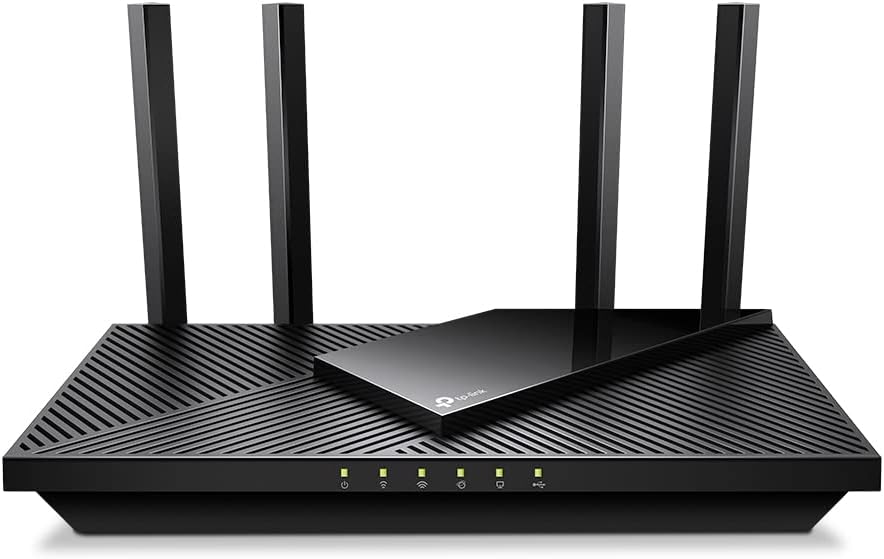
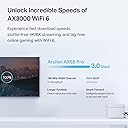
The TP-Link Archer AX55 Pro is a cutting-edge WiFi 6 router delivering up to 3.0 Gbps dual-band speeds, powered by 2 x 2.5 Gbps multi-gigabit Ethernet ports and advanced Beamforming antennas. Designed for seamless 8K/4K streaming, lag-free gaming, and robust multi-device connectivity, it features MU-MIMO, OFDMA, and WPA3 security. With TP-Link HomeShield for comprehensive network protection and compatibility with Alexa and Google Assistant, it’s the ultimate router for a fast, secure, and smart home network.


| ASIN | B0BTD7V93F |
| Antenna Location | Gaming, Home |
| Antenna Type | Fixed |
| Best Sellers Rank | #434 in Computers & Accessories ( See Top 100 in Computers & Accessories ) #32 in Computer Routers |
| Brand | TP-Link |
| Built-In Media | Power Adapter, Quick Installation Guide, RJ45 Ethernet Cable, Wi-Fi Router Archer AX55 Pro |
| Color | black |
| Compatible Devices | Personal Computer |
| Connectivity Protocol | Wi-Fi, IPv4, IPv6 |
| Connectivity Technology | Ethernet, USB, Wi-Fi |
| Control Method | App |
| Controller Type | App Control |
| Coverage | Strong and reliable WiFi coverage throughout a house |
| Customer Reviews | 4.4 out of 5 stars 1,080 Reviews |
| Data Transfer Rate | 2976 Megabits Per Second |
| Frequency | 5 |
| Frequency Band Class | Dual-Band |
| Global Trade Identification Number | 00840030706806 |
| Has Internet Connectivity | Yes |
| Has Security Updates | Yes |
| Is Modem Compatible | Yes |
| Item Dimensions L x W x H | 10.28"L x 5.3"W x 1.62"H |
| Item Type Name | WiFi 6 Router |
| Item Weight | 1.2 Pounds |
| LAN Port Bandwidth | 10/100/1000 Mbps |
| Manufacturer | TP-Link |
| Maximum Upstream Data Transfer Rate | 2.5 Gigabits Per Second |
| Mfr Part Number | Archer AX55 Pro |
| Model Name | Archer AX55 Pro |
| Model Number | Archer AX55 Pro |
| Number of Antennas | 4 |
| Number of Ports | 5 |
| Operating System | Networking Operating System |
| Other Special Features of the Product | WPS |
| Router Firewall Security Level | basic |
| Router Network Type | Wireless Router with Wired Connectivity |
| Security Protocol | WPA, WPA2, WPA3 |
| Smart Home Compatibility | Smart Home Compatible |
| Special Feature | WPS |
| UPC | 840030706806 |
| Unit Count | 1.0 Count |
| Voltage | 12 Volts |
| Warranty Description | 2 year manufacturer |
| Wi-Fi Generation | WiFi 6 |
| Wireless Communication Standard | 802.11ac, 802.11ax, 802.11b, 802.11g, 802.11n |
| Wireless Compability | 802.11ac, 802.11ax, 802.11b, 802.11g, 802.11n |
T**G
Engineering‑grade stability, predictable behavior, and excellent multi‑gig readiness
The TP‑Link Archer AX55 Pro has proven to be a highly capable mid‑range router with engineering discipline where it matters most: link negotiation, RF stability, and consistent throughput under mixed workloads. Setup was straightforward, but what stood out was how cleanly the router handled WAN negotiation with a 5G home internet gateway. The AX55 Pro maintained a stable, low‑variance link without the oscillations or renegotiation events that some consumer routers exhibit under variable 5G signal conditions. LAN performance is excellent. The inclusion of a 2.5G WAN/LAN port provides meaningful headroom for multi‑gig environments, and the router consistently delivered line‑rate performance across wired clients. Internal switching behavior was predictable, and buffer management remained stable even during simultaneous high‑bandwidth transfers and Wi‑Fi activity. Wi‑Fi 6 performance is equally solid. The AX55 Pro maintained consistent modulation rates across multiple clients, with no unexpected drops in MCS levels during sustained throughput tests. Latency remained tight, and the RF environment was easy to tune thanks to TP‑Link’s clear channel and bandwidth controls. Once configured, the router delivered a steady, low‑jitter wireless experience that held up under load. Thermals and long‑term stability were also impressive. The unit remained cool and never exhibited thermal throttling or firmware instability during extended uptime. Firmware features are logically organized, and the router exposes enough configuration depth to satisfy technical users without overwhelming casual ones. In short, the AX55 Pro feels like a refined evolution of the AX20 — same reliability, but with more bandwidth, better hardware, and a noticeably stronger overall performance envelope. For anyone running 5G home internet or building a multi‑gig‑ready network, this router offers predictable, engineering‑grade behavior at a very reasonable price. A true 5‑star device.
S**N
Just works and delivers the full 500 Mbit/s I'm paying for
I bought a Deco X55 back in July 2022 after my 11-year-old Apple AirPort Extreme / Time Capsule just couldn't keep up with all my connected devices (now numbering 27 including IoT lights, etc). Although I liked the Deco, it was a bit harder to set up than it should have been. I will separately comment on that product instead of including it here. Suffice to say that I could never achieve the full 500 Mbit/s speeds I was paying for and instead would get in the mid 400's if I was lucky and often it fell to the high 300's. I put devices that didn't need the bandwidth, such as IoT light switches, thermostats, etc. on the 2.4 Ghz band. But still, even with my computer 4 feet from the Deco, I could never hit 500. The forcing function for me was the Deco did not have a USB port and I wanted to hook my 6TB external hard drive to the router so it would be accessible by my iPad and two computers "over the air". The first thing I noticed was how easy it was to set up. I used the tether app and it did not skip a beat. Very intuitive and it just worked, first time, out of the box when I followed the guidance of the app on my phone. The second thing I noticed was the speed. Routinely getting 520-540 Mbit/s speeds from the devices where I need it, like Apple TV, iPad, and my laptops. The third thing I noticed was the signal strength. I guess that is to be expected since it has 4 antennas instead of the hidden one in the Deco's little white cylinder that is aesthetically pleasing but just simply not as powerful. The Archer AX3000 also has two processors so whether it is signal strength, processing power, or a combination of the two, every device in my house that needs to have a high-speed connection has it - no matter where I am at within the 1800 sq. ft. structure. I place the router on top of a tall bookshelf and I like that I can see the LEDs without standing on a step stool. The Deco didn't permit that because of where the LED was located; I had to stand on the couch to see if the light was red or green. Both the Deco and the Archer AX3000 were good at keeping devices connected without dropping them and with staying connected to my cable modem. My old Apple AirPort would drop its connection to the modem about 3-4 times per week, and that is what prompted me to start looking for something more reliable. Also, the Time Capsure (2TB hard drive) was starting to faintly squeal on occasion, and I think that was the fan. It tended to get very hot and it was clear to me that it was being taxed too heavily with so many devices. It started it's life in 2012 with only 5 connections (iMac, 2 phones, 1 iPad, 1 printer) and this gradually increased to 5X as many devices. I am today at 27 and counting and the Archer AX3000 has no trouble keeping up. I like the Tether app and the ability to give names to my connected devices, to see what band they are on, and to assign icons. Connecting my external hard drive was also pretty straightforward and most of my issues were in understanding how to enable Win 11 and my ipad to use SMB and FTP to access the HDD - not any failing of the router. The price was reasonable ($135) and I could not be happier with the upgrade. Now, to put my Deco X55 on eBay and find it a new home. It was a good little device for the 6 months I had it, but my home is small enough that it doesn't need a mesh device and satellites, and now that I have compared it to the Archer AX3000 it is clear that the Deco cannot match the performance. I pay for 500 Mbit/s through my ISP (Spectrum) and I am finally getting not only the full 100%, but actually about 110% in most cases.
B**I
A Solid Leap Forward in Home Networking with the TP-Link AX3000 (Archer AX55 Pro)
As someone who relies heavily on a robust home network for both work and entertainment, upgrading to the TP-Link AX3000 WiFi 6 Router (Archer AX55 Pro) has been a game-changer. The Archer AX55 Pro offers impressive speeds that are a significant step up from older routers, making it ideal for households with multiple devices. Performance The standout feature for me has been the 1 x 2.5 Gbps Multi Gigabit port which provides ample bandwidth to handle streaming, gaming, and large file downloads simultaneously without a hitch. WiFi 6 technology ensures more efficient data encoding, leading to faster speeds, greater capacity, and reduced network congestion. I've noticed a marked improvement in the performance of my smart home devices and streaming services. Range & Coverage The range is another area where the Archer AX55 Pro shines. It covers my entire 2,500 sq ft home with consistent signal strength. The four high-gain antennas and Beamforming technology effectively focus signal strength towards connected devices, enhancing coverage and stability. Setup and Interface Setting up the router was straightforward. TP-Link's Tether app is intuitive, making initial configuration and ongoing management quite simple. The interface allows for detailed control over your network settings, from basic operations to advanced routing and security features. Security Security features are robust, with WPA3 encryption, advanced parental controls, and comprehensive threat protection. It offers peace of mind, knowing that your network is guarded against potential threats. Considerations However, there is a slight caveat; the router does run a bit warm during peak usage. While this hasn't affected performance, it's something to keep an eye on if the router is placed in a confined space. Conclusion Overall, the TP-Link AX3000 (Archer AX55 Pro) is an excellent choice for anyone looking to upgrade their home network with the latest technology. It provides a powerful, secure, and scalable wireless network environment. Ideal for tech-savvy households where multiple devices need to operate seamlessly. The minor issue of the router running warm is not a dealbreaker but something to consider when setting up your home network layout.
H**Y
It works like a dream!
I decided to replace my old D-Link router to upgrade the speed. I've always had trouble streaming my TV programs reliably. The Samsung TV's self diagnostics would indicate that it was a Xfinity problem. The WiFi would also drop out from time-to-time, and I assumed it was a coverage problem in my house. These problems all disappeared with this TP-Link AX3000 WiFi 6 Router! Signal strength increased and streaming movies now works reliably. The installation was a breeze. One snag in setting it up was that you have to enter the MAC address, listed on the label on the back of the router. When it asks you to enter the MAC address, it displays a default Mac address. This default happened to be one digit off from the address I copied from the back of the router. I assumed I made a mistake in copying the address, so I selected the default Mac address. Nothing worked. Everything worked fine once I entered the proper MAC address from the label. After about 6 weeks, the WiFi stopped working! Fortunately the wired access to the internet still worked. I contacted their technical support through a "chat line," and they resolved the problem. I didn't have to wait long in the queue, and the support person was very knowledgeable. For this reason, I'm giving it only four stars. I added a high speed multi-gigabit cable modem: https://www.amazon.com/MOTOROLA-MB8611-Ethernet-Approved-Comcast/dp/B08DDFKXKC/ref=rvi_sccl_1/140-6050066-5419919?pd_rd_w=IEdej&content-id=amzn1.sym.f5690a4d-f2bb-45d9-9d1b-736fee412437&pf_rd_p=f5690a4d-f2bb-45d9-9d1b-736fee412437&pf_rd_r=7KY3AB9MCKMKJAZZVSKD&pd_rd_wg=rGDhL&pd_rd_r=e31d60a9-a165-43cb-8d74-455efefc02e0&pd_rd_i=B08DDFKXKC&th=1 and connected it to the 2.5 Gbps input to the router using a Cat8 Ethernet patch cable. The WiFi speed is amazing!
J**R
This updated our LAN to WiFi6 support and more. Updated from Asus N300
I recently purchased this TP-Link AX3000 WiFi 6 Router (Archer AX55 Pro) to upgrade our LAN even though our Asus N300 has been working just fine with no drama for many years and still does. I can recommend both sold here on Amazon. The TP-Link Archer AX55 Pro takes things to the next level for WiFi 6 and the router' s many features and settings. I venture to say the Asus N300 will still do fine for most homes streaming and networking needs. It is easier to set up than the AX55 Pro. On to the AX55 Pro - - - So this is just my initial comments and set up so far. Will update if needed. Setup to the TP-Link Archer AX55 Pro is simple using the recommended app, but I chose to use the cable connected method to a spare laptop which provides easier access to detailed settings. It went ok, but advise to go slow and careful to assure what you want to enable and disable. Disable OFDMA if you want the best speeds. I was then able to get speeds off the wired ports usually higher than what Spectrum provides. Good on them. Going wireless . . It upped the speed to even our Roku devices 95 to 110 Mbps. Laptops fared generally better as well but a bit lower. All the dozen or more client devices benefited to one degree or another depending on their capabilities. So for now, the AX55 Pro is a go. It does take more time to power up or re-start. Also, unsure of whether it will pick up ok after an outage of main power or ISP loss? Seemed a like I may need to reset and then restart both modem and AX55 Pro if mains power goes out based on my initial setup, but it could just be me fussing with things. Previously, I was using the Asus N300 WiFi Router (RT-N12_D1) for several years and it served well and still would serve my purposes for 2 heavily used home laptops, a couple of tablets, 3 Roku, 2 internet radios total of about a dozen or so devices plus cell phone use while home. The Asus :https://www.amazon.com/Wireless-N300-Technology-streaming-performing-RT-N12/dp/B00DWFPDNO works very well, never dropped signal in our 1700 sq ft single story home (plus lower level), always recovered after any outages with no drama of having to reset it or Spectrum supplied modem. It is great if your needs are as mentioned above, simple to use, access setup on line for any changes, no muss and no fuss.
G**Y
Amazing User Interface
I bought this router because I wanted to content filter my families internet with OpenDNS. This router actually has its own support features like that (they might have a subscription fee? idk) called Parental Controls. None of us here are children, we just don't want pornography, gambling, gore, or malware bothering us anymore. Content filtering wasn't the only goal we had though, we also needed a stable interface for controlling port-forwarding, device IPs, NAT type for gaming, and also an easy way to attach storage for network use (it's very easy, just plug in a USB external hard-drive). The main reason I bought this was for the interface. I've been using Xfinity's modems for a long time (they're very finicky, ugly, poor functionality, and poor user control). I wanted something that hands over the reigns to the User and allows me to use all of my networking and IT skills freely. TP-Link's router interface is honestly gorgeous. I like the colors, everything is set up in a way that makes the most sense, there are tons of features and all information is very easily accessed. I have used other routers in the past (mostly Netgear), and I must say, I feel like this is a big step up. I chose TP-Link over Asus by recommendation of an IT friend, and after seeing the beautiful interface and comparing it to google images of Asus, I decided very easily to go with TP-Links more professional looking, easy going, non-bloated simple interface. There are also apps you can use with your phone for managing the router, TP-Link Tether is fantastic. A lot of the options I have available through the router are also available on this app, even when I'm not at home. This means I can help my family if someone wants to host a server and I'm not home, or somebody needs to transfer files but they can't remember a device ID or IP. Amazing router tbh, their 6000 model is probably even better. WiFi 6 works very well as well, I have had no connection issues since getting this router (weeks ago?) and I would highly recommend it over competing brands on account of the control, accessibility, and style of the user interface. The router itself doesn't look bad either!
G**E
Worst Router I've EVER Owned!
I have quite a few (about 20) household plugs Echo dots, PCs and other smart home components etc in my household that require internet. I do live alone, so much of that isn't being used all at once. However, I do need it to stay connected in order to work properly. This was a problem for a while when I first hooked up this router. My Netgear router finally bit the dust so I bought the TPlink AX3000. I couldn't afford a super expensive router but $150 isn't what I'd call cheap either. Especially for a Grandma. My Netgear wasn't able to utilize my Internet speeds fully, so I had hoped that this new router would be faster. It most definitely is that, according to Internet speed tests run on my main PC (wired). So, no problems there. Here's the problem... Or should I say a bunch of problems - clients were constantly being dropped. One Echo Dot in my kitchen might work but the one in my bedroom would lose connection or vice versa. I couldn't turn on a light because a plug would drop. Things were dropping out all over the house off and on all day long. I have security cameras and one of them just wouldn't stay connected for more than 5 minutes and then would disconnect. The only way to get it to connect again was to delete it and reinstall it It was driving me NUTS!! So if course, I started Googling and like another reviewer said, found out there were many people having the same unpleasant experience with this exact router model. I solved it by Googling the problem and followed the instructions on how to set up each and every client (Echo Dot, Plug etc) one by one with their own client IP reservation. It was SUCH a pain. It did fix the problem however. I can only assume that the people who left all these great Amazon reviews have had different experiences than I did. I'm still pretty miffed that it was sold as a basic "plug and play" router when that's not the experience I had with it at all. I have had it for some time now and what decided me to finally write a review is the fact that even now, when I open up my laptop after it's been off or asleep, it tries to find an internet connection but it can't connect for an extended time. It's April 2025 and I'm OVER dealing with this piece of junk. Despite spending hours researching and tweaking this thing so it even WORKS my Internet speeds are no where near what they should be wirelessly. The only speed that's fast is my wired desktop. Don't buy this piece of garbage.
R**G
Great for short term rental.
Bought this for a short term rental property and it's been working flawlessly. It was easy to set up with the Tether app. I have 1 Gig fiber optic through a local provider and am getting really fast speeds and great coverage for my 1,000 square foot home. Signal reaches far enough into the backyard to my patio at the rear property line about 80 feet from the router placed in the living room. So far, no connection drops and no complaints. It's easy enough to monitor using the Tether app.
Trustpilot
2 weeks ago
3 weeks ago