We remain fully operational. Our teams are working around the clock to ensure your deliveries continue safely.

DOWNLOAD THE APP


Customer Services
Copyright © 2025 Desertcart Holdings Limited
DOWNLOAD THE APP
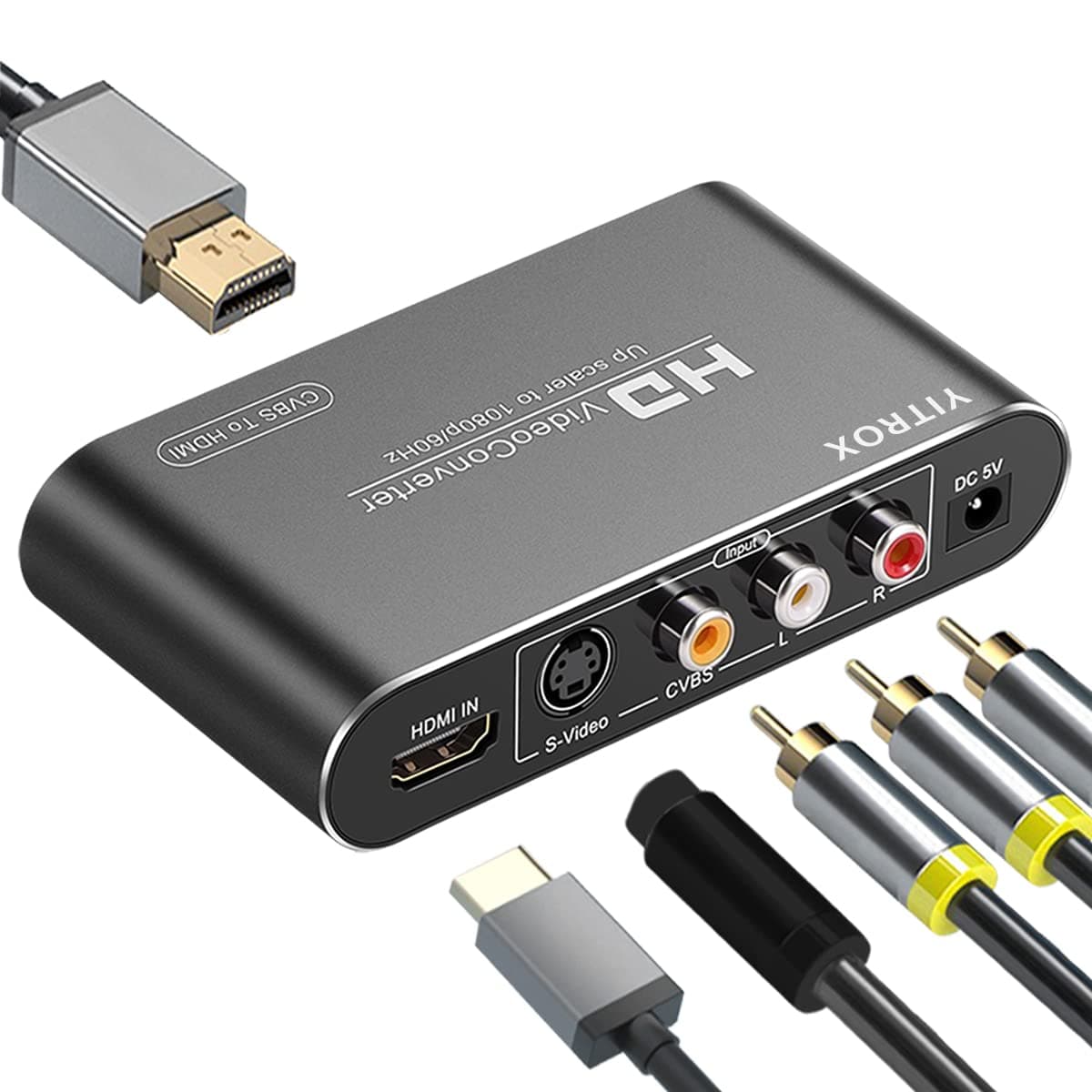
🎮 Upgrade your nostalgia—streamline your vintage gear to HD brilliance!
The YITROX AV Svideo to HDMI Converter Upscaler transforms legacy AV, S-Video, and HDMI signals into high-definition 1080P HDMI output, enabling seamless connection of classic gaming consoles and DVD players to modern HDTVs and projectors. Featuring advanced scaler technology for motion and color optimization, multiple resolution support, and plug-and-play ease, it’s the essential bridge for professionals who refuse to let their vintage tech gather dust.


| ASIN | B0BJVXHY8D |
| Best Sellers Rank | #77 in Video Converters |
| Brand | YITROX |
| Brand Name | YITROX |
| Customer Reviews | 3.8 out of 5 stars 117 Reviews |
| Interface | HDMI, RCA |
| Interface Type | HDMI, RCA |
| Item Dimensions L x W | 4.13"L x 2.44"W |
| Item Weight | 0.5 Kilograms |
| Manufacturer | SZYiTONG |
| Material | Iron |
| Material Type | Iron |
| Number of Channels | 1 |
| Number of Pins | 2 |
| Product Dimensions | 4.13"L x 2.44"W |
| UPC | 716422721736 |
| Unit Count | 1.0 Count |
| Warranty Description | 1 |
T**7
The AV to HDMI function of the YITROX adapter worked for me. Double-check your cable connections.
I bought this product to connect an older VHS/DVD player to a new (as of 2025) Sony flatscreen display that had none of the older connectors -- only HDMI connectors, which the DVD player does not have. I connected the DVD player to the YITROX converter using the AV connectors (yellow, red, and white RCA connectors), and then the HDMI output on the YITROX to the HDMI 1 port on my display. I was disappointed when the display could detect no input on the HDMI 1 port at all, and no amount of clicking on the switches on the YITROX or changing menu settings on the display would help. Luckily, I thought to double-check the cable connections, because I found that the HDMI cable was not fully inserted into its socket. After that, the YITROX was transmitting to the display and showed, in a blue window with text, which of its inputs was active and which resolution setting was active. One of the resolution settings (1920 x 1080 I think) fills my widescreen-format display with the (admittedly grainy) image from the DVD player. In other words, it rescales the limited-resolution image from the AV connectors on my player correctly. I learned that, because of the limitations of my old VHS/DVD player, I cannot get resolution better than the old Standard Definition or 480i/p (interlaced or progressive scan) when using the AV outputs on the player. I may try to connect the player to the YITROX using an S-video cable, which I don't currently have. I have the impression that the S-video connection will allow the image to be sent to the YITROX in higher resolution. If the S-video connection is not appreciably better, I'm likely to replace the old player with a new DVD player with an HDMI output sooner or later. Thus the YITROX converter may turn out to be a temporary fix for me. Still, I suppose that it is an affordable way to extend the life of my DVD player for now. The main point I came here to make is that I nearly gave up on the converter before discovering that I had not inserted the HDMI cable fully into the HDMI port on my display. It had seemed to fit snugly in place, but was not yet making proper contact until I went back and applied a bit more pressure to seat it fully in the port.
F**R
Upscaler
I had to ensure it wasn’t set on the highest 1920 resolution and worked well. I purchased a good 5W 1A power supply separately as advised on youtube. I complimented with a Elgato 4KX capture card and digitised to my laptop using ONS Studio software. I then used Unifab v4 software with Face Enhancer AI model (local non-cloud version) to enhance the video.
N**R
Product did not work
Product did not work from the beginning. Would not power up. Overall poor product quality. On line research indicates power supply quality issues. I would not recommend this item.
C**A
Yitrox received not tested yet
Product arrived quickly and looks very good per specs. Overall build quality is also very good. As I am in Australia not sure if this USA based product will work. Need a new power supply plus another HDMI attachment for PC before I can test. Otherwise 5 star. Not expecting any issues.
S**.
Excellent product.
Works exactly as described. Very clear picture going from VHS to PC. Easy to setup and use.
J**N
Poor Picture Quality
This YITROX HDMI Converter Up-scaler did not do a very good job of capturing the original source. It is supposed to be an “Up-scaler”, but I saw no such thing. I was using a Sharp 8mm camcorder. I ended up routing the Sharp, through my digital Canon camcorder, and then into my computer. The AVI video files looked way clearer then the “Up-scaled” version using the YITROX HDMI Converter. I tried two converters before this one. One gave only black and white. The second gave some color, but all mottled, and off color. This was my third attempt to find something better than my Canon camcorder for getting my footage into the computer. Maybe nothing is better, but I’m still looking. By the way, if you do buy this unit, make sure to replace the power supply with a good one. Several people have had issues that may have been resolved by replacing the power supply. Here’s I link for the power supply, if Amazon will let me post it. https://www.amazon.com/dp/B08HT1HKJ3?psc=1&ref=ppx_yo2ov_dt_b_product_details
A**R
5stars
Works as advertised! I love it
J**D
Inconsistent
I have had some good experience transfering Videos. I have had trouble with older tapes, getting green lines and interference.
Trustpilot
3 weeks ago
1 month ago