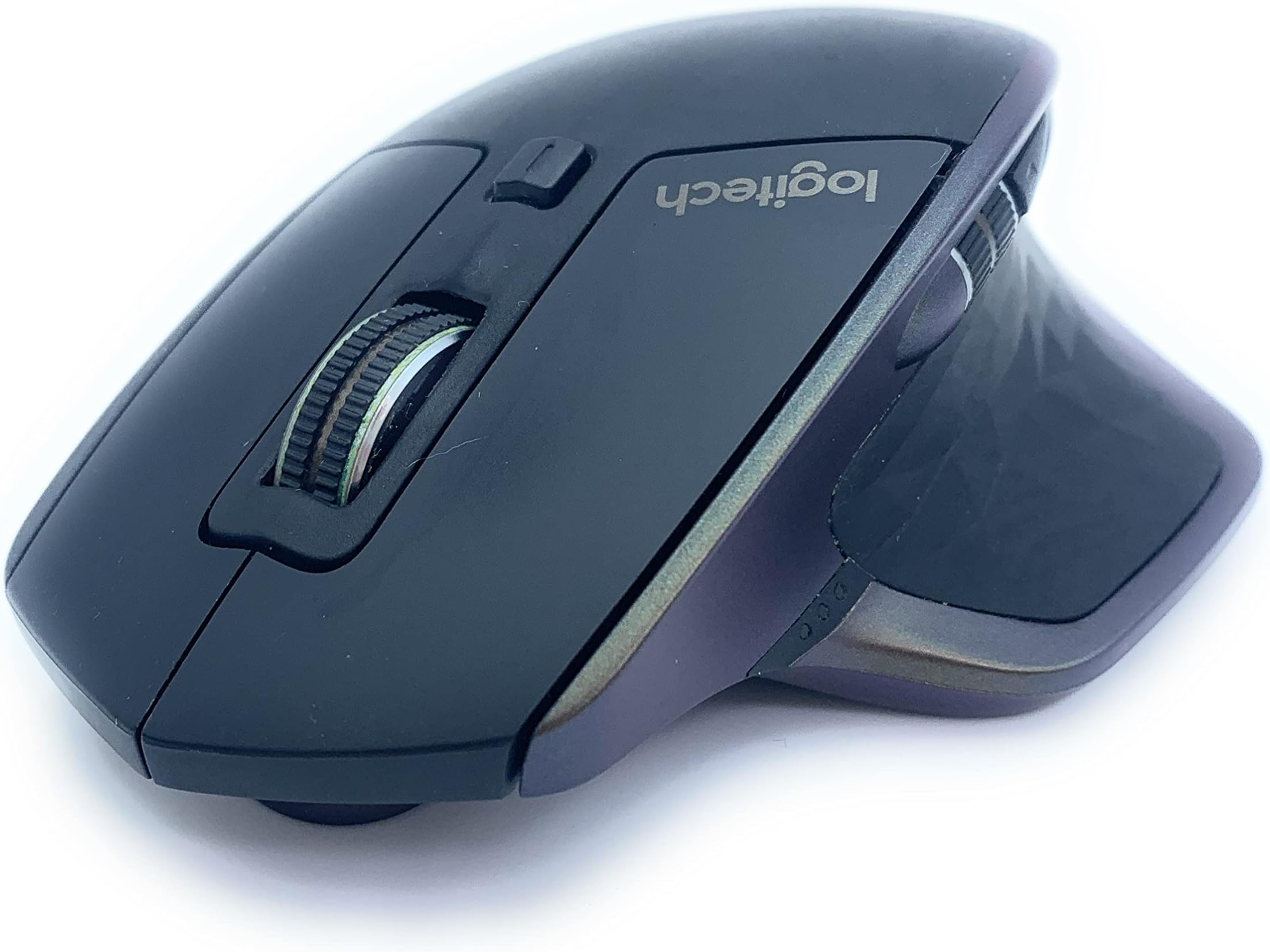




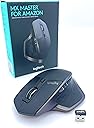
MX Master
Product ID: 50608066
Details
- BrandLogitech
- ColourBlack
- Connectivity technologyBluetooth
- Movement detection technologyLaser
- Special featureWireless
⚡40-day battery life
🔄3-device multi-pairing
🖱️Darkfield tracking on any surface
🚀 Elevate your workflow—master every device, every surface, every task.
The Logitech MX Master is a premium wireless mouse designed for professionals who demand seamless multi-device control, exceptional precision on any surface, and industry-leading battery life. Compatible with Windows and Mac, it features adaptive scrolling, Darkfield tracking, and customizable controls, making it the ultimate productivity tool for the modern multitasker.

| ASIN | B0761YL588 |
| Antenna Location | Office |
| Are Batteries Included? | Yes |
| Are Batteries Required | Yes |
| Battery Average Life | 40 days |
| Best Sellers Rank | 150,520 in Computers & Accessories ( See Top 100 in Computers & Accessories ) 2,811 in Mice |
| Box Contents | Micro USB |
| Brand | Logitech |
| Brand Name | Logitech |
| Button Quantity | 7 |
| Colour | Black |
| Compatible Devices | Personal Computer, Mac |
| Connectivity technology | Bluetooth, Radio Frequency |
| Customer Reviews | 4.7 out of 5 stars 18,427 Reviews |
| Embellishment Feature | Logitech MX Master Wireless Mouse Amz, Bluetooth/2.4 GHz with Unify Mini USB Receiver |
| Enclosure Material | Graphite |
| Global Trade Identification Number | 05099206077331 |
| Hand Orientation | Right |
| Hardware Platform | Nintendo Switch |
| Item Dimensions L x W | 12.6L x 8.6W centimetres |
| Item Type Name | Wireless Mouse, Bluetooth/2.4GHz with Mini USB Receiver Unifying Laser Tracking 1000 DPI 5 Buttons PC/Mac/Laptop |
| Item Weight | 5.11 Ounces |
| Manufacturer | Logitech |
| Manufacturer Part Number | 910-005313 |
| Model Name | MX Master |
| Model Number | 910-005313 |
| Mouse Maximum Sensitivity | 1000 Dots per Inch |
| Movement Detection | Laser |
| Movement detection technology | Laser |
| Network Connectivity Technology | Bluetooth, Radio Frequency |
| Number of Batteries | 1 C batteries required. (included) |
| Number of buttons | 7 |
| Operating System | Windows, MacOS |
| Pattern | Single |
| Power Source | Battery Powered |
| Product Features | Wireless |
| Product Finish Type | Glossy |
| Product Warranty | 2-year manufacturer's guarantee and full product support |
| Special feature | Wireless |
| Style Name | MX Master |
| Unit Count | 1.0 count |
A**C
Best mouse I've had
The best mouse I ever had.. Even compared to Hunter the mouse that's been living on my attic for the last 4 months. I guess he hasn't heard about Corona restriction ease.. But back to the Logitech. Even though my hands are not big and I cannot wrap my palm completely around the mouse, it still feels like a great fit. My hand rests well on the device.. repeating the last sentence in my head made me lol... OK, moving on..Logitech really nailed it with this mouse. The ergonomics is just right and the mouse feels very comfortable. The customizable action keys are very useful and you can set them to any action you like. I use this mouse mostly for work and browse and it feels like a breeze working with it. The gentle but present mouse click sound shows perfection and you can hear its a Logitech. There is no cheap plastic cracking sound, nor absence of sound, it's an elegant click. Scrolling is an absolute delight. The infinite scroll option is amazing when scrolling through an seamingly endless document or books and you just need to find that one chapter or quote... BTW developers created also a really nice option called key word lookup. Just press Ctrl+F on Windows or Cmd+on Mac to find a specific keyword or chapter in a long document or book so you don't need to scroll your finger off... Thank you developers!!! Again back to the mouse. The design is very innovative and sexy, feels like having an F117 under my hand. Battery life: Even if I use it all day, every day, I easily get a 35 days out if it. Keep in mind I don't mean a 9 to five day. I mean 9 am to at least midnight day so if I used the mouse half a day I'd probably get even more battery life. The charging takes only about few hours to get a full charge and back to the action it is. The mouse looks stunning, works perfectly and clicks amazingly. It's my best investment in 2020. It’s now 2022 and I have three of these. My first one still does all the work but compared to commercial junk like the Logitech G502 the MX Master 2s is superior in every possible way. 70 Hr vs 35+ DAYS battery not enough? Think again!!!
I**N
Best mouse I've ever used
I've had this month for nearly two years and use it every day at work, so this is definitely a long term review of the product rather than some reviewers who review a product as soon as they've opened the box. First up, it's up to you whether you like the styling but personally I love the bronze secondary colour of the mouse which makes it stand out compared to most mouses which use silver or grey. It's got a nice rubbery feel so feels nice in the hand and size-wise, it is a large mouse so it's very much a palm grip. To be honest, you don't even 'grip' it as such, more rest your hand on it. It's got your usual left and right mouse buttons, a vertical scroll wheel between them then next to the thumb rest is a horizontal thumb wheel, two buttons (back/forward) and the thumb rest actually clicks down as a 'gesture' button. Behind the vertical mouse wheel button is a small button which switches between ratchet and smooth scrolling. Connectivity is via the small USB 'unifying' receiver which is the same as many other Logitech mice, so if you have one already you can reuse that or use them on different computers if you plan to travel with the mouse. Alternatively you can use Bluetooth but it needs to be a specific version (I think 4?); my old laptop wouldn't connect to it but my current laptop does. You can also use a micro USB cable which is also how you charge the mouse. One nice feature of the mouse, which you may not find useful, is that you can connect the mouse to 3 different machines and switch between them via a small button on the bottom of the mouse. Pairing is as simple as holding this button down until the led indicator flashes, then it is in pairing mode. The mouse can be programmed using the Logitech Options software. The vertical mouse wheel can automatically switch between ratchet and smooth scroll mode if scrolling fast enough and the sensitivity of switch can be set in Options. Other buttons such as the back and forwards buttons, horizontal scroll and the gesture button (clicking it, or holding it down and moving the mouse in different directions) can all be customised to do different things, from basic tasks to keyboard commands. Not only this, but they can be set up to be global settings and then have specific settings for individual applications, so for example you could have the horizontal scroll button to scroll through tabs in Chrome. A lot of these things can be a bit niche but the ability to program the mouse so much is nice to have - I have a program where the horizontal scroll by default zoomed in and out, so I was able to turn it off for that specific program. The mouse has a built-in battery and as I mentioned before, charges via a micro-usb cable. The battery lasts a long time, I work 9-5 five days a week and I would estimate it needs charging once a month, if not less frequently. You get an alert on the screen to say when the battery is 'critical' (5%). I can get another day out of it until it dies and needs recharging. Charging takes very little time (an hour perhaps) and you can continue to use it while it's charging. I wanted this mouse because I wanted an ergonomic, wireless mouse and I've loved the look of the previous Logitech mouse which this is the successor of but never bought one. This mouse really has been a positive change to my working environment - I am a software developer so the automatic smooth scroll feature can help to fly through thousands of lines of code quickly. The programmability is excellent so I can get it to do certain tasks which save small amounts of time. Overall, it doesn't feel like it hinders my workflow, which a lot of cheaper mice can do. There's no poor battery life for a wireless mouse, messing about repairing because it's decided it doesn't want to connect for some reason and it barely feels like you're holding anything.
C**S
An absolute delight to use
I love the Logitech MX Master mouse. It's just such a comfortable mouse to use. For many years I have used a Logitech wireless mouse, from the early noughties with an MX900. I had a VX Nano from 2007 for many years until it finally gave up on me. I swapped it for an MX Anywhere but that developed a fault just outside of warranty and having spent a lot of money on it I was put off from Logitech for a while. I went through a succession of Tecknet mice that were a direct copy of the VX Nano. They were great, and much cheaper than Logitech's original, but they also rarely lasted longer than a year. My wife uses a 10-year old Logitech MX Revolution mouse, which she adores but I have never felt quite comfortable with, but when I saw a Black Friday deal for the MX Master I looked a little closer at Logitech once again. And, I'm glad that I did. Although I've always preferred smaller mice, the MX Master feels great. It's a bigger mouse than I'm used to but it feel really comfortable to use for long periods of time. The bottons are in the right place for my fingers and thumbs, although the forward/back buttons by my thumb just need an extra moment's thought to make sure you're pressing the right one. Battery life has been excellent so far and I have had no issues with connecting it to multiple sources. Which leads me to its real party trick. I work from home on my company laptop, and have my own personal laptop next to it. I also have an iPad Air Gen 3. This one Logitech mouse has the ability to control all three of those devices with nothing more than a press of a button underneath. As it connects by Bluetooth to both laptops and tablet their is no issue with having to swap dongles around. It works very nicely...although my only criticism is that you have to turn over the mouse to press the button. It takes the flashyness away some what not being able to glide effortlessly from one device to another. The button being placed on top would have remedied that. Overall though, it's been a fantastic mouse to use. It's on offer enough to be able to pick up a good deal on it. There are also newer versions of it, but from what I can gather you're just paying for very minor improvements that the vast majority wouldn't notice.
N**C
Great mouse - good feel
I love this mouse. I needed to replace my ageing Microsoft ergonomic mouse that I'd had for about 15 years. I was worried this wouldn't be quite as comfortable, especially without the benefit of seeing/holding it before purchase. But, I was really pleasantly surprised by how great and comfortable it feels. The fact that it's rechargeable is a great benefit, but could be a downside - I imagine it won't last me as long as the last one... but I love all the controls, and especially that it works with up to three machines, including both Mac and PC. I use this on both my work PC and my personal MacBook - one press of the button, and I'm switched over to the other machine. Awesome. I have charged it once since I got it - it was already half charged when it arrived. I can't remember exactly how long it took to fully charge, but it's certainly never inconvenienced me work-wise. It claims it can run for an hour on just 3 minutes of charge. So if you're desperate to get it charged up, you can get going again by the time you've made a cup of tea! It has a handy battery light indicator which lights up when you use it for the first time in a while (not sure how long the 'while' is), so you can keep an eye on it. Easy USB charging - I reckon if you just charge it off your computer USB once a month or two, you'd never have to worry about battery power. Has a really nice weight to it - not light, but not overly heavy either. Ultra-fast scrolling is also pretty cool - and very useful to engage that manually for a Mac.
T**M
Brilliant mouse, only one small niggle stopping it being 5*
This mouse is truly a pleasure to use - as long as you're right-handed! The free-wheel scroll wheel is a revelation for someone who's work involves scrolling through long pages of computer code all day, just give it a strong flick and it instantly unlocks from the usual "notches" to free-wheeling, speeding up / down whole pages in no time. Also I wasn't expecting the gesture button to be as useful as it is! Default settings are press it down to show all applications open to allow quick switching between applications (same as pressing "Windows Key & Tab" in Windows), but hold it down and drag mouse down to minimise everything and show desktop (there are also pre-configured gestures for left, right and up). All the defaults are useful, but using the downloaded software you can configure all the buttons and gestures to do nearly anything! What a revelation! The thumb wheel feels quality, there is a little resistance to it since it feels quite nicely heavy, but I think this gives greater control. Unfortunately I don't have to scroll sideways too often, but if you do you should find it very satisfying to use! All in all it's a very comfy mouse for people like me with slightly larger hands, although I don't know how well smaller-handed people would get on with it! It is the largest mouse I'v ever owned. I do love the thumb rest (including the gesture button) and the way the whole mouse (the usual 2 mouse buttons at least) slants down to the right like most good ergonomic mice. My only gripe is that there is nowhere to rest your ring and little fingers if you use your first and middle fingers to operate the usual 2 mouse buttons! They just have to kind of dangle down by the side, ever so slightly uncomfortably. If you use your middle finger to operate the scroll wheel and your right-hand ring finger to operate the right mouse button it is more comfortable, but I would have liked a dint or something to rest my ring and little fingers. Considering the quality and all of the other benefits of this mouse the complaint is a relatively minor one, but one that stops me giving it the full 5 stars. All in all it's a pleasure to use and if you've only ever used cheapish mice before you will almost certainly not regret upgrading to this beast!
C**Y
Durable, reliable wireless mouse with decent battery- great value for money
I purchased a MX master 2s but the product review is bringing me to this page for the original mx master Bought September 2021, still going strong as of 01-09-2024 I was sick of buying gaming mice which never seemed to last beyond a year, decided to roll with one of these as a replacement to see if they would last longer, (they do!) I've bought a second one as back-up, and will probably buy another 1 or 2 more to shelve I like it so much Pros - cheap, cheerful, durable, easy to disassemble, 2 torx screws visible on the underside of the mouse, 4 more philips screws are hidden under the teflon feet, these feet can be re-used if they are pried up Decent amount of rebindable buttons, I like the side mouse buttons, and the veritical scroll wheel toggle, I did not use the horizontal scroll wheel much nor the thumb button on the rubber grip, , this thumb button defaults to windows virtual desktops but that can also be bound to something else in the logitech options+ app so it's nice to have Cons - it's definitely not as "precise" as some of the gaming mice I have used but it is not advertised for gaming, (corsair m65 line), it can still be used for all types of gaming, this would only be a problem if you're into the competitive scene in fps, For casual play and other genres it's absolutely fine, not to paint this as a huge issue mind you I play fps all the time on it but I'm a casual player Tip: the mx master 2s regularly goes on sale for 39-45 pounds, keep an eye out for a sale, I see it being listed for 60+ at current ~Craig
B**N
Best Wireless Mouse
I’m upgrading from a SteelSeries WoW Cataclysm Mouse, which was a wired MMO mouse, since I don't play games or even MMO’s anymore and it was starting to become faulty i thought i’d upgrade, and i figured i’d upgrade to a wireless mouse since the technology has come a long way in the past few years. (Included photo next to my old mouse) And oh boy it has come a very long way, i remember my first wireless mouse was a dell one, and i remember playing games on it was so bad, you could see and feel the input lag, and that mouse honestly put me off wireless peripherals forever, but I heard a lot of good stuff about the technology logitech uses in their mouses so it bought back some hope for me, and this mouse has solidified that hope in concrete because it's amazing and you honestly can’t even tell it's wireless. I got this one over the other wireless mice they have because it is more feature rich and looks more comfortable in the hand, it has a scroll wheel on the side, which to be honest would be useless for most people, but for me it helps because i draw in photoshop and it's good for scrolling sideways across the canvas, the only downside to the scroll wheel on the side is that the back and forward side buttons are in a very awkward position and difficult to press ,and they are small and close together so you find yourself hitting either the wrong one or both, now this doesn’t bother me too much as I don't use them often, but I imagine it's something you can very easily get used too. Like i said earlier, you can’t even tell it's a wireless mouse, it's so responsive and there is no lag at all, not that the human eye can see anyway, if you recorded it and put it in super slow mo then you could probably see, but if you want to play FPS games you totally can and would have no disadvantage against people playing with wired mouse. Also, I should mention the scroll wheel has two modes, and i find it hard to explain but I will try my best, one mode is like a traditional mouse wheel scroll where you keep feeling tactile bumps as you’re scrolling, and the other removes the feedback and makes it so you can spin the wheel like you’re spinning a prize wheel, it goes insanely fast, i don’t see an application where this would be useful, but I did see someone say it would be good for scrolling long word documents but you can just slick on the side where you want to be so in my opinion that wouldn’t be a very good use case, but hey ho you might find that super useful, i just don’t Overall this is just a great wireless mouse and I really recommend it, it's got a great price, the build quality is amazing, the battery life is amazing, ive been using it for 5 days now (About 8 hours a day) and it's still on full bars! And as i mentioned earlier the only downside I can see if the side buttons being small and awkward. 10/10 Highly Recommended. If you found this review informative or helpful please mark it as such, I'd really appreciate it. Thank you - Brandon
M**T
A brilliant mouse which is comfortable to use and has loads of features.
The mouse is accurate and very comfortable to use all day long for work. The mouse fits my hand perfectly with the buttons in the right places for my fingers. The thumb rest is particularly beneficial and incorporates a button which can be used to activate gesture controls, this is a clever and useful function (although I often forget about it in practice!). Switching the vertical scroll wheel between ratchet and freespin is an excellent feature which works superbly and I use regularly (often ratched for CAD work and freespin for reading large documents or websites). Battery life lasts well, although it is frustrating that charging is via micro USB rather than USB C. The ability to switch between 3 devices is useful, although turning the mouse over to do so is a little cumbersome, it is also frustrating that this cannot be synced with MX Keys (to change from one computer to another you need to press the buttons on both the mouse and keyboard, I had expected that Logitech would design this to sync both one one switch). I also find it frustrating that only 3 devices can be saved, whilst this is probably not an issue for most users, 3 seems like an arbitrary number and surely could be increased. I regularly use 2 laptops, 2 desktops, a mobile phone and a tablet, it would be great if the Logitech Options software could be designed to allow a key combination to be pressed (such as ctrl+shift+a number) to toggle both keyboard and mouse between any number of devices. One good thing about this mouse is that it can be used with either bluetooth or the included 2.5Ghz USB receiver, I have the USB receiver plugged into a 4 port KVM switch and have bluetooth devices connected to the other two presets saved to the mouse, this enables me to use up to 6 devices without having to repair the bluetooth.
R**N
Amazing Quality.
very well made, whilst expensive its tough plastic with super-strong rubber and metal trim with quite a hefty weight, it just feels high quality and it tracks super well, connects quickly and easily, and it's customizable too. SUPER impressed. FAST delivery too.
S**E
Best in class
Perfect mouse for power users. Built quality, battery life and connectivity is on point.
L**A
PARA PROFESIONALES
Pensaba que seria un modelo bueno para uso profesional. Ha superado mis expectativas. Me dedico a la arquitectura y necesito bastante precisión y ergonomía. Este ratón es de una gama alta y muy avanzado. 🟢 Tiene muchos botones. Tiene dos laterales y una rueda para el pulgar, los dos del dedo índice de toda la vida, la rueda y uno para cambiar tipo pulsador. 🟢 Es Bluetooth y Unify. Puedes conectarlo de forma inalámbrica, bien con el USB Unify, o si no quieres tener ocupado el USB, lo puedes conectar por bluetooth, que es de agradecer en estos tiempos. 🟢 Es muy cómodo. La forma que tiene es para manos grandes. El dedo pulgar queda apoyado sobre la parte lateral que lo recoge y hace de apoyo para que no este mas bajo que el resto de la mano. Es muy cómodo para manos grandes 🟢 Los botones hacen ruido al hacer clic. En ese sentido no es muy silent. El raton al moverse no hace nada de ruido. La rueda si que es super silent, no hace nada de nada de ruido, nunca he tenido una rueda tan fina y tan silenciosa. 🟢 Funciona sobra cualquier superficie, así que si te pones en la cama o en cualquier otro lado, tranquilo que no necesitas alfombrilla ni nada. Va perfecto en ese sentido. 🔴 La pila se la consume bastante rápido, en 3 semanas como mucho si usas el bluetooth.
C**N
Souris Logitech
De mon point de vue, il s'agit de la meilleure souris jamais utilisée. L'emplacement des bouton est parfait. La commande de scrolle sur le côté est très pratique et l'autonomie est supérieur aux concurrents. Je l'utilise pour de la bureautique ou des jeux et elle fait parfaitement le job.
S**O
Recensione onesta del migliore mouse professionale!
Il mouse Logitech Mx Master è uno di quei pochi prodotti di cui si fà difficoltà a trovare dei difetti, bisogna pensarci un pò su, ovviamente non rappresenta la perfezione ma ci si avvicina davvero molto. Nasce come mouse professionale senza fili, andiamo a vedere nel dettaglio tutte le caratteristiche, i pregi e i difetti. 🅳🅾🆃🅰🆉🅸🅾🅽🅴 Un aspetto che molti non considerano quando c’è da recensire in modo dettagliato un prodotto è il packaging e la dotazione, che lo vogliate o no è la prima cosa che vedete quando dovete comprare un prodotto. La scatola di questo mouse è in realtà piuttosto minimale, all’interno troviamo: - Il Logitech Mx Master (menomale aggiungerei) - Un cavo micro-usb per la ricarica lungo 1,5 metri - L’adattatore bluetooth usb, il classico, piccolo ma funzionale 🅴🆁🅶🅾🅽🅾🅼🅸🅰 🅴 🅳🅴🆂🅸🅶🅽 Probabilmente è questo il mouse più comodo che proverete in vita vostra, il motivo è semplice, la sua forma è stata studiata per molto tempo. Logitech ha prodotto diversi prototipi modellati e modificati prendendo come punto di riferimento le forme della mano, le curve che assume combaciano esattamente con il palmo, per questo anche dopo ore e ore di utilizzo non sentirete il benchè minimo dolore o fastidio al polso. La sensazione che si prova al tatto è piacevole e delicata, grazie alla forma che accompagna il movimento della mano, potrete percepire maggiormente la qualità dei materiali con cui è costruito. La struttura è in plastica solida, la parte superiore e dove si appoggia il pollice (che è cliccabile) è trattata con una texture poligonale e coperta da un rivestimento gommato. Principalmente i difetti di questo mouse sono due: 1. La rotella per lo scorrimento verticale delle pagine è stata implementata con un meccanismo che, alla pressione di un tasto posto poco sotto, la rende libera di girare fino a che non viene fermata. Nella modalità di scroll normale risulta un pò troppo libera di scorrere, infatti se la si fa girare con un movimento più veloce entrerà accidentalmente nella modalità di scorrimento infinito. 2. Nella parte laterale, posti sopra il pannello per appoggiare il pollice possiamo trovare due pulsanti che sono usati generalmente per andare avanti o indietro tra le pagine del browser. Il problema è che stati messi in una posizione difficile da cliccare, infatti dovremo fare un movimento con il pollice poco naturale e talvolta scomodo. 🅻🅴 🅵🆄🅽🆉🅸🅾🅽🅰🅻🅸🆃🅰' Le funzionalità sono davvero tante per essere un mouse, tutti i tasti sono completamente personalizzabili tramite il software Logitech Options che si scaricherà automaticamente al primo collegamento con il pc. IL SOFTWARE Il programma che possiamo utilizzare con questo mouse è uno dei più completi mai creati. Ogni singolo tasto può essere associato ad una specifica funzione, i comandi disponibili sono ben 70, dall’apertura di una cartella all’arresto del sistema. Grazie alla personalizzazione potremo navigare in modo più rapido e comodo tra windows o internet, questa funzione può essere sfruttata al massimo in ambiti profesionali come Design, grafica o programmazione. Potremo poi aggiungere nuovi dispositivi con la modalità che vedremo tra poco e controllare il livello della batteria. TECNOLOGIA EASY-SWITCH Il Logitech Mx Master permette di associare contemporaneamente fino a 3 dispositivi, per fare un esempio potremo collegarlo ad un computer fisso, un portatile e un tablet e passare da un device all’altro semplicemente schiacciando l’apposito pulsante. Per sapere quale dispositivo stiamo utilizzando possiamo fare riferimento ai numeri posti sopra che lampeggiano quando avviene la ricerca e rimangono statici quando il collegamento è stato effettuato. Non preoccupatevi, i led dei numeri non rimarranno accesi per tutto il tempo; Per non consumare batteria Logitech ha pensato di introdurre un sensore che attiva l’illuminazione appena solleviamo il mouse. Questi sono i dettagli che fanno la differenza! SENSORE LASER DARKFIELD Se con il mouse che utilizzavate prima non riuscivate ad ottenere una buona precisione e usabilità in assenza di un tappetino, con l’Mx Master non dovrete preoccuparvi. Grazie al suo sensore Darkfield riuscirete ad usarlo al massimo delle sue potenzialità, che vi troviate sopra un scivoloso piano in vetro o sulla coperta del letto otterrete la stessa precisione di quando lo utilizzate su di un tappetino. 🅰🆄🆃🅾🅽🅾🅼🅸🅰 🅳🅴🅻🅻🅰 🅱🅰🆃🆃🅴🆁🅸🅰 Ho sentito molte persone affermare che i mouse wireless sono inferiori a quelli cablati perchè sono scomodi da caricare ogni volta, questa è l’eccezione che confuta la regola. Logitech dichiara un’autonomia di 40 giorni con un utilizzo di 6 ore al giorno, già questi sono ottimi risultati. Personalmente sono riuscito ad andare avanti per ben 2 mesi con una sola ricarica usandolo dalle 4 alle 6 ore al giorno, il che è davvero pazzesco. CONSIDERAZIONI FINALI Come avrete già potuto intuire, abbiamo a che fare con un mouse di altissimo livello. Tuttavia, a meno che non siate davvero appassionati di tecnologia, non consiglio l’acquisto di questo mouse per un utilizzo occasionale e superficiale. Il prezzo a cui si può trovare qui su Amazon, al momento è di 69€ per la versione nuova e 44€ circa per l’usato, certamente non costa poco, ma per tutte le funzioni che offre e la qualità generale del prodotto la spesa è giustificata.
Trustpilot
2 months ago
1 week ago