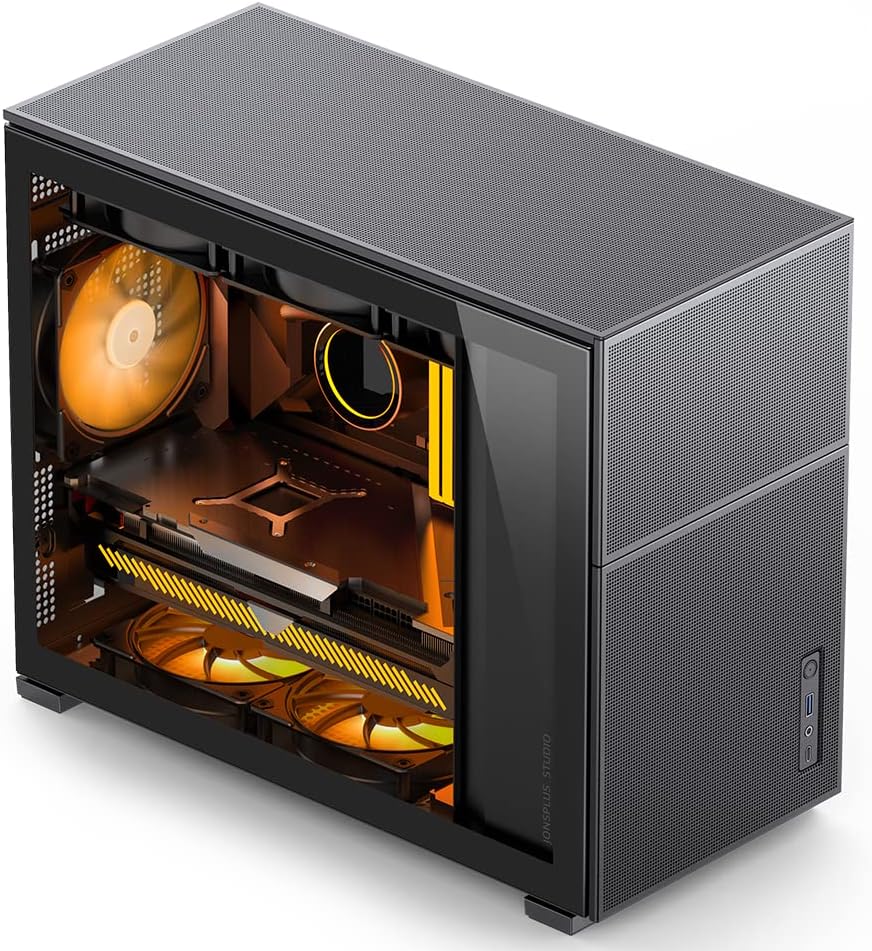
🔥 Mesh airflow meets micro-ATX muscle — build smarter, cooler, and faster!
The JONSBO D31 MESH is a sleek Micro ATX computer case engineered for high-performance builds. It supports large GPUs like the RTX 4090 (up to 400mm), multiple AIO radiators (360/280mm), and offers superior ventilation through full mesh panels. With tool-free design, adjustable PSU mounting, and a clean black metal frame with a clear side window, it’s the perfect compact case for professionals and gamers who demand power and style without compromise.


| ASIN | B0BQJ9TSP3 |
| Antenna Location | Business |
| Best Sellers Rank | #545 in Computer Cases |
| Brand | Jonsbo |
| Case Type | Tower |
| Color | BLACK |
| Compatible Devices | Micro ATX Motherboards |
| Cooling Method | Air |
| Customer Reviews | 4.6 out of 5 stars 237 Reviews |
| Enclosure Material | Metal |
| Hard Disk Form Factor | 3.5 Inches |
| Internal Bays Quantity | 2 |
| Item Dimensions D x W x H | 17.32"D x 8.07"W x 14.29"H |
| Item Height | 36.3 centimeters |
| Item Weight | 6.85 Kilograms |
| Manufacturer | Dongguan Sibo Sitong Industrial Co., LTD |
| Material | Metal |
| Model Name | D31 |
| Motherboard Compatability | Micro ATX |
| Power Supply Mounting Type | Bottom Mount |
| Recommended Uses For Product | Business |
| Supported Motherboard | Micro ATX |
| Total USB 2.0 Ports | 3 |
| Total Usb Ports | 3 |
| Warranty Description | 2 Year Manufacturer |
I**Y
The Case So Good I Bought It Twice
AKA: The Micro-ATX Marvel With Airflow for Days and Looks That Slap You know how rare it is to find a case that: Looks minimalist and clean without being boring? Has actual mesh airflow that doesn’t choke your fans? Doesn’t feel like it’s going to warp the first time you mount a GPU? Yeah. The JONSBO D31 MESH SC nailed it. And I liked it so much, I picked up a second one—because when a case just works, you stop experimenting and start building. The layout is tight but intentional—everything fits where it should, no cable management rage quits, and the airflow path is dialed. I’ve got one build running a Ryzen 5 5600 with a 240 AIO top-mounted, and the second with a full air tower cooler and a 3060 Ti—both run cool and whisper quiet. What I Love: Full front mesh = unrestricted airflow and dust filtering without killing the look Compact micro-ATX footprint but still fits full GPUs and AIOs—yes, even 2.5–3 slot cards Side window is clear and clean, not tinted black like you're hiding something PSU shroud is clean and smart, giving you that cable-free look even if you didn’t try that hard 😅 Great white finish—not that cheap glossy stuff; it’s clean and modern What Could Be Better: The included fans are basic—not terrible, but you’ll want to upgrade if you care about acoustics or ARGB Clearances are tight if you're trying to squeeze in a thick radiator and tall RAM—measure first Front panel I/O could use a USB-C, but not a dealbreaker for me TL;DR: The JONSBO D31 MESH SC is hands-down one of the best airflow-first, aesthetic-friendly micro-ATX cases on the market. It’s clean, compact, and just makes sense. If you want a case that won’t fight your parts or your build process—and still looks sleek on your desk—this is it. You bought two? Smart. I’d do the same.
Y**I
Very nice but simplistic
When I saw this case I was like woah screen built in and when I got it. Found that it is removable even cooler if you don't want the screen or want extra cooling. The case is a very simple design in it of itself and without the screen it will look like a regular simplistic PC case. But still nice looking in its own right. But what drew me to the case is the screen itself and at this price point that's not bad at all. Now the case itself. The quality is pretty nice , light, sturdy and some cable management but not very much but it's not hard to put it together at all. The case has a tempered glass side panel with mesh on the top bottom and front of the case for airflow so you don't have to worry about anything choking. Now the screen the screen build quality pretty good and when I took it out the PC case I was surprised by the quality itself especially for this price point. It has a USB type c and a mini HDMI cable to connect to your PC. It has a power button and a brightness up and down button. The resolution looks crisp and bright in the case. I love it personally lol. Now my initial cons of the case are very little cable management. Other than that everything's good so far.
M**N
High quality and thoughtful features, and the screen is super neat.
I took a chance on this case and was very happy with it! All of the exterior panels, including the front and top, can be easily removed with no tools. The screen will refuse to work unless you send it 800x1280 - so video sources like cheaper USB to HDMI dongles may not support the needed mode. The screen has controls on the side, as well as a power button to turn it off as desired. I used an adapter to get USB 3.0 from the motherboard header to power the screen and run the USB->HDMI converter. Rainmeter provides some fun free options to use the screen as shown in my pics. Build quality: The build quality is surprisingly good. Everything pops on and off in a crisp, satisfying way. Nothing about it feels cheap or flimsy. The panels are very easy to remove and assemble in an intuitive way. Cable management: There are holes located throughout to pass cables from the main compartment to the "basement" behind the motherboard. In this area there are a bunch of eyelets to thread cable ties through to keep everything tidy. There's also a nice internal trim panel to hide the nest of cables that comes out of the power supply. The case also includes a cable from the back of the PC to the power supply, which is convenient.
B**N
Beautiful case, lots of air flow, limited space
This case is a very good looking design with a lot of features. The monitor is more of a novelty that I would say I don't personally use a lot but it's a cool feature to have. The mesh panels on the front and top allow a lot of air to keep parts cool and there is plenty of room for most gpus. I currently have a 3 fan RTX 3080 in this case and a 280mm AIO. The power supply is an 850W and I ran into a space issue with the front fan (120mm) mounting just because the size of the power supply. The psu cage is adjustable with about 4 different spots but if you want a fan in the front then the highest psu spot just barely fits to allow a fan. Also for spacing, there is very little room for any cable management on the back side on the case so I wouldn't recommend running an rgb hub. Ultimately, this is a great case. Definitely pleased with Jonsbo and the product they have so far!
G**C
Recommend for small pc build
Very nice pc case, love the small form factor. The mechanism to remove the glass side panel and back panel is very nice and easy as it hooks in at the bottom and the top connects with magnets. The only complaint I have is the top panel of the case has thumbscrews, which is the only panel that has screws for some reason, that are pretty finnicky and needs to be removed in order to shut off the psu. Case requires good cooling since its smaller of course but it is just the right size to fit all of your standard pc parts aside from the motherboard as the case only supports m-atx. You can fit standard atx power supplies even ones on the longer side given that your gpu isn't too long aswell. Building in this case isnt hard or bad either and would probably be a cake walk if you get a short atx psu and cable extentions.
A**S
Great tower that looks really nice.
Really nice tower that was easy to set up. It's very open on the top, bottom, front, and back so air flow works well. The screen on the front is nice as well, though I was never able to figure out the diagnostics they wanted me to put on the screen in the instructions.
@**H
Great quality and exceptional value
I purchased this for my daughter's PC to alleviate high temp problems and for the front LCD screen. The case arrived very quickly and packaged very well to ensure safe transport. Setup of the components was very straightforward and a pleasant process. I did not need to modify anything in order to get everything working from first boot. My daughter's PC is a 14700k with a MATX mobo, a 3080ti, and a 240mm AIO. This case can fit a 360mm AIO if you wanted. The screen is connected to your GPU via HDMI (it comes with the case) that has a cutout to come out of the back of the case and is plugged into your GPU. The display is powered by a USB port which also comes out of the port and plugs into the back of your motherboard. If you do not have an extra HDMI port available on your GPU you will need a HDMI to displayport adapter (found on Amazon). The screen amazingly has GSYNC/FreeSync compatibility (60hz). If you don't want to use the screen on the front of the case, it also comes with an aluminum front cover that looks nice. Coming from a SFF case with poor airflow this case lowered the CPU temps by 15 degrees which is significant. The case allows 3 fans on the bottom for intake, 3 fans on the top for exhaust, 1 fan on the back for exhaust, and 1 fan on the front for intake. Because there are so many fans you can run them on low and still achieve excellent cooling performance while keeping the PC near silent. I like the simple design, easy setup/installation, cool temps, and great looking screen. I would definitely recommend this case to others for the exceptional value.
T**Y
One of the best and fun cases to work in.
First off, I normally don’t purchase cases that I have not heard of. But, Jonsbo has been on my radar for a long while. I have seen them on Newegg before when I’m browsing. Just wasn’t the right time. Until I saw this. There is an ATX and mATX version. I had to go with the mATX version since like semi-small builds. Out of the box I was impressed. Has such a clean appearance. None of that nonsense edgy corners or angles. Let’s talk about it being tool less. The front mesh and screen pop off as well as the side panels. Love it! The top have two thumb screws and the top slides off and is easy to place back on and secure. PSU mounting does require a tool to undo some screws, two in the front. But you need to undo four more from the side where the tempered glass panel is. By removing this long narrow plate you can now remove the PSU cage. One thing nice is that psu cage’s height can be adjusted from top to bottom. So not entirely tool less lol but only 6 screws to deal with. Cable management was challenging in this case. However, the back has a decent channel that allows your cables to fit snug and zip tie down. My process was kinda backwards. Since I had 7 case fans, I wanted to map out the cables. WARNING: Fan hubs that are thick will not fit in the back. The case fans I got came with a fan hub that was more that 1/2in thick. I countered this by using a raised pump mount that attaches to the fan. This is mount in front with the case fan just below the PSU. I barely had room but I made it fit! So with fans on the bottom and 3 fans on top and one in front, everything fitted. One thing that should be done first is too cable the HDMI and USB for the front screen. Just leave it hanging out a bit. Typically, this would be the last step prior to finishing up the build. Overall, very nice case and fun to build in. I need to buy the ATX version as well. So thank you Jonsbo! You’ve done very nice on this one!
Trustpilot
2 weeks ago
2 weeks ago