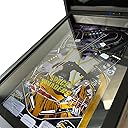
🎯 Compact power, endless play—your home arcade revolution starts here!
The Legends Pinball Micro is a compact digital pinball machine featuring a 15.6'' HD LCD playfield and 8'' backglass, delivering authentic flipper action with haptic feedback. It comes preloaded with 50 licensed tables from classic arcade legends and supports Wi-Fi/Ethernet connectivity for multiplayer, voice chat, and downloadable content. Designed for easy setup and immersive gameplay, it’s the perfect blend of retro nostalgia and modern convenience for any home arcade enthusiast.


| ASIN | B0BN285THC |
| Best Sellers Rank | #36,978 in Toys & Games ( See Top 100 in Toys & Games ) #70 in Plug & Play Video Games |
| Brand Name | AtGames |
| Controller Type | Button Control |
| Customer Reviews | 4.0 out of 5 stars 132 Reviews |
| Display Type | LCD |
| Form Factor | Compact Home Digital Pinball Machine |
| Hardware Interface | HDMI |
| Item Dimensions L x W x H | 23.6"L x 22.64"W x 12.36"H |
| Item Height | 12.36 inches |
| Item Weight | 24.3 Pounds |
| Manufacturer | AtGames |
| Material Type | Plastic |
| Memory Storage Capacity | 16 GB |
| Number of Players | Multiplayer |
| Platform | Not Machine Specific |
| Power Source | Corded Electric |
| Screen Size | 15.6 Inches |
| Size | 24 Inches (Width Only) |
| Theme | Retro |
| UPC | 818858027557 |
M**W
Great on sale.
This pinball machine looks smaller than it actually is. That being said it is small. I knew that going in, and it wasn't an issue. Everything works well and everyone (even my dad) loves playing pinball on this digital machine. It may come with 50 tables, but out of the tables I've played, maybe 10 of them are good, and three are great, 13 in total good tables. Still, that's fine. That being said, I do not believe thid digital pinball machine is worth the asking price. Get it on sale when it goes on sale.
L**S
Must have for home arcade!!!
Overall it's so much fun and seems well built, but it does glitch sometimes. I've played about 300 games so far and a couple times the ball disappeared into a character and a few times it's froze when an animation happens. Not the biggest deal but it's obviously disappointing to be in the middle of a good game and lose your score. It was easy to assemble and took about 10-15 minutes from closed box to playing a game. Would purchase again with the understanding that it's not the same experience as a real one, but cost less and has no maintenance.
P**E
Honest review
I read the reviews before buying. I took a chance. I got a great virtual pinball machine that set up easily. My only complaint in assemble was that the video cable was a bit snug, but it plugged in with a little gentle coaxing. My 8 yr old daughter and I have played it heavily for 2 days. No issues. Sound is great. Display is great. Haptic feedback makes it feel way to real. Only complaint is the D pad for navigating menus. Go gentle and you will get the feel for it. My future expectations. This is a pretty sophisticated piece of technology. I expect with play im going to have to solder some connections. I'm probably going to have to replace some flipper buttons at some point. It's a pinball machine. They require maintenance. I would hazard a guess that lots of the negative reviews are due to rough handling during shipping. It is a piece of precision equipment. It performs like it. Lots of fun. Very realistic My suggestions. Get legs for it. If you buy standard pinball machine legs you will require washers because the head of the bolt is to small. At games has them available as well. Second, understand that this machine will probably require a little love to keep it in tip top condition. Conclusion. I'm saving up for a full size legends pinball machine. Amazing product great price.
M**E
Overall an excellent product -- but for a few problems
I am very impressed with the Legends Pinball Micro. The small form factor is perfect for my space and when I am playing, I often don't even think about the fact that the pinball table is presented on a screen, mounted under glass. The build-quality is very good, the minor assembly required is simple, and ATGames delivered the product earlier than expected. I paid $300 for the my Legends Pinball Micro, and an impressed with what I got for the money. If it weren't for a few annoying problems, I could easily rate the product five out of five stars. Annoying, but by no means a deal breaker, is the fiddly directional control pad you must use to navigate menus and enter data when between games. How this D-pad could be this bad is mind boggling. I saw this mentioned in other reviews on Amazon and I thought, "How bad could it be?" The answer is "very bad". It is not completely unusable, but accurate navigation with the D-pad can be a challenge. My second complaint is the process by which you are supposed to register the product. According to the manual, "If you signed up for a new Legends account, follow the instructions in the product registration email sent to the email address associated with the account." Well, I did sign up for a new Legends account, but I never received a product registration email. I have received other emails from them, but no mention of product registration. Again, not a deal-breaker, but kind of annoying. My third issue is much more annoying and is the main reason I am dropping my rating from 5 down to 3 stars. Whenever my Legends Pinball Micro tries to upload high score information to the Legends servers, I get the error, "Failed to submit your high score record due to an invalid UUID. Please contact AtGames at [URL]". Do I care about submitting my high scores online? Not really. The problem is that pressing the Okay button will often NOT dismiss this error message. You are then stuck waiting and retrying the click on the Okay button until the message is eventually dismissed and you can continue playing. Power cycling the unit does not help, because when the device restarts, it tries to upload high score data and I am again stuck trying to dismiss the error message. It seems like the more I play, the harder it gets to dismiss this message (perhaps because there are more and more high score records it is trying to upload?). I did fill out a customer support ticket on atgames.com, 9 days ago, and the problem remains unresolved. Immediately after creating the ticket, I received what must have been an automated email which said, "We’re back with great news following the recent v6.1.13 release. Our team has been working diligently, and we’re pleased to report that several key issues have now been resolved. Confirmed Fixed: [...] Invalid UUID Error on Legends HD – UUID error on machine no longer displays. You can now submit your scores without interruption. [...]". Really? How nice. Except the problem hasn't been fixed, at least not for me. I don't even know what v6.1.13 release they are talking about. My unit reports its firmware version as 10979_A36, and it says that there are no firmware updates to install. I added a reply to my customer support ticket, telling them I am indeed still receiving the invalid UUID error. It has not been fixed. I received a reply asking me to send photos of the box in which the unit shipped showing any damage. There is no damage to the box or visible damage to the device. But I sent them pictures of the box (explaining that there does not appear to be any damage to the box) and I sent them screenshots of the Device Info screen and the error message screen. That was 6 days ago. There has been no response. I could just turn off WiFi and play completely offline. But I am worried about this invalid UUID error. If I buy any add-on tables, will they work or will I simply get another invalid UUID error. I would like to have this problem resolved before I risk spending additional money on add-ons. Finally, buying add on tables and table packs is a little confusing to me. I see online where people talk about buying add-ons for the device or associating add-ons with your account so they are not locked to a specific device. But then people complain that if the servers are down, you can get locked out of playing tables that are associated with your account rather than the device. The online FAQ mentions an offline mode which may allow you to temporarily lock selected add-ons to a specific device (so that you can play offline?), but there aren't a lot of details. It seems a little confusing to me. Maybe it will make more sense, if they ever fix my "invalid UUID" problem and I feel comfortable taking the risk to buy some add-on tables. As it is, I don't think they have done a very good job explaining how purchases of add-on tables is supposed to work. *** January 19, 2026 (UPDATE) *** It has been 15 days since I filed a support ticket about the Invalid UUID Error. I did receive a reply, asking me to clear data, perform a button test, and perform a factory reset. I did all this, and the problem remains unresolved. The main annoyance is the inability to dismiss the error message, and at least for now this seems to only happen after restarting the device. It can take many minutes and many attempts to dismiss the error message so that I can play. Once I am able to start playing, the error appears whenever I exit a table, but at least in those cases I can dismiss the error by clicking "okay" just once. I wish it were as easy to dismiss the error after a restart. I did eventually purchase add-on tables, during AtGames' January sales event. I am happy to report that purchased tables do seem to work, despite the Invalid UUID Error I get whenever the machine decides to upload high scores. The process for buying and downloading tables is a little confusing. You apparently need two different accounts, a Legends account which you log into on the pinball machine itself and a separate account for the AtGames online store. I guess these accounts are linked to one another by using the same email address for both accounts? I don't know, but somehow the accounts are linked so that when you buy something, using the store account, the code to redeem the table or pack becomes available on a pinball machine logged into the Legends account. To get new tables onto your pinball machine, you buy the new table or multi-table pack at the AtGames store. After you complete the purchase, you are sent an email with a redemption code, but as far as I can tell, you don't need to use the code from the email, because the redemption code also shows up in the "My Digital Locker" section of "Settings" on the Legends Pinball Micro (assuming you are logged into the Legends account that is linked to the store account you used to make the purchase). It may take a few minutes for the code to show up in "My Digital Locker", but so far it has always shown up for me after a purchase. In the "My Digital Locker" (in Settings on the Pinball Micro), you select the code you want to redeem and press the start button. You are presented with a warning that the table or pack will be associated with your account, rather than the machine, and it tells you how you can redeem the code differently, if you want the table or pack to be associated with just the machine. Associating it with the machine means that you cannot transfer the table or pack to a new machine, if you buy a new machine, even if something happened to your old machine. So, you probably want to associate the purchased table or pack with your account anyway, which is what you do from My Digital Locker. After you redeem the code, you want to head on over to the "AppStoreX" screens of your Legends Pinball Micro, so that you can download the table or pack you just redeemed. During redemption in My Digital Locker, it asks you if you want to go to AppStoreX. Choosing that option sends you to AppStoreX, which lists all of the tables and packs you own and/or can buy (well sometimes it shows you tables and packs you don't own, but sometimes it only shows you what you own -- I don't know why). If you are lucky, the table or pack whose code you just redeemed will be automatically selected, and you can hit the start button to download the table or pack. There is no on-screen prompt that pressing start will download the table or pack, so I guess you are just supposed to know that. If you are unlucky the redirect from My Digital Locker to AppStoreX takes you to some table or pack that is not the one for which you just redeemed the code. In that case, you need to remember what you went to AppStoreX to download, and navigate to that table or pack yourself, and then press the Start button. This all seems to work, I guess, but it certainly seems unnecessarily convoluted. Now, my understanding is that if you redeem your purchases via My Digital Locker, such that the new table or pack is associated with your account rather than the device itself, you will need to be online and signed in on the Legends Pinball Micro in order to play the newly downloaded tables. But there is a way to take a table or pack "offline", so that it is temporarily bound to a particular machine and can be played while the machine is not connected to the Internet. You do this by going to AppStoreX on the machine, pressing the front "nudge" button to enter "Offline Mode", and select the tables or packs you want to take offline. I did this once, just as a test, but I think taking a table offline put my Legends Pinball Micro into "Offline Mode", and now I could not play my other purchased tables and packs that I had not taken offline. At least that's what it looks like was happening. I put the table and pack back "online", and all of my tables and packs seem to be working again. This is another feature of the Legends ecosystem that is not explained very well. Offline mode seems like a good idea, except if you want to put the table or pack back online, you have to do it from the machine on which it was taken offline. What happens if this machine breaks or becomes unusable? Well, I guess you lose the ability to put the table or pack back online and your purchase is lost to you (unless you can repair the machine). For now I am leaving all of my purchased packs and tables online, and I am hoping the AtGames servers are reliable. Of course, by staying connected to the Internet, I continue to get this "invalid UUID" error. *Sigh*
M**E
So much fun!
Squealing, snorting, laughing, crying, tinkling lol is how much I enjoyed playing on this pinball machine! Fully digital but feels like you’re playing a real pinball machine. So so much fun!!! Not so fun was the setting up two separate user accounts one for the hardware and another for the software but once that’s done. It’s great. Perfect size for my space, really gives you that arcade feeling at home. And best price for this item was on Amazon. Love this purchase.
S**S
Nice when it worked.
Was pretty good until it completely died less than 30 days after ordering. That's crazy poor QC or just garbage parts. Trying to get support from the company has been not extremely helpful so far
J**R
Be aware not to buy from 3rd party sellers!
Fun games we actually like it. Came with marks inside the glass. Trying to get a replacement or return. 2 weeks and Still waiting on return label from company. Have to jump through hoops to get things done. I woukd not purchase this again from a 3 rd party seller!.
M**R
Great gift well made pinball machine
Bought this product for Christmas, well made and very sturdy. Kids love it and have not stopped playing. Comes loaded with 50 games and the option to get more from the internet. Great gift.
Trustpilot
3 days ago
1 month ago