We remain fully operational. Our teams are working around the clock to ensure your deliveries continue safely.

DOWNLOAD THE APP


Copyright © 2025 Desertcart Holdings Limited
DOWNLOAD THE APP
Buy anything from 5,000+ international stores. One checkout price. No surprise fees. Join 2M+ shoppers on Desertcart.
Desertcart purchases this item on your behalf and handles shipping, customs, and support to Italy.
🎥 Capture. Convert. Conquer your video legacy.
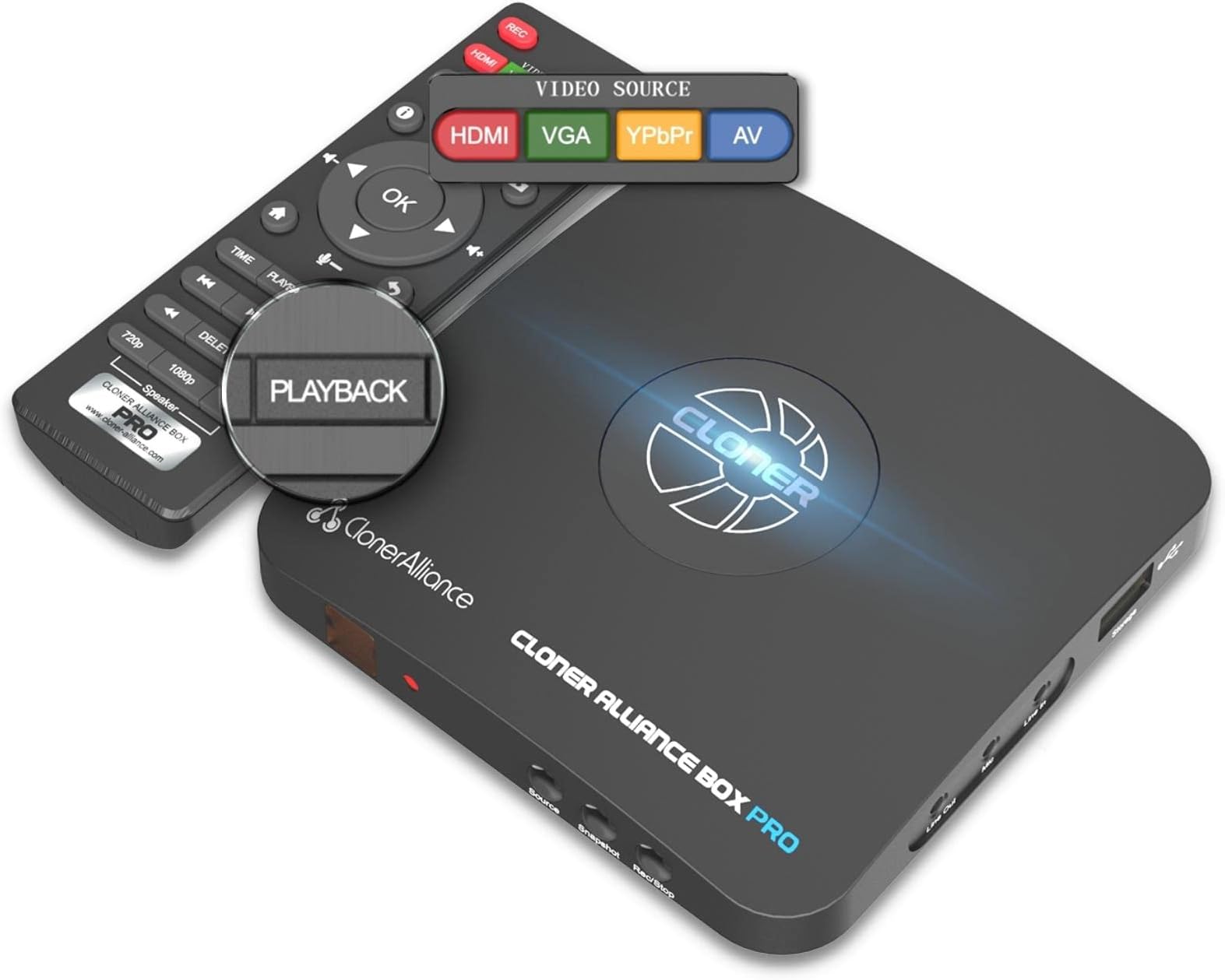
The ClonerAlliance Box Pro is a standalone 1080p@60fps video recorder and analog-to-digital converter that requires no PC. It supports multiple input types including HDMI, RCA, YPbPr, and VGA, enabling users to digitize, archive, and playback videos directly on TV. With ultra-low latency under 90ms, broad device compatibility, and flexible USB storage options, it’s the ultimate tool for professionals and enthusiasts looking to preserve or stream high-quality video content seamlessly.


| Brand | ClonerAlliance |
| Product Dimensions | 10.92 x 10.92 x 1.52 cm; 192.78 g |
| Batteries | 2 AAA batteries required. |
| Item model number | CA-998P |
| Manufacturer | ClonerAlliance |
| Series | CA-998P |
| Colour | ClonerAlliance Box Pro |
| Additional Drives | Thumb Drive |
| Voltage | 5 Volts |
| Wattage | 12 watts |
| Tuner Technology | PAL, NTSC, ATSC, DVB-T |
| Power Source | DC |
| Operating System | Windows |
| Are Batteries Included | No |
| Item Weight | 192 g |
| Guaranteed software updates until | unknown |
P**R
The best electronic gadget for recording video streams available
I have spent several days trying out a few different ways to get the best out of this clever little ClonerAlliance HDMI Pro recording device to suit my specific needs and now I feel that I am in the position to write an honest and detailed review of it to the best of my ability - something I think is really important as this device may be able to help many people looking to record video from sources they can find no other way of doing currently. The first thing to say is that the ClonerAlliance HDMI Pro product is a fantastic bit of kit that has made something possible that I feared I would be unable to achieve - namely recording a video stream from NowTV. But it actually works better than I hoped it might and I have been really enjoying using it. This review will be mostly created by the notes I have been making about the various ways I have tried and prefer recording with it, and I know that anyone wanting to record streams will benefit from reading this and trying out such a great gadget as this. Firstly, I want to mention something that did put me off when I first used it - that annoying "Och, something wrong!" message that appears when you first try connecting the device to your tv and video source. It turns out that it really is a simpler fix than even the instructions lead you to believe - you just press and hold the "Source" button on the front for 10 seconds to really sync everything together and then they just work together again forever without any further effort from you. Until I knew that I kept on having to disconnect and reconnect everything to the ClonerAlliance HDMI Pro every time they were powered down. Now, no such problems and everything just reconnects and works each time I switch all the devices back on. I will now explain my exact use of the device which may give you a better idea of whether it will be of use to you. I have been trying to get high quality versions of the episodes of 2Point4 Children as streamed via NowTV because I know that they will never be released by the BBC on DVD due to a licensing issue with Lady Penelope’s pink car from Thunderbirds (if you can believe such a thing.) In my tests I found the best way to record them was to first fast forward the episodes to the end of each clip, cancel that annoying "watch next episode now" message that would otherwise appear at the end, rewind to the beginning once again, then cancel the play positioning bar by using the rewind 10 second button and press record on the ClonerAlliance HDMI Pro at the same time to enable me to get a perfect recording from start to finish without any more annoying pop up or display bars on it. The ClonerAlliance HDMI Pro enabled me to do exactly that and get the episodes I wanted recorded perfectly (I now need only hope that more episodes get shown on UK Gold to allow me to get the entire series recorded!) However, with the ClonerAlliance HDMI Pro it goes without saying that you only get out of it what you put into it. By that I mean that you should have the following: 1. A good stable internet connection and being prepared to record late night/early morning (if using the ClonerAlliance HDMI Pro to record from a streaming service such as NowTV to prevent buffering/jumpy playback/audio issues.) 2. A high quality stream or video input such as 1080p as the ClonerAlliance HDMI Pro will not provide HDMI upscaling. 3. A decent quality flash drive/external hard drive (unless using the ClonerAlliance HDMI Pro to record straight to pc.) I tend to record with it earlier on the morning when my internet connection is at its best to ensure the optimum achievable rate of transfer, plus I have NowTV boost to receive all content in 1080p. That being the case my ClonerAlliance HDMI Pro is able to record in perfect clarity with the files looking great in playback once transferred to my pc (I usually don’t check the playback on the device itself, although it does have that ability.) When it comes to playback of recorded files, I have adopted the method of recording straight to a flash drive and then simply copying files across to the pc after I have finished, and so I cannot comment on connecting to PC via HDMI (even though I bought a long enough high-quality HDMI cable to do so) or really even using the software to edit/combine files - apart from one minor thing I will mention in a moment. The software that you have access to with a purchase of the ClonerAlliance HDMI Pro does seem quite good, but I only tried editing a file recorded with it once as I changed my recording method after that. (I just know that something will likely always go wrong if using software on a pc due to the constant updates computers get - so even if the software provided with ClonerAlliance HDMI Pro works now, it won’t be long before Microsoft comes along and breaks something, hence my reason for not really trying it too much.) When I was first recording with the ClonerAlliance HDMI Pro, I had my flash drive formatted in fat32 rather than NTFS which I now prefer - fat32 is apparently more stable for recording with it, but NTFS records files record in one piece rather than splitting anything over 2GB into multiple files. I decided I would prefer single files due to a slight "audio drop" issue at the point of split I noticed when using the provided MP4-Cloner software to merge split files back into one file. However, there is another important choice to be made regarding the formatting standard if using an external drive to record to, because the same quality and length of 30 minute episode recorded on a fat32 formatted drive which comes to around 2GB would be around 3.2GB on a NTFS formatted drive. This is all due to the size of the default allocation unit size used in the drive formatting, which is something you will have to search for yourself to get the best results for you - however it is of little concern to me really because I plan on storing my precious recorded files on my large 4TB external hard drive connected to my TV for later playback and for burning straight to Blu-ray discs for long term backup, but for those with limited space requirements you may wish to take care with your choice here. Apart from the slight audio drop out issue I mention above during the only time I tried file merging and possibly the slight moment of panic caused by that initial "Och, something wrong!" message that was solved after a quick online search, I cannot find anything I do not like about the ClonerAlliance HDMI Pro. It performs better than I had hoped it might when ordering and right now I think it may well be greatest electronic gadget I have ever bought. (And yes, for those that are inevitably going to ask if the ClonerAlliance HDMI Pro can be used to record from copyright protected DVD's and Blu-ray, I can say during my test it did so perfectly and made an excellent recording, as you might expect, because it simply records whatever video source it receives to a file. Just please only use it for whatever you might legally have the right to do so, okay?) In the added pictures you can see my current setup with all my various devices for watching content, my NowTV device for streaming and the ClonerAlliance HDMI Pro itself (with the flash drive removed as it was connected to my pc at the time.) It is now just starting to look a little dusty, I really must do some cleaning - the other little marks on the rest of the devices are just emulsion paint from my roller when decorating I promise! I can happily rate the ClonerAlliance HDMI Pro 5 stars and recommend it to anyone wanting to find a way to record HD streams that other devices will not accept.
A**U
Amazing device
Amazing device was a little fiddly at first but once you know it’s great and the support is really good online chat. I have a laptop connected to a docking station and three screens, I duplicated 2 and connected this between my laptop and one screen, I then connected the cloner to my other laptop for recording to. It’s for work which means when I’m being shown a process with 50 steps I can record the entire process and watch the video back to document the steps. Most work places lockdown record functions but this works different if you have an hdmi out from a device then this little device will record it! Brilliant device I just leave it connected and use my recording laptop to record. Recommend it despite the cost as it does a great job.
D**G
Recording quality Brillant and easy to use
Brilliant bit of kit. Recording quality spot on . Converted old video and camcorder. With no lag. To digital. Very happy.
R**B
absolute heap of junk
absolute rubbish and simply does not work. tried using 2 reputable usb sticks. seemed to record ok....but as soon as i tried to play back, i received video error on both sticks. complete waste of time. Avoid this like the plague!
A**R
Great Prodcut but beware the Power Supply
Have used this product on and off for the best part of nearly a year - and it works well. You do need quality memory cards otherwise they fail to record. I use Sandisk normal 2 inch long USB sticks and they work WELL ... The very small micro USB memorys caused me issues. The one areaof concern is the Power Supply - it came with a 2 flat pin plug which plugged into an adapter to convert it to 2 round pins and then this plugs into a shaver .. all in all, it sticks out about 4 inches ... not something I would leave switched on when there are children around or if I am nort in the room. I have since replaced it with the following power supply: Outtag 36W Destktop Charger AC Power Supply Adapter 5V-15V 2.4A for Bluetooth BT Speakers Routers CCTV Cameras LCD TV Box USB HUB IP Camera Led Lamps Other than the power supply issue, this is a fantastic product
K**H
Excellent HDMI recorder box.
Excellent recorder from HDMI to USB flash drive or external HD. Typical first time power on had the "oops Something Went Wrong Message" so had to consult document that came with it which pointed to website. Result was just to hold the source button in for 10 secs to reset the box. Would have been easier and more useful (and quicker) just to put that in the included instructions to save having to go to the website. Works fine from Amazon Fire TV and Panasonic Blu-ray recorder. Bypasses HDCP. Only issue is as commented by other users, in that the recorded output is only 30fps and not the same as the source i.e. 24fps or 25fps. This means that it adds extra frames to achieve the 30fps. This leads to slight jerkiness in recording from 25fps. Saying that when recording 24fps from Blu-ray seems to be no issue. Obviously must depend on where and how the extra frames are added. Otherwise after initial reset have had NO issues with this device - recording on to old 240GB OCZ SSD without any issues. Excellent device would recommend to anyone that needs to remove video from old Freeview recorders. Manufacturer - PLEASE add ability to have output at either 25fps or to be same frame rate as source.
C**R
Not bad... but buyer beware as there are some limitations and issues.
I've only been using the Cloner Box Pro for a few days so I cannot comment on its long term reliability but here are a few observations. I needed a simple standalone unit that could be left unattended for transferring videotapes and I got the Cloner Box Pro primarily to archive dozens of PAL SVHS tapes into mp4 files for later editing in Final Cut Pro X (on a Mac) - so my setup is fairly unique. Initially I had my SVHS machine connected to the YPbPr AV inputs and all seemed well. It's a neat unit and comes with with a decent selection of interface options - on a multipurpose connector with and array of HDMI, VGA, Composite and Component sockets. It comes with an HDMI cable and was easy to set and is pretty much plug and play. I haven't attempted to use their software as it's not available for Mac - and anyway I'm using FCPX. I have to say the quality of the mp4 video captures was very good, with strong colours, nice contrast and a consistently stable image and no glitching, that I could detect. As others have reported there were some occasional lip synch errors, but in my experience these were minimal, and fixable. However, no matter what format or playback machine I was recording from the resulting mp4 files were always recorded in 16:9 format at 30fps (or 60fps). This meant that when the files were imported into my PAL (25fps) video projects there was a lot of frame juddering due to the 30fps to 25fps mismatch. I cannot find any way at all to change the recording format to PAL 4:3 at 25fps (or 50fps) - maybe it's not possible on this unit. I can crop the videos to 4:3 in FCPX but it's an extra stage of processing that I shouldn't need to do. But what was far, far worse though was the constant appearance across the bottom of the mp4 video recordings of an 'input/format' banner graphic which pops ups for 5-10 seconds whenever there was an edit or any kind of glitch on the videotape playback (which are very common with videotape). That there is no way to disable this annoying banner is totally unacceptable on a something costing nearly £200. Thankfully (for me) I did find a workaround - by playing the output of my SVHS machine though a spare digital video mixer I have (which has a built-in Time Base Corrector) and feeding the mixer re-stabilised HDMI output into the Cloner Box Pro - no more banner pop ups on the recordings! Unfortunately though not many users are going to have access to that kind of equipment. To be honest am still deciding whether to keep this unit or return it for a refund. The video quality is good but with some very obvious limitations and issues. And it's not even a question of "you get what you pay for" because this unit is not cheap compared to other similarly specified convertors. I guess it's a case of buyer beware.
P**J
Great little device .....BUT.... .
On paper this is a great device ...easy to use and seems to produce good recordings. Unfortunately it only works at 60HZ.... even though it recognizes a 50HZ source it still only produces a 60HZ (or 30fps) file. The company have been very good in replying to email queries but have admitted this is normal for the box and they don't foresee this changing. It is with great reluctance I am returning it. once again great customer service and if was updated to enable frame rate changes then I would have no hesitation buying it in future. Update..... I have had amazing customer service form Cloner Alliance.... they have been very helpful and have now been able to use the device with a laptop to record at a frame rate of 50HZ. Currently though this is only 720. I’ve been told this may change in the future to enable 1080 at 50 (rather than just 60). If this does happen (and the ability to do from remote to memory stick rather than hav8ng to connect to laptop) then I will definitely update to a 5 star review.... watch this space. 2nd Update......... The PC software has been updated again and now allows 1080P/25 to be selected as the record format.......
Trustpilot
2 days ago
3 weeks ago