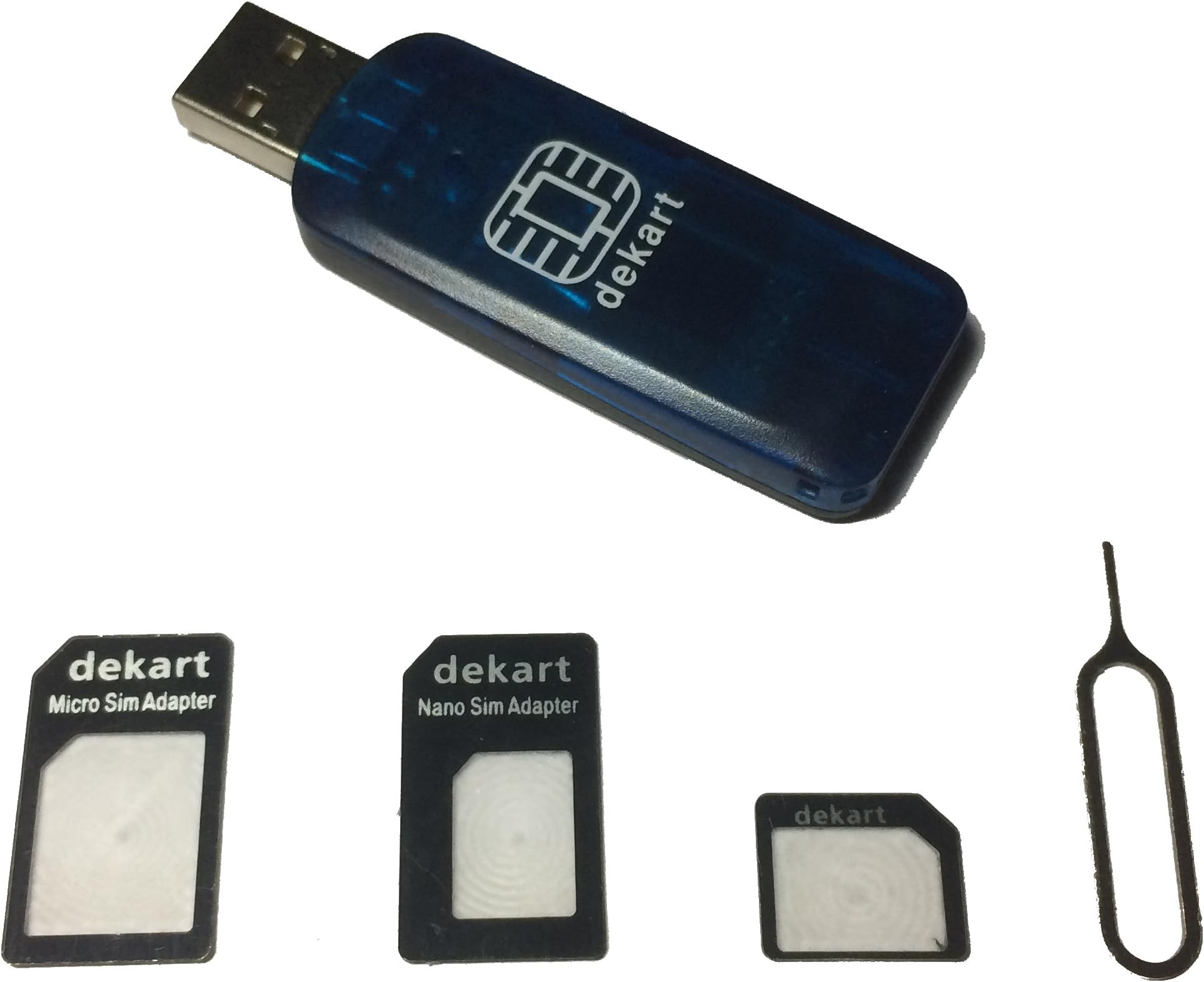
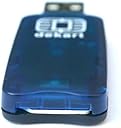
Dekart SIM Card Reader with Powerful SIM Card Management Software for Windows PC
Product ID: 4941973
💾Full SIM read/write & backup
📊CSV export for Outlook sync
🔌Universal USB compatibility
📲 Unlock your SIM’s full potential — manage, backup, and secure like a pro!
The Dekart SIM Card Reader is a compact, USB-powered device designed for professional-grade SIM card management across multiple network types including GSM, CDMA, and satellite SIMs. Paired with powerful Windows software, it enables users to read, edit, backup, and securely wipe SIM data, export contacts to CSV for Outlook synchronization, and manage PIN codes. Its universal compatibility and lifetime warranty make it an essential tool for tech-savvy professionals who demand control and security over their mobile data.
| ASIN | B0045BIUGG |
| Brand | Dekart |
| Customer Reviews | 4.1 4.1 out of 5 stars (218) |
| Date First Available | September 29, 2010 |
| Is Discontinued By Manufacturer | No |
| Item Dimensions LxWxH | 2.64 x 0.87 x 0.24 inches |
| Item Weight | 0.811 ounces |
| Item model number | dk38 |
| Manufacturer | Dekart |
| Product Dimensions | 2.64 x 0.87 x 0.24 inches |
J**N
Great little SIM card reader and supporting software
Purchased this SIM card reader and SIM manager software through Amazon in October 2010. Finally! A SIM card reader that is well built and comes with software that makes it really easy to manage data read from your SIM cards. Now, all was not perfect. When first attempted to install the reader drivers, the installation would not complete. It appeared to just stop near the end of the installation. Had to use task manager to kill the installation. The quick install instructions were not entirely clear about the reader - that is - it didn't state whether a SIM card should be in the reader when installing the drivers. Sent an email to Dekart support. Received a reply - could have been a little faster, took about 3 days - it doesn't matter if a SIM card is in the reader when installing the drivers. I had another PC that was a clean install - w/ no anti-virus or firewall software installed yet, never connected to internet. I was able to complete the installation successfully. Went back to the first PC (a laptop), disconnected network connection, removed the internet security app (from Comodo) and was able to install the drivers. Reinstalled Comodo and SIM card reader works fine. Drivers installed on both WinXP and Windows 7 PCs - 32 bit. Except for the install conflict w/ Comodo, this is a great product, I highly recommend it. Reader and software have been working just fine almost three months. Email support was okay, could have been a little faster. Two notes related to this purchase: 1. Because Dekart is not located in the US, I was not comfortable purchasing from them directly. Purchasing through Amazon provided the added security I was looking for. 2. In order to get the registration number for the SIM Manager software you have to provide an email address directly to Dekart to receive it. The Amazon seller feedback system strips out any email addresses sent to the seller. Don't know why Dekart couldn't just send the registration number via the seller feedback system.
V**N
Works great!
My only problem was that it did not include the software or any install information, so I had to find their website. At first, I downloaded SIM Manager, which requires registration after 30 days. I emailed Dekart and was told that the included software was SIMple, which has most of the same features as SIM Manager without registration. It does exactly what I need: read/write SIM cards, and store the information in various file formats on the PC. I now have the correct software installed on Windows 7, and was able transfer my contacts to a new cell phone for myself, and do the same for my mother. so I'm happy. Also, I was surprised that it came with a set of adapters for different SIM card sizes, which was handy. I with I had seen that in the product description, so I would not have bothered to order Simdevil.
B**T
Misleading and over priced
This product and its description are misleading. It doesn't (can't) copy or clone a complete card. It only backs up contacts and call logs that may be stored in the SIM. The (not likely to be stumbled upon) official FAQ makes it clear like nothing else does: Q: I want to make a copy of my SIM card so that I can have the same second SIM card in my other phone, is this possible to do with your reader and software? A: This cannot be achieved with our software, and gerally there is no solution to such a problem... It goes on, but there you have it roght from the reluctant horses mouth: NO, this device does do what many are misleading to believe is possible, and they will gladly sell you their product for 10x the cost of similar items, claiming it works like no other. What a joke! My advice, if you're someone from the late 90s with a Nokia candybar phone, an Eminem shirt, and contacts stored on the SIM, is to get a $5 Chinese card reader, download free software, and save yourself $40. They pitch the price justification by claiming premium build quality, which seems fair enough, but in reality you could break 10 cheap readers before touching the cost of this one.
F**E
Works and easy to use
Worked as advertised without any problems; I now have a backup of my contacts and a little more peace of mind. Worked on Win 7 Home Premium 64-bit, did not try Linux. Came with a card with a link to install instructions and Dekart's free SIM reader (the pro version only includes Google/Yahoo contact and vCard support for $30). Software was simple and easy to use, though it was unclear whether I had to do anything besides close the software to "safely remove" the SIM card or device. The device slowly blinks when plugged in to the computer but without a card in it, so I guess it's not staying plugged in to my desktop. One star off for price, I feel it should have been cheaper.
A**.
but it worked fine and I was able to read and export my ...
Dekart SIM Card Reader - Wasn't sure if this was worth taking the risk after reading about people having problems, but it worked fine and I was able to read and export my data to Excel. I'll be importing to Outlook so I can synch it with a new phone I'll be getting in a few days. No problems with the driver or App install with Windows 7. Device was recognized right away when plugged into the USB port. I can see how some people might be having problems with their SIM Card not making contact in the slot, not the best design, but it worked. I'm happy with the purchase, I didn't want to have to re-enter 200 plus entries on my new phone. Was shipped quickly, packaging was OK (Reader was wrapped in bubble wrap, in a box an placed in a padded envelope).
K**S
It was an Ok item... I used it to spy on cell phone texts
I used this product to spy on a cell phone text messages. the only down fall was that the phone that you want to recover the text messages from... must have program their cell to save text messages on the SIM card. thats the only way you can retrieve the messages. And, when I made the switch on the program to save- the Dekart only retrieved up to the last 20 texts. the upside, if you have program your phone to save on your SIM card, then you can retrieve your lost programs. So would I recommend this product... umm... lets see... you decided
H**R
Works great.
Works really great and for this price is a steal. It's not 100% accurate as it had difficulty with some of my Radio/nextel numbers. It would not copy the first 2 sets of numbers for each radio number. I don't know why it does that and I have not call helpdesk yet, but that's the only thing I have against it and I'm really happy with my purchase.
H**H
It just plain works
I told my father is was worth spending a bit more than those $3 devices to move his large contact list from an AT&T Sony/Ericsson to a StraightTalk Nokia and I found the process to be easy, straightforward and fast (less than a hour after it arrived; granted I've been programming computers since 1977 (sic)). My father's also happy I have a thoroughly backed up copy of his contact list (if you look at my location you'll realize why the concept of good backups is fresh in our minds, I had to use my last ditch type for some of my data after May 22nd). The host computer was a Windows XP Pro SP3 machine, I had no driver or other problems with the device or SIMManager. One very nice touch: Dekart emailed the SIMManager registration number and a PDF of the setup instructions as they were mailing the device; no muss, no fuss. All around a class act.
B**T
budinet
Hallo, habe diesen Kartenleser erworben um meine Telefonnummern auf andere Karten zu kopieren, dies ging echt gut. Problemlos lässt sich auch die die Simkarte einstecken bzw. entnehmen. Software ist auch Top (von Herstellerseite,freundlicher Kundendienst), alles gut zu verstehen. Würde nochmal kaufen, MFG!
P**L
Read the comments on the few negative reviews for the full picture - its 5 stars through and through
From my initial 'pre-sales enquiries' with Dekart through to a minor technical hitch (which there is a simple workaround to) Dekart have been nothing but exemplary! If you're at all concerned by the fact there are a few negative reviews, it's worth clicking on the 'comment' link below to see Dekarts response. In each of the three negative reviews I've seen, there were excellent responses from Dekart, with no further response from the reviewer involved. How can they help to achieve the wanted outcome where needed information isn't given or it seems the reviewer has misunderstood how many SMS messages can be stored on a SIM for example. Read the comments with the negative reviews to get a fair picture. These people really know their stuff and it shows in my dealings with them. How can I get their customer service staff to come and work at some of the UK's utility and mobile phone network providers I deal with :-) They take the time to properly investigate any question or issue and you are fully supported. Although this card reader and SIMple software has undergone updates since the first release was provided, it appears that the list of supported operating systems on their website and in the software's own help files has not. A recommendation for how they can make it even better is therefore to mention in each of these places that it works with Windows 10 (I'm not aware of other such devices making such a claim so this would give them a distinct advantage). My Windows 10 PC/Tablet seems to work well with this device and software. I simply installed the SIMple software which is available on their website and had a look around it for the day or two it took for the Dekart reader to arrive in the UK post (although Amazon claimed it would take much longer, its far better to under promise and over deliver than the other way around). When the reader arrived I plugged it in while the PC was turned off and when it was next booted and I started the software again it read my SIMs perfectly. I found that to write 'My phone number' to the dedicated 'own number' part of the memory in my SIM, i had to use from line 2 or higher on the software but the result is still the same and my phone no longer displays an ugly 'unknown' where the phone number should be but shows the actual number that I wrote to the SIM using this hardware and their free SIMple software.
J**Z
Satisfecho
Justo lo que necesitaba
W**Y
SIM Kontakte einfach schnell und sicher verwalten
SIM Telefonbücher aus Excel Files erstellen - Kein Problem! Wird von mir für ein recht großes norddeutsches Lebensmittelunternehmen für die Firmenhandys (Anzahl größer 500 Stück) genutzt... TOP!
H**M
"The Dekart SIM reader & SIMple software work fine with Windows Ten 64 bit
"The Dekart SIM reader & SIMple software work fine with Windows Ten 64 bit, I had a glitch either from some mistake I made or an incompatibility of my particular SIM card which, with the help of the very kind and patient lady at Dekart support, has been resolved. The actual card holder is much more substantial than the cheaper ones from other providers. One thing about the holder; I have read criticism that the SIM is difficult to get out of the holder this is not the case if you know to push the extractor back in, after pulling it out, as it will then leave enough of the card out side to be extracted easily. The "Help" section of SIMple is worth studying as is Options > Settings."
Trustpilot
1 month ago
3 weeks ago