Buy anything from 5,000+ international stores. One checkout price. No surprise fees. Join 2M+ shoppers on Desertcart.
Desertcart purchases this item on your behalf and handles shipping, customs, and support to Italy.
⚡ Upgrade your desktop’s network game—speed, stability, and style in one sleek card!
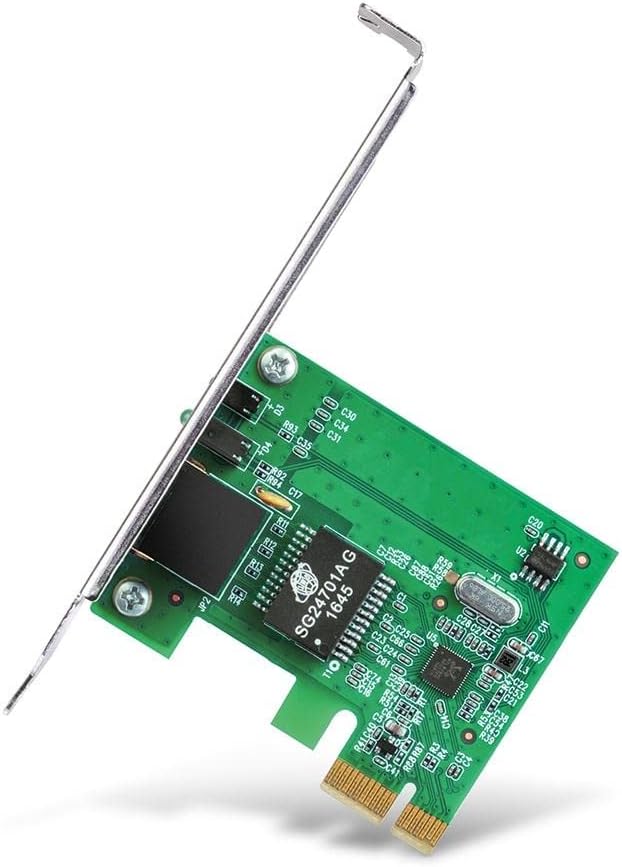
The TP-Link TG-3468 is a high-performance Gigabit PCI Express network adapter delivering up to 1 Gbps wired speeds. Featuring a 32-bit PCIe interface and dual bracket design, it supports a wide range of Windows operating systems from XP to 11. Engineered for easy installation and reliable, lag-free connectivity, this Ethernet card is the perfect upgrade for professionals seeking fast, stable, and versatile desktop networking.


| ASIN | B003CFATNI |
| Best Sellers Rank | 5,949 in Computers & Accessories ( See Top 100 in Computers & Accessories ) 14 in Network Cards |
| Box Contents | Gigabit PCI Express Network Adapter TG-3468, Low-profile Bracket, Quick Installation Guide, Resource CD |
| Brand | TP-Link |
| Brand Name | TP-Link |
| Color | Verde Smeraldo |
| Colour | Verde Smeraldo |
| Compatible Devices | PC, notebook |
| Compatible Operating System Family | Windows |
| Compatible devices | PC, notebook |
| Country of Origin | Netherlands |
| Customer Reviews | 4.6 out of 5 stars 14,025 Reviews |
| Data Link Protocol | 1000BASE-T |
| Data Transfer Rate | 10000 Megabits Per Second |
| Data link protocol | 1000BASE-T |
| EU Spare Part Availability Duration | 1 Years |
| External Testing Certification | FCC, CE, RoHS, BSMI, VCCI |
| Global Trade Identification Number | 06935364001049 |
| Hardware Interface | Ethernet |
| Hardware interface | Ethernet |
| Item Dimensions L x W x H | 16L x 2.8W x 13.5H centimetres |
| Item Part Number | TG-3468 |
| Item Type Name | TP-Link NE000644 TP-Link TG-3468 Gigabit PCI Express Network Card |
| Item Weight | 0.22 Pounds |
| Manufacturer | TP-Link |
| Manufacturer Part Number | PCI-E |
| Minimum Required Operating System Version | Windows XP |
| Model Number | TG-3468 |
| Product Warranty | Default Manufacturer Warranty. Please contact us if you require further details |
| Product dimensions | 16L x 2.8W x 13.5H centimetres |
| UPC | 767531764145 840460604796 |
| Unit Count | 1.0 count |
J**C
A full (or adjustably half) height PCIE card which even fits in the small PCIEx1 socket
I thought my onboard network adaptor was playing up with random network drops, so decided to buy this to bypass the onbaord one. This card comes as a full height card, though also comes with a half height backplate which you can swap to if you are fitting into a machine with half height slots. The card itself is very small which is perfect since you should have no issues with it blocking up space or airflow if for example you had a graphics card in an adjacent slot (I don't mean double height card of course!) I went into BIOS, disabled the onboard network card, then switched off and opened up the case. As you can see from the photo, the card fits nicely into the small PCIEx1 slot (I'd always wondered what would really ever use those slots and my question is now answered!) On booting up Windows 10, this was automatically detected as a Realtek Gigabit network card and configured automatically without need of the driver disks. Though I did manually update to the ones on the disk since they seem to be a couple of years newer than the ones detected by Windows 10. In terms of performance, it seems to run just as well as the existing onboard 1Gbit adapter. I noticed no network drops during my time and I could see it connected and transferring data at the 1Gbit speed. For £9, this is a great network card and if you're in the situation of needing one, I can definitely recommend this one.
K**S
Great option for an additional Ethernet port
Great option if your motherboard’s Ethernet port no longer works, provides fast speeds and a stable connection. Super easy installation - I didn’t need to install drivers either as my pc is running windows 11.
P**T
Recognised Immediately
I'm using this on a Windows 7 Professional 64-bit PC. I couldn't use the port on my motherboard so just bought one that was good enough from the present reviews. Hardware installation was easy and straightforward, turned on PC, took about 30 seconds to get connected after logging on. Got it working in under 10 minutes from opening the parcel. Came with a small guide and an installation CD. The claimed complient OS are: Windows: 98SE, ME, 2000, XP, Vista, 7 Linux Novell (When I've installed Ubuntu 12.04 on it, I'll update this review. Came in strong anti-static bag, which is considerably stronger than the ones I've been getting from the Seagate 3.5 drives recently. The only nag is that the ethernet clip preventing accidental disengagements, is facing upwards when connected to the network card. This is a problem for me and perhaps to others is that the PCIE x1 slot is the first and most upper slot on the motherboard. The access to the card slots are indented by 1cm to the rest of the rear of the PC case. Proving difficult removing the cable and you're trying to get a finger between the clip and the underside of the card slot enclosure-type. And if your PC is low down from your position, you're unable to see the flashing LEDs of their activity. Besides the physical complications for me, I'd recommend this to Windows 7 users, due to the fluidity of installiation. I saw that the 3 reviews giving this 1* did not state their OS.
M**T
Good upgrade for an old computer
Great product, recommended. I bought this since I wanted quicker LAN speed on a my old computer that I use as a server (Dell dimension 5000), 2x sata 1tb, 1x 60GB IDE, and 1x 80GB IDE drives. I ordered this on 29 Nov 2015 and it arrived within a 3-5 days. The installation was simple, as I just replaced a old phone line port card. I thought I required the low profile bracket, but I didn't in the end. I use a switch to allow me to have multiple computer to be connected to the router. the dell and my current computer are both on the switch. I got 20MB/s on the motherboard and then using just this card I get 60MB/s. Since I previously set a static ip for the motherboard port I needed to delete and then add the mac address of the network card. From another reviewer they mentioned that you need to a fast computer to get full GB and I do agree, since the computer I installed this on is a I am not getting the full speed. The computer is only 32bit windows 7 and has 3gb ram, on the network adapter properties I have set it as 1.0Gbps Full Duplex.
M**R
5 min install, great performance
I've had a problem with my motherboard network connection for a while now, it just wasn't working and despite looking around the web non of the solutions I tried worked. I've been using WiFi for a while but while it's fine for general browsing it's not very good when I want to move large files around my network. This card works brilliantly, it comes with the standard sized plate attached and a smaller plate is included in the box. Installation took less than 5 minutes, I plugged it into a spare port and when I loaded Windows 10 it was up and running right away. I connect to my router via some TP Link Powerline Adapters and I'm getting great speeds with this card, much faster than my WiFi connection. Given the low cost I wish I'd purchased this sooner instead of hobbling along with WiFi!
D**E
Excellent add-on
Having read most of the reviews for this card, I decided to go with the majority and bought one. Received in the post (with no unnecessary packaging) after a couple of days, under the free postage option. Installing the card took no time at all - backplate out, card in. Booted up XP Home, it found the new device and then, when it said 'If this device came with a CD - insert now' I did. XP found the driver, installed it, and pronounced my new device ready for use. A look in 'Network Connections' confirmed this. I went into Device Manager and uninstalled the failed on-board ethernet port (which I had not been able to do before the new card was fitted). The 'Auto-Negotiation' part of the card is what threw some of the reviewers, I think. One bright reviewer flagged the ability to interrupt the boot-up and configure the card to your own preference, which should solve the 'it wouldn't do anything' problem. Anyway, my personal preference is not to be permanently on line. Pasting a shortcut to the 'Local Area Connection' in 'Network Connections' onto the 'Quick Start' bar, gave me the control I want. Left click the shortcut icon to connect to the network/internet, right click on the icon and choose 'disable' to disconnect - what could be simpler! Open the Local Area Network Connection properties and tick the 'show icon in the task bar when connected' and you can easily see your current status at a glance. The ethernet card performed, and still does, superbly - and my wife was happy again. After all, the PC is hers. Mine runs Win7, with the same connection control in place.
P**L
Perfect
Words are hard to describe how happy I am with this. Value for money, can't complain there. It goes nice into PCI-E x1 slot - cables connected and it does network things - meets job description! What is extra nice; is that it works not just with Windows, as many would intend - but also with Linux. Some may switch off now, but for me.. VMWare ESXi 5.1; it works with that too. The card received is revision 2.0. Only downside - postage. £6.49 for card, £4 for postage. Not the products fault. The package arrived, in it's own display box as would see on shop shelf; with shipping sticker attached. Such fitted through letter box. So that is another plus point - but still, can't get over that £4 postage for 'first class' - [free not available as under £10].
N**L
152 Mbps Broadband Success
This product is absolutely fit for purpose. I bought it to enhance my experience of the new Virginmedia up to152 Mpbs Broadband connection. I was not disappointed. I had a Virgin engineer booked to sort my very slow connection on the Super Hub 2ac which was pulling only 20 - 30 Mbps at its best. I then had the thought! What if I connect my Wireless Laptop (Younger than my Main desktop Machine) to the Super Hub 2ac Via a 'Cat 5' Cable. Well!!!!!!!!! What a revelation. The Ethernet Card in my laptop was faster than my main machine's. It registered in excess of 157 Mbps. This is when I came across the TP-Link TG-3468 Gigabit PCI Express Network Adapter. I knew from past experience that TP-Link made excellent Networking kit and I wasn't disappointed this time either. Thank you Amazon and Thank you TP-Link. Good service and excellent price. Will absolutely recommend. I had to cancel the Engineer. Neil Vincent
B**Ć
Awesome device
Works as described, plug and play. Immediately recognized by Windows 11 and working at full speed (1 Gbit/s).
T**S
Plug and play, worked first time
Needed an additional network card for a PC used for security (Dell Optiplex desktop). This one comes with a full size and a half size bracket (I needed the half size to fit the case and PCI express). Changed the bracket, installed and worked first time without issue.
K**N
Reliable, Cheap, and Just Works — Perfect for Adding Gigabit to Old Desktops
Bought this to revive an older desktop that had a flaky onboard NIC. Plugged it in, booted into Windows 10 — detected instantly, no driver needed. Ethernet came up at full gigabit speed and it's been rock solid since. No weird compatibility issues, no disconnects, no driver hunting — just clean, stable performance. I’ve tested sustained transfers over LAN and this card keeps up no problem. Also appreciate that it comes with both full-height and low-profile brackets. I used the full-height one, but it’s nice that it’s not an afterthought. Honestly, for the price, there’s no reason to mess around with Realtek garbage from no-name brands. TP-Link nailed it. It does exactly what it says, quietly and reliably. Would absolutely buy again if I needed more.
K**様
いいね
いいね
A**9
Muy buen producto
Bueno producto, adentro trae lo reducción por si tienen CPU slim Lo recomiendo
Trustpilot
3 weeks ago
3 weeks ago