Buy anything from 5,000+ international stores. One checkout price. No surprise fees. Join 2M+ shoppers on Desertcart.
Desertcart purchases this item on your behalf and handles shipping, customs, and support to Italy.
๐ Elevate your WiFi gameโnever miss a beat or a meeting!
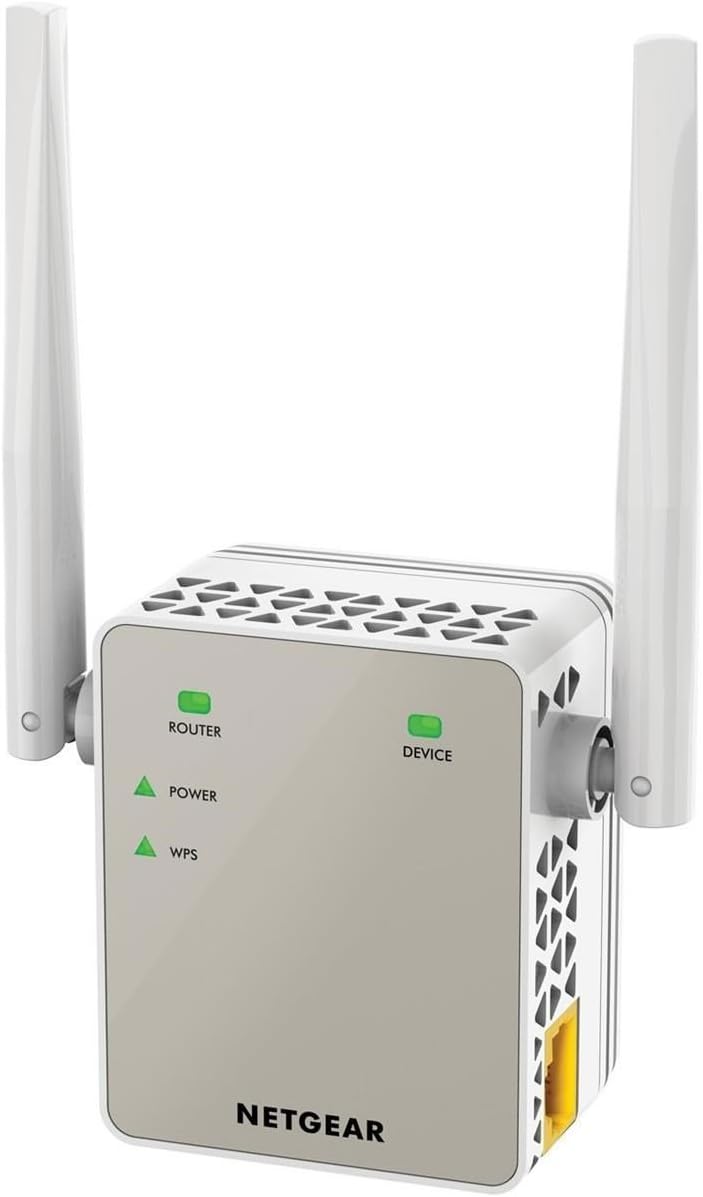
The NETGEAR EX6120 WiFi Range Extender boosts your wireless coverage by up to 1200 sq ft, delivering dual-band AC1200 speeds (up to 1200 Mbps) and supporting 20 devices simultaneously. Featuring a wired Ethernet port for stable connections, universal compatibility with all routers, and simple WPS setup, itโs designed for seamless integration into any home or office environment. Compact and reliable, it ensures strong, secure WiFi even through thick walls, making it a top choice for professionals demanding consistent connectivity.


| ASIN | B01560JGQW |
| Best Sellers Rank | 3,132 in Computers & Accessories ( See Top 100 in Computers & Accessories ) 30 in Network Repeaters |
| Box Contents | 1 |
| Brand | NETGEAR |
| Brand Name | NETGEAR |
| Colour | Chrome |
| Compatible Devices | Router |
| Connector Type | RJ45 |
| Country of Origin | United Kingdom |
| Customer Reviews | 3.8 out of 5 stars 11,243 Reviews |
| Data Transfer Rate | 1200 Megabits Per Second |
| Data transfer rate | 1200 Megabits Per Second |
| Frequency Band Class | Dual-Band |
| Frequency Bands Supported | 2.4 GHz, 5 GHz |
| Frequency band class | Dual-Band |
| Global Trade Identification Number | 00606449109993 |
| Item Dimensions D x W x H | 3.9D x 5.5W x 6.7H centimetres |
| Item Weight | 0.29 Pounds |
| Manufacturer | NETGEAR |
| Manufacturer Part Number | EX6120-100UKS |
| Model Number | EX6120-100UKS |
| Range | 1200 meters |
| Smart Home Compatibility | Not Smart Home Compatible |
| Special Features | Access Point Mode, LED Indicator, WiFi Mesh |
| Special feature | Access Point Mode, LED Indicator, WiFi Mesh |
| UPC | 606449109993 |
| Unit Count | 1.00 count |
| Wireless Compability | 802.11a, 802.11b, 802.11g, 802.11n |
| Wireless communication standard | 802.11a, 802.11b, 802.11g, 802.11n |
R**C
Cannot fault it.
Having read some of the reviews commenting on set up problems I was a tad apprehensive. Looked like a great bit of gear apart from that so I bit the bullet and ordered it. Took me about 5 minutes to connect it and be up and running. Really easy, just following the instructions in the quick set up guide. I'm using it, via the ethernet connection, to my desktop PC in my home office in the garage. Which is detached from the house and the signal has to go through the house wall (cavity block and brick) and the garage wall (brick and drylined and insulated) with about a fifteen foot gap between the house and garage. Works perfectly, and gives me a much better connection than the BT 610 Wi-Fi extender which I had before and had started to give me problems. I cannot fault it so far, and am more than happy with the performance. As an added bonus it is a very small and neat unit, even with the external antennae, and I can use both sockets in the double wall outlet no problem. I'm just adding to this review as it's almost six months on from purchase, and I'm pleased to report that everything is still working wonderfully. No problems at all and it's been on constantly in that time. Never had to reset or adjust settings. I can thoroughly recommend this item. For all those, like myself. Who pore over reviews and specs prior to making what I hope will be an informed purchase. This is another update as of November 2021, so over three years after purchase, and it's still working beautifully. I am now on BT's FTTP with their latest Smart Hub2 and it integrated with it perfectly. In my opinion anything electronic at this price point that is still giving perfect service after the best part of four years pretty much continuous service deserves top marks.
C**N
Decent WiFi extender
After getting a new router, the signal wasn't quite strong enough to reach upstairs towards the back of the house, so I went online and researched quite a few WiFi extenders. The house was built in the late 1960s with thick brick walls, so finding a good extender was crucial. I decided to go with this one, as it received pretty good reviews. And, I'm pleased to say, that I haven't been disappointed. Feeding off the main router downstairs, I was a little apprehensive setting it up; however, it was very easy to do so, and it only took a matter of minutes to sync up with the TV, laptops, etc. It integrated seamlessly with my BT router. I've been happy with the performance and signal; however, on the odd occasion, when it has dropped out, which has been very rare, all I've had to do is turn it off and back on again, and it's as good as new. The coverage has been good, as has the speed, which has been great, as it's used daily. I'm sure there are other WiFi extenders out there, but having used this for a year or so, I can't complain about it.
M**S
Reliable Solid Performance - Easy setup
These Netgear Dual-Band extenders really are just the Jolly Job I used the Extender to boost the weak wifi signal Coming from my Skywatcher AZ GTI Alt AZ Astronomy Mount ... It works like an absolute dream ... And the price is much better than you would pay for a dedicated Astronomy Wifi Dongle "Don't be ripped off ,,, just the word Astro increases the price of anything by double" Buy one of these ,,, connect to the Wifi of the extender ... go into command prompt At C:\ type Ipconfig hit return you will see the IPv4 address of your Extender Type the Ipv4 Address into your browser bar ... and then you connect to the set-up page of your new WiFi Extender During the web based set up process you can add both 2.5 and 5GHZ Channels to be cloned The Skywatcher Mount runs on 2.5GHZ Follow the on screen instructions to set everything up as you like it wait for setup to finish and then you will see your wifi device , that you want to boost, with a separate Wifi channel of the same name but with the EXT suffix on the end ... then switch on the Device/Mount with the weak signal,,, Then the weak signal is copied to the extender automatically you then connect to the Extender. Usually using the same password as the cloned/Extended Device ... And you have a nice strong powerful wifi connection to your Mount or what ever device it was that you chose to extend ... It is explained properly in the documentation But it really was a Breeze to set up ... Just Test it Make sure it works Plug it in where you want it And forget about it And get on with your life Well Done Netgear I love these little beauties Great Job :) ++++++ Ty....
R**N
Not the performance I was expecting.
This WiFi extender was very easy to set up. I bought the mid-level version to extend my home WiFi to the garage/garden as we were spending a lot of time outside during the lockdown. I followed the setup advice and mounted the extender about halfway between the router and the garage. The resulting extended network was easy to join and worked first time on all our devices. So far, so good. Shortly afterwards the signal began dropping. Listening to streaming music, the WiFi signal dropped about once every 30-45mins and was very difficult to rejoin and reception fluctuated between 1 and 4 bars. I tried repositioning the extender in different sockets at varying distances from the router and had to conclude in the end that despite the promised 40ft range it struggles to extend the coverage barely 20ft past the extender with any reliability, and even then the signal drops regularly. In summary, very easy to set up, easy to use but if you're hoping for the advertised performance, you probably need to live in a wooden house with no other electrical signals or metallic objects!
G**N
Update review: Not so good now
UPDATE REVIEW: After 13 months usage, I've had to downgrade my review. One of the antenna had started to become loose and there is no way to remove it for a replacement, I've had to use rubber bands to keep it in position. For the last 12 months or so it was working flawlessly, but now every other day I have to restart it because of drop in speed. Will have to play around with the settings, perhaps there are inteferences from other wifi devices using the same channels. If this keeps going on like this for a couple of more months I am considering buying a different brand. --------------------------------------- First of all, the feedback ratings are misleading as there are feedback on numerous Netgear wifi extender products here. The one I've purchased is Netgear AC1200. I've recently relocated my workstation from 1st floor to 2nd floor in my house, but the wifi signal is really poor in that area. Plus with a couple of wifi dead spots I decided to purchase this product to give it a try. Apparently the easy installation method of using WPS didn't work for me, so I had set up this device using a web browser. Setup was very intuitive. Once it was ready to go, I then explored my home to find the best position to place this device. It seems a lot of the bad reviews here doesn't seem justifiable. It really all depends on individual circumstances, such as what router you have and your home layout in order to get the best out of this product. I'll list my feedback in bullet points: - You must find an existing socket position with good wifi signal to plug this device into. This will depend on individual circumstances. My router is located on ground floor and I was lucky enough that there is strong wifi signal if the extender is placed directly above the router. It seems my ceilings doesn't have much impact on the wifi signal. So by placing the extender in a socket directly above the router (2 floors up) was the best position. It became a bit of obsession for me as I had placed it in various places in the house in order to confirm that this is the sweet spot. - The angle of the antennas plays a huge role. Basically wifi signals are like a donut shape that are perpendicular to the antenna. I wanted to ensure that the signal covers a dead spot in the floor below it, so I kept one antenna pointing up and the other antenna pointing sideways. - Someone here complained that they weren't getting a good connection and that the connection keeps dropping. They also mentioned that they had set up the extender to use the same SSID. I see the rational behind using the same SSID between the router and extender. They did this to avoid having to switch between two SSIDs back and forth on their phone. This is wrong and serves no benefit. Although you can set it up to use the same SSID, but it just means that you don't know which access point your phone is actually connected to. Perhaps the bad connection was simply because the phone was still connected to the router rather than the extender. But the reviewer didn't know that as they had set it up to use the same SSID. Keeping separate SSID is better, then at least you know what you're connected to. - There is a setting on the extender to use Fastlane Technology, which is totally useless. The idea is that you set up the extender to either A) use 2.4GHz band to communicate between the router and extender and use 5GHz band to communicate between extender and devices, or B) use 5GHz band to communicate between the router and extender and use 2.4GHz to communicate between extender and devices. They claim that it will improve gaming and streaming experience. In either setup, I've seen serious drop in speed when performing speedtest. So I've disabled 2.4GHz on the extender and use just 5GHz band. All of my devices are 5GHz compatible, so I see no benefit of keeping any 2.4GHz options on for any devices around my house. - There are occasions where if I'm at ground floor my phone is still connected to the extender because the signal is still there to stay connected but giving me reduced speed. However, I do acknowledge that this has nothing to do with the extender. It's all down to how sophisticated your internet device is for determining which access point to connect to. Some people complained about this, but they are complaining about the wrong thing. Overall, a wonderful product.
L**Y
Surprisingly Good Range Extender
NETGEAR 11AC 1200 Mbps (300 Mbps + 900 Mbps) Dual Band Wi-Fi Range Extender with External Antennas (Wi-Fi Booster) (EX6120-100UKS) This is a review for the Netgear EX6120 Wi-fi Range Extender. I bought this to see if it was possible to extend wi-fi coverage from the house to an outbuilding approx 50 yards away, across open ground. Netgear's own app on my (2012 vintage) Samsung tablet reported the signal as -80dBm (very weak) in the outbuilding, and normal connection on any device was poor, slow and intermittent. You have to set the device up close to the router, where the signal is strong - clear instructions are provided - then take it to the more distant location, in my case, the outbuilding. To my surprise, after a bit of 'aiming', the signal as received by the extender was reported as 'medium' and I was able to watch YouTube and Catch-up TV using the repeated signal on my laptop. There is a little extra latency, but once the streaming starts you don't see this - you only see it if you do a speed test. The internal setup programme is accessed as a set of web pages, and there is a lot of flexibility - you can completely rename the retransmitted network and its password, select WPA2, define the strength of the retransmitted signal (in four steps) and set up access controls. You can select either or both of the 300M and 900 M bands. There are other modes that I didn't need. I thought I was going to have to spend about ยฃ100 on a top-of-the-range device, and am delighted that this medium-price extender performed so well at locking on to a very weak signal from the router and retransmitting it locally.
V**E
It works in my detached garage!
I took a bit of a risk buying this - wanted it to extend my Wifi signal to my detached garage at the end of the garden so as I could install a CCTV camera at the back of the garage (recent break in) - wasn't sure it would extend that far. To my amazement, the Wifi extender worked when I plugged it in to a power outlet in my detached garage at the bottom of the back garden (my router is at the front of the house, in the living room) - probably about 60ft in distance! Was initially planning to put the extender ib nmy kitchen at the back of the house and see if the signal would extend to the garage. It did - I then tested it the detached garage, on the off chance - couldn't believe it worked! However, please note the set up process of the extender via the webpages is far from straight forward (I don't have a WPS button on my Sky router) - the process failed at quite a few attempts and you have to clear your browser history after each unsuccessful attempt, in order to get the set up webpage to reload - I found this out after googling set up process and reading others' suggestions after they had trouble settign up! In my opinion, Netgear have made the process needlessly difficult (other reviews have also noted this point). It would be useful if they would facilitate the set up process via an app (which some of their other products allow for). If you have a WPS button on your router, I gather form other reviews, the set up process is simple. Also, if you have an ethernet socket on your laptop / pc (which I don't ) the process also sounds more straightforward. After eventually setting the extender up, I'm really happy with the signal range of the product. I'm obviously hoping the signal will last - so far, so good!
B**T
Absolutely brilliant, would recommend to anyone !
๏ ๏ ๏ I was a bit hesitant to buy an extender as some of them have massive issues and lead to more problems than they are worth. After much research and deliberation I settled on this model from Netgear. From the first step of opening the package the product is well made. Simple set of buttons and a single outlet for a wired connection. The instructions are very simple and the setup takes literally minutes. It also allows for some customisation of the signal, so do make sure you read the paperwork that's comes with the extender. It outputs two signals by default and this then allows 2ghz connectivity and also 5ghz for faster devices. The connection is brilliant both on 2ghz and 5ghz signals are very stable and have not dropped once while connected. There is also a handy feature of the device showing the signal level to in relation to your router position. It changes colour when not in range, so it gives you optimal positioning around your space giving a very stable connection. I have personally switched off the 2ghz signal and only used the 5ghz. This allows all my devices to run really fast up to 864mb, which for a wireless device of this size is awesome. All in all I am very happy with my purchase and can highly recommend this item to anyone. It's a simple interface and quick setup makes it easy someone who doesn't know much about these items. Make sure register your device on the website. It's both very easy and quite satisfying, there is a premium product feel to the registration process and they have a full support team at hand for any help you may need. I hope you find this review useful. It is a great product
Trustpilot
2 months ago
1 month ago