๐ฏ Level up your FPS game with precision and style!
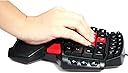
The ZeleSouris FPS Gaming Keyboard is a compact, USB-powered keypad designed for professional FPS gamers. Featuring adjustable LED backlighting with three brightness levels, an ergonomic diamond-shaped layout, and recessed red AWSD keys for quick, accurate input, it enhances gameplay precision. Its unique double space bar design supports ambidextrous use, while a one-key function/arrow key toggle boosts efficiency. Compatible with Windows XP through Vista, this 600g keyboard combines portability with durable performance, boasting a key lifespan of over 10 million presses.
| ASIN | B00DAXPT00 |
| Antenna Location | Gaming |
| Box Contents | Chinese Manual |
| Brand | ZeleSouris |
| Brand Name | ZeleSouris |
| Button Quantity | 19 |
| Colour | Gaming Keypad: DC-01 |
| Compatible Devices | Laptop |
| Compatible Operating System Family | Windows |
| Compatible devices | Laptop |
| Connectivity Technology | USB |
| Connectivity technology | USB |
| Customer Reviews | 4.2 out of 5 stars 170 Reviews |
| Enclosure Material | Silicone |
| Hand Orientation | Left |
| Keyboard Description | Gaming |
| Keyboard Layout | QWERTY |
| Keyboard description | Gaming |
| Manufacturer | ZeleSouris |
| Manufacturer Part Number | ZLDCY01 |
| Minimum Required Operating System Version | Windows 2000 Professional |
| Model Number | ZLDCY01 |
| Number of Items | 1 |
| Number of Keys | 104 |
| Product Features | Portable,Adjustable |
| Recommended uses for product | Gaming |
| Special feature | Portable,Adjustable |
| Style Name | Modern |
| Switch Type | Mechanical |
| UPC | 519750776405 |
| Unit Count | 1.0 count |
S**S
Great Pad Great Price Great Build Deserves top marks
I have used a Belkin/Razer N52te for about 4 years and it has been an excellent piece of kit but it is getting a bit worn. So I thought I would either replace it with the new model or look for something different. The new models are all about ยฃ60 or more so i thought I would try this one. I have had it for a week so i'm still getting used to it which is fine. My first observation was how well made it is and it really is very well made, extremely solid, heavy and the keys feel like they will take some real abuse and there are over 40 keys as apposed to the 15 on the N52te. Although it doesn't had the thumb pad which is a shame as that was a useful addition on my old keypad especially for FPS games when you get helicopters to control etc. Its back lit and comes with a nice long usb cord, the pad also has volume controls and esc which is useful and an internet button not so useful. You can't alter the key setup at all so you will have to edit and assign in game which is fine, there are so many keys including 1-6 and F1 - F6 its very easy. I can also see it would be ideal for left or right handed players no problem, At under ยฃ30 it is excellent value and well worth trying out, don't worry about the Chinese instructions you don't need them or drivers essentially this is a mini cut down keyboard shaped for gaming. The only thing that caught me out was when you press Mode it changes WASD into directional keys, probably ok for helicopters in FPS etc etc, press mode again and it goes back to WASD simples! In short I would recommend this pad to anyone wanting a game pad, its a great price solid and the keys are quiet and very smooth and the whole thing feels robust. I'm going to try it with BF4 and I'm sure the extra buttons will come in very handy (excuse terrible pun). Packing was very good as well the Key pad was boxed, then wrapped then placed in Amazon box and would even withstand Parcel Force or Parcel Farce as we used to call it when i worked for them.
J**T
Cheap, but good
I'm playing Elite Dangerous Beta and my desk is mainly taken up by HOTAS and mouse, but still needed access to further buttons. While I could use the keyboard this would involve reaching around the joystick so not convinient. A simple USB number pad helped, but not enough buttons on that for me. So after looking I popped for this to have a go. As others have reported, it feels solid and well made, bigger than your hand but not by much and while not a full keypad has lots of options. The instructions are a bit pointless unless you read chinese, but not really needed. decent backlit option that helps on long plays as the light fades. I mapped the controls I wanted on it, using about half the buttons, and it's small enough to sit comfiortably on my desk next to my other controls. After a few days I have found it instinctive to reach for the button I want while leaving the HOTAS options with only what I need in combat flight. So now I have access to all the controls I want on a tight desk space which is not overcrowded using this and with no awkwardness in gaining access. For around 30 quid well worth it for improving my gaming experience and easing control access. Yes I think I would have preferred a programmable keypad where I could label the functions, but as at least 4 times the price that wasn't justifiable financially. This has done the job well for me and as I have a 2nd set-up I play on too I'm going to get another so I can run identical control systems at both PCs. I haven't used for AWSD gaming but you can read other reviews for that. For me as a small control pad for Elite to allow me access on a small desk, this was worked perfectly and I woudl reccomend to anybody needing the same.
P**L
Not bad, not bad at all
Having suffered a lot of strain of late, from so much time at the computer, I decided it was time for a new keyboard and mouse,I went for a Microsoft comfort curve keyboard, while it's absolutely brilliant, and very comfortable for typing on, it's pretty much useless for gaming,for a few reasons. The curved shape makes it difficult sometimes, (which was a little less of a concern) The real problem, is it will only respond to so many key presses at once, and will only respond to a key being held down for so long. Which makes it utterly useless for gaming. Since I work from home, I didn't want to get rid of the MS keyboard, since I've never found anything more comfortable, and in the past have suffered from CTS, so I needed a different solution. I started to look at these gaming keypads. Obviously the go to companies for such things, are generally Logitech, and Razr, however their offerings are insanely priced. So this became the only alternative. I have to admit when it arrived the first impressions weren't good The whole box, and all the paperwork inside are in Chinese. Thankfully, it's just a simple plug and play device,it's just recognized as a keyboard so no instructions needed. Upon unboxing it, the first thing I noticed is how weighty, and solidly made it is. It's definitely not a cheaply made product, even if first impressions give that feeling. While it took me an hour to get used to it, I did start to find it very comfortable The palm rest is very rubbery and nice, and the whole thing is an improvement over most other keyboards, I've used for gaming. All the keys are easy to get to, and feel very nice. The WASD keys have a slight indentation, so they're easy to find without looking down, and the space keys (the 2 red ones at the bottom) are positioned in a way so your thumb naturally rests on it (whether your left or right handed). The illuminated keys are very handy for playing in a dark room, It's all exactly as you'd expect. My only criticisms are there are only 6 F buttons, and 6 number buttons. For some games this may be a problem. It also isn't programmable, like some of the more expensive offerings, But at this price, I doubt you'll find anything better, and not sure if you'd really need programmable buttons with a keyboard anyway. Overall I'm very happy with the item, its clear that quite a bit of time went in to the design. Now I have the best of both worlds. A great gaming keyboard, as well as a good work keyboard. I definitely recommend it if your looking for something like this, and don't fancy forking out ยฃ60+ for some of the more well known ones. Most of those, do however have a thumbstick, which this doesn't. But at this price, you can't have everything, and I certainly can't complain about any of its small short comings.
R**N
'MODE' button? Why, oh God, why?
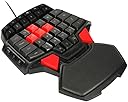
This 'gaming' keypad must have been designed by a Lefty because I can't understand certain things like why place a button where a right-handed person will be always pressing 'jump' to toggle a different input-mode, which I can only assume is for some RPG game I never heard of where W,S,A,D become Up,Down,Left,Right. So you're in the middle of a crazy Insurgency game and try to jump over an obstacle and suddenly none of the buttons work!?! I got a screw-driver and ripped out that 'MODE' button which set the W,S,A,D keys to Keyboard-ARROW keys. I mean, it improved the product tremendously not having that button. I covered the square-hole inside with some black electrical insulation tape. (I can still press 'TOGGLE' if I need to by sticking something sharp into that square-hole.) Another issue is that when you have your left-hand on a normal QWERTY keyboard CTRL is at the bottom-left, but for some strange reason they placed the ALT key there and moved the QWERTY buttons SHIFT, CTRL etc UP above the ALT button ?! It just means if you're a right-handed person you have to RE-BIND your keys and set them to be compatible with this LEFTY designed gaming keyboard. A headache to set up. A headache until you rip out the MODE button.. but other than that, I like the idea of having a mini-gaming keyboard. Just next time I will probably see if there's a RAZER one available. I've never been disappointed with a RAZER product.
M**N
Great keypad!
I have both the Razer Tartarus and this. I got this for my brother since he uses the WASD to move instead of the thumbstick which is what I prefer. The keypad works perfectly. We did have an issue with the D button not responding BUT you just need to remove the key and put it back on and it'll work perfectly. The only downfall to this keypad are the numbers 1-6 and the F1-F6 keys. They are really small and in a uncomfortable angle which can be a pain trying to get used to pressing. IF they were moved to the right an inch or so it'd be perfect. If they were to make a version like this but with a thumbstick to move around with it'd be perfect. My brother plays: League of Legends, CS: Global Offensive and a few other games. It works flawlessly.
J**X
Fantastic.
Being a left handed computer user it was impossible to find a gaming keypad set up for use with the right hand; ALL the Razer (and every other big-named brand) cater exclusively for right handed gamers, making their gaming pads to be used with the left hand only. Rubbish for us left-hand mouse users! I saw this on amazon and checked out a few youtube videos which weren't very helpful. However, after buying and using this gamepad for about 2 months I can clearly say that it has really elevated my online gaming experience (primarily DayZ) significantly AND at a fraction of the price of the named brands! I would recommend it to anybody, even right-handed mouse users as it is a very good price, very well built with excellent non-slip rubber feet, plug and play (meaning you don't have to do anything other than plug it into your computer to get it set up), has backlit LED functions, and works for both Mac and Windows (I use both operating systems on a daily basis). I believe it was shipped from China, therefore the instructions are not in English, but I haven't had to refer to them as the product sets itself up, as I mentioned earlier. Despite the distance it had to travel, it only took about ten days to arrive and was in pristine condition - not even a scuff on the box. Excellent service! Have no doubts about this product; low price, well built, works perfectly on both mac and windows, does exactly what you want it to do! One final (but not too important) thing I must put in is that compared to its more expensive rivals, this device does NOT support macros, as far as I am aware.
G**S
I never reviewed this - ZeleSouris Ergonomic Design USB etc.
This is not the product that I bought. This is not the product that I reviewed. Someone has taken my 4-star review of another keyboard by the same manufacturer and transferred it to this one. I have no idea of the quality of this one, I have never seen this one, I did not buy this one. Edited review down to one star, because using my review (and an indeterminate number of others) to bulk out the 4 and 5 star reviews is disingenuous at best. (whoever did it, even if inadvertently, it should not have happened) Below is my original review for the keyboard I bought (Which was, and is, an adequate game board) Really good. I been using a Razer for the last couple of years and was looking at the Orbweaver. This here was a quarter of the price. It's solid and well made. Loses a star because the backlight is a bit rubbish. I can only see it from directly above. Still I've set it up on a little easel stand so it's upright and it's acting as a secondary keyboard for Elite Dangerous. Can't fault it for the money
S**N
Economic Gameing keypad with big features.
The T9 gaming keypad sounds like it should be from a film, however its ideally suited to the typical ASWD gamer. The ASWD keys are not only in red, but have small curved depressions in so your fingers can always find them. Overall the game keypad gives a comfortable feeling with the wrist sat on the support pad, although a hard rubber pad it is softer than a desk and helps support the wrist. As for keys? Just about every key you will need for your typical FPS game, F1 to F6 and 1 to 6 are catered for as well as many of the voice and map keys often missed on other game keypads. The keys are slightly larger than a normal keyboard and are all within easy reach, however the bonus is the backlighting. Two levels are available by pressing the backlight button, first dim, then a brighter blue light, in darkness this offers great feedback to finding the required key. Spacebar is available on both sides with the large red buttons as well as volume controls down the right side. One thing the T9 does not feel and that is cheap, its has a good weight, good feet to hold it in place and feels well constructed. There is no twist to the bodywork and the USB cable is a generous 1.7m typically, Windows 7 found and installed the game pad easily giving quick access to using it. Overall for the price, the T9 is a great buy and will in time replace my ageing Cyber Sniper as well as being considerably cheaper than many other similar products.
Trustpilot
1 month ago
3 weeks ago