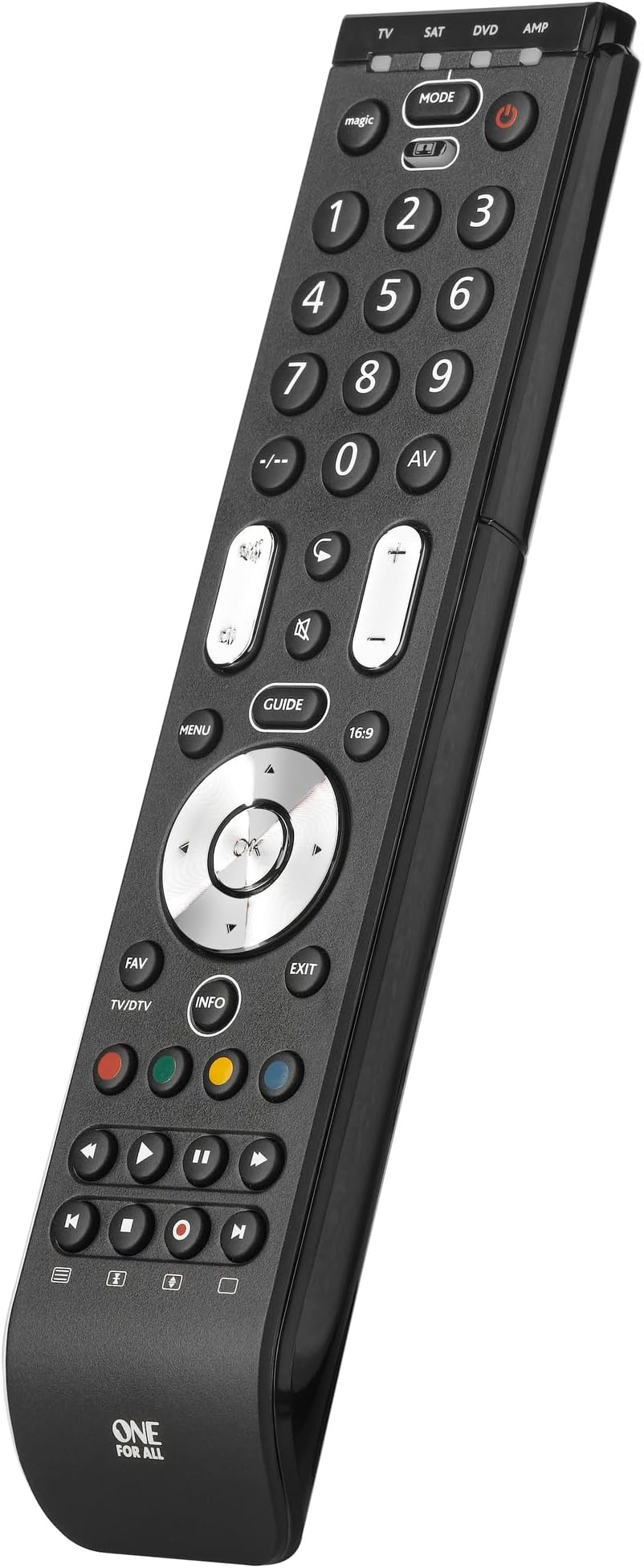
🎯 One remote to rule your media kingdom — simplify, customize, dominate!
The One For All Essence 4 Universal Remote (URC7140) is a powerful, easy-to-use controller that consolidates up to 4 devices—TV, Freeview, Blu-ray, and audio systems—into a single sleek unit. Featuring a lightning-fast 3-step setup, a unique Combi Control button for simultaneous device operation, and a learning function for personalized commands, it delivers seamless compatibility across all major brands. With a robust infrared range of 10 meters and premium tactile buttons, this remote transforms your entertainment experience while decluttering your space.


| ASIN | B003NSIE40 |
| Battery Types | AAA |
| Best Sellers Rank | 1,707 in Home Cinema, TV & Video Accessories |
| Brand | One For All |
| Brand Name | One For All |
| Button Quantity | 41 |
| Colour | Black |
| Compatible Devices | DVD/Blu-ray Player, Set Top Box |
| Compatible devices | DVD/Blu-ray Player, Set Top Box |
| Connectivity technology | Infrared |
| Controller Type | Button Control |
| Country of Origin | China |
| Customer Reviews | 4.4 out of 5 stars 9,780 Reviews |
| Global Trade Identification Number | 08716184043215 |
| Item Weight | 0.11 Kilograms |
| Item height | 21.9 centimetres |
| Manufacturer | One For All |
| Max number of supported devices | 4 |
| Maximum Number of Supported Devices | 4 |
| Maximum Range | 10 Metres |
| Model Name | URC7140 |
| Model Number | URC7140 |
| Network Connectivity Technology | Infrared |
| Number of Batteries | 1 CR2 batteries required. |
| Product Features | Universal |
| Product Warranty | 2 year manufacturer |
| Special feature | Universal |
| UPC | 793518157013 715933108890 712885682447 616268573820 742271249206 767383433541 |
| Unit Count | 1.00 Count |
M**S
One for all and all for one! Top Quality Programmable Remote
One for all and all for one...this remote does it all for peanuts and it's a pleasure to use. Easy quick programming with pre-coded brands to punch in and use. But if you have a little complicated setup, say a soundbar from a different other brand to your TV, you can customise the programming of the volume keys etc separate from the base TV channel controls. The infra red signal is so strong you can fire off the walls or ceilings and the receivers still all respond reliably...no need to aim like a sniper! The weight, fit and finish oozes quality. For the price, it's a steal!
S**E
Easy to set-up. Everything works!
I was inspired to purchase this remote as I was frustrated at having to gather together 4 remotes when watching TV. I have what some might consider an archaic set-up of Bauhn TV, Humax FVP-4000T recorder, Sony DVD Home Theatre System, and Amazon Alexa Firestick (which I purchased as the YouTube app is no longer supported on Humax). However, I'm happy with the set up. The TV is an Aldi brand but the picture is fantastic. The Humax has served me well as it allowed me to ditch Sky. The Sony thumps-out incredible sound quality particularly as I now use it with a powered sub-woofer. My Humax and Sony are in a cupboard behind a door (I don't like to see equipment and wires visible). I use a range extender to operate the Humax and Sony - with the small sensor fixed to the outside of the cupboard door (see pic). I know if the Humax is on or off as I have a spare optical cable running from an optical splitter in the back of the unit with the other end embedded in a rivet in the door. This works really well, but my gripe was that I couldn't tell if the Sony had been powered-off and so often it was left on. I thought the Humax remote would have been my saviour as it can be programmed to power-on an AV device but unfortunately I couldn't get this to work (you can get the Humax to power the TV on and off in settings - so I was nearly there). The Firestick is a recent add-on and works great with the Bauhn TV. I didn't realise what I was missing out on with my Prime subscription! To the remote. It has a quality feel about it. I like how the cursor, channel, and volume buttons are metallised. It not only makes the remote look good, but also helps you to 'feel' the buttons in the dark. I was able to quickly set-up each device using the provided codes - even the elusive Bauhn TV! You can even assign a device to the volume controls on the remote. I keep the volume on the Humax on full, and use the volume controls on the remote to control the Sony sound system. I used the mirroring function to assign the coloured buttons to 'Netflix', 'Search', and 'Options' from my Humax remote. I also added the 'Library' button to the Favourites (FAV) button on the new remote. The mode button allows you to control each device separately. In TV mode I am able to select the Firestick and fully control it using the new remote. However, if you want to use voice control you'll need the Firestick remote for Alexa (it uses Bluetooth). The cherry on the cake with this remote is that it can power on and off 3 devices simultaneously. Just press the multi button followed by the power button and you'll see as the corresponding blue light flashes as it communicates with each device in turn. I no longer have to worry if the Sony has powered down... This is a truly amazing device at a low price point, and it's so easy to set up. It has actually exceeded my expectations and has become one of the most useful gadget purchases I've ever made.
M**S
The best multi-remote I have owned
I have owned quite a few multi-remotes over the years, including the One-For-All brand, but this is the model I am most happy with. The weight, balance and styling combine to give this a quality feel that is indeed superior to most of the original device remotes that it replaces (why do manufacturers of otherwise excellent products let themselves down with either clumsy or flimsy remotes?). The unit was programmed up to my devices very easily. However I have learned from experience that a learning function is essential. There are always some buttons that do not work or are not where you want them, and the learning function worked reliably and allowed me to quickly customise the layout as I wanted it. An extra feature which I like is the master volume control. When this is selected it means the volume buttons will only control one of the devices regardless of which mode you are actually in. No longer do I find the TV set to maximum volume because the satellite box is set too low, only to then blast the room with sound when I play a DVD! Yes you could set this up yourself using the learning function, but having it as a built in feature is helpful. One small criticism - I prefer having an explicit button for each mode: TV/DVD/Satellite etc. With this unit you have to press the single "mode" button repeatedly until the required device LED lights up. Overall though a good buy - not the cheapest, but well worth paying a few pounds extra for. Late update: After 12 months or so the colour has pretty much rubbed off the coloured buttons (the red/blue/green/yellow "teletext" buttons). This is something of an annoyance, caused by painting the colour onto the plastic buttons rather than using coloured plastic.
A**Z
Excellent
I found my TV remote was getting old and often took some encouragement to do its job, so I bought one of these, excellent decision on my part, set up was surprisingly easy, great functionality, getting used to where the buttons are is the biggest pain I’ve got, as I’d spend many years using the original remote, my fingers knew where everything was, but I’m learning the new positions, and found them so useful I have 3 now, which control 5 devices, in 3 rooms, and I couldn’t be happier, excellent gadget,
S**W
Amazing once you figure it out
I bought this to replace a failing, flimsy knock-off remote control for my Samsung TV. The price was only marginally more expensive so it was an easy choice, and I was hoping the brand name would mean the device would be better quality, and I was right. The build quality is solid and the remote feels suitably weighty in the hand. Best of all, the buttons are clicky and responsive, unlike the squishy rubber nubs on the previous remote. My only gripe is that the instructions are not entirely well-written and while I like to consider myself fairly tech-savvy, it took some trial and error, along with watching some tutorial videos, to get the remote working as I want it to. Initial set-up with the TV was fairly easy, and I was able to get my soundbar working with a separate mode on the remote control, but I was disappointed by the "Combi-control" function as the controls were extremely limited. Luckily, the remote control also has a learning function and using this feature I've been able to combine both the TV and soundbar controls in one mode (TV), so I don't need to switch modes or rely on Combi-control. Hopefully this info might help anyone else struggling with getting it to work as they want. Overall, this remote is great value and highly recommended for anyone looking to simply replace a remote control or take advantage of its features.
J**S
Powerful
I bought this remote to replace four different ones we were using for: a Samsung TV, a Toshiba DVD, a Humax PVR and a Technics audio amp. I recently connected them all up and I was getting fed up with juggling all the remotes. The device is quite slim and feels solid. The channel and volume buttons have a more positive action than the others. The batteries were a bit fiddly to fit, and note that it takes 4xAAA. The easiest way to set it up (provided it works for your device) is the "Simpleset" method, which maps all the keys in one go based on the device manufacturer (i.e. ignores any model differences). This worked immediately for me for the TV, PVR and DVD, and it set all the keys to what I'd expect. I suppose that this method works because each manufacturer tends to keep consistency across their models. Each key on the combi can be set up to send four different signals, as you use the "mode" key to switch between the TV/SAT/DVD/AMP mappings. So for example, the playback control keys at the bottom will control either the DVD or the PVR, depending on how the mode is set. Unfortunately the Simpleset amplifier list did not include Technics. However there is a second mapping method that uses a list of codes in the instruction manual. This list is more comprehensive, but even so, the "amp" section did not include Technics. Instead, I picked a code from the "Tuner" section, and it worked. One thing to note is that there are probably fewer keys on the combi than on many dedicated remotes - you are effectively getting a common subset rather a superset. One shortfall in my case was that I wanted to be able to switch the input source on the amp itself, as it was now connected to both a CD and TV (via aux). While the combi has an "AV" button that can be used to switch source on a round-robin basis, my amp had separate buttons to select each source, so the default mapping did not support this. The answer in these cases is to map some unused combi buttons individually (the "learning" method). This is slightly more fiddly than the first two methods, and it times out if you take too long. If so, go back to the start. Basically, you put your combi into a "record" mode, and then fire the key on your existing remote towards it. The combi detects and stores the signal, then you assign that to one of the combi keys. In my case, there were plenty of combi keys I didn't need for the amp mapping, so I chose a couple of these to assign to the amp's "CD source select" and "aux source select" functions. I found that I had to try a few times to get this to work (if the lights don't flash in the way described in the instructions, you know you need to try again). But eventually it took. I even managed to program the combi playback keys in this mode from a separate Technics CD remote, so I now have five devices mapped onto four modes. The final challenge was that the PVR mapping did not include two keys that were essential (one to call up the recorded programme list, the other to switch between TV and radio broadcasts). I tried to use the learning method but the combi would not recognise the Humax remote at all. I googled a bit and it seems that some remotes use encoding or frequencies that are in a completely different range. I emailed the help address in the combi manual for some advice (don't look on their website, it's hopeless) and I was pleasantly surprised to receive a response within hours, containing some instructions. It turns out that there is a fourth method to program the combi, which is undocumented. In this process, you can map individual keys with a numeric code that you enter (i.e. no need for it to read an I/R signal). They sent me the codes for all the keys I needed to replicate my Humax remote, and I programmed a couple of spare ones on the combi to do what I needed. It worked first time. I've now been using this about a month without problems. You do need to get used to switching between the modes, otherwise the buttons are ignored or do the wrong things. In my case it's complicated further as the TV itself has a source select, so there are two ways I can get it wrong. But I got the hang of it, and it's a big improvement on five remotes.
S**R
Great remote
Wasn't expecting much given the price point but this thing is great. My last (comparatively very expensive) Logitech Harmony 650 finally became unusable as more and more buttons stopped working and they've stopped making them anyhow. Got this up and running in a few minutes and it seems to do everything I need and although the body feels a bit flimsy the buttons are very responsive. If it does me for a couple of years I'll be happy (and I'll buy a replacement!).
S**.
Not Recommended!
Not Recommended! I have a JVC TV with remote and a Tecnicolor TalkTalk sat box. The main power button on my second JVR remote stopped working (as did the first JVC remote – which is why this one is the second / replacement, and I know the power button is a bad design – graphite button on a flex pcb). So I decided to not get a third JVC TV remote but this One For All so I could also combine both remotes. I setup both units onto the One For All using the codes in the instructions, no problem. But the tv guide button on the Sat wouldn’t work. Its probably the most important function. No matter what I tried with the Learning Function (where you can copy one button over to your new remote by beaming your old remote into your new remote and following instructions) it wouldn’t work. Going onto the help and support sections at One For All was of no help. The Combi Control function (where the One For All power button helpfully turns on/off both the TV and the Sat at the same time, also doesn’t work). I was going to return the One For All remote but decided to keep it as its only £5 more than yet another JVC remote. So I am back to using two remotes as I did before, the One For All replacing my old TV remote only. The unit appears well made but the firmware is a dead loss. I’m from a technical electronics and mechanics background - this One For All is a strongly NOT recommended.
Trustpilot
2 weeks ago
2 months ago