Desertcart purchases this item on your behalf and handles shipping, customs, and support to Italy.
โ๏ธ Elevate your Surface gameโprecision, power, and style in one sleek pen!
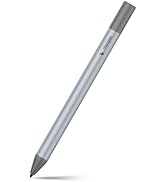
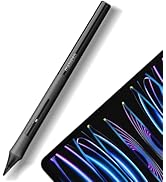
The Metapen Stylus Pen M2 is a Microsoft-authorized, high-performance digital pen designed for Surface and compatible devices. Featuring 4096 pressure sensitivity levels, tilt shading, palm rejection, and a tail eraser, it offers a natural writing and drawing experience. With fast 1-hour charging delivering up to 100 hours of use and strong magnetic attachment, itโs engineered for professionals seeking precision and convenience without the premium price tag.


| ASIN | B0B1CY438Q |
| Are Batteries Included? | Yes |
| Are Batteries Required | Yes |
| Battery Average Life Standby | 100 Hours |
| Battery Description | Lithium |
| Battery average life standby | 100 Hours |
| Best Sellers Rank | 6,592 in Computers & Accessories ( See Top 100 in Computers & Accessories ) 8 in Graphic Tablet Pens |
| Brand | metapen |
| Brand Name | metapen |
| Charging Time | 1 Hours |
| Colour | Graphite |
| Compatible Devices | Laptop |
| Compatible Tablet Computer Models | HP 7 Plus, HP Pro 8, Microsoft Surface 3, Microsoft Surface Duo, Microsoft Surface Go, Microsoft Surface Pro 11, Microsoft Surface Pro 3, Microsoft Surface Pro X, Sony Tablet S |
| Country of Origin | China |
| Customer Reviews | 4.5 out of 5 stars 2,348 Reviews |
| Enclosure Material | Aluminium |
| Item Diameter | 9 Millimetres |
| Item Weight | 14 Grams |
| Item weight | 14 Grams |
| Manufacturer | Shenzhen Qianfenyi Intelligent Technology Co., LTD |
| Manufacturer Part Number | M2-EU-QFY-MPP702 |
| Material | Aluminium |
| Minimum Required Operating System Version | Windows 10 |
| Model Number | ME-MPP702 |
| Number of Batteries | 1 Lithium Metal batteries required. (included) |
| Number of batteries | 1 Lithium Metal batteries required. (included) |
| Pressure Sensitivity | 4096 Levels |
| Product Warranty | worry-free 12-month warranty |
| Unit Count | 1.0 count |
M**N
A decent substitute for the official pen - and cheaper!
Looks quite good. I lost the MS Slim Pen that I had bought to go with my Surface Laptop Studio 2. I didn't use it very often and really did not want to pay the very high price for the MS original, so I decided to give the Metapen a try. It feels decently built and is comfortable to hold. Also seems to work fine on my laptop - decently responsive and positioning seems accurate. As some others have suggested, the tip is quite hard. I was concerned that prolonged use might mark the screen, so this has prompted me to fit the screen protector that I have always intended to buy. Oh, and, despite various reports on the web, it does fit well enough in the "pen garage" on the Laptop Studio 2. Obviously, it will not charge there - that is for MS pens only - and the magnetic attraction is a bit less than I remember from the MS Pen, but it hangs there well enough.
D**M
Good to use.
This is the first stylus pen that I have ever used. I had recently bought a used surface pro which I am liking very much, but the price of a stylus pen is far too much, almost the same price or more than I paid for the surface pro. There were a few cheaper ones than this but in general you get what you pay for so I went with this as it seemed to be generally better than the others in most regards and being rechargeable. It worked straight away with no set up required. I charged it first which only took ten minutes and as soon as I placed the tip near the screen it was working. Firstly it feels good in the hand and has a nice weight. It isn't light but I like that. It feels solid. Writing on the screen feels okay, at least I can write my signature with it and it actually looks like my signature. It also feels responsive enough, not too laggy. I've only been used to using graphic tablets, writing or drawing onto a black slate. Being able to draw directly on the screen is far better. The tilt function is new to me and I like it very much. I have been using it lightly as I have this fear of scratching the screen but it's been fine and haven't seen any marks other than fingers and some keys from the keyboard. It fits snuggly to the side of my surface pro where it has remained and not budged or fallen off, it looks like it belongs there. Overall it is easy to use, feels good and does the job.
J**N
Nice stylus!
Bought this to use with my ASUS Zenbook Duo. It works fine straight out of the box - no need to pair etc. It feels nicer in the hand than the ASUS stylus that came with the Zenbook, and is a bit slimmer too. The magnetic feature is useful, as I can stick it to my music stand. It's a flattened shape, not round, so it won't roll off the table (unlike the round ASUS stylus). The eraser function works well. I would have preferred the button to be more rubbery rather than the hard plastic that it is. However, the side button works well so probably won't need to use the eraser end that often. The side button is raised from the side of the pencil enough to feel where it is, and needs just the right amount of pressure to activate, so it won't get activated accidentally, unlike on some styluses. I would have preferred if there was a softer tip option. The supplied tips are hard plastic and a bit 'clacky' on the screen. The stylus wakes up when you pick it up, so no need to press any buttons etc. to get it working if you have put it down for a while. Very pleased overall with just a couple of things that could be improved.
K**T
Works as intended, however has very little stability features.
The pen works mostly as intended, with responsive touch, palm rejection and all the other expected features. However, there are a few drawbacks. 1. There seems to be few stability features, which means the lines aren't always consistent. Very annoying if I'm doing my work on the train. 2. I can't seem to get the right mouse button to work consistently, and because the pen doesn't have to pair with the computer, I can't change what the button does. (The need to not pair with a computer for the pen to work though is very cool). 3. The eraser side of the pen doesn't always produce consistent lines as well. However, I do like the feel of the pen - It feels like using a real pencil - and since first charging 3 days ago and non stop use, the battery has not run out or been even close to running out. Overall, very good!
P**Y
Excellent Stylus pen
Excellent stylus pen, does exactly what l need it to do. The battery life is superb and it was so easy to setup up with my laptop. Excellent quality for the price.
A**E
Good with Surface Pro
Lovely little pen, feels nice in the hand. USB C charging and linked immediately with my Surface Pro. Magnetic also. Nothing to dislike.
A**Z
Works well with Surface Go2
Was very apprehensive buying this as its always a risk with Microsoft products - but I was really impressed. It worked immediately and has zero lag. My son uses it for school and its robust for him to use. He uses it on a tablet in art (so on a tilt) with no issues. It dosent have any lag and works so well. It charges very quickly (1 hour). Its lasted a whole day so far and hasnt run out of charge as yet.
G**E
Great quality stylus pen.
First impressions of this pen is that it has a high quality feel to it, with a good weight for writing. The instructions are straight forward, simply to charge for 10 minutes and gently shake the pen to wake it up, then use it. I bought it for sketching and writing on my surface go 2 tablet and although I haven't yet put it through it's paces I'm confident it won't let me down.
F**Y
Tevreden
Koppelt makkelijk met mijn kobo libre color. Reageert snel op aanraking met scherm. Snel opgeladen. Zeer tevreden over prijs kwaliteitverhouding. Losse tips gekocht omdat ik 'm van de trap had laten vallen (lekker handig) en tip was krom. Werkt nog steeds! Niks mis mee.
J**R
Outstanding for its price! Works flawlessly with Asus Rog Flow X16
The stylus feels really good in the hand. It's made of a metal, so it's a bit heavier than a usual pen or pencil. Nonetheless, the quality of this pen is on top. You don't have a feeling of possessing cheap product, it feels really good on touch. I had not any issues with drivers or connectivity, it just works out of the box. I'm using OneNote for taking notes and Photoshop sometimes. And the pressure detection works good in both applications. As I said there is no need for drivers, and here is a disadvantage though, you can't configure the pen for your needs, I mean to re-assign a different command on the button or edit the pressure curve as you want. But it's not that essential, just keep this in mind. Overall, I love it, it is worth every penny. Don't hesitate to try it out!
L**9
Well designed
I purchased the M2 to use specifically with my Kobo Libra and it works perfectly so far. I love how the pen feels in your hand. it has a nice soft matte finish, with an oval shape for easier gripping. The size and weight are nicely balanced making it a comfortable pen to hold. The nib is hard but writes nicely with no drag and the right click button works well and has nice feedback. The M2 eraser highlights text on my Kobo and so far has worked without issue. This pen truly feels like an extension of myself and I am thankful for the magnet attach feature to better ensure I will not lose it, because who hasn't had that happen before. I feel this stylus was very well thought out and crafted. The build quality appears to be excellent and it looks very stylish. I found it charged quickly and stays charged for a long period of time which is handy because you do not want to be writing in the middle of a book and have it just suddenly die. This pen was bought specifically with an e-reader in mind and overall, I am extremely pleased with my purchase and feel the price point was very reasonable.
B**A
BARATO Y EFICIENTE
Funciona perfectamente para el Kobo Libra Colour.
P**G
Works great for Surface Go 2, possibly better than the MS Surface Pen
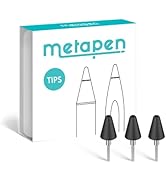
I've been using this pen for several months now and I can definitely say this is a VERY good pen. The M2 feels quite comfortable in hand much like an apple pencil and writes with no lag. The nibs are solid plastic, but not too hard where it'd damage the screen and they rotate on the head of the pen to "roll" across the screen to reduce friction. However, using a "paperlike" or textured screen protector REALLY wears down the nibs fast, so stick with a bare screen or regular glass protector if you'd like to have some longevity to your pen nibs. Switching nibs is pretty easy, just pull em out and pop them in. The M2 also has a stronger magnet than the normal Microsoft surface pen to keep it attached to the device (mine usually stays mounted firmly on the side when not in use). No software or drivers needed to get things going, just hover it over the screen and it's good to go. While it would be nice to have some software to adjust things like pen pressure or remap the eraser/side button, it overall functions just fine for my needs. It charges via USB-C and I typically top off the battery between drawing or while taking a break, typically less than 15-30mins at a time. I typically use my surface for drawing and animating on the go rather than just taking notes, so having a good pen is very important to make the experience more comfortable and to maintain decent workflow for art purposes. One thing I CANNOT stand from most non-wacom styluses is lag and poor accuracy, so the responsiveness of this pen is notably very good for an MMP device. Attached are a couple of doodles I've made with the M2 and my "set up" with the Go and M2 for size comparison. While tools don't make the artist, they certainly can help and this pen makes my drawings on my travel device near indiscernible from quick sketches made on my wacom display tablet and desktop set up. I'd argue this pen is even better than the standard surface pen, especially for the price point. Bonus, it comes with a few extra nibs and some metapen stickers lol
Trustpilot
1 month ago
4 days ago