Buy anything from 5,000+ international stores. One checkout price. No surprise fees. Join 2M+ shoppers on Desertcart.
Desertcart purchases this item on your behalf and handles shipping, customs, and support to Italy.
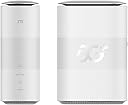
🚀 Unlock the future of home internet with ZTE MC888 — speed, style, and stability in one sleek package!
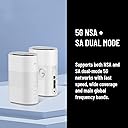
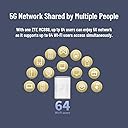
The ZTE 5G CPE MC888 is an unlocked home router featuring Qualcomm Snapdragon X62 for blazing 5G speeds up to 3.8Gbps. It supports Wi-Fi 6 technology, connecting up to 64 devices simultaneously, and includes dual 10Gbps Ethernet ports for ultra-fast wired connections. Designed with built-in high-gain antennas and a premium low-power design, it offers seamless failover between wired and wireless broadband. Perfect for professionals seeking reliable, high-speed internet with easy plug-and-play setup and UK warranty.


| ASIN | B0BD9BH7TB |
| Antenna Location | Business, Gaming, Home |
| Antenna Type | Internal |
| Best Sellers Rank | 4,445 in Computers & Accessories ( See Top 100 in Computers & Accessories ) 11 in Mobile Broadband Devices |
| Box Contents | 1x Ethernet Cable, 1x Power Supply, 1x Quick Start Guide, 1x ZTE MC888 (White) |
| Brand | ZTE |
| Brand Name | ZTE |
| Colour | WHITE |
| Compatible Devices | Personal Computer, Smartphone |
| Compatible devices | Personal Computer, Smartphone |
| Connectivity Protocol | 5G, Wi-Fi |
| Connectivity Technology | 5G |
| Control Method | Touch |
| Controller Type | Switch |
| Coverage | Home/Small office |
| Customer Reviews | 4.3 out of 5 stars 412 Reviews |
| Data Transfer Rate | 3.8 Gigabits Per Second |
| Frequency | 2.4 GHz |
| Frequency Band Class | Dual-Band |
| Frequency band class | Dual-Band |
| Global Trade Identification Number | 06902176082665 |
| Has Internet Connectivity | Yes |
| Is Modem Compatible | No |
| Item Dimensions L x W x H | 12.4L x 7W x 18.2H centimetres |
| Item Weight | 680 Grams |
| LAN Port Bandwidth | 10 Gbps |
| Manufacturer | ZTE |
| Manufacturer Part Number | MC888 |
| Maximum Upstream Data Transfer Rate | 316 Megabits Per Second |
| Model Name | MC888 |
| Model Number | MC888 |
| Model name | MC888 |
| Number of Antennas | 2 |
| Number of Ports | 2 |
| Operating System | RouterOS |
| Other Special Features of the Product | 5G CPE ROUTER |
| Product Warranty | 2 Years Manufacturer Warranty |
| Router Network Type | hybrid |
| Security Protocol | WPA-PSK, WPA2-Enterprise, WPA2-PSK |
| Special feature | 5G CPE ROUTER |
| Unit Count | 1.0 count |
| Voltage | 12 Volts |
| Wi-Fi Generation | Wi-Fi 6 |
| Wireless Compability | 802.11ax |
| Wireless communication standard | 802.11ax |
S**B
It's brilliant! Rural folk - buy this!
This is a review for the ZTE 5G CPE MC888. I live in the country and we have terrible wired internet, and no fibre broadband available here. 4G coverage is excellent, so we've been using '4G broadband' for a few years now, via a Huawei mifi device and a SMARTY card. We ended up needing two cards/devices as our walls are thick and the signal wasn't getting through. Wanted to get rid of having two devices, and use a better router with a mesh system...... I did LOADS of research before getting this!! I'd tried a cheaper Archer MR 600 CAT6 4G device first, which just got very hot, kept dropping out and was disappointing! Sent it back, did more research and came up with this. I'm using a SMARTY card in it, and I'm on the edge of a 5G network, so thought I'd get the 5G capability, even if we can't get 5G just yet. As I thought, I'm only getting 4G, BUT the speeds I'm getting are still amazing compared to the old wired BT internet, and to the SMARTY card used in the mifi device. Setting up the device was easy. It works best in a very specific spot on a window sill in the living room. I moved it all over the house to see if anywhere else was better: upstairs was worse strangely. Bought a set of three Deco mesh hubs (TP-link Deco X10 AX1500, £144.99 on Amazon), as on its own the ZTE couldn't get through our very thick walls. The set up works perfectly. The first Deco hub connects to the ZTE router directly, and becomes Hub number 1 (hidden under an old 50's radio's shell in the photo!) which then sends the signal to the other Deco hubs. I now have a brilliant signal all over the house, with two Decos, and one extra one which we only use when people stay in the Granny annex. We've had this set up for a couple of months now, and we only lost signal once, when it was chucking it down with rain/stormy. We've had bad weather since then, and all has been well. Copes with three devices at once streaming films with no problem. No problems with Teams meetings for work, with lots of people on the meeting, and sharing presentations etc. It's fairly pricey (£212.49 when I bought it), but so far this has been money well spent.
A**H
Best router after testing 4 other routers
It turns a weak signal to decent speed and improve download speed significantly but upload speed is slow but much better than other routers (if not the best). I tested portable ZTE router, 2 different TP link routers and a Huawei router and this was the 5th. I used to live in an old flat building that was blocking the signal. I used it with SIM from Three (which might not be good everyday and every where). You should investigate it with other SIMs before committing to long term plans. It's extremely useful to have 2 connection ports in this router for my PC and laptop to give me stable internet connectivity. try placing it in a room with good 4G or 5G signal and test speeds in different places in your home then you might want to connect it through cables to your PC/Laptop When I moved flat, I didn't have down time in my internet connection using this router and SIM card and I rescued myself from long contracts with TalkTalk which increased prices after contract and they didn't offer better terms, they just kept taking a lot of money every month from my bank account without letting me know if there are better contract terms. Leave alone the issues I had with OpenReach to connect the new fibre and had to reschedule and didn't get a satisfactory solution.
K**H
Easy to use and fast setup
Really good piece of kit. The router arrived on time and the set up is literally unbox, pop in Sim card and fire up. I have an unlimited data sim from Smarty that I was using in a 4g router (a Smarty sim card was also included in the box with the router) and the difference in speed between 4g and 5g is incredible. The ZTE goes through its boot up procedure and the lights on the front of the router are all self explanatory. I had previously worked out the best position for signal with the 4g router so just placed this one in the same position and all good with what seems to be a very strong 5g signal indoors. Browsing to the admin interface of the router is also straightforward and it informed me there was a firmware update to download and run in - took about 10 mins in total and all went smoothly. Changing SSID for WiFi and passwords is also very straightforward from the admin interface. If all you need is to browse the internet, work from home, connect your TV and stream content there is nothing else to configure in the router and it all works brilliantly. Have been running the router for 5 days now and no disconnects or any other funny business. Phones, tablets, TV's, laptops and PCs in the household all connect and use the strong WiFi signal all without any issues. All in all very happy with the router.
M**E
Not bad could be better
I recently explored several reviews of 5G routers, finding some to be exorbitantly priced while others were quite affordable. This particular model falls comfortably in the middle range. Setup was a breeze: I unpacked it, inserted a 5G Giffgaff SIM card, and within a few minutes, everything was up and running smoothly. The speeds are acceptable for my needs. A feature I appreciate is the ability to set up a blocked list or an allow list, providing some control over network access. The GUI is simple yet functional, making it easy to navigate. However, there is one notable downside: there is no information available on accessing logs, which is a significant omission. Additionally, there's a USB-C port at the bottom of the device that isn’t mentioned in any documentation, which piques my curiosity. Overall, it’s a solid mid-range choice with a few quirks. Update: I have been using this now for a few month and it has been reliable every day.
A**R
Item failed within 4 months
ZERO Star rating for marketplace seller. The product worked perfectly initially, but subsequently failed to connect to network after less than 4 months of use. Two different Sims on different networks were used to determine whether issue related to the phone network or the router itself - Smarty SIM using the Three network and GiffGaff SIM using the 02 network. ZTE support were helpful, but advised that item should be returned to supplier. Even though item is within the 12 month warranty the seller will not provide either a replacement or refund, asking myself to try to claim on manufacturers warranty. In the UK sellers must provide a remedy for faulty products within a reasonable period. I wil not use this marketplace seller again. Very poor service.
R**.
Well priced. Well built. It just works.
A recent outage by my broadband supplier that lasted from a Friday until Monday morning had me trying to connect my old DrayTek router into taking my iPhone with a 5G connection on it. It didn't really work out that well. I wasn't able to do my work during this period of Internet outage and that justified my search for a backup broadband solution. My primary broadband comes in over the telephone line and is a fibre connection. So I wanted my secondary connection to turn up using a different method, but I didn't fancy paying the costs of a cable type connection. Remembering that I had a 'spare' 5G SIM, I decided to go for a 5G router as my backup broadband. That SIM would be relatively cheap to run in the background, and I can share extra data to it from another connection if any outage would be prolonged. So I went for the ZTE 5G CPE MC801A as my 5G router, and it's been brilliant! The ZTE also takes a 4G SIM too and I've tested this with a spare 4G SIM on EE (oh, the SIM size you'll need is the nano-SIM). With good signal, 4G will still be good enough for use as an emergency backup when there aren't too many users connecting to the ZTE on your network. The interface is simple and I've not seen an option that I've missed. I've configured DHCP for my installation so that it doesn't give out any IP addresses, but I've had moments where I've locked myself out of the router. But a quick reset and I was back in the game. This router is well priced and is well built. On price, this router and a separate SIM easily beats any packaged contract options from the likes of EE and 3. It plugs into my new, replacement DrayTek router - a DrayTek Vigor 2927 (I've reviewed this on Amazon) and it has become my backup broadband solution. The DrayTek handles primary WAN failure perfectly and I've pulled out the primary broadband connection to see that within a minute, the ZTE steps in to continue providing Internet connectivity. I'm very happy.
A**I
At last for the first time in years, I have FAST internet in a poor non cable area.
Having had such poor 3g 4g internet and poor wired internet for what feels like years, I was told about the ZTE 5G CPE MC801A 4g 5g router, which arrived with a free SMARTY sim card (eventhough the router is unlocked to any network anyway). I registered with SMARTY and plugged sim in the router, and totally hassle free - it just WORKED. There are additional settings if needed, eg. change wifi code to something easier, data management (eg set to 95% of your monthly data before getting a warning), reboot automatically every 2 days at 3.30am (example). Other options, which you might never need are Bridge Mode, Cable Broadband Mode, Telephone Function, Wifi switch (which connects to backup broadband if your sim provider goes off for a while due to work etc). But last of all, and the best bits, having tolerated broadband at home from 2megbits to 12megbits, suddenly I have crazy speeds in the 5g network of 200megbits to 440megbits, with my Smarty Sim. Setting up is easy, and the ZTE fascia is so uncomplicated, and you will be up and running even without any settings, other than plugging your sim card in.
F**T
Good, but wasn't unlocked.
Good router with fairly stable performance in poor reception area for 5g. Not able to add external aerials, but knew this as purchase. Where service is good it's a really really fast router. Dropped stars as didn't come unlocked, but in Network 3. However, I did buy through the "Other Sellers" link for a refurbed one....but was still listed as unlocked. They didn't even reply to question I sent. Should have returned really, but I'm using 3 at the moment so not a massive issue unless I want to change network.
G**Z
رهيييييييب صار عندي دبل السرعة
قوي
A**X
Guter Router mit schönen Designs. Sehr leicht ablesbare Signalstärke .
Simkarte wüsste ich nicht sicher wie rum sie rein gesteckt wird. Aber hab es nach dem 2 Versuch geschafft. Ansonsten alles besten funktioniert einwandfrei. Und sieht gut aus.
C**O
ZTE 5G CPE MC888
Manuale utente poco utile. Necessario cambiare la configurazione preimpostata, ma fatto questo, funziona alla grande. Questa versione non ha connessioni per una antenna ausiliaria, quella interna comunque è piuttosto sensibile. Tempi di consegna accettabili. ---Aggiornamento dopo 14 mesi di utilizzo: il router continua a spegnersi a intermittenza ed è inutilizzabile. Assistenza evanescente. Soldi buttati.
P**.
Doing well what's supposed to
Constantly on, actually forgotten in the corner - meaning its work pretty much good
L**R
Très bonne alternative en attendant la fibre
Commandé car la fibre passe à côté de mon habitation depuis plus d'un an mais toujours pas raccordé et pas prêt de l'être. Notre ligne ADSL est catastrophique, elle oscille entre 3 Mb/s et 8 Mb/s (génial en 2023...). Au préalable, je vous conseil de vous rendre sur le site cartoradio.fr et de bien regarder les antennes 5G les plus proches de chez vous et qui diffusent de la VRAIE 5G (5G NR 3500). Pas comme Free avec sa fausse 5G NR 700... La mise en place du routeur est très simple. L'interface du routeur est très simple également mais suffit largement à un usage domestique. Personnellement, je l'ai passé en mode bridge, comme ça c'est mon routeur UniFi qui porte la connexion et encore une fois, très simple à mettre en place (pensez bien à noter le mot de passe si vous le changer sinon c'est reset). Concernant les débits, j'ai un abonnement 5G 200 Go chez SFR (RED By SFR). L'antenne est à environ 1,7km de mon domicile mais la vue est bien dégagée. J'ai une moyenne de 100 - 120 Mb/s dans les heures creuses et une moyenne de 60 - 80 Mb/s quand il y a du monde. Du coup je recommande vivement le routeur pour ceux qui comme moi, recherche une alternative à l'ADSL sans passer par StarLink. C'est sur que ce n'est pas comparable aux débits d'une fibre mais ça dépanne bien en attendant... Reste à voir si les 200 Go seront suffisant pour le mois.
Trustpilot
1 month ago
4 days ago