Buy anything from 5,000+ international stores. One checkout price. No surprise fees. Join 2M+ shoppers on Desertcart.
Desertcart purchases this item on your behalf and handles shipping, customs, and support to Italy.
🖧 Upgrade your office printing game—network two printers like a pro!
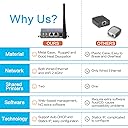
The CHEECENT CR102 is a 2-port Ethernet to USB print server designed to convert USB printers into networked devices compatible with Windows, Mac, and Linux. It supports multiple printer types (inkjet, laser, dot matrix, thermal) but excludes mobile devices and 3D/photo printers. Featuring a compact metal design, it enables shared printing over Ethernet without WiFi or dedicated host PCs, ideal for professional and institutional environments seeking cost-effective network printing solutions.


| Best Sellers Rank | #9 in Computer Networking Print Servers |
| Customer Reviews | 3.9 out of 5 stars 296 Reviews |
Z**S
Works excellent - Highly recommended.
This device isn't exactly a straightforward print server. The sellers know this device setup is confusing - they tell you constantly to read and follow the instructions or follow the videos on YouTube. Listen to them and do that. I've been in IT for quite a while and when you get the product, you think you'll know better --- you don't. This device is set up very specifically and you need to follow the instructions even when they seem weird or wrong. I assume the hardware was a firewall or something and was repurposed by Cheecent as a print server. Once you understand that the hardware is sort of universal, it's actually a lot easier. It's got functions, items, routing tables, DHCP server, I assume a firewall in there somewhere, etc that just aren't used for being a print server. Here are the cliff notes. The LAN port is used specifically for configuration. It does nothing else. I'm sure for some other applications that use this hardware LAN is used for a whole bunch of other stuff - in this print server device, it's used for nothing but initial configuration. It's default setting is 192.168.6.1. Connect your laptop using ethernet - I don't believe you need a crossover cable. You'll need to statically assign your computer a IP on the same subnet - 192.168.6.100, for example. This is only a method to configure the print server, once you're done with the configuration step, you'll never need the LAN port again, unless you need to reconfigure something. Configure your WAN port with an internal address on the same subnet as everything else on your network. You do this for the wireless or wired port, one or the other. If your internal gateway ip is 192.168.1.1, set it up to something static that's not used, they recommend 192.168.1.248, but you can do whatever as long as it's not currently in use on your network. Set up your subnet mask etc; DNS shouldn't be needed or the gateway in normal circumstances. Don't use DHCP, as you're going to use this IP as the printer's port, and you don't want it changing. You might want to visit the print server page at this step and turn off the bi-directional printing option on the USB ports. It's recommended in the instructions; I turned it off and never looked back. Hook up your printer to one of the usb ports, plug the power in. Hook up your network cable to WAN if you're using wired, or nothing if you're using wireless. Wait a couple of minutes for it to boot up. For printer installation on the computer, install as normal and use a jet direct port with your WAN IP colon corresponding port number. For example, 192.168.1.248:9100 for USB1 or 192.168.1.248:9101 for USB2. I'm sure you could hack this thing and do a bunch of stuff with it. I'm not sure why or what you would want to do, but it seems the hardware is general purpose. Maybe they could have made set up easier, blocked the lan port with a piece of tape and allowed management from the WAN port; I don't know nor does it matter. Once it's set up, I'm not planning on ever touching it again as long as I don't need to change my wireless name or internal IP address. As a print server, once it's set up it's been rock solid which is by far the most important thing. BTW I'm using this with a Zebra Eltron LP2844 CTP with an mfg date of 2004 and on an iMac. Works great - but wasn't on the compatibility list. If anything changes, I'll update the review, but I'm really happy with this device.
E**O
LAN printer server when your printer is not found.
This is a printer server ! Connects your old printer to a notebook computer via WiFi when WPS or Air Print can’t find it. When it’s working I becomes a network printer, not a plug and play wireless printer. Worked well on first attempt at connecting. Small and compact. Well made. Comes with decent instructions and additional support for technical assistance. Why I needed this ? My printer HP Deskjet cannot connect to my Xfinity Gateway and IQ Fiber Eero. I spent hours trying different ways to make it visible but still not good. Now my printer works with my notebook computer as the default printer. The printer is still not visible by AirPrint or by HP Smart app. Need to actually go into settings and input the ipv4 address to connect to the printer server. In this mode it does it job well.
K**.
BUYER BEWARE - Had for 4 months and then had to trash it
I got this and set it up with no issues. There was great support videos available online and the guide provided helps you to get this working out of the box. I was able to get my Brother Laser printer setup and it worked flawlessly for months. I was happy because it solves an issue I have had for a long time. HOWEVER, my ISP changed some of my settings on my router and I was forced to reconfigure it to get it to work again. I ran into some issues and in the process of trying to fix it, I was reading other reviews. One reviewer mentioned that this print server contacted Chinese servers once plugged into his network. and without any configurations done to it. This also was the case for me. Additionally, the print server started asking me for my router information such as my Serial Number and Password. It did not work the same way I set it up originally so I immediately unplugged it and threw it away. I hope Amazon removes this product from their store because it seems like it is allowing Chinese hackers a backdoor into peoples personal networks.
S**N
Hard to setup wifi print server but it works
Please note any time you make a change in the setup page you have exit the tab and reopen it to see your change (for example if you connect wifi it will show 0% signal). So exit out of the tab (by hitting the "x"). Also if you have one tab open you cannot hit "X" to exit, open another tab and close the one you want to reopen. Also reset your printer's NIC card just in case before installing this. Also when doing wifi setup the manual will ask you to obtain another computer to access the setup page using the new IP address which you obtain once server has one, please note to make this happen see point "4" below to enable this feature. If not it will not work. 1. You need to connect router to wan on box then PC lan to box lan. Then setup as per manual (if you looking to share Lan or wifi). 2. May find that when you connect to your wifi the server does not connect (signal bar maybe 0%). Got o where the manual instructed you to "scan" for networks and hit the "Edit" button for the wifi name you picked, which will be the third one down. Then in advance tap change country code from China to your country, else wifi may not obtain signal (as was the case for me). 3. Once your wifi is connect and box notes a green light (solid or blinking) you can disconnect the WAN and LAN. Make sure which ever device you use is on the same wifi name as the printer server box. I would recommend you ping the ip address of the printer server to confirm it works from CMD line in windows (type in "ping" followed by your ip address of the server). 4. If you are looking to access the printer server from any device in your network wireless then do the following: "Advanced Network" - "Firewall" - "Traffic Rules" - "Drop-WAN-Web", unselect "Discard input" and click "SAVE&APPLY" 5. I was able to use this with pfsense (just make sure xxx.xx.x.xxx range covers which ever ip is noted on the printer server box).
T**N
It works! But it takes a few hours to get there.
Once you get past the installation configuration nightmare, it took me 2 hours to install due to several minor changes in the Windows 11 software windows vs the printed instructions, (hint use control panel) this print server allowed my HP 2430tn to print from its USB port wirelessly. The unit has good signal reception. The instructions included are fairly well organized, if you have a magnifying glass. The videos online go through the installation, albeit too quickly to follow the steps for newbie’s. I bought a second unit 3 days later to connect to my other 2430 printer that’s located in another building, and that setup still took me 2 hours via the instructions, even though I had already installed the first one, yes it’s complicated. The good? Both printers are wireless, print fast, and work flawlessly. You can use both printers at the same time in two different locations from any computer on my private network. Crap, with another 4 hours, I could add another 2 printers if I wanted to! I give it a 5 star rating for the control you have over it and that it does the job, the setup is what it is. Hey Bill, a little AI would be helpful here in this setup with Windows 11.
A**R
GREAT but - You need to blow past the "device not found" error
Great problem solver for label printing! My printer for shipping labels has always been problematic. So are all the others. When the print started to fade it was time to upgrade. When I decided to upgrade recently, USB cable was the deal breaker. There was no space at my workstation for a printer. This device is the best solution I've found for making a WiFi label printer. The name brand printer didn't have WiFi, it was Bluetooth only, and I decided to settle. But the print quality was worse than my old printer. I sent it back. (I returned 5 different printers) Brother makes a WiFi label printer, but it's pricey AND hard to set up according to reviewers. It would be my other option. I found a cheaper Bluetooth printer and was going to settle (again) but the Bluetooth was proprietary. It only worked with their labeling software, not ebay or Pirate Ship. This Cheecent print server was a cheap way to make my cheap printer WiFi capable. Device Setup - the LAN connection is only to connect to the server to configure it for WiFi. Once it's on WiFi you can connect to it through the same IP address if necessary. Printer Install - Probably different for everyone but I put the pdf of the manual on one screen and went through it slowly. Following the videos only - no worky. I think they skipped a step. It's a bit clearer in the pdf: When you come to "device not found" don't stop. There's another step.
N**N
Works great but defenitely for the faint of hearts
It's a great unit to have to service WiFi-less and network incapable printers. Rather than tossing out my old laser black-and-white and color printers being connected to a dedicated router with USB2/USB3 port, now, they're sitting pretty in a centralized area to service the entire family, freeing my USB3 port for my router to use for my backup media center. For those who don't like to mess around with computer settings, be setting up the print server or manually provide setting info during Add Printer setups, this is not for you. If you're willing to learn, it's a boon to have. Be aware that you will need your 2.4 GHz turn on. Huh? Really? Yes, we tend to forget that our faster and newer devices connect to the 5GHz and 6 GHzbands, and completely forget about the 2.4 GHz. I turned mine off as well for certain reasons. It does connect to hidden networks. It may be useless to most, but for those who wish privacy and go into hidden modes, this print server does support hidden networks. My older print servers did not have such glorified option. But this printer server goes beyond that and provide you the option of LAN/WAN connection option as well beside wireless. Kudos.
N**A
bloated features, unreliable wifi connectivity
unreliable. set it up fine. if anything, it has way too many features. I already have a physical firewall, dns servers, etc. I do not (and I think almost no one) needs that in a print server. it worked great with my zebra label printer, but it loses connection to wifi essentially rendering it useless. I am not running a cable to something I bought for its wifi capability, especially when it is 10' form an AP. I am running enterprise grade cisco APs, there is no reason why this print server shouldnt be able to stay connected. I have a cheap iomega print server that is 10 years old and manages to not drop from the network. I end up having to power cycle it by pulling the plug and reconnecting it, and then it automatically reconnects to wifi and prints whatever was in queue. this has to be some sleep or power saving function that is built in. completely unnecessary.
A**X
Funktionier einwandfrei.
Ich nutze den Druckserver sein einigen Jahren. Einrichtung mit Anleitung hat gut funktioniert! Bis heute keine Probleme.
A**A
Good Product
It's working fine & build quality is amazing
B**S
Artigo execelente
Artigo de acordo a descrição apresentada
A**R
Value for Monday
Works great, easy set up
J**E
Funciona limitado
Funciona muy limitado y complicada su configuración
Trustpilot
2 months ago
1 month ago