Buy anything from 5,000+ international stores. One checkout price. No surprise fees. Join 2M+ shoppers on Desertcart.
Desertcart purchases this item on your behalf and handles shipping, customs, and support to Italy.
💡 Light up your life—smart, synced, and simply stunning!
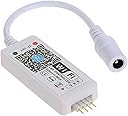
The Aubric LED WiFi Controller transforms ordinary RGB LED light strips into a smart, voice-controlled lighting experience compatible with Alexa and Google Home. Featuring WiFi connectivity, music synchronization, and multi-strip group control via the free Magic Home app, it offers millennial professionals seamless ambiance customization from anywhere. Easy to install and backed by a one-year warranty, this controller is the perfect upgrade for a connected, stylish home or office environment.


| ASIN | B0746654D5 |
| Additional Features | Voice Control |
| Best Sellers Rank | #201,947 in Tools & Home Improvement ( See Top 100 in Tools & Home Improvement ) #1,129 in LED Strip Lights |
| Brand | Aubric |
| Brand Name | Aubric |
| Color | White |
| Connectivity Protocol | Wi-Fi |
| Connectivity Technology | Wi-Fi |
| Control Method | Remote, Voice |
| Controller Type | voice control,wifi |
| Customer Reviews | 4.1 out of 5 stars 658 Reviews |
| Included Components | WiFi controller, 4 pin connector, User manual |
| Indoor Outdoor Usage | Indoor |
| Indoor/Outdoor Usage | Indoor |
| Item Dimensions | 5.12 x 0.79 x 3.54 inches |
| Item Length | 13 Centimeters |
| Light Color | Multicolor |
| Light Source Type | LED |
| Manufacturer | Aubric |
| Manufacturer Part Number | 14202055 |
| Material Type | Plastic |
| Model Number | WIFI LED Controller |
| Number of Items | 1 |
| Number of Light Sources | 150 |
| Occasion | Christmas |
| Power Source | DC |
| Product Style | Compatible with Alexa & Google Home |
| Smart Home Compatibility | Smart Home Compatible |
| Special Feature | Voice Control |
| Theme | Music,Voice |
| Unit Count | 1 Count |
| Voltage | 12 Volts (DC) |
| Water Resistance Level | Not Water Resistant |
| Wattage | 100 watts |
| Wireless Communication Technology | Wi-Fi |
D**F
Fantastic WIFI LED Light Strip Controller and Customer Support!
This LED WIFI controller works great and all of the apps functions and the integration with Google Home work great! As mentioned in another review I was able to find out a way to activate effects with Google Home. First you have to go into the Magic Home app and make a scene that triggers a function, If you haven't already you need to link the Google Home app to the Magic Home app by selecting the plus sign>select Set up device>select works with Google>search for Magic Home>select Magic Home WIFI>sign into your Magic Home account>then add your controllers to a room. Now you can activate the scene that you made using any Google Assistant device by asking it to turn on the (name of the scene that you made in the Magic Home) or by making a routine in the Google Home app that activates the scene. This also works with the Amazon Alexa but the steps may be different. There was a problem that I had with the Magic Home app to where it said that the controller was not connected to my WIFI even though it was but after closing the app and re-opening it; the problem was fixed. If you ever need to reset the controller you need to un-plug and re-plug it four times. I'm not sure if this set up automatically but if you run into an issue to where the colors or flipped then all you have to do is go into Magic Home app, long press on one of the LED controllers, select change device type, and change the device type to BRG. The LED Light Strip will blink white notifying you that the device type has been changed. Aubrey was very responsive and helpful when I had concerns regarding the controllers and was quick to send me a replacement controller at no extra cost when I found out that one of the controllers that I received had a defective four pin connector. I strongly recommend getting these controllers even if you need to buy LED Light Strips (LED Light Strips and power supplies can be bought separately but you need to make sure that the voltage of both of them match or the LED Light Strips will either not work correctly or be ruined).
J**D
Led wifi
Worked like it should. Love it
B**K
Works well can be tricky to set up
I bought this so I could use my LED light strips with my Google Home and it works very well i’ve had no connection issues and everything works very smooth. Only reason why I give a four-star review is because it was sort of tricky to get it initially connected to the internet, and had to reset the device multiple times and after the third try of resetting the device it worked.
G**Q
Use The Correct Control App And You'll Have No Issues
Works well with any 4 pin LED strip. Programming (pairing) is fairly simple BUT be sure you use the Magic Home app for setup. It won't work with Smartthings or SmartLife (Tuya) or any other app. I tried, just to keep from adding yet another control app but no go. I'm able to turn my LED strip on/off, change brightness and color via the app or using commands to Alexa. BTW, I purchased this controller to replace another that had stopped working.
A**R
An unfortunate fire hazard
UPDATE: A few weeks ago I came home to a burning smell in my apartment. One of my controllers was in the process of melting down until I unplugged it and tossed it outside. The controller wasn't overloaded, and had not been on/in use at the time of failure. Luckily I caught this before any real damage was done, but if there's a chance any of these could start a fire in my home, that's simply not worth the accent lighting. I should've listened to other reviewers. LEARN FROM ME! A couple weeks ago I was bored and started seeing how I could make my apartment smarter. After investing in some rgb led light bulbs, getting my raspberry pi integrated with Alexa, and setting up an ir blaster to control other devices, I thought adding some LED lighting that could be controlled by Alexa would be a nice touch. I also happened to have a spare roll of 12v LEDs and power supply with a basic ir remote controller. Physically, installation couldn't have been easier. All I had to do was unplug the power supply and leds from the old controller and plug them into the new one. Software setup wasn't much trouble. It operates like a lot of other smart devices. Download the app (it comes with a card that has the QR code), register on their server, connect the lights, install the Alexa skill, voila. Ok, I can't remember if those were the exact steps, but pretty close. I've had them running for five days now, and I have to say I'm pretty pleased. Once it's all setup, it integrates fairly well with Alexa, and I haven't had any issues with it responding to basic voice commands. BUT here's where the caveats come in. Much like the RGB bulbs I bought (different manufacturer), the Alexa integration allows control of color and brightness, but doesn't allow you control and effects, like strobe, fade, jumping, etc. To do that you have to open the Magic Home app. That said, I usually just keep it on the same color change effect, and that stays persistent when you power it off with Alexa, so it's not really a big issue. UPDATE: There is a bit of a workaround for this. The Magic Home app allows you to create scenes. You could create a scene using a more complex color shifting effect, and the scene will show up in Alexa. The other ding I would have against it, and this is a slight ding, is the limited functionality of the music effects. The controller does allow for the LEDs to pulse to music, but to do that, it uses the mic on your phone (or tablet), and you have to keep the app open to keep the effect going. There's also an option to sync with music stored locally on your phone. Again, the effect works, but it's a bit of a clumsy implementation. My suggestion to the manufacturer would be to either add a mic to the controller (I'd pay a little more for that), or add a way to sync either with music streaming to your phone or to Alexa. Overall I'm only taking one star off because for the price point, it's a nice little package to control a small set of LEDs (have to be aware how much current you're putting through it), and offers fairly good Alexa integration for everyday use. That said, there is a little room for improvement.
T**E
Great for Streamerbot, if you put some work in first and use flux_led
I bought this to have some RGB strips that can be controlled by a bot during livestreams. Easiest way is installing flux_led python script, and then using streamerbot to run a program and pointing it to pythonw.exe with arguments pointing to the flux_led script and with the arguments it needs to send commands to the lights. If you just switch colors, it will force a fade transition of 500ms, but a semi-hacky way to get around that and cut colors immediately or cut lights on/off without the transition is to send it a command for a custom pattern of just the color you want. You can also use a pattern with just the color followed by black along with speed controls to get a custom color flash effect. For the money, it's great. Obviously, in case anyone can't figure it out, this is JUST the controller, no lights included. Can't say how many reviews I've seen on DIY parts like this or LED strips without a controller where people leave a bad review upset because they can't be bothered to read and understand before blindly throwing money at items.
D**L
Does well with what's advertised, but
This little guy does well to connect existing light strips. It's quick with Google requests and hasn't had any connectivity issues yet. I would note that the pins do not sit securely. I had to fasten the pins in with tape as it kept physically disconnecting after a few hours. Other than that issue, I highly recommend this for the price.
J**F
Hard to setup but don't give up...
It took me 3 times to set it up. When you reset device count to 5 fast and unplug and replug 3 times. Works great. When I was ready to send it back I could only connect directly to device and control it. Just keep trying to add it turn off your cell signal and turn on bluetooth. Make sure you don't have more than 1 wireless connections saved on your phone in your house. Once setup correctly you can name it at zone other devices in groups. I'm testing tonight with the mic playing pandora over loadspeaker and its working great so far. Good luck. They need better instructions Update 2-27-2020 I was able to connect to google assistant, Now I say "Hey Google turn on the steps" or "Hey Google turn the steps blue" or "Hey Google put the steps to 50%" etc... Don't give up trying to set this up. I almost put it back in the box and shipped it back... I'm glad I didn't. I'm doing my backyard floodlight next. All voice control google or alexa or by the phone app direct all wifi Good luck!
A**N
Fallo en la configuración.
No funciona! Lo detectó al principio, ni siquiera pude terminar la configuración y ya no lo detecta. No se puede configurar. Tampoco por wi-fi es detectada la red.
Trustpilot
1 month ago
2 months ago