Buy anything from 5,000+ international stores. One checkout price. No surprise fees. Join 2M+ shoppers on Desertcart.
Desertcart purchases this item on your behalf and handles shipping, customs, and support to Italy.
🖥️ Elevate your rack game with precision and power!
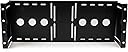
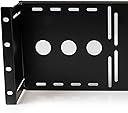
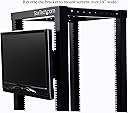
The StarTech.com 4U Universal VESA LCD Monitor Mounting Bracket is a robust, cold-pressed steel solution designed for 19-inch racks or cabinets. It supports 75mm and 100mm VESA LCD panels, offers adjustable mounting depth for optimal fit, and complies with TAA standards for government procurement. Built for IT professionals, it ensures durability, versatility, and lifetime technical support.


| ASIN | B002D1GG0C |
| Best Sellers Rank | #212 in Computer Racks & Cabinets #639 in Computer Monitor Accessories |
| Brand | StarTech.com |
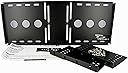
| Built-In Media | 8xM5 cage nuts,8xM5 screws,4xM4x10mm LCD mounting screws |
| Color | Black |
| Compatible Devices | PC |
| Customer Reviews | 4.6 4.6 out of 5 stars (310) |
| Enclosure Material | Alloy Steel |
| External Testing Certification | ROHS |
| Global Trade Identification Number | 00065030834896, 00100177422282, 00151903134429, 00151903600443, 00521227103140, 05054533310957 |
| Item Type Name | Mounting Bracket |
| Item Weight | 1.65 Kilograms |
| Manufacturer | StarTech.com |
| Maximum-Supported Screen Size | 19 Inches |
| Mfr Part Number | RKLCDBK |
| Minimum-Supported Screen Size | 19 Inches |
| Model Number | RKLCDBK |
| Mounting Type | Wall Mount |
| Movement Type | Tilt |
| UPC | 521227103140 065030834896 151903600443 |
| Unit Count | 1.0 Count |
| Warranty Description | Lifetime |
C**A
Made in Canada? Nice hardware. Self explanatory
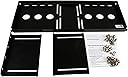
It goes without saying that reviews are purely subjective and never going to be universally agreeable. I am not clear about the criticism about the "hardware"-be it poor quality or confusing at to its placement. This is not a complicated product. To understand this review, it's getting the "terminology" correct/comprehensible for others to read. This kit is as simple as it gets. The components: back plate, side arms (one for the left and one for the right rack tower attachment) and 3 types of screws (4 to attach arms to back plate, 4 to attach back plate to monitor and 8-although not required to use all 8-to mount the assembled bracket to the rack. Note, first determine if you will be able to attached the bracket after the monitor has been attached to it or if you first need to attach the bracket to the server rack and then attach the monitor to the bracket. Either way, it's a very simple process to screw the monitor to the backing plate. In my case, having the bracket and monitor attached first, I wasn't able to mount the bracket using the rear posts of my server rack. Either way, it's beneficial to attach the monitor to the back plate and then line it up/press it up against your server rack to determine the final position you'd like the monitor to protrude outward or inward of the rack posts. Once you know this, you can tighten down the side arm screws into their final position. If you pre-attach the bracket and then mount it to the server rack, you may not have access to the screws. Again, this just allows and 1" of inward/outward positioning of the monitor after its attached to the backing plate. It makes sense when you're assembling it. I found the 3 types of screws, clearly marked and bagged accordingly, to be of good quality. Also, the threaded back plate attachment points were very sturdy. No issue whatsoever in terms of cross threading or stripping. [Pro tip: any time a screw is inserted or re-inserted after being removed from it's original location-particularly when it's anchored into a different material than it is made like a self anchoring metal screw into plastic or sheet metal; first insert the screw with light pressure and slowly turn backwards ("counterclockwise", in other words, the opposite direction of that to tighten the screw) until you feel a little "click" and sink. This "click" is the sound and feel of the screw naturally being re-aligned with the thread pattern. This little trick will prevent 90% of cross-threading mishaps because the screw will naturally realign with the particular thread pattern that has already been "forged" between the materials whether metal to metal or metal to plastic, etc on self-anchoring screws in particular.] The rack mounting hardware in particular is great, it's a complete mounting set of M5 sized (some rack hardware is M6) consisting of a "pass through" screw, a tub washer and a spinner/grip nut. You don't have to use the nut if the threads on your server rack are substantial and no major load bearing requirements. However, I recommend to use the seated washer as it makes for a professional look and it insulates the metal to metal contact and reduces vibration. The good thing about having M5 "universal" mounting screws is that they will work with larger mounting holes as long as you use the supplied nuts. Otherwise, you will have to bore out the holes in your rack rails to accommodate M6 screws and will be obligated to use nuts. Regardless, this mount is solid, heavy gauge metal and it allows for several mounting positions. I took a couple pics to capture how I used the rear post position and recessed the side arms to limit the depth (although it is difficult to see the side arm screws after the bracket is mounted) which keeps my monitor flush with the front rails of the rack. Again, STEP 1, pre-assembly of the frame (using 4 screws to attach the arms that thread directly into the back plate). Don't over tighten as you may want to adjust the final position of your monitor before you attach the bracket to the rack. I recognize that there are all levels of experience and skill when it comes to these types of products but I find it a bit harmful to a product/vendor to trash an item simply because you should've hired a trained monkey to do it for you. If nothing else, take the pro tip as my gift to pass along.
P**Y
Perfect!
I work in broadcasting and we have a lot of racks with automation servers, satellite IRDs, and just a bunch of equipment that is made for racks. I wanted to use just regular monitors with VESA mounts instead of buying a rack monitor that are so overpriced... This works perfectly... I love that I can adjust the depth if I had a smaller monitor and wanted it to be flush with the rack if I wanted to use a bigger monitor and have it outside of the rack which is the way I am using it. I can't believe this isn't a more common solution to putting monitors in racks instead of the typical sliding tray type monitors or the kvm trays. I will eventually phase out the tray monitors and put these in their place with larger monitors and use my own KVM in each rack. This idea is so simple and perfect that I can't believe it took me this long to get one. Very easy to assemble and mountain. 5 stars all day long!
S**R
BYO screws for VESA portion
Only ships with screws to assemble and put in rack - this is a VESA mount with no screws for attaching anything with a VESA mount
J**.
Works flawlessly
Excellent mounting bracket. I have this in the back of my 12U Gator rack for DJ work to hide the mess of wires, holding up an old Samsung SyncMaster 712N, which is actually a bit heavy. Still, it hasn't complained or bent in any way and I'm happy with my purchase. Solid bracket. I highly recommend this. One side note---I see some people have had problems with monitors with a curved back; I can't speak for that, as the Samsung SyncMaster 712N monitor I attached has a flat back. Nonetheless at least know that this has a good weight-bearing capacity.
J**H
Great bracket for mounting monitors.
Solid construction, plenty of holes for rack mounting. Bracket is 4U tall, and can be mounted in a variety of positions in racks to make the monitor used flush with the front. Pros: Low profile / bracket itself doesn't take up much space Strong material used Side brackets are slotted and the monitors can be mounted in varying depths Cons: Instructions were not clear on which screws to use for installation. I did not realize the bracket comes with additional mounting hardware for different rackmount systems. I didn't use these, but this was the only con I could think of. Other thoughts: My box arrived crushed and the monitor mounting piece was slightly bent. I tried righting it by hand but the material was too strong to bend like this. I bent it at work and now it's great. I recommend this bracket for anyone looking to mount their monitors in an enclosure.

A**R
Sturdy, good thought, but not very adjustable
Pros: Easy enough to assemble, and very sturdy. Pretty good value for it's price. Cons: Depth adjustment is very limited when mounting a larger LCD (23" in my case) to the outside of the rack. The mounting arms slide towards the monitor, so when they hit the monitor, no more depth adjustment (in my case, less than an inch). If the adjustment arms could slide back into the rack, the monitor could sit flush to the posts. This is impossible with this design, however, so the monitor sits several inches out.
T**N
Easy way to rackmount an LCD monitor
If you have a 19" widescreen monitor you'll be able to recess the monitor into a standard 19" rack. I used a 20" widescreen monitor. To use a 20" widescreen monitor, you'll need to install the rackmount into the rack, flush with the sides. Then you can attach the monitor from the front of the rack, screwing through the rackmount from the back. My rack doesn't have doors - if yours does the monitor sticks out far enough that they probably won't shut. Overall the construction is solid, and it can handle the weight of any LCD monitor without issue. Note: Your power and video connections must be downward facing, not rear facing, in order to use this mount. The back of the mount will block rear facing ports.
J**P
Etwas teuer, aber es ist halt keine Massenproduktion. Qualität ist perfekt, Montage war mehr als leicht. Ich habe in dem VESA Mount einen 14 Zoll Touch Display montiert, auf dem ich meine Home-Assistant Dashboards laufen habe oder Hardware Monitoring einsehen kann.
J**S
Brilliant
J**Z
El soporte viene en un paquete plano bastante ajustado. Viene con todos los tornillos para su colocación en el rack y para el monitor vesa. Puede ajustarse la altura y la profundidad con los soportes laterales. Ideal por si tienes un rack sin puerta porque puedes dejarlo casi rasante. Volvería a comprarlo sin duda.
F**.
Produit renvoyé pour ma part. Mauvais usinage des pas de vis du coup impossible de visser le support écran sur le rail sans déformer l'empreinte des vis. Peut être un mauvais lot... Heureusement, le service retour Amazon est toujours au top.
A**R
It does exactly what I needed. The only reason for a 4-star rating is the screws provided to go into the back of the monitor have rather small heads (no washers). This means as they pass through the holes in the device they don't get a solid purchase on the hole edge. It will need washers or different screws if the monitor is subject to vibration over time. If it is a set and forget situation then all should be fine.
Trustpilot
2 days ago
3 weeks ago