We remain fully operational. Our teams are working around the clock to ensure your deliveries continue safely.

DOWNLOAD THE APP


Customer Services
Copyright © 2025 Desertcart Holdings Limited
DOWNLOAD THE APP
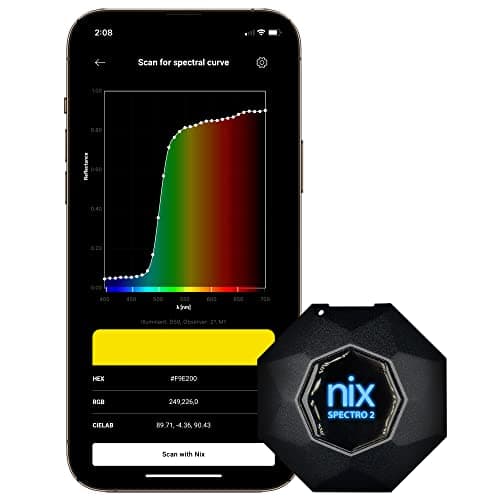

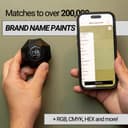

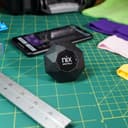
🎨 Unlock the true spectrum of your brand’s colors—anywhere, anytime.
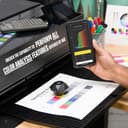
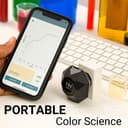
The Nix Spectro 2 is a professional-grade, portable spectrophotometer designed for print, packaging, paint, and coatings industries. It delivers rapid, precise color measurement with 31 UV-visible channels and 1-second scan speed, syncing effortlessly via Bluetooth to the Nix Toolkit app. With access to extensive paint libraries and cloud storage, it empowers color professionals to maintain impeccable color quality on the go, all in a durable, cost-effective device.


| ASIN | B09PZHC75H |
| ASIN | B09PZHC75H |
| Batteries | 1 Lithium Polymer batteries required. (included) |
| Batteries | 1 Lithium Polymer batteries required. (included) |
| Batteries Included? | Yes |
| Batteries Required? | Yes |
| Battery Cell Type | Lithium Polymer |
| Best Sellers Rank | #137,733 in Sporting Goods ( See Top 100 in Sporting Goods ) #700 in Activity Trackers |
| Customer Reviews | 4.5 4.5 out of 5 stars (37) |
| Customer reviews | 4.5 4.5 out of 5 stars (37) |
| Date First Available | 28 April 2022 |
| Date First Available | 28 April 2022 |
| Item Package Quantity | 1 |
| Item Weight | 1.57 Kilograms |
| Manufacturer | Nix Sensor Ltd. |
| Manufacturer | Nix Sensor Ltd. |
| Manufacturer reference | NIX-S2S-EN-000-001-R |
| Manufacturer reference | NIX-S2S-EN-000-001-R |
| Package Dimensions | 34.11 x 26.19 x 11.51 cm; 1.57 kg |
| Package Dimensions | 34.11 x 26.19 x 11.51 cm; 1.57 kg |
| Part number | NIX-S2S-EN-000-001-R |
D**K
This is an excellent tool for decorators, paint and print professionals. It's a bit unfortunate that it's not cheap enough for non-pros, as it's the perfect tool to solve all the arguments/debates some couples have had about colours over the years :) Well, not just couples, remember the blue and black or white and gold dress viral phenomenon? With a spectrophotometer you are not left with any doubt! Anyway, it's to expensive to be used as a toy, so let's go back tho the device: it comes in some impressive military grade case, like the ones you expect to hold the controls to nuclear ICBMs, however the actual device is small, it fits the palm of your hand and connects to your phone via bluetooth. It's quite easy to use, there are third party apps too, as it's a well known brand. It does not rely (obviously if you think about it) on ambient light, so you can use it pretty much anywhere.
A**Z
Muy intuitivo, lo uso para igualar color en un plotter de lona y vinil. Pros: -compacto -facil de usar -bateria de larguísima duración -software estable (app) -el software (app) integra bastantes funciones útiles: control de calidad, diferentes tipos de medición: lab, cymk, RGB, hex, etc, diferentes métodos de medición: M0, M2, etc Contras: - por su geometría es facil de tirar al piso - al ser de metal puede ser jalado por imanes - su forma no permite poder ser almacenado dura de su estuche
B**S
Soy colorista profesional para madera. Tengo varios espectro metros entre ellos data color y spectro de Variable y decidi probar con este. A continuación les diré los aspectos malos y buenos a mi parecer profesional del equipo y su software. Puntos Positivos - Se puede hacer mediciones multipunto - La maletita es bonita - Se puede hacer comparación de más de 2 MUESTRAS o más con respecto al mismo patrón Puntos Negativos - Poco portátil ya que su tamaño es incómodo para llevar en el bolsillo y como no tiene protector de lente es mejor llevar en su maleta pero ya es un bulto medio grande - Software poco amigable. Primero viene solo en Inglés. Segundo no guarda tus preferencias o configuraciones personales ya que si lo pagas tienes que volver a reajustar tus preferencias como delta de iluminación, y número de mediciones promedio para la pieza, además de que aunque tengas una cuenta creada no te permite revisar tus carpetas de colores guardados sino esta conectado el espectro. - Si lo comparara con un equipo más económico Spectro Pro de la Marca Variable es mucho más caro el de Nix, tiene un delta de error muy similar y no recomendaria pagar tanto por lo mismo. En conclusión es un equipo bonito pero incómodo de llevar encima y con un software muy poco ágil para trabajar profesionalmente. Ahora lo estoy usando a diario pero cada vez me gusta menos este spectro.
A**X
Für meine Arbeit im Bereich Druck und Verpackung habe ich schon länger nach einem mobilen Gerät gesucht, mit dem sich Farben zuverlässig messen lassen – also haben wir den Nix Spectro 2 bestellt. Der erste Eindruck nach dem Auspacken war schon sehr positiv: der Koffer ist stabil, alles ordentlich einsortiert, und allein das beiliegende Prüf-Zertifikat und die Referenz-Tile zeigen, dass es sich hier um ein ernsthaftes Werkzeug handelt. Das Messgerät selbst wirkt wertig, liegt gut in der Hand und hat eine angenehme Größe – nicht zu sperrig, aber auch nicht so leicht, dass man Angst hätte, es gleich zu beschädigen. Im Alltag überzeugt vor allem die Genauigkeit. Egal ob auf bedrucktem Papier, auf lackierten Oberflächen oder sogar auf Textilien: die Messungen sind konstant und stimmen sehr nah mit den bekannten Referenzwerten überein. Gerade bei Druckaufträgen, wo Farbabweichungen schnell auffallen, spart das enorm Zeit und Nerven. Gut gelöst ist auch, dass die App verschiedene Farbräume direkt anzeigt – RGB, CMYK, Lab oder Hex – das macht die Weiterverarbeitung deutlich einfacher. Praktisch finde ich auch die Handhabung unterwegs: das Gerät ist klein genug, um im Rucksack dabei zu sein, und durch die eingebaute Kalibrierfunktion kann man jederzeit schnell überprüfen, ob alles passt. Die Akkulaufzeit ist ebenfalls ausreichend lang, sodass man nicht ständig nachladen muss. Die Software ist für mich fast genauso wichtig wie die Hardware. Da hat sich in den letzten Jahren einiges getan: die Oberfläche ist übersichtlicher geworden, Verbindungen per Bluetooth laufen stabil, und man bekommt mit wenigen Klicks einen klaren Überblick über die gemessenen Daten. Für wirklich tiefgehende ICC-Profile braucht es zwar immer noch etwas Handarbeit, aber für den täglichen Einsatz im Druck reicht es völlig. Schön ist außerdem, dass die App Bibliotheken wie Pantone oder NCS unterstützt – so spart man sich langes Suchen. Natürlich ist der Preis kein Schnäppchen, und für den Hobbybereich lohnt sich das sicher nicht. Aber wenn man beruflich mit Farben arbeitet und Fehler vermeiden will, ist der Nix Spectro 2 eine Investition, die sich auszahlt. Alles in allem ein sehr robustes, zuverlässiges und gut durchdachtes Werkzeug, das die Arbeit nicht nur präziser, sondern auch entspannter macht. Am Ende zählt für mich: ich kann mich auf die Messungen verlassen – und genau das war der Grund, warum wir dieses Gerät bestellt haben.
A**E
This product is essential for anyone who works in the print industry, home/interior design and painting, fine art, graphic design, or any myriads of businesses that requires color identification or matching. I happen to work daily in the print and graphic design industry, and my side business works with home decorating and sewing. I've always prided myself on having a good eye for color, even placing very well with the Pantone color test. The issue, however, is that colors are often hard to decipher with different lighting situations. I jumped at the chance to own one of these as it would help in so many ways. It's a bit high for the price point, but it's well worth the cost; especially with what it does, and what comes with it. What you receive: A pelican case with heavy duty latches and the ability to add locks if needed. The case is padded and contains the Spectrophotometer, a calibration disc, cleaning cloth, USB-C cable (for charging), a wrist strap, and soft carry bag for on-the-go protection. It also comes with a certificate of quality check, and a quick QR scan code to the mobile application to use the system. Using the Tool: Very simple setup. You can scan the QR code using your phone's camera, install the Google/Apple application, then setup your account. You will need to charge the Scanner first (as per the instructions). Once charged, you connect to the Nix Spectro through Bluetooth. After connected the interface is very simple, you can scan for Hex, RGB, CIELAB, paint colors (choosing your desired paint brands), and so many more. Scanning is as simple as hitting the scan button, doesn't require natural lighting or bright light. I literally scanned everything in arm reach, around my home, even plants to check the color. I admit I probably looked insane. Once I settled down, I tested each of the paper colors my printshop uses to update the color codes on our website, my eye was close, but this was better. Important to note: You will need to connect the device using Bluetooth to a phone or a mobile device that can install the application from the Google or Apple store. I haven't searched too hard to see if there is a way to scan to an application using a formal computer. You can use the application free of charge, but there is a subscription based opting in the application if needed. The Nix Pro software is best for pressrooms and businesses that need to have tolerance levels calculated as well as possible substrate color corrections. You can use Pro for 90 days to see if it meets all your needs, that is if the base model does not meet your needs. I primarily use the scanner for my own personal color needs and do not usually work directly on the print-floor anymore, so I don't need the added tools.
Trustpilot
1 day ago
2 months ago