
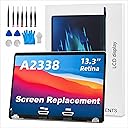
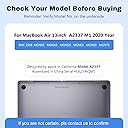


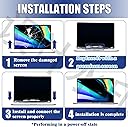
A2338 Screen Replacement for 13.3 inches MacBook Pro M1 2020 Year 2560x1600 Replacement LCD Full Assembly for EMC 3578 Silver
Product ID: 432015
🔧Full assembly with webcam & backlight
🖥️2560x1600 Retina resolution
🛡️3-month warranty & quality tested
Buy anything from 5,000+ international stores. One checkout price. No surprise fees. Join 2M+ shoppers on Desertcart.
Desertcart purchases this item on your behalf and handles shipping, customs, and support to Italy.
🖥️ Upgrade your MacBook Pro’s view — because your screen deserves a glow-up!
This A1502 screen replacement is a precision-engineered full assembly for 13.3-inch MacBook Pro Retina models from late 2013 to early 2015, featuring a stunning 2560x1600 resolution. It includes all essential components—LCD, back cover, cable, webcam, and backlight—ensuring full functionality. Each unit is quality tested and backed by a 3-month warranty, making it a reliable and cost-effective solution for restoring your MacBook’s display brilliance.


| Best Sellers Rank | #3,554 in Computers & Accessories ( See Top 100 in Computers & Accessories ) #3 in Laptop Replacement Screens |
| Customer Reviews | 4.5 out of 5 stars 925 Reviews |
R**N
Saved $70
I ordered this for thirty dollars on Amazon when the best I could find locally for a screen replacement was a hundred. Of course, they'd also do the labor, but I figured if I could replace a hard drive, ram, etc, I could probably handle this. There are many videos online that explain how to do it. Let me first say that this product is excellent. It doesn't feel like glass, but neither does the original. More like thin plexiglass. It came with the adhesive already in place and was a simple application once the old screen was off. I have only positive things to say about the replacement screen! But. My experience removing the cracked original screen was far from easy and went down nothing like the videos. I used a very hot hair dryer around the edges. I'm not sure if it just didn't get hot enough (though was too hot to touch!) or what, but attempting to release the edges from the original adhesive resulted in lots of splintered glass. When I was brave enough to use the glass suction (those things are amazing and can be purchased at your local big box hardware store), the screen came off but the edges remained shattered and stuck. It was a total nightmare getting all the tiny pieces off the edge. Required tweezers, box cutter, and a lot of swearing. Probably took an hour and resulted in two minor scratches to the LCD, which are not noticeable when computer is in use. So final verdict: great product, great convenience of doing this at home rather than dropping off for several days, PITA if the original screen does not pop loose easily. Proceed with caution.
L**Y
buy your own tools
I was able to replace my screen but only thing is, the tools that it comes with screen kinda suck. The screen works amazingly. it was easy to replace. if having trouble just watch a YouTube video, that's what I did. I've been having this screen for about week and it works well
S**N
Perfect fit but...
This glass was a perfect fit for my 13 inch MacBook Pro. The only complaint I have is that the guide for the camera/light sensor does NOT come with the glass. It was glued to the original glass. I had to recover it by using a razor to "peel" it from the glass and then find suitable adhesive to affix it to the new glass before installing the glass into the computer. Otherwise, this is a perfect produce, fits perfect, comes with several layers of protective plastic. The adhesive "tape" comes pre-installed on the glass for easy installation.
T**L
I had a pretty bad bread on my screen which made the one ...
I never write reviews but had to because this Mac screen was life changing! :-) I accidentally broke my Mac book pro 13" screen around 4 months ago and have just been dealing with it. It's been terribleeee shards of plastic/glass not to mention trying to see through it to use my laptop. My husband bought me a new MacBook Pro and I was trying to see if I could get anything out of my old one. Mac had a buyback program and sent it in but they said instead of $300 they could only give me $25 because of the screen or if I got it fixed and sent it back they'd give me $300. I'd checked before quotes were always $500-600 to fix my macs screen, but figured what the heck if it was only worth $25 then I might as well try to do it myself. Bought this screen off here for only $16, thankfully when it came it was the exact same as the one on my computer (had my doubts of I'd ordered the correct one) and sat down one evening and I'm less then an hour fixed my screen!!! It looks BRAND NEW!!!! There are two pieces of plastic protecting the new screen - one on the front and the back. I used an old credit card to go around the whole edge of my screen and lift it off. I had a pretty bad bread on my screen which made the one corner hard to take off all the shattered screen bits otherwise I could have finished the whole thing in 15-20 mins. I used glasses cleaner and a soft cloth and cleaned th led. Once it's all off make sure you save the little metal prong piece from around the webcam because the new one doesn't come with it and then take off the protective back and position the screen correctly and then press firmly in place! Voila! Take off the front thin layer of plastic and you will have a shiny crystal clear beautiful new screen! Best $16 I've spent in my life!! Good luck!! ;-)
D**I
GO AHEAD-TRY IT-SEE FOR YOURSELF
Hands down one of the easiest screen protector to use. I have my beloved MacBook Pro and one day noticed it had several hairline cracks on the screen (GASP) and I asked myself "how did it get there?" Did I drop it on my rug one too many times? Probably so. I was devastated as I thought I would not be able to see clearly when the computer is on. Thankfully although there are quite a few cracks, my baby is still operational. I tried looking at how much it would cost to get the screen replaced and had to put that idea on the back burner as Christmas is around the corner and I did not have the money. I decided the best thing to do was to buy a screen protector until I am able to get the screen fixed. The first one I bought was not horrible but it did leave bubbles no matter how careful I was. When I tried several times to take it off and correct it, the screen protector bent at one corner and would not stick so in frustration I took if off. Bad mistake. when I lifted it off, it made one of the cracks worse. I decided then that I had to buy another one as now its not just a "scratch". I decided on this one based on the description, price and reviews. It arrived quickly and I have to say that on my first try, I was able to place it on my screen perfectly as it is large enough to cover the WHOLE screen as most screen protectors leave the edges unprotected. NO BUBBLES OR SMUDGES. Once I was sure it was anchored to my screen, I was able to take of the protector film over the protector. This protector is thick unlike other and if I didn't know they were there, I would not see the cracks/scratch lines. I love it. I am definitely getting my screen replaced but now I don't feel as if I have to rush. If I purchase another laptop then this will be my choice before anything can happen to the screen.
J**H
same as original. adhesive, the works!
so a while back my wife decided to leave her brand new macbook on the floor, where my foot found it and spider-webbed the screen. I decided instead of the aprox $420+ apple quoted on a 3+ week repair, that this might be a better option, myself being rather handy. She doesn't know i fixed it while she is at work today so she gets a surprise, like-new macbook tonight when she's off. I purchased a wagner heat gun for this fix, having not already owned one i needed it. Be very careful on just how much heat you blast the screen edges with. i melted a little bit of the rubber edge. also, the lcd doesn't like a lot of heat so watch out! the original adhesive holds extremely tight and I ended up with a pile of glass shards and chips over it. this takes patience! Oce you have cleared the old screen cover and all black adhesive, the new one goes on super quick and easy. for the isight bracket thingy (you'll know what it is when you remove the old cover) just melt the glue on the new screen in that area using the heat gun and place the metal piece on. real easy. the new cover is all ready to go on once the white backing is removed. line it up (making sure ALL inside surfaces are crystal clear (i used the disposable zeiss wipes) match em up and rub the edges to ensure it adheres to the computer. DONE. I did not remove the screen portion from the computer. some DIY videos recommend and show that you do. It makes a better work surface i think, but i managed without physically taking the computer in two pieces. decide for yourself. this is not a super lengthy fix, but allow yourself time to be patient and not rush it. after all, its about 50 bucks worth of one piece of glass you do not want to re-order over a slip up or impatience. take your time! If your handy like me, save yourself $370+ and use it for a few gallons of gas or something. I prefer to invest the money saved on tools like the heat gun to make future DIY projects like this even more affordable. Hope this helps anyone curious about fixing there macbook!
T**H
Can't Tell My Screen Was Ever Cracked
This fit perfect on my 13 inch mid 2012 MacBook Pro. The seller "BetaMacs" overnighted it. Getting the old screen off can be a little tricky. You need a heatgun (or blowdryer), small flathead, and a industrial suction cup (or dent remover) and possibly youtube, depending on your level of knowledge. My original screen did not pull up nicely because the crack spider-webbed and the suction cup became of no use as it had no seal. I had to use the heat gun and small screw-driver to remove the outer glass (which was a mess, so do it outside or in an area where you can easily clean up glass shards if this happens to you). Also, be careful around the camera, you'll find that it pulls up with the glass, with only a metallic plastic piece securing it. Obviously don't mess with the lcd as much as you can, be VERY careful not to put too much heat or pressure on it, and god forbid you knick it with the screwdriver. Clean up the lcd with a soft cloth, remove any debris that would cause the screen from not sticking on the edge, peel off the protection film and slap it on (be careful about fingerprints). Other than that, my mac looks good as new, thanks!
F**Y
Perfect for DYI project to avoid paying Apple to replace it.
Had to replace my Macbook Pro 13" glass after I accidentally dropped my laptop. This was a great deal purchasing this through amazon from PowerbookMedic and installing it on my own. I didn't want to pay enormous prices (Around $400 or more without warranty) for the Apple store to replace my six year old mac screen. The packaging did secure the fragile screen very well. It arrived in perfect condition. After viewing videos, I was ready to start the process of removing my old screen. It's not as easy as the video made it to be, my advice is to wear gloves when removing shards of glass and use a good and precise heat gun. The original adhesive is very strong and if you are not careful, you can melt the plastic liner that is around the outside of the glass, which unfortunately I did. Once all the glass was removed from the old screen, I had to clean off the remaining glass dust. As I was placing the new screen on, the one thing I was not aware was that the screen itself does not have a plastic coating to protect the back, only the front, so when you do put the screen on, remember to clean both sides, which I did not know and so when I finally finished installing it, there were fingerprints on the inside of the glass. Overall the product was an excellent purchase and with time and patience, I was able to install the screen without any major issues and saved myself a ton of money.
Trustpilot
3 weeks ago
1 day ago