Buy anything from 5,000+ international stores. One checkout price. No surprise fees. Join 2M+ shoppers on Desertcart.
Desertcart purchases this item on your behalf and handles shipping, customs, and support to Italy.
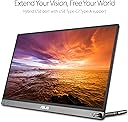
🚀 Elevate your workspace anywhere with ASUS ZenScreen — portable power meets pro-grade clarity!
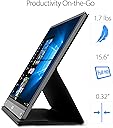
The ASUS ZenScreen MB16AC is a 15.6-inch Full HD portable monitor featuring an IPS panel with 178° viewing angles, hybrid USB-C and USB-A connectivity, and an ultra-slim, lightweight design at 1.7 pounds. It incorporates ASUS Eye Care technology with flicker-free and blue light filter certifications to minimize eye fatigue. Designed for professionals on the move, it includes a smart cover and pen hole for versatile orientation, plus a complimentary 3-month Adobe Creative Cloud subscription, making it the ultimate travel companion for enhanced productivity.


| ASIN | B071S84ZW7 |
| Adaptive Sync | FreeSync |
| Additional Features | Blue Light Filter, Flicker-Free |
| Aspect Ratio | 16:9 |
| Best Sellers Rank | #1,397 in Electronics ( See Top 100 in Electronics ) #49 in Computer Monitors |
| Brand | ASUS |
| Brightness | 220 cd/m² |
| Built-In Media | ASUS smart case, Quick start guide, USB Type-C cable, USB Type-C to A adapter, ZenScreen pen |
| Color | Black |
| Compatible Devices | Laptops, smartphones, and PCs with USB 3.0 and USB-C ports |
| Connectivity Technology | wired, wireless |
| Contrast Ratio | 800:1 (Static Contrast Ratio) |
| Customer Reviews | 4.5 out of 5 stars 2,791 Reviews |
| Display Resolution Maximum | 1920 x 1080 |
| Display Technology | LCD |
| Display Type | LCD |
| EU Spare Part Availability Duration | 3 Years |
| Global Trade Identification Number | 00889349599129 |
| Hardware Connectivity | USB |
| Has Color Screen | Yes |
| Image Contrast Ratio | 800:1 (Static Contrast Ratio) |
| Is Electric | No |
| Item Dimensions D x W x H | 0.3"D x 14.2"W x 8.9"H |
| Item Type Name | ASUS ZenScreen MB16AC 15.6" Full HD IPS USB Type-C Portable Eye Care Monitor |
| Item Weight | 1.7 Pounds |
| Manufacturer | ASUS Computer International Direct |
| Model Name | ZenScreen MB16AC Monitor |
| Model Number | MB16AC |
| Mounting Type | Desk Mount |
| Native Resolution | 1920x1080 |
| Picture Quality Enhancement Technology | Flicker-free and Low Blue Light |
| Pixel Pitch | 0.18 |
| Power Consumption | 8 Watts |
| Refresh Rate | 60 Hz |
| Resolution | FHD 1080p |
| Response Time | 5 Milliseconds |
| Screen Finish | Glossy |
| Screen Size | 15.6 Inches |
| Screen Surface Description | Glossy |
| Shape | Rectangular |
| Specific Uses For Product | personal, gaming, business |
| Total Number of HDMI Ports | 1 |
| Total Thunderbolt Ports | 1 |
| Total USB 3.0 Ports | 1 |
| UPC | 889349599129 |
| Viewing Angle | 178 Degrees |
| Voltage | 5 Volts |
| Warranty Description | 3 Year Warranty |
P**0
Best portable monitor in its price range - versatile stand & great quality
I tried two other portable monitors from competitors in a similar price range, and this ASUS ZenScreen is hands down the best one. The stand is excellent - it allows for different viewing angles and is very versatile for various setups. The brightness is decent and works well for my needs. I use it daily with my MacBook Pro and honestly don't feel much difference from the built-in display - the picture quality is great. My only wish is that it came in 4K, but I understand that would likely increase the price significantly. I really appreciate that it comes with a protective cover - great for portability. Though I wish the cover was built-in rather than separate, it still does the job well. Overall, highly recommended for anyone looking for a reliable portable monitor!
T**T
Inexpensive and impressive option for a "pop-up" office
About a year ago, a customer support rep from a company I work with was raving about the "portable monitors" her team had acquired. I remember being intrigued by the concept but I'd yet to encounter an application for such a thing -- both my home and on-site offices were already equipped with full-sized, dual screens. However, since then, my wife and I acquired a travel trailer, out of which I plan to work remotely on occasion. I started thinking about using the trailer's onboard HD TV as a second monitor but it's really too far away from my workspace to serve as a 2nd monitor. I then thought of hauling and extra, full-sized monitor along but the work to set it up, tear it down and find storage space seemed to outweigh the benefit. Then I remembered that conversation last year about portable monitors .... The ZenScreen seemed to garner good reviews, and I've been happy with other Asus products I've purchased in the past. Mine arrived yesterday and I gotta' say that I'm rightly impressed. I'm not sure why you'd want to consider the larger models as those seem to fly in the face of portability. But the 16" model (15.6" viewable) is lightweight and small enough to coexist with a laptop in most computer bags. Setup is fast and easy – a quick-connect kickstand allows you to place the display right next to your laptop at the perfect angle. Power and video are simultaneously delivered via a single USB C connection. And brightness, contrast and image quality really exceeded my expectations. My local Target store has a similar Asus 16" ZenScreen for twice the price. The performance specs seem identical to this one. The only difference seems to be that it has an integrated folding stand verses the screw-on "kickstand." While the integrated stand seemed a bit more convenient, it didn't look as sturdy (especially when propping up the display in portrait mode) and I couldn't justify twice the price. Obviously, I have not yet had enough time to speak to the long-term reliability of this product. I'll be sure to edit this review in the future if I encounter any issues. However, this Asus backs the ZenScreen with a 3-year warranty and, as I said, the company has a good reputation for quality. So far, I enthusiastically recommend the ZenDesk portable display for those who travel with a laptop and have the need for dual displays.
S**S
Portable Productivity Powerhouse for Remote Work
As someone who travels frequently for work and values a dual monitor setup, this ASUS ZenScreen has become an indispensable tool. The ability to have a second screen anywhere transforms laptop productivity from cramped and limiting to spacious and efficient. The 16-inch size is the perfect balance between portability and usability. Large enough to actually work on comfortably, small enough to slip into a laptop bag without adding significant bulk or weight. The slim profile and light weight make it genuinely portable, not just technically movable like some "portable" monitors. The IPS display quality is excellent. Colors are accurate and vibrant, viewing angles are wide, and the Full HD resolution provides crisp text and clear images. This is not a compromise display you tolerate for portability. This is a legitimate quality monitor that happens to be portable. Reading documents, editing spreadsheets, and viewing presentations all look great. The USB-C connectivity is brilliantly simple. One cable provides both power and video signal. Plug it into your laptop and it just works. No separate power adapter to carry, no multiple cables to manage. The simplicity cannot be overstated. For travel, reducing cable clutter is a massive benefit. The dual USB-C ports provide flexibility. You can use either port for connectivity, and the extra port can charge your phone or connect other devices. The inclusion of Mini-HDMI means you can also use this with devices that do not support USB-C video output. Versatility matters for real-world use. Setup is literally plug and play. No drivers to install, no configuration needed. Connect the cable and the monitor works immediately. Windows recognizes it instantly and you can start using the extended display right away. The simplicity makes it accessible even for less technical users. The auto-rotate feature and portrait mode work well. For reading documents or coding, portrait orientation is fantastic. The monitor detects orientation and adjusts automatically. Small touches like this show thoughtful design. Eye care features including flicker-free technology and blue light filter make extended use more comfortable. When you are working on the road all day, reducing eye strain matters. These features actually make a difference during long work sessions. Build quality feels premium. The materials are solid, the stand works smoothly, and everything feels well-engineered. This is not a flimsy gadget. It is a serious productivity tool built to withstand regular travel and daily use. For remote workers, digital nomads, consultants, or anyone who works from different locations regularly, this monitor is transformative. Turn any coffee shop, hotel room, or client site into a productive dual-monitor workstation. The productivity gains easily justify the investment. Highly recommend for mobile professionals.
S**I
Great Display and Portability, but Feels a Bit Fragile
The screen quality is crisp and bright, and the portability makes it perfect for travel or dual-screen work on the go. Setup with USB-C is simple and reliable. However, the build feels a bit delicate, so you need to handle it carefully. Overall, a useful portable monitor with a slightly fragile feel.
C**N
Oddly Practical Must Have for the Mobile Professional
Happened to be in Taipei during the Computex Electronics show and saw this new ZenScreen on the show floor at the ASUS booth. Was so immediately blown away by the road warrior practicality of it that I ordered one from Amazon right then on the show floor. Then later when I got back to the hotel room I ordered another one (why stop at two? My MacBook Pro has 4 USB C ports!). Have had the ZenScreens for a couple days now and I love them. Can't wait to hit the road again so I can put them to work in hotel rooms, coffee shops, etc. The work flow I've developed works best on a 3 monitor setup, which I have in my home office, but I always lose that when I travel and am confined to laptop. So being able to take my workflow with me now and have all my dashboards setup on additional displays the way I need to is a godsend. Overall, I find this one of the most oddly practical and magical "accessories" to come out for a long time. Blows my mind that the ZenScreen gets both power and video from the same cable. That you don't have to find additional power outlets to plug it in makes it so much more practical. Also find it amazing that a phone can power the display (plugged it into a Galaxy S8 and the screen powered on and got video - doesn't work with all phones though). Also love that it just gets detected as a display, so you can set it up how you want to - landscape or portrait. The screens are big and I think deceptively lightweight for just how big they are. I like that you can avoid lugging around the covers/stands if you want to save some weight and just rely on a pen (included!) to prop up the displays. Since getting them I've already had half a dozen friends and work colleagues pick one up.
G**A
Best Portable Monitor!!
Perfect screen that is easy to move from my home office to any other room in the house. Sturdy handle, lightweight and comes with a setup to either hang from a door or perch on the end of a table. I wouldn't recommend this size for travel as it is larger than a traditional laptop screen and doesn't have a protective cover. But, if you are wanting something to move locally, or room to room that is large enough to see everything on, this is the monitor you want! I am truly pleased with this. I work from home and often move from my office to the kitchen for a change of scenery or to let the dogs lay out on the patio while I'm in the kitchen. It would be a pain to move my other larger monitors...but this one is a breeze! Super easy to take on road trips too for a quick setup in a hotel (wouldn't fly with it) Resolution is great! Buy it!! You won't regret it.
S**N
The cover/stand works great once you have it on correctly
Reading reviews I was worried about the cover/stand being bad. I quickly realized what people were describing the first time I put it on. The magnets line up enough when it's on backwards to nearly function, but function poorly. Flipping the cover around solved it completely, the magnets are strong, line up extremely well and stay in place in a variety of positions. If that's a concern, ignore the other reviews, it was user error. I'm a software engineer who works remotely, so sometimes I'm at a kitchen table, a normal desk, a recliner/rocking chair, a hammock, a boat, etc... This monitor is great in every place except the hammock since there's no real good position to keep the laptop and extra monitor... not a fault of the monitor obviously. Color and clarity is great for software engineering, web browsing, and general use like that. I could see if you were doing a lot of graphic intense gaming, it might not be good, but I even run my google hangout and Zoom video conference meetings on that screen, while running IntelliJ, 30+ Chrome Tabs, Slack, Jetty, and a few Docker images. For my purposes of video conferences and googling solutions for development, it works great. It's not quite as bright as my macbook pro's retina screen, but it's sufficient for development purposes. Angle of view is pretty good too, I can turn it to nearly 180º and to show someone something and still see enough of what's on the screen to point things out. It does get darker when you do that, but it's no worse than the macbook's screen I'm extremely happy overall with this screen. I also have a 22" on an Uplift Desk, but find myself liking the mobility this screen gives me. On my older MacBook Pro (13" from 2015) I did have to download and install a driver to make it work using their USB to USB-C adapter that came with it, but on my newer MBP (15" from 2017) it worked right away using one of the built in USB-C ports.
D**S
Second monitor that is as portable as a laptop
This thing has been a life saver. I got recommended getting one of these from a student in the Computer Science department at my university when I told him I was struggling keeping up in the labs because of all the switching between documents and programs required. It's a little glossy and attracts fingerprints like an iPhone given to a kid, but the screen is sharp and clear. I like it using the USB-C cable as my laptop has one USB-C port that I use for nothing and leaves the limited number of USB-A ports free for other devices. It is also thin enough to comfortably fit in the laptop holder of my pack along side my laptop without deforming or forcing anything. That doesn't mean it is perfect. There are a few things that could be improved. First the cable could be about 6 inches longer. The laptop I use with this monitor is an ASUS 2 in 1 15.6in. The USB-C port on this laptop is on the right side and the USB-C port on this monitor is on the left. This means there will always be a gap of about 4 inches between the two if the monitor is on the right side. This I actually don't have a problem with. It feels natural to have a couple inches of space in this configuration. The problem comes when you try to swing the monitor over to the left side of the laptop. Even with the monitor right up on the side of the laptop there is no slack in the cable. This leads you to either rotating the monitor to get slack or position the monitor in such a way that part of it is behind your monitor. I wouldn't normally grip about this (and to be honest It's kind of splitting hairs) but since both this monitor and my laptop are built by ASUS you would think someone would have asked if the cable was long enough to use the monitor on the right side. A simple pass through on the right side of the monitor would have also solved this problem but that would add additional cost. Second, auto-rotation either is flaky, a conflict with Windows 10 or is broke on my device. I got it to auto-rotate once but the second time it didn't do it. Not a big issue and honestly I believe it's a Windows 10 issue and not with the device. Third not ink or touch capable. Ok, so this is more of a wish (well maybe not the touch because fingerprints) but I was a little disappointed that my Bamboo Ink didn't work on it though it works on my laptop. Didn't really surprise me as Ink is fairly new technology but I really wish it did have it. I will be watching to see if/when one comes out and will probably upgrade to it at that time. TL:DR If you need a second monitor for a laptop this one works extremely well but you might find the cable a little short in certain configurations.
J**.
Good and easy to use
Work seamlessly. Just plug-in and go.
A**B
Good build quality, fit for purpose
The monitor has good build quality. Plug and play, no issues in connectivity using Type C cable. Works equally well with USB A cable when drivers are installed. Very portable being lightweight. The color reproduction is not great but good enough for general use as an extended display.
N**7
Portabe and versatile
I purchased this product as I travel a lot and needed a second monitor when using my laptop. The dual mode input is a great advantage as it increases the compatibility to include all laptops with a USB port, without requiring the additional input. The size and weight make it great for travelling, fitting easily into my existing laptop case. I would definitely buy again, and am considering a second to provide me with a third screen option.
N**N
Awesome portable monitor! Should have just gone for this right from the start.
If you're sitting on the fence on whether to pay the premium for an ASUS zenscreen or save a few bucks and settle for one of those cheaper OEM alternatives, I'd highly recommend you to just get the ASUS. I too, went for the cheaper ones, and ended up hating the quality and returning them. This model from ASUS works as advertised - build quality is fantastic, screen quality and color are also much better compared to the cheaper OEM models.
A**A
Cumplió con mis expectativas
El monitor cumplió con mis expectativas. Es muy ligero y fácil de llevar en la mochila, incluso en el mismo compartimiento que la laptop. No tuve problema en conectarlo al puerto USB-C, aunque la lap que tengo supuestamente no era compatible. Para mayor comodidad adquirí un cable extensor y no hubo problema de compatibilidad. La calidad de despliegue es muy buena y el brillo y contraste son excelentes. La funda es resistente y funciona bien como base. El driver necesario para que la pantalle cambie entre orientación vertical y horizontal tiene algo de fallas en Windows 10, aunque la rotación se puede cambiar desde el panel de configuracion de Windows. En general estoy muy satisfecho con la compra.
Trustpilot
2 months ago
2 weeks ago