Buy anything from 5,000+ international stores. One checkout price. No surprise fees. Join 2M+ shoppers on Desertcart.
Desertcart purchases this item on your behalf and handles shipping, customs, and support to Italy.
๐ Elevate your workspace with 4K power and seamless connectivity!
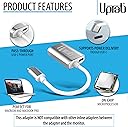
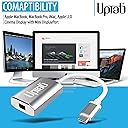
The UPTab USB-C to Mini DisplayPort Adapter delivers 4K@60Hz video and audio output with 24-bit color, supports USB-C Power Delivery pass-through, and offers plug-and-play compatibility with Thunderbolt 3 and USB-C devices including the latest M4 MacBook Pro/Air and iPad Pro. Its compact silver design fits perfectly into any professional setup, enabling high-resolution display connections without sacrificing charging capabilities.


| ASIN | B01N4FQNYW |
| Best Sellers Rank | #26 in USB-to-VGA Adapters #3,961 in Computer Cables & Interconnects |
| Brand | uptab |
| Color | Silver |
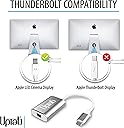
| Compatible Devices | All Mini DisplayPort Monitors, Apple Cinema Display Mini DisplayPort Version |
| Connector Type | Mini DisplayPort, USB Type C |
| Customer Reviews | 4.5 out of 5 stars 1,189 Reviews |
| Finish | Silver |
| Item Dimensions | 6 x 1.25 x 0.25 inches |
| Item Weight | 0.05 Kilograms |
| Item dimensions L x W x H | 6 x 1.25 x 0.25 inches |
| Manufacturer | UPTab |
| Mfr Part Number | UP-USBC1009-SL |
| Model Number | UP-USBC1009 |
| Number of Items | 1 |
| Number of Ports | 3 |
| Package Quantity | 1 |
| Power Plug Type | Type C |
| Smart Home Compatibility | Not Smart Home Compatible |
| Specific Uses For Product | Monitor |
| UPC | 616320248376 |
| Unit Count | 1 Count |
| Warranty Description | 1 Year Limited Warranty |
| Warranty Type | 1 Year Warranty |
R**7
Worked great to connect MDP Apple cinema display!
After purchasing, I used this item to connect a 2010 Apple Cinema display with a Mini Displayport connector to a Thunderbolt-4 connector on a 2024 Mac mini M4. It worked perfectly, without a glitch. The monitor appears to have full capabilities, after also connecting the monitorโs USB type-A connector to an ancillary dock on the same Mac. That last action enables the camera and the ability to have adjustable audio output from the monitorโs speakers.
B**Y
Plug and play
This little thing works as advertised. Iโm using it to connect a newer MacBook Pro to an Apple Cinema Display. After many tries of different products that did not work, this one does. Some are noting that the dongle heats up? Iโm not experiencing this, mine does not seem to rise above room temperature, even if on all day. But Iโm also not using the power pass-thru, which I know will cause resistance issues and waste heat. Overall, works as advertised.
R**S
Works wonderfully
Works wonderfully with my 2018 MacBook Pro, partnered with a seasoned Apple 27" LED Cinema Display.
N**S
Clear High Res Video
This adapter works as expected when directly connected to my M3 MBA. It might work with certain hubs or docks, but I didn't have success with the StarTech DKM31C3HVCPD which features a USB-C port with Alt Mode. I used this adapter in conjunction with the Apple mDP to DL-DVI adapter to connect my ACD 30" display. You'll need a separate USB to USB-C adapter since the Apple adapter is active and requires power.
T**M
Works to connect M1 MacAir to Apple LED Cinema Display
This adapter worked for me to connect a November 2020 M1 MacBook Air to a 2009 Apple LED Cinema Display 24-inch (1920 ร 1200) Model number: A1267. This display has a 3-part cable with Mini-Display, USB, and power. In order to fully function, both the Mini-Display Port and USB both need to be plugged into to the Macbook, and yet this adapter only has the Mini-Display port. That means you also have to have another adaptor to connect the USB. Without that USB, brightness control, the USB ports on the back of the display, and perhaps other functions won't work. To solve this problem I also purchased an adapter (Aukey 6-in-1) having a USB port. However, this means that with this external display working I have no other ports available since since the M1 Macbook Air only has 2 USB C ports. That means that I can't, for example, plug an external hard drive into that port. It's true that this adapter also has a USB C port, but I tried plugging the second adapter into this port and it did not work. That's because the USB C port on the adapter is only for power pass through. Other than that limitation, I'm happy with the purchase because it looks nice, appears to be a quality product, and allows me to keep using this perfectly functioning 12 year old monitor.
C**S
Used to connect Dell laptop to Mac Cinema Display from 2008!
Hi everyone! So I have a DELL Latitude 5401 laptop from work, and I wanted to connect it to this giant 24" Apple display monitor (from 2008, its called a cinema display, looks like they don't make them anymore). Multiple problems included the Apple monitor having an old mini display port (which is pretty much obsolete tech) as well as having a hard time finding adapters that would connect properly to both systems. Also, I have a USB-C port charger for my dell, and it only has the one port.......Thankfully this adapter worked for me, I was able to simultaneously hook up the monitor AND charge my laptop :) PROS: - connects to a mini display port with no quality issues - the additional USB-C port allows me to charge my laptop AND connect to the monitor - worked on 2008 Apple Cinema Display monitor - worked on Dell Latitude PC laptop CONS: - although it is charging my laptop, I recently saw a pop up on my laptop that said it was charging at a low speed. No biggie since I leave it connected the entire time it is in use - the USB-C port on the adapter (which I am using to plug in my charges) is on the same side as the USB-C connector, so it makes it kind of awkward to plug in my charger as it twists the cords up a bit. - the length is fairly short for my use (I think extra length would make it less awkward to plug in to the USB-C port) and it would have been nice to have a couple more inches on the adapter to make it more "flexible" for my setup...this is totally a FIRST WORLD problem as not many adapters out there on Amazon even have this capability
N**R
Perfect for my Mac mini M4 and 12 year-old apple cinema display
I have a 12 year-old Apple cinema display and needed a way to connect it to my new Mac mini M4. This did the job perfectly. Be aware, you do need to plug the USB cable from the monitor into the USB port on front of your Mac mini. This will require a standard USB a to USB-C adapter. That said it works perfectly.
J**.
Works great
Fast shipping fixed the issue with my monitor flashing.
Trustpilot
1 month ago
1 week ago