Buy anything from 5,000+ international stores. One checkout price. No surprise fees. Join 2M+ shoppers on Desertcart.
Desertcart purchases this item on your behalf and handles shipping, customs, and support to Italy.
🎮 Level up your PC gaming with wireless Wii U Pro power — no compromises, just pure play.
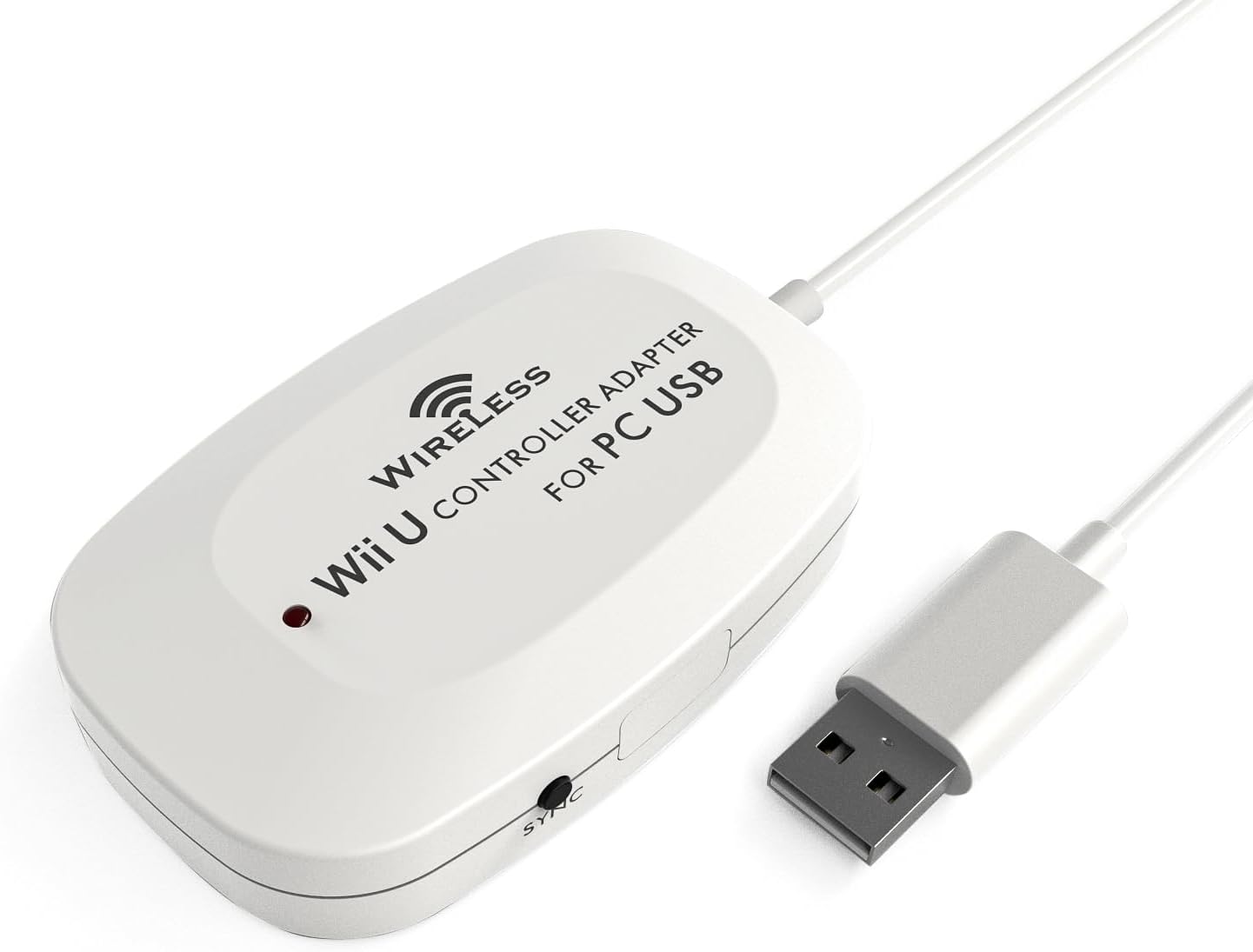
The MAYFLASH Wireless Wii U Pro Controller Adapter connects your Wii U Pro controllers to your PC via USB with Bluetooth v2.1 EDR, offering up to 33 feet of wireless range. It supports both Direct Input mode for up to 4 controllers simultaneously and Xinput mode for single-controller compatibility with Xbox-based PC games. Features include turbo button customization, vibration feedback with no latency, and broad Windows OS compatibility, making it a versatile and cost-effective solution for gamers wanting to repurpose their Wii U controllers on PC.
| ASIN | B00E6553PW |
| Best Sellers Rank | #38,378 in Video Games ( See Top 100 in Video Games ) #13 in Wii U Adapters #93 in Wii Adapters #6,019 in PC Accessories |
| Brand | MAYFLASH |
| Color | White |
| Compatible Devices | Desktop, Gaming Console, Laptop |
| Connector Type | USB Type A |
| Customer Reviews | 4.5 out of 5 stars 710 Reviews |
| Finish | Abs |
| Global Trade Identification Number | 06902012051404 |
| Item Dimensions | 4 x 2 x 0.7 inches |
| Item Weight | 0.1 Pounds |
| Item dimensions L x W x H | 4 x 2 x 0.7 inches |
| Manufacturer | MAYFLASH |
| Mfr Part Number | W009 |
| Model Number | W009 |
| Number of Items | 1 |
| Number of Ports | 1 |
| Package Quantity | 1 |
| Smart Home Compatibility | Not Smart Home Compatible |
| Specific Uses For Product | gaming |
| UPC | 796594141341 634041327040 |
| Unit Count | 1.0 Count |
| Warranty Description | 30 days |
J**.
Works as advertised, firmware update can be finicky
Does exactly as advertised here, it's a no-nonsense PC adapter for your Wii U Pro controllers. There are some oddities with its direct input mode which render it incompatible with Steam - it will detect that you have a controller plugged in, and you can even navigate around the menus with the dpad / analog sticks, but you can't change the configuration at all and it accepts no other controller inputs. I suspect this may have something to do with how the adapter presents itself in direct input mode, and how steam expects to receive controller input. Steam does not automatically load a user profile for this controller either, so I suspect that nobody else has figured this out and that i'm not the only one with the problem. If you were planning to use this device with Steam Big Picture mode (say, for in-home streaming and multiple Wii U Pro controllers, for example), this will not work for you. Steam only recognizes it and accepts input from it in xinput mode, which only allows you to use one controller per adapter. It is 100% functional as an xinput device, all xinput compatible software sees it and accepts it as an xinput controller in that mode. As shipped, the button mapping is 1:1 (ie: A=A, B=B, X=X, Y=Y), even though Microsoft and Nintendo place these buttons in different locations on the controller. A firmware update released in February of this year allows you to press a button combination on the controller in order to reverse the mappings, which places the buttons back where you'd expect them to be. The software could've been a little more intuitive, though - I couldn't get it to work on my primary computer, and their directions left me wondering if I was just doing something wrong. So, here's what you have to do: Download the firmware updater from maysoft's website, and run it as administrator. You'll see a single greyed out button that says 'update firmware'. Unplug the device, and set it to xinput mode. Press and hold the sync button, and keep it held as you plug it in. If you did it right, Windows will detect a different device than usual, and the red light on your adapter will NOT light up. At this point, the 'update firmware' button on the software will be clickable, and you can proceed to update the firmware. Leave it plugged in until the software tells you that the update was completed, it shouldn't take long. If this process exactly as I described doesn't work for you, something went wrong in the process and your only real choice is to try it on a different computer, which can be inconvenient or simply not possible for some. Since it's a firmware change on the device and not a software update on your OS, once updated, the button combination will work to change the button layout no matter what computer it's plugged into, which is nice. With this update, the controller can be considered to be completely interchangeable with every other Xinput device on the market, and no longer requires its own special button mappings. I previously gave this adapter 4 stars, but now that they've updated it, I believe it's worth 5 stars.
A**D
Works great, quick painless setup
Works great, quick painless setup, inexpensive, I love it! I split my video gaming between a home built gaming rig and a Wii U console. I was considering purchasing an xbox controller to use for gaming PC, until I started researching if I could use my Wii U pro controllers on PC and this adapter does the trick perfectly and sames me money! I love the feel of the Wii U Pro Controller and with certain style games a gamepad just feels right (I'm currently playing Gauntlet with it). I still play FPS and strategy games with Keyboard+Mouse, but this gives me more game play options for other types of games and allows me to give dual purpose to controllers I already own for my Wii U. Note: I think most modern games on Steam support gamepad controllers but only Xinput (not Dinput). With Gauntlet for example I have to use Xinput, which means only one of my Wii U Pro Controllers with this adapter. So for something like Lego Star Wars Complete Sage where local co-op play (2 people playing in the same room on one computer) I will likely have to get a 2nd one of these adapters for my 2nd controller for both pro controllers to work at the same time. If the game supports Dinput then up to 4 can be used on one adapter. This adapter allows you to switch between Dinput and Xinput (I cut the notes below directly from Mayflash's website) ●If the Input Switch is set to the "Direct Input" mode, the controllers are recognized as standard Human Interface Device. Your controllers can be calibrated at the Windows Gamepad Setup screen. Up to four controllers can be recognized by a single adapter while in this mode. ● Setting the switch to "Xinput Mode" will make it possible to fool certain PC games which lock out proper input modes from the user unless an Xbox controller is attached (for a list of these games, check Wikipedia). While in Xinput Mode Vibration Feedback is available. The drawback is that while in this mode, only one controller can be recognized by the adapter.
B**K
Very Simple, Very Good
For the longest time, I've been trying to find ways to use Wii controllers on my PC. I started off with bluetooth adapters and a cavalcade of programs that ended up not working too well. I had purchased a Wii Classic Controller to USB adapter and used that for awhile. Though, given the superiority of the Wii U version, I had always wanted to use it. To my excitement, I discovered that this product exists. First and foremost, it's the most simple thing you could ask for. There is no software to customize or drivers to install; you plug the unit into your system, hit the sync button on the unit and on the Pro controller, and everything works seamlessly. It has two modes: X-Input and Direct. X-input mode emulates an Xbox 360 controller, whereupon the rear triggers function as analog and the rumble works perfectly. The only caveat is since this is a Nintendo controller, AB and XY are in their respective Nintendo locations, so the bottom button presses as B and the right button presses as A and so on. In Nintendo games, it works as it should. In most PC games, though, you may need to remap the buttons accordingly. Also, in X-Input mode, only one controller works per adapter, so in a situation where you would like four wireless controllers on your PC, you would have to either buy four adapters or use Direct Input. DI mode supports four controllers with one adapter, but the ZR and ZL buttons become digital and the rumble doesn't operate. With that said, the Wii U Pro Controller is my favorite gaming controller. I've used Dualshock 3, Xbox 360, XBox One and PS4 controllers, and this one is still my favorite. You really can't argue with the 80 hour battery life, either.
D**Z
Very nice supplement to Wii U Pro Controller
This device allows up to four Wii U Pro Controllers to connect to the PC and interact as human interface devices, which is perfect for general PC games. The controllers react to the PC without delay and without a hassle for setup. Just plug in the device to a USB port and let it seek for any controllers, just like a Wii (U). I have even tested it with the Afterglow Wii U Pro Controller, a third-party decice, which would not be recognized by traditional Bluetooth communication, unlike the official Wii U Pro controller. Nevertheless, regardless of the brand, the controller operates perfectly. In addition, the adapter allows the controller to operate as an Xinput device, which is very useful for games requiring the official Microsoft controller. One adapter will only allow one controller connected in this mode, but, for the majority of PC games which use only one Xinput gamepad, it's not a problem. The controller still interacts and emulates the Microsoft Xbox controller, from the thumbsticks right down to the triggers. There may be methods to connect the controller to the PC, and such techniques simply require a Bluetooth adapter and the right drivers. However, when I could not get my Afterglow to be recognized by my adapter, I veered to this solution instead, and I do not regret it. Even the light-up LED feature on my third-party controller functions with no fail, and I would not consider any other method to attempt, given the money invested and the payoff from the device's reliable functionality.
B**W
AMAZING! My PC picked this adapter up no problem ...
AMAZING! My PC picked this adapter up no problem and treated it as an official Xbox 360 controller. This is actually better than using the official Xbox 360 controller, because the PC sees this adapter as always connected. The official Xbox 360 adapter will disconnect if the controller is turned off, causing some inconvenience. Pairing a Wii U Pro controller was stupid easy. Press sync button on receiver. Press sync button on contrller. Wait a few seconds. Gold! It's worth noting that there is a software update for this adapter that will allow you to remap the buttons (it swaps the A and B buttons to make the Wii U Pro controller behave more like an Xbox 360 / Xbox One controller). The software update can be found on Mayflash's website. I've owned this device for over a year now and have had NO issues. I'm an avid gamer and use this adapter just about every day. It has just as good range as the original Xbox 360 controller. I'm able to control from 20 feet away in a different room.
N**Y
The unit is broken and Mayflash has been unwilling to ...
The unit is broken and Mayflash has been unwilling to work with me to get a new unit sent out. I successfully installed the device and synced my Wii U Pro controller with the device in DINPUT mode and it worked as expected, though the sticks weren't working right. I saw online that I would either need to program the DINPUT setting or simply switch to the XINPUT mode to emulate a 360 controller. As soon as I switched the device to XINPUT mode, my computer blue screened. I tried everything. Uninstalled, reinstalled (from the website, obviously), blue screened. System restore, install, blue screen. Nothing worked. So I wrote an email to Mayflash and explained my situation and requested that a new unit be sent to my house in a box with return shipping paid for so I could send the defective unit in for testing. After a week with no response, I resent the message. I finally got a response in broken English suggesting I try it on a different computer. Of course I did and it also blue screened that computer. I still have not received a response back from Mayflash and that's been over a week ago again. I am on a 64 bit Windows 7 machine. I'll update this review if I ever hear back from Mayflash.
T**.
Great for 1 Player. Buy Multiple for Multiplayer
Pros: -Works great for 1 player games. Everything works in Xinput, even the rumble. If you don't update then the home button works too, but you need the update to switch the A/B X/Y by holding + and effective A at the same time. -Get to use lovely Wii U Pro controllers. Love their feel and battery life. Cons: -Only problem is that the 4 player Dinput only works for some games. I've been able to get it to work with "Lovers in a Dangerous Spacetime" and that was because it had a gamepad recognition option in the options menu. All other games I have been unable to get it to work correctly with for 4 player. I've tried all different kinds of key binders and Dinput to Xinput converters, and, despite most of them recognizing the controllers and even their inputs, for some reason I can't get the games themselves to recognize them. It is very frustrating.... If anyone knows an actual way around this then please do tell. The only way that I've tried now that works is getting another of these... But that is a rip off by Mayflash because you have to buy 4 of these for $80 worth to get full 4-player controllers. I have a weird feeling that they did it on purpose, however, it could also be contributed to the processing power of the adapter or USB speed...
E**D
Surprisingly Awesome
My expectations were fairly low, but I was pleasantly surprised by how well this product works on my PC. It seems quite reliable and there's absolutely no problem using my Pro Controller with emulators. No joystick calibration issues, no issues with recognizing the adaptor, and no problems with the adaptor becoming disconnected. The adaptor is quite durable-looking and doesn't feel like it's going to fall apart when I hold it, which puts it ahead of almost every other low price USB gamepad or adaptor I've purchased. And since it's wireless, there's really no stress placed on it during use. So, while I can't guarantee long-term function, this seems to be a very solid product and I'm glad I bought it. The turbo mode is also surprisingly easy to use and better than most turbo options. Just hold a button and press Home to toggle between normal, turbo when pushed, and continuous turbo. It's fast enough to switch between modes regularly in normal gameplay.
F**E
Indispensabile per chi ha un pc, una ps3 e un Wii U
Il prodotto funziona alla perfezione e viene riconosciuto senza bisogno di driver come controller xbox 360. I tasti sono mappati 1:1 (A>A) quindi rispetto ad un pad 360 le due coppie di bottoni saranno invertite. Il tasto home funziona come il tasto guida del pad xbox ed è perfettamente supportato dallo steam big picture. Per quanto riguarda l'altra modalità di funzionamento,la dinput, essa consente di collegare fino a 4 controller a un solo ricevitore (la modalità precedente mappa massimo 1 pad per ricevitore) everranno riconosciuti come pad generici. La cosa bella di questo adattatore è che mettendolo in quest'ultima modalità esso funzionerà perfettamente anche con una ps3 e in questo caso i tasti saranno mappati come quelli di un pad playstation (A>O, B>X, etc...). Prodotto veramente consigliatissimo!
R**N
Works perfectly!
The Wireless Wii U Pro Controller Adapter for PC USB is surprisingly small with a long USB cord. The build quality seems fine. The adapter comes with a mini CD that installs drivers for the adapter, the software is tiny and has no bloatware or obtrusive tray items, you'd never know it was installed. I have two official Wii U Pro Controllers and have had no problems connecting both to the adapter. Syncing takes seconds, after use you will have to re-sync your controllers back to your Wii U if you own one. Using D-Input, when the adapter is active 4 separate controller inputs are added as input devices. I thought I might have to key-map the inputs but this isn't the case. Buttons and directions are assigned to games as you would keys. I had no problems with range in my sitting room, I haven't tried using the controllers beyond that distance. There were no problems pressing several buttons at the same time (an issue with keyboard mapping) and there was never any missed lag or missed inputs. The controllers felt as responsive as they would on the Wii U. Using X-Input the PC recognized the Pro Controller as a 360 controller, I haven't had much experience using the method, but it's artificial identity was successful. Overall I'm entirely satisfied with the adapter, it delivers what it promises with convenience and no obtrusive software habits.It would sit better in my set-up if it was black but that's not a real problem, and it's easily hidden. For the price it definitely deserves 5 stars.
C**O
Un producto fascinante
Un producto de calidad, se ve sencillo pero hace su trabajo, me gustó bastante. Llegó en tiempo. Así podre sacarle provecho a mi control Wii U pro
W**N
Plug and Play! Button Layout an Wii U Controller angepasst!
Ich muss sagen, dieser Adapter ist wirklich sein Geld wert. Nachdem der Adapter angeschlossen wurde, wurde er automatisch erkannt(Windows 7 64 Bit). Das Adapter ist auf XInput eingestellt, somit wurde der Controller nach der Synchronisation(welche nach Drücken der beiden Sync Buttons reibungslos funktionierte) sofort als Xbox 360 Controller erkannt. Ich musste keine zusätzliche Software oder Treiber installieren. Habe den Controller mit 2 Spielen ausprobiert, welche den Controller als Xbox 360 Controller erkannt haben. Somit werden alle Bedienelemente automatisch mit den Buttons des Xbox 360 Controllers angezeigt, wie man das von einem orginalen Xbox 360 Controller her kennt. Wie bereits in anderen Rezensionen beschrieben, sind die Belegungen des Wii U Controllers und des Xbox 360 Controllers nahezu identisch. Nur der Viererblock mit den Buttons Y,X,B,A sind quasi umgedreht. Ich war daher überrascht, dass die Belegung der Buttons dem Wii U Controller angepasst werden. Sprich wird z.B der A-Button angezeigt, muss auf dem Wii U Controller auch der A - Button gedrückt werden, trotz der unterschiedlichen Anordnung. Hatte die bisherigen Resenzionen immer dahingehend verstanden, dass das Layout identisch bleibt, und somit z.B bei Anzeige des A-Buttons auf dem Wii-U Controller der B-Button gedrückt werden muss. Sofern man nicht vorher permanent einen Xbox 360 Controller genutzt hat und somit die Buttonanordnung in Fleisch und Blut übergegangen ist, finde ich so eigentlich besser und weniger verwirrend, dass die angezeigten Buttons auch den tatsächlichen Buttons des Wii U Controllers entsprechen. Die Reichweite des Adapters ist ähnlich gut wie bei der Wii U. Auch in mehreren Metern Entfernung funktioniert der Controller noch ohne Abbrüche. Da lobe ich mir die Bluetooth Technologie. Die Rumble Funktion funktionierte auch auf Anhieb ohne zusätzliche Treiber. Mit diesem Adapter wird der Wii U Controller für mich wirklich zu einem der besten Controller für den PC.
A**H
Nickel Chrome !
Reçu aujourd'hui, du coup je vais pouvoir répondre aux 2 questions que j'avais posé : Est ce que quelqu'un l'a testé avec Assassin's Creed Unity sur PC ? OUI et c'est marche impeccable !!! Est ce que c'est compatible avec cette manette : Manette pro sans fil afterglow pour wii u ? OUI donc tout est parfait ! S'installe en 2 secondes, synchronisation immédiate, et aussi pour amazon, livraison ultra rapide !!!! Il y a effectivement une LED rouge qui clair en permanence mais comme je l'ai planqué derrière la tour, on ne voit rien, sinon : chaterton !!! J'espère juste que ca va tenir dans la durée ! Je suis très très satisfaite (et c'est pas toujours évident !!!)
Trustpilot
1 month ago
3 weeks ago