We remain fully operational. Our teams are working around the clock to ensure your deliveries continue safely.

DOWNLOAD THE APP


Customer Services
Copyright © 2025 Desertcart Holdings Limited
DOWNLOAD THE APP


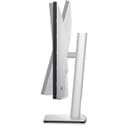



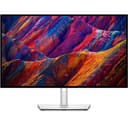


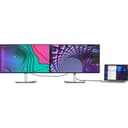

🚀 Elevate your workspace with ultra-sharp clarity and power-packed connectivity!
The Dell UltraSharp U2723QE is a 27-inch 4K UHD monitor designed for professionals seeking crisp visuals and versatile connectivity. Featuring a 3840x2160 resolution at 60Hz, 400-nit brightness, and a fast 5ms response time, it supports HDMI, DisplayPort, and USB-C with 90W power delivery. Its ergonomic adjustments and anti-glare coating make it ideal for productivity, gaming, and multimedia, while FreeSync ensures smooth visuals. A sleek, thin-bezel design complements any modern desk setup.
| ASIN | B09TQZP9CL |
| Adaptive Sync | FreeSync |
| Additional Features | Blue Light Filter, Height Adjustment, Pivot Adjustment, Swivel Adjustment, Tilt Adjustment |
| Aspect Ratio | 16:9 |
| Best Sellers Rank | #15,719 in Electronics ( See Top 100 in Electronics ) #441 in Computer Monitors |
| Brand | Dell |
| Brightness | 400 Nits |
| Built-In Media | Information Not Available |
| Color | Black, Silver |
| Color Gamut | 100 |
| Compatible Devices | Laptops, Desktops, Gaming Consoles, Multimedia Devices |
| Connectivity Technology | DisplayPort, Ethernet, HDMI, USB |
| Contrast Ratio | 2000:1 |
| Customer Reviews | 4.4 4.4 out of 5 stars (1,022) |
| Display Resolution Maximum | 3840 x 2160 |
| Display Technology | LCD |
| Display Type | LCD |
| Hardware Connectivity | HDMI, USB, USB Type C |
| Has Color Screen | Yes |
| Is Electric | Yes |
| Item Dimensions D x W x H | 15.2"D x 24.1"W x 7.3"H |
| Item Weight | 14.6 Pounds |
| Manufacturer | Dell Technologies |
| Model Name | UltraSharp |
| Model Number | U2723QE |
| Mounting Type | Wall Mount |
| Native Resolution | 3840x2160 |
| Number of Component Outputs | 1 |
| Picture Quality Enhancement Technology | VESA DisplayHDR™ 400 |
| Pixel Pitch | 0.15 |
| Power Consumption | 90 Watts |
| Processor Count | 1 |
| Refresh Rate | 60 Hz |
| Resolution | 4K UHD 2160p |
| Response Time | 5 Milliseconds |
| Screen Finish | Matte |
| Screen Size | 27 Inches |
| Series Number | 2723 |
| Shape | Flat |
| Specific Uses For Product | Gaming, Desktop |
| Total Number of HDMI Ports | 1 |
| Total USB 3.0 Ports | 5 |
| Total Usb Ports | 8 |
| UPC | 884116415589 |
| Unit Count | 1.00 Count |
| Viewing Angle | 178 Degrees |
| Voltage | 240 Volts |
| Warranty Description | 3 Year Manufacturer |
| Warranty Type | 3-year manufacturer warranty |
S**E
Mac OS Scaling is perfect.
This is the perfect casual Mac OS monitor. The 4k is crisp, the colors are very nice. I have no idea if visual creators will like this, but it works very well as a productivity monitor. The screen finish allows me to see it beside a bright window. The build is very nice but not 'expensive' feeling; it's plastic, which means it isn't heavy to move around on a stand or a monitor arm. Dell has also a massively improved joystick toggle to replace its old squishy buttons on the bottom of the screen; more akin to other major monitor brands. Another great thing about this monitor is that it can double as a USB-C hub (a single cable plug and play solution for your laptop). I plan to get a 2nd and place them side by side. The only thing I miss is a high refresh rate, but I could not find a 4k monitor at 27inches with a screen refresh higher than 60htz. It just does what I need it to do, which is great.
J**S
Full-featured, high quality monitor
I originally used this monitor with a dell XPS 15 and now use it mostly with a MacBook Pro 16 as well as a windows laptop for work. The monitor handles all these devices very well, and I keep my work laptop plugged in at all times with a permanent cable, while using another cable to connect my MacBook as needed. This single usb-c cable also charges my MacBook at 90W, which is more than enough even with the M4 Max processor under load. The screen quality is great. I haven't used a 5k/6k and this is definitely no studio display, but for writing and reading code, web browsing, and even some photo editing it serves me very well. The included stand is sturdy and smooth to adjust height and rotation of the screen. I dont mind 60Hz, but I would not recommend this monitor if you game a lot myself. Moving from my MacBook with the 120hz promotion display to this monitor isn't noticeable to me, for purposes of regular work and productivity tasks. The main draw for me to this monitor in particular compared to other competitors is the design. It is sleek, and has thinner bezels than most other options on the market. If you can get it on sale, I think its a good value, highly practical monitor that I am happy to recommend.
D**4
Sharp 4K USB-C Work Monitor - Built-In KVM switch is awesome for WFH
U2723QE is a productivity beast: crisp 4K text, tons of workspace, and USB-C makes a clean one-cable laptop setup with extra ports. Built-in KVM lets me share keyboard/mouse between two PCs easily. Colors look accurate after quick tweaks. Not ideal for HDR/gaming 60Hz and some IPS glow in dark rooms. Bose speaker quality sound
E**R
Beautiful Monitor. Minor Issue
I purchased the 27" version U2723QE - Looks beautiful, works great, and supports both my MacBook Pro and ThinkPad X1. The setup was easy and fast. I was up and running in about 5 minutes. The picture is sharp and clear. No ugly Dell branding or logos on the front. Plenty bright even next to my window with direct sunlight. One thing I didn't realize at first - No speakers, no sound. No biggie. The monitor/stand can be a little wobbly if I have to connect or disconnect anything, but that's not really an issue either. I know there's a built-in KVM switch if I want to have multiple computers connected at the same time, but I wasn't happy about needing all the extra cables, so I bought a separate USB-C switch, that only needs one cable from each laptop, and then a single cable into the monitor. All of my external peripherals (keyboard, mouse, audio interface, etc.) - Those are all plugged in directly to the monitor. Which means I can easily switch between work and play no problem. This is definitely the nicest monitor I've ever bought. Only one minor issue, which is why I didn't give it 5 stars - After a long period of inactivity, and even with everything plugged-in and connected to power - The monitor will fail to recognize the USB-C connection. This is a known problem, although I went crazy thinking something died. The solution is to unplug the actual power cable from the monitor, and give it a good 5 minute break before plugging it back in. This resets the USB-C connection and then everything will work just fine. It's not an ideal scenario having to do this so often, and there is no updated firmware fix. It is what it is.
J**S
Great monitor!
Beautiful monitor. Great resolution and color. Bright enough for use in bright rooms. Cant beat the price.
K**Y
Excellent monitor
Great monitor. I was a little challenged at the beginning - there is a little switch on the back of the monitor that moves up, down, left, right- no where was that explained. After that, all was good
E**E
Múltiples puertos y la funcionalidad de conectarlo con USB-C y que cargue al mismo tiempo es una maravilla. La resolución de imágenes excelente !
B**.
Macbook M1 ve M2 kullanıcısıyım. İki cihazı da kendi Type-C kablosu ile yansıtmayı başaramadım fakat monitor ile birlikte gelen Type-C kablo ile yansıtabildim. Sanırım görüntü aktarma özelliği olan kablo gerekiyor. İçinden bir tane Type-C - Type-C kablo çıktığı için diğer bilgisayarı HDMI ile bağladım. Sorunsuz çalışıyor. İkinci Type-C portunu başka bir kablo alınca deneyeceğim. Bir de sanırım bir tanesini sarj edebiliyor sadece bu da mantıklı. PS5 ile benim beklentim minimum seviyede olduğu için ben makul seviyede buldum ama tabiki sırf oyun için alınacak bir monitor değil. daha çok iş ve görsel düzenleme ağırlıklı kullanılabilir.
A**R
Great color and pixel density. Best screen I've ever owned of a computer to date
S**T
I tried two monitors from Amazon PD series from BenQ and an ultrawide from LG. Both had low brightness and their pros and cons. I wanted to get a perfect sized monitor for coding and YouTube and Netflix. This one fits and checks all the boxes. With its almost glossy screen contrast is amazing with ips black, huge difference as compared to others like PD series from BenQ. It has amazing dci p3 color gamut produces amazing colors and with 4k 27inch great text clarity while coding. It's little pricey but worth every penny.
C**E
Excellent quality monitors, with inbuilt KVM setup which makes it easy to use with two computers.
Trustpilot
2 weeks ago
1 week ago