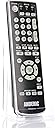
🌟 Own your entertainment universe with the Anderic RR3UNV—control, glow, and conquer!
The Anderic RR3UNV is a compact, universal remote designed to control up to three devices including TV, DVD, VCR, and audio systems. Featuring glow-in-the-dark buttons for easy use in low light and a user-friendly learning function for quick programming, it’s ideal for both home and hospitality environments. Equipped with essential controls like Sleep and Closed Captioning, this remote combines convenience, versatility, and intuitive design powered by 2 AA batteries.
| ASIN | B06WP71WWL |
| Batteries | 2 AA batteries required. |
| Best Sellers Rank | #77,955 in Electronics ( See Top 100 in Electronics ) #4,464 in Remote Controls (Electronics) |
| Customer Reviews | 4.3 4.3 out of 5 stars (11) |
| Date First Available | February 16, 2017 |
| Is Discontinued By Manufacturer | No |
| Item Weight | 2.89 ounces |
| Item model number | RR3UNV |
| Manufacturer | Dan's Electronics Etc., Inc. |
| Product Dimensions | 5.5 x 2 x 1 inches |
D**E
Excellent Learning Function
This remote is easy to program using the ""Learn"" function, but the two remotes must be 1-3 cm apart. That's about an inch. Other learning remotes I have used allowed for more distance. Still, if you keep them that close, the learning function works well. I did not try the programming function where you enter a code. I had a learning remote that I was using, but it required precise aiming since the signal pattern was very narrow. Often I had repeat the pushing the key after adjusting my aim. This remote has a wider signal pattern so you don't have to aim so precisely. That's a big plus for me. The OK button and the surrounding arrow keys are well spaced. The description says the keys are "glow" keys, but even in a completely dark room, I see no glow.
T**R
Works well, offers flexibility in button assignments
Wasn't the easiest to setup because instructions were very clear. I think I turned to YouTube in the end, but it works well once setup. I only use it for one device (TV) though.
K**.
Couch-Potato H.E.A.V.E.N.
My new universal "learning" remote arrived, this morning! Already, I have it programmed to operate my 75" Vizio Smart HDTV and my "old-school" faithful DVD player, plus a Ceiling Fan, too! I spent about 45 minutes tinkering with the buttons, it felt almost like I was "sculpting" a work of art? I really like having full-control over my ever-growing assortment of remotes. I managed to make every single button, DO exactly what I wanted them to DO, even the difficult unique "feature" buttons? Not to mention my Region-Free DVD player with it's difficult-to-learn cheap remote control, now has been perfectly programmed, like Magic! (wow!) In Short, my Remote-Control MESS is now Remote -Control H.E.A.V.E.N. I am very pleased with the Quality & Functionality of this Product, not to mention the low price!
K**5
A great universal and learning remote, but the "select/OK" key is not learn-enabled
Probably the easiest remote to set up that I've ever had. Required only a couple of minutes to link to me Samsung TV; all the keys worked except one (to bring up the EPG guide), but this key could be learned manually. For the old PC that I use for a DVR, the learning function on the remote was simpler and quicker than that on any pure learning remote I've ever used. With one exception: the "select/OK" button on the remote is not a learning-enabled key--I had to program another button on the remote to function as an the "enter" key for the DVR/PC. If it were not for this one flaw I'd give this remote 5 stars for being nearly perfect.
J**S
Works great, now have 1 remote instead of 3.
Works great. I was substitute 3 remotes for 1. I did the option of learning from the old remotes. Was easy to do.
G**.
Hybrid IR learning and programmable remote
The other review said only power worked - there are multiple codes per brand, and you might need to try different ones. Better yet, if you have the original remote, you can program each button to do what you want to do. The only issue I had with this was mute on a Sony remote (or a universal programmed for Sony) couldn't be learned successfully, but all the other buttons worked.
J**N
Nice universal replacement.
It works! Instructions are a bit erratic..so in my case I did turn the device (SONY Dvd Player) on manually, then pressed the DVD button, then pressed the POWER button 5 seconds. The DVD light (RED) will come on..then this got tricky. In the back of the included booklet, there are 5 or 6 codes..I had to try them all to find one that engaged all buttons, but I finally did. Each 4 digit code, after input, will turn off the red light. Then you can try the buttons..hit and miss-keep trying the included codes.. I haven’t tried on any other devices as its not needed, but I imagine it will work.
S**P
Only power button worked
Our television was listed as one of the compatible devices with this. The power button worked, but none of the other buttons did anything (yes, we paired it with the tv).
Trustpilot
5 days ago
3 weeks ago