We remain fully operational. Our teams are working around the clock to ensure your deliveries continue safely.

DOWNLOAD THE APP


Copyright © 2025 Desertcart Holdings Limited
DOWNLOAD THE APP
Buy anything from 5,000+ international stores. One checkout price. No surprise fees. Join 2M+ shoppers on Desertcart.
Desertcart purchases this item on your behalf and handles shipping, customs, and support to Italy.
🔵 Elevate your CAD game with precision and wireless freedom!
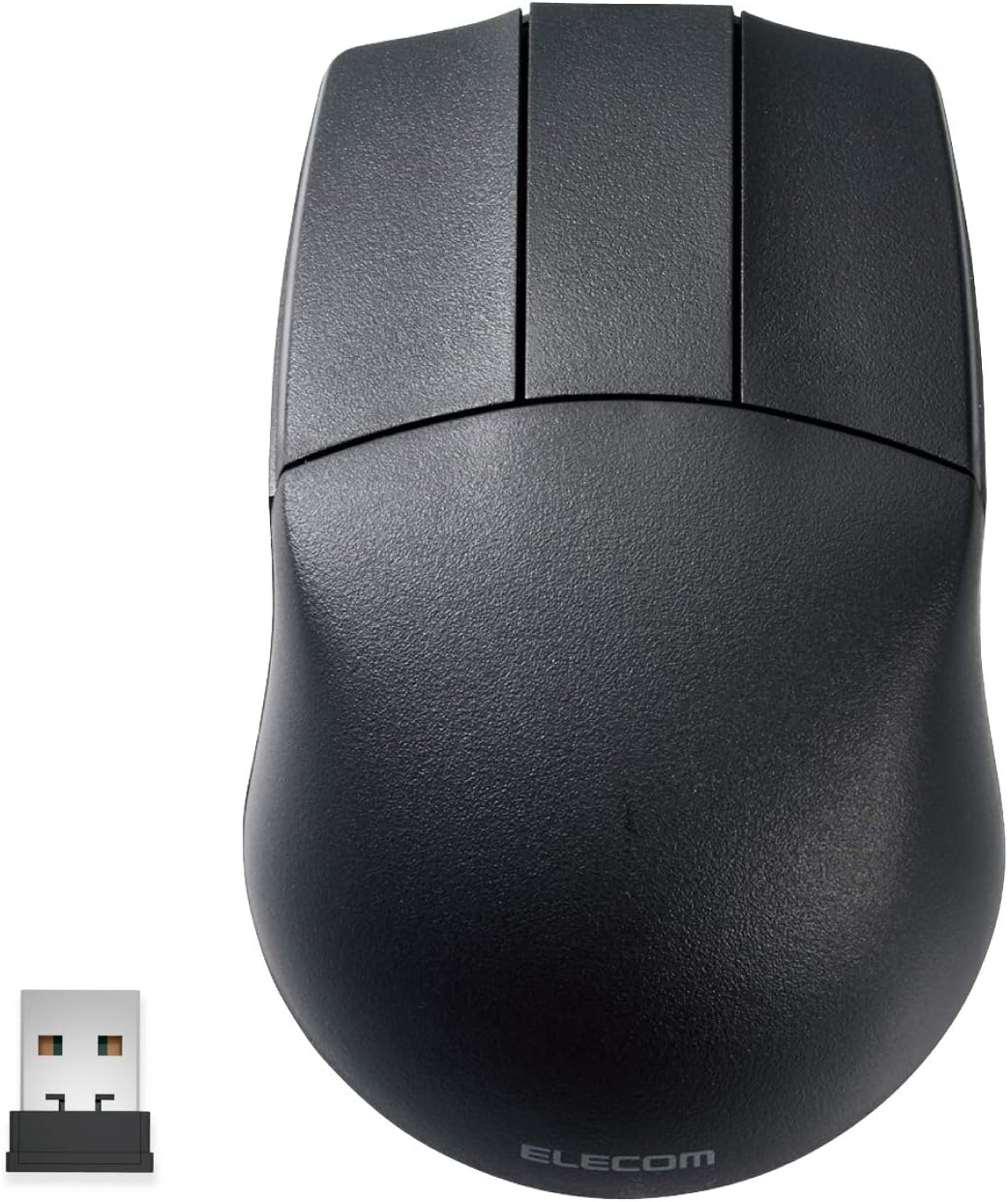
The ELECOM M-CAD01DBBK is a wireless 2.4GHz optical mouse designed specifically for CAD professionals, featuring adjustable 600/1200 DPI sensitivity, an ergonomic ambidextrous design, and a minimalist 3-button layout without a scroll wheel. Compatible with Windows and Mac, it offers smooth tracking with a blue LED sensor and long battery life, making it a reliable tool for focused, fatigue-free design work.


| ASIN | B07W3STDLR |
| Batteries | 1 AA batteries required. |
| Batteries Included | No |
| Batteries Required | No |
| Battery Average Life | 20 Months |
| Best Sellers Rank | #449,907 in Electronics ( See Top 100 in Electronics ) #1,066 in Mice |
| Brand | Elecom |
| Compatible Devices | Personal Computer |
| Connector Type | wireless |
| Country of Origin | USA |
| Customer Reviews | 4.0 4.0 out of 5 stars (413) |
| Date First Available | 11 August 2019 |
| Generic Name | mouse |
| Hand Orientation | Ambidextrous |
| Hardware Platform | PC |
| Item Dimensions LxWxH | 11 x 7 x 3.8 Centimeters |
| Item Weight | 63 g |
| Item model number | M-CAD01DBBK |
| Manufacturer | 0 |
| Material | Plastic |
| Model | M-CAD01DBBK |
| Model Name | M-CAD01シリーズ |
| Movement Detection Technology | Optical |
| Net Quantity | 1.0 Count |
| Number of items | 1 |
| Operating System | Mac,Windows |
| Power Source | Battery Powered |
| Product Dimensions | 11 x 7.05 x 3.8 cm; 63 g |
| Special Features | Wireless |
P**D
Good product
Good product. using since 15 days, working fine, Good quality. Best for cad designers, cad mouse. Size is perfect, feels ergonomically perfect to hands, no stress on hands. Bit costly.
T**G
Very Good Product
its a bit wider than i like... but overall pretty good
B**8
What it is NOT: - high quality feeling materials - highest dpi and refresh - modern gaming mouse - a super precise tracker. It not a fast feeling mouse if you’ve used a decent mouse before. What it IS: - surprisingly ergonomic - super simple to use - decent switches - exactly what you want in a CAD mouse BIG NOTES: 1. It isn’t ergo in the modern sense, but it is rotund and fills the palm. 2. Without the wheel your hand is free to hold it more freely. Again, shocked it’s this comfortable. 3. I actually like the use of batteries for a niche item like this. I can rest assured I will always be able to use it even when they stop making it. 4. It would be even better if I could still get the wired one….. 5. The dpi switch actually is weirdly handy. 6. The LED is indeed blue.
A**ー
space mouseと一緒にcad専用で使用。他の作業はトラックボールを使用。 壊れたのでもう一つ購入した後、ダメモトで分解清掃したら復活しました。3d connexionのマウスも気になるが、なんせ¥2,000そこそこだよ。 自分的には、3d mouseとの併用が必須でこれだけでは何も出来ません。普通のマウスでcadるとホイールが2,3ヶ月程度で壊れるのと、右手だけでグリグリやってると腱鞘炎になってしまう。 おすすめします。
エ**ン
cad用の無線マウスとしては非常に使いやすいが、pc作業と併用で使うにはスクロールホイールが欲しくなる。 ホイール付きであれば満点なのだが。
S**N
I picked up the ELECOM 3D-CAD Wireless Mouse for animation work, and it’s surprisingly effective. It doesn’t have a scroll wheel, which took a bit to get used to, but it actually helps avoid accidental zooming or panning something that can be really annoying in animation software. The tracking is smooth and precise, with adjustable DPI (600/1200), which makes frame-by-framework easier. It's also ambidextrous and lightweight, so it's super comfortable during long sessions even for left-handed users like me. If you want a no-frills, comfortable mouse that’s great for precision tasks like animation or rigging, this is a solid pick. Just don’t expect it to handle scrolling-heavy tasks.
M**N
After using my regular mouse in blender, I noticed my fingers were getting sore constantly "clicking" in the scroll wheel so I purchased this mouse with a dedicated middle mouse click. It has been a complete game changer - I no longer have finger fatigue from working in blender! The wireless is snappy with no lag as long as the mouse has a relatively close connection, I did notice MINOR wireless connection issues when I plugged it in behind my computer but when in the front ports it works great. Highly recommend 5/5
Trustpilot
1 week ago
2 months ago