


๐ Upgrade Your Connection, Own the Network!
The NETELY Wireless-AC 1200Mbps NGFF M.2 WiFi Adapter leverages Intelโs Wireless-AC 8265 chipset to deliver dual-band WiFi 5 speeds up to 1200Mbps, combined with Bluetooth 4.2 and WiFi audio streaming capabilities. Designed for laptops, desktops, and industrial devices with NGFF M.2 slots, it supports advanced security protocols and broad OS compatibility, making it the ultimate upgrade for professionals demanding fast, reliable, and secure wireless connectivity.


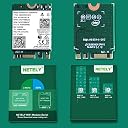


| ASIN | B07Q3NG5CZ |
| Best Sellers Rank | #205,045 in Computers & Accessories ( See Top 100 in Computers & Accessories ) #325 in Network Interface Cards |
| Brand | NETELY |
| Brand Name | NETELY |
| Color | Intel8265 NGW |
| Colour | Intel8265 NGW |
| Compatible Devices | Desktop, Laptop |
| Compatible Operating System Family | Windows |
| Customer Reviews | 4.3 out of 5 stars 372 Reviews |
| Data Link Protocol | Bluetooth |
| Data Transfer Rate | 1200 Megabytes Per Second |
| Hardware Interface | 802.11 ac/b/g/n |
| Item Dimensions L x W x H | 30L x 22W x 1H Millimeters |
| Item Weight Unit of Measure | 0.1 Ounces |
| Manufacturer | NETELY Co.Ltd |
| Manufacturer Part Number | Wireless-AC 8265NGW |
| Minimum Required Operating System Version | Windows 7 |
| Model Number | Wireless-AC 8265NGW |
| Product Dimensions | 30L x 22W x 1H Millimeters |
J**R
Fast and reliable
Needed to replace the wifi card in my Lenovo Yoga 730, which gave me unreasonably slow speeds and would completely lose wifi connectivity whenever I picked up and moved my computer. Have had this card in my laptop for about 30 minutes -- so no this is not a long term review -- but my speeds are noticeably better and I've been walking all around the house without losing connectivity. Installation is fairly straightforward as long as you have the right tools to open your computer (a T5 torx) and the little screws holding the battery and wifi card in (little tiny phillips head). A note: When I first turned my laptop back on this did not work and in my device manager I received Error Code 10. All I did was reboot my computer once and everything worked just fine.
P**.
Wifi now working!
Installed on a Lenovo Yoga 730 13" laptop which was having WiFi connection issues. Apparently a common problem for Lenovo. Easy to install; don't forget to download and install the Intel WiFi drivers.
T**T
Really helped my old Lenova 2015 Yogo Pro - wish I had not waited.
I got this card when researching a sound problem I was having with my 2015 Lenova Yoga 3 Pro. I fixed the sound problem but saw this card as something that might help the poor wi-fi signal strength and problems with bluetooth dropping constantly. What difference! My wi-fi went from 2 bars on 5g to full bars instantly and the speed difference is SO much better, and my blue tootch is working properly now (its like a new machine now). Yes, I had to download the Intel drivers to get the card recognized and you have to turn on blue tooth on the network card too which can be a bit tricky to find. See one of the early posts to do this. I strongly recommend that you DO NOT load the full driver assistance package also offered on the Intel site. Just download the two drivers for the wi-fi and the bluetooth only. The full package adds a RAID controller and parks/loads itself on your start and really slowed down my laptop. I had to uninstall and download the individual drivers, then go through the whole process of getting them both working again. Got it done but save yourself the hassle. WARNING: The black and grey plugs on the card itself are in the OPPOSITE positions as compared to the original card. Compare the white and black triangles marking on each and you'll note that they are switched between the cards. Disregard the J1 and J0 on the original compared to the J1 and J2 on the new card. Use the triangles to know which one is for the black cord, and which is for the grey one. Because the new card connects and closer on one side, you are going to have a bit to extra wire to deal with (there is room) but make sure the metal plugs are positioned so they do no touch after you close the back up (the plugs are too close together). You will see what I mean when you snap them back on. You may have to unplug and re-route the wires a bit so they stay separated and do not touch. I strongly suggest you download the drivers first and put them on a thumbdrive or on the laptop. Remember, you won't have wi-fi when you are re-installing (I used a usb RJ45 jack to hard wire to my network so I did not have that problem - but you might!).
D**R
Fast and easy on HP laptop
I was hesitated on this Wireless-AC 8260NGW NGFF M2 card for my kid's HP Pentium Gold 14" laptop which is few years old and slow download speed of 40mbps. Had tried two different wifi cards taken out from two of my other laptops but not working. This one not only works without have to install any driver, but also really fast. Tested it have 300mbps+ from my fios router. Same transmission speed as my other i5 & i7 processor laptop. Highly recommended. Just have to make sure your laptop have the same NGFF M2 interface on the motherboard.
N**S
Make sure you buy an antenna if you don't already have them.
Good and easy to install, just make sure you buy an antenna if you don't already have one to go with it. First wifi card I ever installed and didn't realize the antenna is basically a requirement. It'll work without an antenna but the signal is trash, unless you're in the same room as your router you're going to need an antenna. I just ordered this antenna which should be compatible with this chip: https://www.amazon.com/dp/B07P8CKGZM?psc=1&smid=A169Z7QURE8JMH&ref_=chk_typ_imgToDp
Trustpilot
1 day ago
2 weeks ago