Desertcart purchases this item on your behalf and handles shipping, customs, and support to Italy.
⚡ Stay powered and connected—because buffering is so last decade!
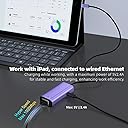
The sunshot 2-in-1 Lightning to Ethernet Adapter with Charging Port delivers simultaneous high-speed wired internet (up to 1000 Mbps) and charging for iPhones and iPads without USB-C. Its plug-and-play design, broad device compatibility, and compact form factor make it an essential accessory for professionals demanding stable connectivity and power on the move.


| ASIN | B09DRR5YMT |
| Best Sellers Rank | #705 in USB Computer Network Adapters |
| Brand | sunshot |
| Built-In Media | 1 x Power Delivery Out Put: 100W (Max), 1 x RJ45 Gigabit Ports Transfer Rate:1000M(Max), Instruction Manual |
| Color | Purple |
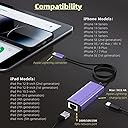
| Compatible Devices | iPhone 14/14 Plus/14 Pro/14 Pro Max/13/13 mini/13 Pro/13 Pro Max/12/12 mini/12 Pro/12 Pro Max/11/11 Pro/X/XS/XS Max/XR/8/8 Plus/7/7 Plus/6s/6s Plus/6/6 Plus/SE Compatible Devices iPhone 14/14 Plus/14 Pro/14 Pro Max/13/13 mini/13 Pro/13 Pro Max/12/12 mini/12 Pro/12 Pro Max/11/11 Pro/X/XS/XS Max/XR/8/8 Plus/7/7 Plus/6s/6s Plus/6/6 Plus/SE See more |
| Compatible Operating System Family | iOS |
| Customer Reviews | 3.9 out of 5 stars 67 Reviews |
| Data Link Protocol | RJ45 |
| Data Transfer Rate | 1000 gigabits_per_second |
| Hardware Interface | Ethernet, USB Type C |
| Item Dimensions L x W x H | 8"L x 1"W x 1.5"H |
| Item Highlight | Compatible with iPhone & iPad, Supports 10/100/1000 Mbps Gigabit Network, Purple |
| Item Weight | 0.04 kg |
| Manufacturer | senshuo |
| Minimum Required Operating System Version | iOS 17 |
| Number of Items | 10 |
| Product Dimensions | 8"L x 1"W x 1.5"H |
| Warranty Description | 1 Year |
M**L
Faster than most similar devices
Most similar devices have short pigtails, some lack a pass-thru power connection (forcing one to run off battery when using ethernet), and perhaps most importantly, many only have 100-Mbps EtherNet ports. While a lightning port max's out at 480-Mbps, at least this device's 1-Gbps EtherNet port isn't the bottleneck. That makes this almost 5x faster than a 100-Mbps port device. The female lightning socket on the side allows you to plug in your normal lightning charging cable into this device, which the provides pass-thru power to your iPad/iPhone. (It doesn't provide power out of this port; one-way only.) Unfortunately this power pass-thru only; no data. So if that lightning cable is connected to your Mac, you won't see your iPad/iPhone on the desktop (but power from the computer is passed on through to the device). It seems that none of these devices with a pass-thru port offer data pass-thru. I'm not sure whether this is a technical limitation, or a cost issue. I've been using this device for over a month now and it has been working reliably; only gets warm, doesn't get hot with my rather moderate network usage for it. Mostly video streaming, Podcasts, and iPadOS updates. I would buy again. Note: Due to limitations in iOS and iPadOS, AirDrop and AirPlay won't work over EtherNet. It appears that FaceTime and FaceTime audio also won't use EtherNet. All of them should; there's no technical reason they can't. It's Apple's fault that they don't. Nonetheless most of the device's other network traffic will go over EtherNet (e.g. eMail, Podcasts, web browsing, software updates, App Store downloads, Messages, etc.) I'm not sure whether WiFi Calling will work over EtherNet. There's no reason it couldn't, but that's also true of AirDrop, AirPlay, and FaceTime. Pro's: • Fast 1-Gbps EtherNet port • Long, approximately 18-inch cable • Lightning power pass-thru port keeps battery charged • Doesn't seem to get hot Con's: • Cable isn't braided • Pass-thru port doesn't support data; power-only
T**5
Who knew you can connect iPhone to Ethernet?
I didn’t, but I do now. The capability to connect your Apple device to Ethernet is built in to these devices, but it only shows when it detects a signal. Plug your Ethernet cable into this adapter, then plug the adapter into your device, and Voila! You have super fast, reliable and secure wired network access. There’s even a port on the adapter to plug in a USB-C charging cable, so you can charge the device simultaneously.
B**E
qc issues
lights work, ios sees it as an adapter, no connection. fun
P**R
A great tool to have to stay connected when the WiFi goes down.
Excellent little tool. Lived in an area where the WiFi was constantly going out but this helped me stay online. I didn’t know that when the WiFi went down the Ethernet still works! It’s easy to use. Just connect the Ethernet cable to ine end and the other end goes into the laptop or ohone jack. The internet is fast and connection is secure. Even when the little clip broke off my Ethernet cable, it still fit snugly into the Ethernet port without it falling out.
D**E
works great
bought three for broadcasting a robotics competition using Google Meet (enterprise) on three iPhones: iPhone 11, iPhone 14 Pro Max, iPhone Xr. I bought these because WiFi and Cellular data were hugely congested due to hundreds of people attending and many of them using their phones, causing WiFi and Cellular data to not work well. All three worked flawlessly! The remote viewers of the broadcast were happy with the quality of the broadcast. All three phones were fully charged after the broadcast. I have no complaints. I did have one technical glitch that was my fault. One of the iPhones had a VPN app installed, and the VPN was enabled. The network firewall blocked the outbound traffic. Once I turned the VPN off on that phone, it worked fine. This technical glitch was not the fault of this Ethernet adapter, but I mention this in the hope that others can learn and benefit from this.
N**E
Works as intended, kills battery
It works if you want an ethernet cable for your phone so points for that. However, it absolutely rails your battery, so if you’re using it on a regular basis you’re just going to speed run the life of your phone’s battery, if you’re using it and don’t care about that, it’s a great product, go for it. I personally don’t use it anymore for that reason.
W**Y
Adapter
Works for me. Trying to stay off the wifi. Plugs right into the iPhone or iPad.
A**S
Adapter works
I bought this for my iPad Mini 5 since when I do Whiteboard presentations on Zoom the wifi kept cutting out. Initially when I plugged in the Ethernet adapter the iPad said it was an unsupported dongle. I plugged it into my iPhone 12 and the Ethernet option in the "Settings" showed up. I replugged it back into my iPad Mini 5 and the Ethernet option in "Settings" showed up as well. So if you buy this adapter and it doesn't work first try, definitely try replugging it in. The nice thing about this adapter is that it also has an extra lighting port so you can charge while using the ethernet. I haven't checked maximum speeds, but the stability of having an ethernet connection is all I wanted in this dongle.
Trustpilot
3 days ago
3 weeks ago