Buy anything from 5,000+ international stores. One checkout price. No surprise fees. Join 2M+ shoppers on Desertcart.
Desertcart purchases this item on your behalf and handles shipping, customs, and support to Italy.
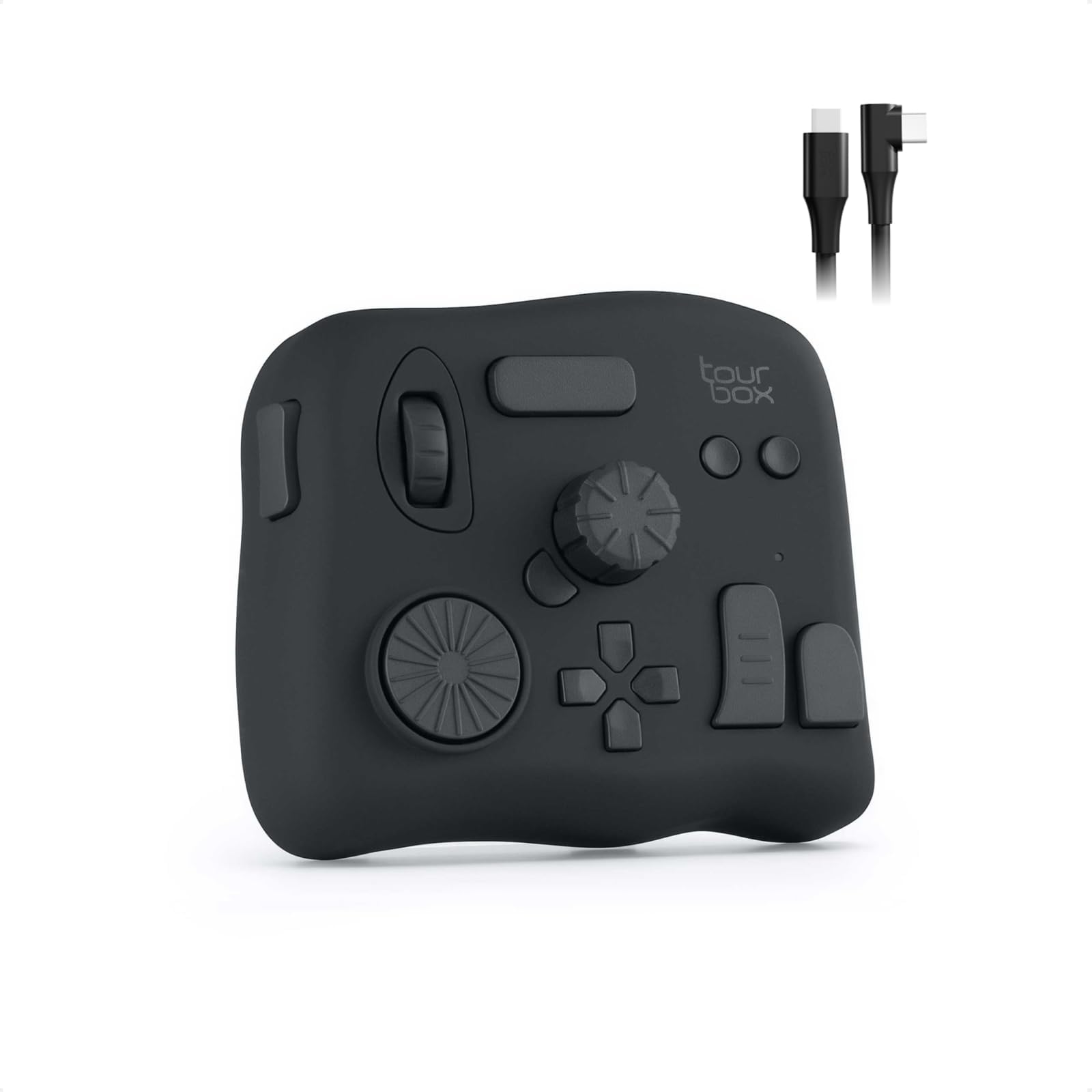
🎨 Elevate your creative game—control, customize, and conquer with TourBox NEO!
TourBox NEO is a next-gen productivity controller designed for creators across image, audio, drawing, and video editing software. Featuring 42 customizable controls, macro automation, and multi-preset management, it streamlines complex workflows and enhances creative efficiency. Compatible with top creative apps like Photoshop, Premiere, and Final Cut Pro, TourBox NEO empowers professionals to work smarter and faster.


| ASIN | B08HCV1JGB |
| Customer reviews | 4.5 4.5 out of 5 stars (928) |
| Item model number | TourBox NEO AMTBG_H_L_N |
| Language | Spanish |
| Product Dimensions | 17 x 4 x 14 cm; 370 g |
E**I
افظل جهاز تحكمي ومريح عملا هو هذا الجهاز الجبار ، افادني كبرامج الرسم ، اشترها ولا تترددوا
A**9
I recently purchased the TourBox NEO Quick Key Tools for Creators and I am blown away by how much it has improved my workflow. With its 14 customizable shortcut keys, I can easily access my most-used tools and functions, saving me time and increasing my productivity. The TourBox NEO also offers over 100 customization options, allowing me to fine-tune the device to fit my specific needs. The software interface is user-friendly and intuitive, making it easy to set up and customize. One of the things I love most about the TourBox NEO is its compact size. It's small enough to fit comfortably on my desk without taking up too much space, but still provides all the functionality I need as a content creator. Overall, I highly recommend the TourBox NEO Quick Key Tools for Creators to anyone looking for a reliable and efficient way to streamline their workflow. It's a game-changer for anyone who wants to work faster and more efficiently. Cons - While the TourBox NEO offers a lot of customization options for creators, there are some cons that potential buyers should be aware of before making a purchase. Firstly, the device can take some time to set up and get used to. The customization options are extensive, but this can also make it overwhelming for some users. The device can also be bulky and take up a significant amount of desk space, which may be an issue for those with limited workspace. Additionally, the TourBox NEO may not be compatible with all software programs, which limits its versatility for certain creators. Some users have also reported issues with the device not functioning properly or disconnecting from the computer. Overall, while the TourBox NEO offers many customization options for creators, it may not be the best fit for everyone. Potential buyers should consider their workspace limitations and software compatibility before making a purchase.
B**Z
Comprei o TourBox Neo como uma alternativa mais barata ao SpeedEditor do Davinci Resolve. Mas estava preocupado se ele seria capaz de cumprir bem essa tarefa. E depois que consegui configurá-lo corretamente, ele não só conseguiu, como superou minhas expectativas! Ele é altamente personalizável através do software TourBox Console, permitindo a configuração de atalhos simples (com 4 opções de atuação) e também a combinação de teclas, mas principalmente possibilitando um ajuste fino (com 3 níveis de intensidade do Scroll, do Knob e do Dial), funcionando muito bem no Davinci Resolve, seja para navegar nas Timelines frame a frame ou um para um movimento mais acelerado, e ele consegue fazer isso de maneira fluida e natural. Ele também é capaz de exibir um HUD em overlay exibindo os atalhos configurados caso seja necessário. O tamanho é compacto, e o design é versátil, e o acabamento é agradável, podendo ser utilizado tanto com a mão esquerda quanto com a direita conforme a preferência. Além disso ele tem a vantagem de poder ser utilizado em diversos cenários não se limitando ao programa A, B ou C, e ainda tem a opção de alternar entre perfis automaticamente. Recomendo utilizar com um apoio de pulso para ficar nivelado e mais confortável para longos períodos de uso. Obs: estou utilizando no Win11 v.24H2 e a versão do TourBox Console é a v5.7.4 Pontos Negativos: os cliques não são silenciosos e são um pouco duros, mas nada demais. esse modelo não possui Bluetooth, ficando limitado a utilização com fio.
S**G
Habe mir das Teil gekauft, weil ich weder an der Tastatur, noch am Hotas Warthog (Joystick/Schubregler) Drehregler habe. Installieren ist problemlos und das Programm öffnet sofort in Deutsch. Die Belegung der Drehregler und Tasten ist simpel und selbsterklärend. Einsatzmöglichkeiten nahezu unbegrenzt: Höhenmesser einstellen, Beleuchtung des Cockpits, Lautstärke der Funkgeräte, Reichweite des Radars etc. Es gibt 3 Einstellungen für die Feinheit Drehregler. Falls man eine feinere oder gröbere Einstellung wünscht. Für die Höhenmesser in der A-10 und Hornet lässt sich der Luftdruck so präzise einstellen. Durch unterschiedliche Formen der Drehregler und Tasten ist das Gerät auch blind zu bedienen. Also ideal geeignet, wenn man den Feind nicht aus den Augen verlieren darf….. Eine ideale Ergänzung zum Elgato Stream Deck!
J**S
Te adaptas super rápido! Los materiales son de muy buena calidad, ya he dejado mi teclado fuera de mi alcance, con el tourbox puedo usar el photoshop sin problemas (lo uso para lustración digital) y mi mano que antes era del teclado ahora esta mas relajada, me llegaban a doler los dedos por la postura en el teclado, con el tourbox ya no pasa eso.
Trustpilot
1 month ago
2 days ago