Desertcart purchases this item on your behalf and handles shipping, customs, and support to Italy.
🔑 Unlock the Future of Home Security!
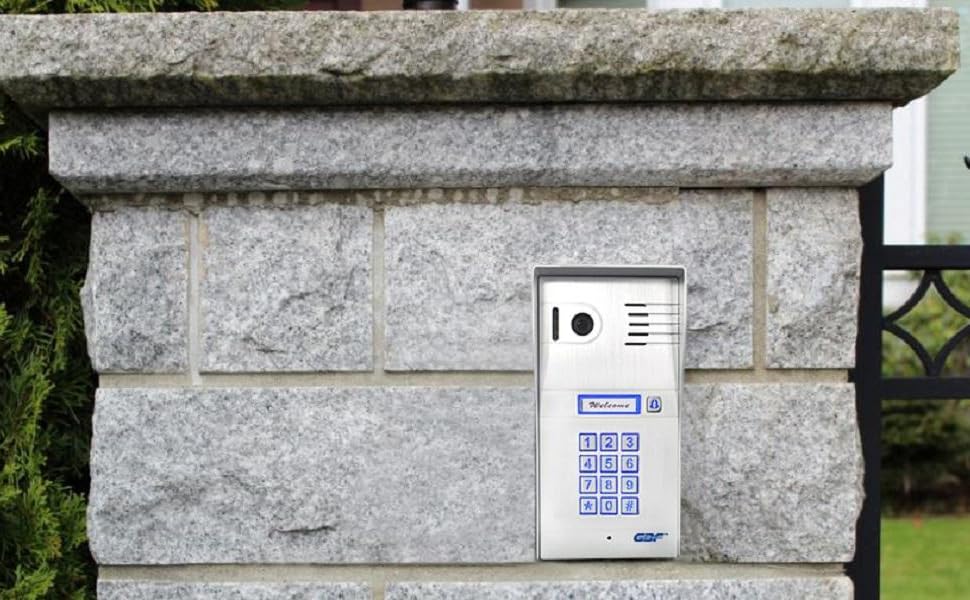
The GBFSmart Video Door Phone & Doorbell Intercom System (PL963PMPOE) features a 1080P camera, built-in POE, and the ability to control two locks remotely. With advanced motion detection, a smart keypad for access control, and a weatherproof design, this system ensures convenience and security for your home.


| ASIN | B0996BYPN5 |
| Alert Type | Motion Only |
| Antenna Location | Doorbell |
| Best Sellers Rank | #787 in Home Security Systems |
| Brand | GBF |
| Built-In Media | GBF outdoor station PL963PMPOE, 12V DC power adapter, Wiring harness and the Bell Connector Wire Set, wifi antennat etc. |
| Color | Silver |
| Compatible Devices | Smartphone |
| Connectivity Protocol | Wi-Fi |
| Connectivity Technology | Wired |
| Control Method | App |
| Controller Type | Android |
| Customer Reviews | 3.8 out of 5 stars 56 Reviews |
| Effective Video Resolution | 1080 pixels |
| Enclosure Material | Aluminum, Metal |
| Indoor Outdoor Usage | Indoor, Outdoor |
| Indoor/Outdoor Usage | Indoor, Outdoor |
| Item Dimensions | 8 x 4 x 2 inches |
| Item Weight | 2 pounds |
| Manufacturer | GBF Electronics Inc. |
| Mfr Part Number | GBF-PL963PMPOE |
| Model Number | PL963PMPOE |
| Mount Type | Door Mount |
| Night Vision | Night Color |
| Number of Channels | 2 |
| Number of Items | 1 |
| Other Special Features of the Product | Motion Sensor |
| Power Source | Battery Powered |
| Recommended Uses For Product | Doorbell |
| Room Type | Bedroom, Kitchen, Living Room, Nursery, Office |
| Special Feature | Motion Sensor |
| Specific Uses For Product | Surveillance |
| UPC | 661706307963 |
| Unit Count | 1 Count |
| Video Capture Format | MPEG-4 |
| Video Capture Resolution | 1080p |
| Viewing Angle | 160 degrees |
| Voltage | 12 volts |
| Waterproof Rating | IP55 |
| Wattage | 24 watts |
| Wireless Technology | Wi-Fi |
R**T
Great Value
I've had a gated driveway for 22 years. I originally installed a "Crown Jewel" Telco based access control. Worked well for several years (using the "land line"), until lightening fried the telco system, then I just used it as a keypad control. No big deal, esp. since "land line" has been gone for many years from our residence. I've really wanted to upgrade for years, but couldn't find something that would do what I wanted at a reasonable price. Another lightening strike finished off the keypad function of the Crown Jewel and forced me into remediation mode. I saw this on Amazon, and was skeptical. Since I was in a pinch, I decided to give it a try, and I'm so glad I did! So, here are the "good/bad/ugly" of the system - and it is mostly "good" (if not great): My gate is LONG way from the house through woods. First I have to establish good connection, and our rural location makes cellular access less than ideal (and I don't want a monthly bill). The rural location means internet is also a challenge, so I'll give Starlink a plug here too. Several months we got our Starlink dish, and internet service has been phenomenal. So I purchase several wireless bridges, because I have a long distance and many obstacles to navigate. I am successful at getting internet via. daisy chained bridges to the gate, and I install the GBF keypad. It works amazing. Pictures are good quality, the "call" button works as promised, I'm very happy. Put that with the price (and I priced other systems) and I'm ecstatic. Not to say the system is "perfect". I would gladly pay more for a few upgrades. I did paint the outer enclosure black (see image), and I think it improves the appearance. The old Crown Jewel, while susceptible to lightening, was built like a Sherman tank - but this is more like a Volkswagen Beetle. It would take running over with a car to damage the Crown Jewel, but a baseball bat would destroy the GBF unit. They should offer a more robust enclosure as an upgrade. As mentioned in another review, the "#CODE#" sequence is odd. What is the purpose of the "#'s" on each side of the code?? This would be an easy win for the programmers if they'd make a modification that made the "#'s" unnecessary. Better description than a "bell icon" should indicate the call button. What about "Call"?? I plan to put a label by the keypad that says "#CODE#" for those with codes, so they don't forget about the #'s, and a label by the bell button that says "Call Button". Those labels will distract from the clean look of the unit, but are needed to avoid confusion. A 'night vision' option is needed on the camera. All you have is a bright LED that will illuminate the caller, IF they lean in when talking. The type of night vision on products like a Ring security camera would be a welcomed enhancement. To finish my review on refocusing on why I give it 5 stars - the unit does everything + more than what the Crown Jewel did - and that unit cost close to $2,000 22 years ago! When setting it up, I had a few questions so I called the technical support number. The person that helped me was FANTASTIC (Thanks Ray!). It is a nice looking unit, and is priced very competitively. I highly recommend this for anyone looking for a gate access control.
R**T
Works like a charm
This is the third call box I've purchased and by far the beast. Easy to install and set up. Because of the distance I use a Wi-Fi extender and ran a LAN cable from the extender to the call box. Not a problem. I have it control access to the gate at the entrance to my 4-acre property. I programmed a four-digit code for me to access and set up temporary codes for one-time uses, all easily controlled through the app. When someone presses the call button my phone rings, I open the app and can see and talk to the person and open the gate if I choose to. Highly recommended.
N**C
Exactly what was needed
I purchased this to work with my ghost controls auto gate opener. This has normally open option as well as normally closed option for your unlocking needs. I needed normally open. The only downside to this entire system was getting it connected to the internet using an iPhone with iOS. Tip: I didn’t get it working with their instructions. After talking with Ray at support, I just added a device in the app and did the sound wave option for adding a device. However it didn’t smoothly work. For me this is the steps to get it connected: Download app, plug power into keypad and wait about a minute before doing anything. After a minute press and hold the button on the back panel next to the Ethernet port until you hear the first set of beep tones. Let go of the button. Wait about 20 seconds for the keypad to make another noise. At this time I opened the app, added a device, I did NOT going into the setting in the app, just add device. Make sure your in a somewhat quiet area, as your phone will make sounds they keypad will hear and start programming itself through the sounds. After starting the process my keypad lights lit up and it made a noise, my app said they keypad was attempting to connect but would fail everytime. When you get to this point back out of that area in the app, do not do anything to the keypad, and then add a device using the QR code on the device. Instantly everything worked. Done. I have a reolink security nvr system at my home and wanted to add its camera feed to it. This was a process. Download the app called ControlCam2 2 and find your camera on the network, this will give you the ip address to the camera. From what I can tell, this is the easiest way to get that up address. After you have the ip address, go into your onvif setup and use port 8000, username and password should both be admin. My system is very laggy and won’t actively stream the camera, but that’s how I got it to work. My issue is with my system not this keypad. Overall, it was a little confusing to get setup, the manual could use a complete overhaul for guidance. But to make up for it, they have a die t number to call, they are very helpful and will sit on the phone trying to help you get through any issues you are having. If anyone is wondering, I set the wire harness up in lock 1, hooked the blue wire from the keypad to the com port on my ghost controls panel, and the green wire from the keypad to the CYC port on the ghost controls panel. This is all you need to use this keypad with that setup. These are the 2 wires that will cycle a normally open circuit lock. The resister supplied is not needed but is a good precautionary step for feedback signals. If you are concerned about anything, the support at GBF is amazing, specifically Ray walked me through all my questions and helped at every step I needed.
S**M
Do not expect this device to work smoothly - has glitches and software bugs
Wifi connectivity drops frequently. video call does not work well. echos badly bottom line - struggled many hours with it until I decided to give up and returned this damn thing
T**Y
A Great solution to my challenge
Well built and does what is says on the box. Had a challenge with gate over 100 metres from the house and didn't want to dig up driveway to run cabling. This WiFi solution (with the help of a good Outdoor AP) has solved my issues. Did take a while to setup, but once setup has now been running nicely. Use of Doordeer App does have a couple of issues, like date format is American format with no option to choose other formats... and date displayed on video is incorrect.. though alerts are correct time and date all up a good unit and exceeds my expectations (even if expectations were low to start with)
R**O
120 day trial, Requires a (China) subscription for codes/video cloud storage.
Needs a strong WiFi signal otherwise hard to communicate over the network. Also notice it was manufactured in China with software from China that you’re going to install on your smartphone and connect to your home network. I unfortunately purchased it and custom installed it to work my driveway gate. It looses internet connection or frequently get a network error. Closing and opening the app can resolve it temporarily. I wanted to submit feedback but at Apple Store had a link to the Chinese web page for the developer. It was not in English so I couldn’t provide any feedback.
G**T
Connectivity and features
I have had a gate intercom system for 20 years but it required a wired land line telephone connection which costs $70 a month. This system allows me to disconnect land line and still allows me to converse and operate gate when someone rings door bell. Allows me to operate gate when I am not home. The camera shows person at gate so you can let them in or lock out. It connects to mine and my wife's phone by sharing connection. It will mount on entrance access post in place of Crown Jewel system which works well but requires expensive phone land line. All other systems I have seen are several times more expensive to get this functionality. Great price point and functionality in a small size and phone support is great. I watched several videos before I purchase this system and it will work great for me. I have it programed and working well before I mount it. Gordon
M**N
Has a lot of quirks, some quite bad.
It took hours to actually get the thing configured, mostly due to the extremely poor app. The device itself is ok but there are some serious quirks. It is not a grade-A video doorbell for sure. * There seems to be no way to change how the chime sounds (on the doorbell itself). It dings incessantly if not answered, which really bothers me (and would bother guests as well). I just want it to ding once or twice so the person at the door knows the doorbell was wrung, and that's it. There is no configuration field to do that. * You MUST use the POE+ ethernet. The wifi sucks... badly. The video becomes extremely laggy and virtually unusable, even when the base station is close. I've tried multiple combinations and it just doesn't integrate well via Wifi. * This thing really wants to talk to the internet, a lot. It would be nice if it had configuration features to turn off all of the cloud junk rather than having to set it up on a dedicated wifi and then unplug the wifi's internet. I don't want mobile device integration. I just want a video doorbell and two displays on the same network in the house and that's it. * Audio echos are fairly severe. One would think that a product out this long wouldn't have these problems. My mistake was in believing it would be decently good after being available for so long. But no.
Trustpilot
2 days ago
2 weeks ago