We remain fully operational. Our teams are working around the clock to ensure your deliveries continue safely.

DOWNLOAD THE APP


Copyright © 2025 Desertcart Holdings Limited
DOWNLOAD THE APP




Buy anything from 5,000+ international stores. One checkout price. No surprise fees. Join 2M+ shoppers on Desertcart.
Desertcart purchases this item on your behalf and handles shipping, customs, and support to Italy.
🚀 Unlock Ultimate Productivity with One Dock to Rule Them All!
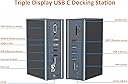
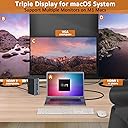
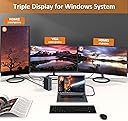
The Tobenone USB C Laptop Docking Station is a premium 16-in-1 hub designed for professionals craving multi-display setups and extensive connectivity. Compatible with M1 MacBooks and USB-C Windows laptops, it supports dual HDMI and VGA outputs, ultra-fast USB 3.0 data transfer, and stable Gigabit Ethernet. This all-in-one docking station streamlines your workspace with versatile ports, power delivery, and plug-and-play ease, making it an essential upgrade for modern multitasking and remote work.
| ASIN | B09DFXCKK4 |
| Item model number | CW2003250 |
| Manufacturer | MOKE INDUSTRIAL LIMITED |
| Product Dimensions | 14.22 x 10.41 x 5.08 cm; 771.11 g |
G**.
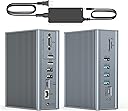
It has decent amount of ports. The USB ports on both front and rear are ideal to my setup. The dock design looks premium. The build looks sturdy with its metal frame. The included power adapter looks noticeably cheaper and lower end but works fine. Runs on my Windows laptop and two 1080p 60hz monitors. It will require you to install the DisplayLink drivers from the Synaptic website. It is not hard to install, but it can be for tech illiterate, especially if they download from different sketchy website. The only problem I had is that sometimes it would disconnect my two monitors randomly. The problem was not the cables, ports, or drivers, but something else inside the dock that I have not figured out. I could only solve it by disconnecting and reconnecting the dock from the electric outlet. However, the customer service was very helpful and fast. They quickly sent a replacement. They kept checking to check if my problem was resolved, which I appreciate well. So far, the replacement works well.
J**D
* This does work with M1 Macbook Pros * It was not easy to find a tool like this that was confirmed to work with M1 Macs. This one does the trick. If you work at home on a laptop and want dual monitors, or just some extra ports, this thing is awesome. It also charges the laptop and only uses 1 USB-C port to connect. Absolutely no issues setting it up, make sure to install displaylink if you want to use 2 screens. Just google "displaylink driver" and you'll get what you need.
J**J
TOBENONE USB-C Triple Display Docking Station - Model: UDS-016D is one of the worst product in this category, that I have come across. 1. Too heavy metal enclosure - too big and looks not attractive or visually pleasing 2. the connectors not smooth to connect 3. DC power supply supplied is too low - 65W (minimum 90 preferred) - 4. No option to use a USB-C/PD power supply already available to the customer - no PD port even. 5. Additional driver software required - but not at all user friendly. 7. Reboot of Mac required, but even after multiple reboots this software did not detect my second monitor on HDMI2. Basically so far I am unable to connect only one external monitor and HDMI and VGA just unusable - though I don't care the VGA port. 10. I don't think any user care about the VGA port in this era and the manufacturer could have repurposed that real estate for some thing else. 11. Had this provides more USB-C ports that would have been better. Only feature the manufacture claim to work, supporting Mac M1 chips, I had no chance to test. Basically at this price point this is a piece of junk and waste of money. Much better product available half this cost. Even, the older TOBENONE 15-IN-2 EXPANSION product is much better option - even though it use two USB-C ports, that gives a triple display without any hassles.
F**B
This was an upgrade of a previous Tobenone docking. I like this upgrade. It works for both Mac and Windows. Easy to install. I just plugged in and it worked. The enclosed manual is handy. It suggested to download the display link driver, so I downloaded it after I had already installed the docking and used it. I am not sure what this driver has added or even was needed. The docking is compact and fits nicely in my crowded small desk. It can support three external monitors. However, I am only using it for one external monitor at present. The SD/TF slots and USB's are in front which are more convenient. It is not recommended to use the USB-A Port for charging a smartphone, tablet, etc., which I see as a drawback. Also, there is no USB-C port connection to a DisplayPort monitor. I had to connect my Microsoft Surface Book laptop to the external monitor directly using a USB C to DisplayPort Cable not via this docking station. It allows only for VGA and HDMI monitors. Adding a DP and a power charging USB-A ports shall make this docking station close to perfect. However, I am happy with it as is, and I would recommend it. Update (Dec 12, 2021): I changed my rating from 5-star to 3-star for the quality of the dock. But I would still give 5-star for the customer support. They are very responsive. I experienced problems when I switch from MacBook Pro to PC laptop. So, I decided to stick to using it only with my PC Laptop. It worked fine for about 2 weeks, but then stopped connecting to my monitor. When I changed the port from VGA to HDMI port, it worked, but when I shut down the computer, it did not connect when I rebooted. I reverted back to VGA, and rebooted, it worked. However, after about 2-weeks, it decided not to work with either ports. I gave up and disconnected it. I feel this dock is NOT stable with monitor ports. I communicated this with customer support. They are very responsive but the problem stays.
J**.
I set this up in my home office for a dual monitor setup and it was wonderful! 4 months, no issues... until it stopped working today. It was pricey, so I didn't expect it to run out of steam so quickly. I contacted the seller for a replacement, and they issued a new one right away. So happy!
Trustpilot
2 months ago
1 week ago