We remain fully operational. Our teams are working around the clock to ensure your deliveries continue safely.

DOWNLOAD THE APP


Copyright © 2025 Desertcart Holdings Limited
DOWNLOAD THE APP


Buy anything from 5,000+ international stores. One checkout price. No surprise fees. Join 2M+ shoppers on Desertcart.
Desertcart purchases this item on your behalf and handles shipping, customs, and support to Italy.
🚗 Elevate your Tesla drive with smart HUD tech that’s as dynamic as you are!
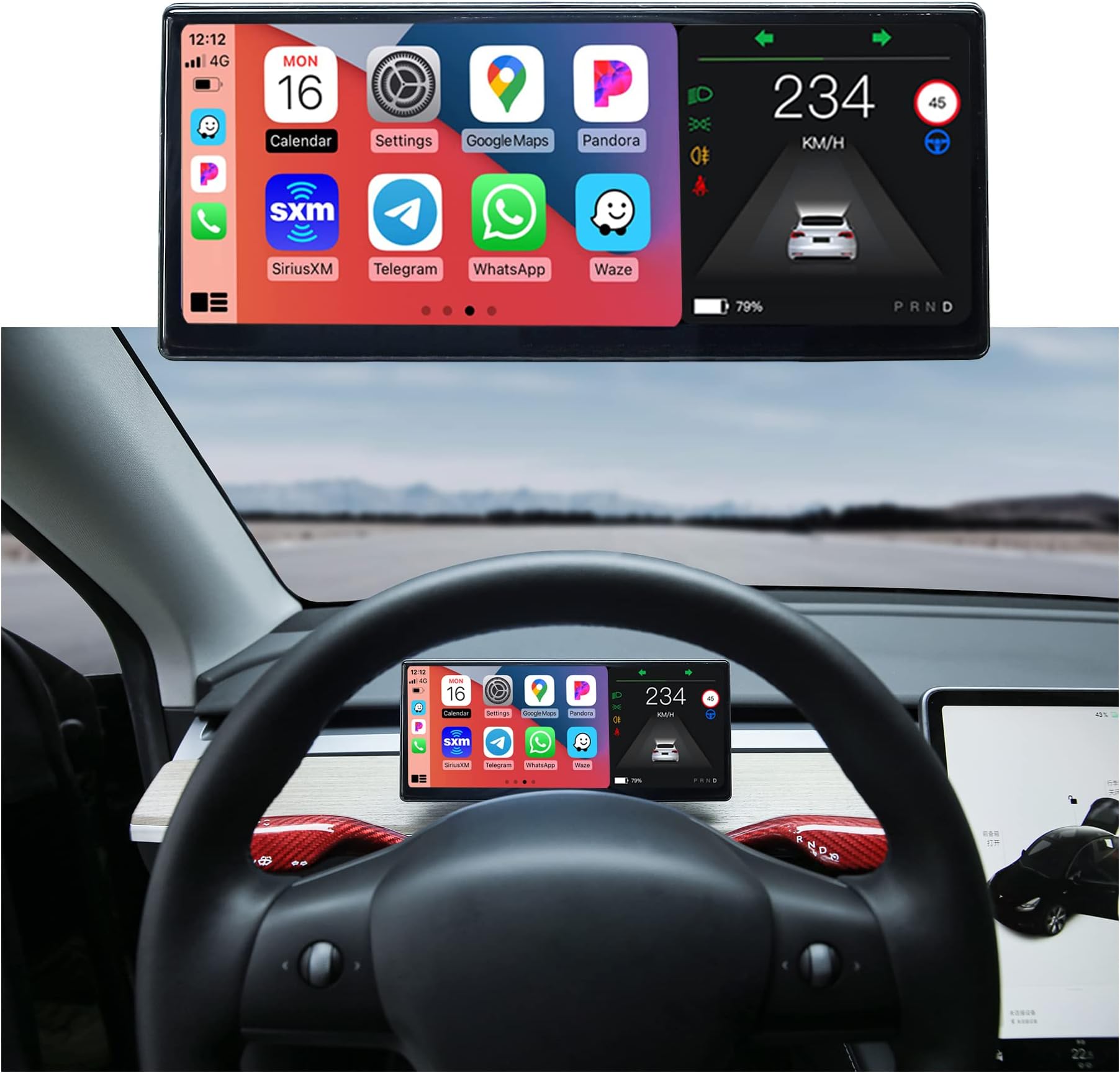
The VERKOKAPPA Tesla HUD is a 9-inch HD IPS touchscreen upgrade designed exclusively for Tesla Model 3 and Y (2019-2023). Featuring an AMD Ryzen processor and a minimalist Linux OS, it delivers ultra-responsive, lag-free performance with wireless CarPlay and Android Auto support. Its 600-nit brightness ensures visibility in all lighting conditions, while OTA updates and customizable UI themes keep your interface modern and personalized. This HUD integrates seamlessly without altering your Tesla’s original structure, providing real-time vehicle data and enhanced driving safety.


| ASIN | B09DKXVFR6 |
| Brand | VERKOKAPPA |
| Built-In Media | Dash Camera |
| Color | Grey |
| Compatible Devices | Tesla Model 3, Tesla Model Y |
| Connectivity Technology | Bluetooth |
| Customer Reviews | 3.8 out of 5 stars 42 Reviews |
| Display Type | LCD |
| Item Dimensions L x W x H | 9.02"L x 3.94"W x 3.94"H |
| Item Weight | 2.54 Pounds |
| Manufacturer | VERKOKAPPA |
| Mfr Part Number | T3 |
| Model Number | T3 |
| Native Resolution | 1920*720 |
| Product Dimensions | 9.02"L x 3.94"W x 3.94"H |
| Screen Size | 900 Hundredths-Inches |
| Warranty Description | 90 Days |
M**K
CarPlay on my Tesla makes it all worth it
Installed on my Model Y 2022. AMD Ryzen chip. New Model DOES NOT require you to go through the firewall to connect to the battery. You simply connect the wires and you are done. Originally I couldn't get it to disconnect from CarPlay while at home. learning that I have to lock it to turn off solved it. Thank you VeroKappa support! Positives: CarPlay works flawlessly. 98% of the time. once in a while you may just to wait for an extra 2-3 minutes Android Auto tried it once it works Looks stock Relatively easy to instal. Negatives: Audio lag when using the display as a middleman between the phone and Tesla BT Using the display to take phone calls is terrible. Audio is great, Lag is awful. This is not the displays fault but rather a limitation of Bluetooth. Your best option to avoid the lag is to switch to phone Bluetooth on the Tesla. Then move it back once call is over. This is probably not an issue for wired Android auto. Wish List Allow wired CarPlay. Port it there why can't wired CarPlay work?? it works for Android Auto. This would solve the input lag issue. Connect to two devices. Unless I am doing something wrong. I cannot get it to connect to my wife's phone.
F**D
lasted 8 months
The screen literally fell out when accelerating. I have a Y so it's not like I can accelerate that fast but apparently too fast for this screen. I tried to contact the seller but they've ignored me over the last couple months so here I go. Maybe this is how I can get a response...if not, I would avoid this seller.
A**E
Easy to install and looks like it’s OEM (Great support response too)
This works perfectly for adding Apple Car play to my Tesla Model 3. The install was pretty easy. There’s one tight spot pulling the connector out but other than that it’s a breeze. It took me a little over an hour. My CarPlay does default to the speaker so when I play music I just hit the airplay button and send it to the car. While that may seem a little annoying I’ve found I like that as my Waze notifications come through the speaker on the device and not my car speakers. Overall, I’m more than happy with this product. I did reach out to support for two items and they responded the same or the next day. They helped me through both issues. The first was getting the system tray to appear (It's a swipe from the middle of the right side into the center of the screen) the instructions say to tap the top right corner. The second was getting my calls to automatically chose my car speaker and not the screen speaker. They sent me this below and it works! The phone call setting needs to be set to Bluetooth priority (mobile: accessibility > touch > call audio routing > set to Bluetooth headset ), so that the car's speaker output will be used first after the call.
M**U
Stable
What I like: - I did not encounter any problems with the installation, but it was a little difficult to get into the slots where it was mounted when installing it. - Its operation is very stable. - It can be quickly opened and established carplay connection. Things I don't like: - Screen quality is not very good, colors are not vivid. - The graphic designs are not good, they do not match the original design of the car. The colors chosen are bad, the font sizes are small, and it is difficult to read, especially at night. - Screen themes can be selected from three themes. However, for this you need to connect the device to wifi and download it every time. So you cannot easily switch between themes. - Sometimes the speed limit on the car screen may be different from what appears on the HUD.
K**Q
Best price seller, Excellent Quality Screen, Install requires skill.
For 2022 AMD Ryzen cpu Tesla Model Y, install was not easy because: 1) routing the power cable red and black wires to the frunk low voltage battery is tricky. You either have to fish the wires through a circular rubber cap seal to the frunk or go around the passenger door weather seal underneath the fender. 2) Beware the power cable metal end clips, as the black ground wire that I got was defective and it fell off (see photo). I had to use my wire stripper to get bare ground wire and hook it around a ground bolt and tighten it. 3) routing the power wire underneath the dashboard trim was also tricky because you need to tape/secure the cable to vacant areas that will not be compressed when you reinstall the dashboard trim. Overall, this T3 display is worth the effort since gaining CarPlay and driver line of sight to Speed/instrument cluster is a huge win! Note: this unit requires Wi-Fi and Bluetooth connection to your mobile phone.
J**C
Great substitute HUD
For those looking for a heads up display, this is a great choice (this is apparently no different than the Hanshow one according to their website/FAQ) With a 2022 M3SR+ (AMD Ryzen), you have to get the power from the 12v cigarette lighter as there is no way to draw power from the battery as shown in the installation video. Took me almost two hours to disassemble/reassemble before realising the access to the frunk area is inaccessible for this particular vehicle. Then had to purchase a separate piece for that (*Cigarette Lighter Male Plug with Leads*). Which means, in the end, the wires cannot be fully hidden For those concerned about it blocking the climate control, it will depend on your particular area. Since my location is rather moderate for most of the year, it doesn’t concern me, but yes, the airflow is definitely hampered (by quite a bit), so keep this in mind Can’t install software update yet as I don’t have a USB-C flash drive, so also just purchased one to update the unit Satisfied with the out of box display thus far. It can employ either AppleCarplay or AndroidAuto, which means you can use Waze or GMaps for your navigation. It can also Bluetooth into your sound system, which is SIGNIFICANTLY better than the attached speakers. I sorta like that the waze navigation sound comes from this unit, as it doesn’t interrupt music/radio from car speakers (depending on your settings). Conclusion: if you reside in a hot climate, you MIGHT be able to work this in by adjusting the airflow (flowing separately left/right instead of straight on). If you’re ok with the cigarette lighter being always occupied (it also blocks the tray from being easily removed), and a small bit of visible wire hanging out your centre console (it’s possible to use black electrical tape to cover up), then I recommend this purchase.
F**S
Do not buy! It will void your warranty
The item worked well and did what it needed to do. Seller states that it will not mess with the car’s warranty because it’s a professional connection. Turns out it will void your car’s warranty. Took my car in for service and they ended up voiding my warranty because there was “aftermarket device connected to the computer” stay away. It’s not worth it.
A**J
Really happy with this purchase.
I didn't like having to look over at the Tesla screen to see how fast I was going, or what gear I was in, or what time it was, and what my battery state was. Installing this screen has made it much easier and makes it feel more natural having this information right in front of me. The screen is beautiful and it looks really cool in the car. Quality is excellent. You do not need to buy a separate cable if you have a Performance model. My package came with two cables and one of the cables looked exactly as the cable I bought separately for a Performance model.
Trustpilot
1 week ago
2 months ago