🏷️ Label Like a Pro, Organize Like a Boss!
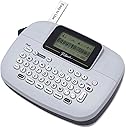
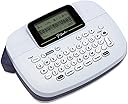
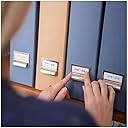
The Brother P-Touch PTM95 is a compact, handheld label maker designed for small businesses and home offices. Featuring a QWERTY keyboard and an easy-view LCD screen, it offers 9 font styles and 8 decorative patterns for stylish, durable labels. Compatible with 9mm and 12mm Brother M-series tapes, it runs on 4 AAA batteries with an auto power-off function to conserve energy. Perfect for organizing files, storage, and more with professional-quality prints and user-friendly operation.


| ASIN | B01GQHHYFE |
| Additional Printer Functions | Print Only |
| B&W Pages per Minute | 1 |
| Best Sellers Rank | #24,148 in Office Products ( See Top 100 in Office Products ) #76 in Desktop Label Printers |
| Brand | Brother |
| Built-In Media | PTM95 label maker, black on white non-laminated M starter tape 0.47" (12mm) x 13.1' (4m), users guide |
| Color | Standard |
| Color Depth | 1 bpp |
| Color Pages per Minute | 1 |
| Compatible Cartridge | Brother Genuine P-touch M series non-laminated label cartridges, available in 12mm and 9mm widths, compatible with model PTM95 |
| Compatible Devices | PC |
| Connectivity Technology | Wi-Fi |
| Controller Type | Manual Keyboard |
| Customer Reviews | 4.5 out of 5 stars 17,398 Reviews |
| Display Type | LCD |
| Dual-sided printing | Yes |
| Duplex | Automatic |
| Global Trade Identification Number | 00012502643760 |
| Hardware Interface | USB |
| Ink Color | Navy/Blue Gray |
| Item Dimensions D x W x H | 4.4"D x 6.1"W x 2.4"H |
| Item Type Name | Brother PT-M95 Label Printer |
| Item Weight | 9.12 ounces |
| Manufacturer | Brother |
| Maximum Copies Per Run | 9 |
| Maximum Copy Resolution Black and White | 203 dpi |
| Maximum Copy Resolution Color | 203 |
| Maximum Copy Speed Black and White | 1 ppm |
| Maximum Media Size | 1 |
| Maximum Print Resolution Black and White | 203 dpi |
| Maximum Sheet Capacity | 1 |
| Maximum print Resolution Color | 203 dpi |
| Model Name | PTM95 |
| Model Number | PTM95 |
| Model Series | PT |
| Number of Drivers | 1 |
| Other Special Features of the Product | Auto Power Off, Built-in Designs Template, Horizontal Alignment, Label Length Setting, Manual Cutter, QWERTY, Vertical Printing |
| Output sheet capacity | 1 |
| Paper Size | 12mm |
| Print media | Labels |
| Printer Connectivity Type | Wi-Fi |
| Printer Output Type | 1 |
| Printer Type | Thermal |
| Printing Technology | Thermal |
| Processor Count | 1 |
| Resolution | 203 dpi |
| Scanner Type | Portable |
| Series Number | 95 |
| Special Feature | Auto Power Off, Built-in Designs Template, Horizontal Alignment, Label Length Setting, Manual Cutter, QWERTY, Vertical Printing Special Feature Auto Power Off, Built-in Designs Template, Horizontal Alignment, Label Length Setting, Manual Cutter, QWERTY, Vertical Printing See more |
| Specific Uses For Product | Label Printing |
| Total Usb Ports | 1 |
| UPC | 012502643760 |
| Unit Count | 1.0 Count |
| Warranty Description | 2 Year Manufacture Limited |
| Warranty Type | limited warranty |
| Wattage | 1 watts |
M**T
Great label maker with good quality prints
This label maker is perfect for what we needed it for around the house. It’s small too so it stores easily. The battery lasts a good while and it’s very easy to use. The print quality is very clear as well. This is definitely worth the money and will buy this again if this one breaks.
N**N
Works great!
Really nice for the price. Simple functioning and easy to follow setup. Makes labeling the shop a lot easier!
C**S
Very nice little label maker
This is a very nice little label maker. The label print quality is excellent. The size is fairly small so it does not take up a ton of space. This is a pro and a con. The pro is small for storage and travel. The con is that this necessitates a smaller keyboard and less area on the keyboard to print secondary symbols. For example, this printer has the capability to print many pictograph type symbols such as a phone pictograph. However, to do this, you have to hit the "Symbol" button and then put in a code. The code for a phone pictograph is A7. You cannot see these codes on the keyboard or the LCD screen, you must look them up in the manual provided, so you better keep the manual or there is no way to do these pictographs. They are a nice feature. I really like and appreciate that this printer supports printing on two lines. For example, you can print a label with your name on the top line and your phone and or email on the bottom line. Not all label printers do this and it really can help make your labels more compact. I noticed many complaints about battery consumption. I have used numerous label makers and this is common to all of them - I think printing the labels consumes a lot of energy so just expect that. All in all, a very nice little label maker, just save the manual if you want to take advantage of the pictograph
S**S
Great label maker. Simple and easy
The Brother P-Touch PT-M95 is a compact and user-friendly label maker, ideal for home and office organization. Its lightweight design and QWERTY keyboard make it easy to create labels on the go. Users appreciate its simplicity, with many noting that it's intuitive enough to use without reading the manual . The device offers nine type styles and eight decorative patterns, allowing for customization to suit various labeling needs . While it operates solely on batteries, which some users find limiting, its portability and ease of use make it a popular choice for those seeking a straightforward labeling solution. Overall, the product does its work and works well for the price.
M**W
Simple, Reliable, and Perfect for Home Organizing
The Brother P-Touch PTM95 is a lightweight, handheld label maker designed for those who want a straightforward, standalone device. It features a familiar QWERTY keyboard and an easy-view LCD screen, making it a "no-learning-curve" tool for labeling everything from spice jars to file folders. Why It’s Great for Organizing Creative Personalization: With 9 type styles, 10 frames, and over 200 symbols, you can create labels that are more than just plain text. The 8 Deco Patterns are particularly popular for adding a professional touch to gift bags or craft bins. Preview Before You Print: The 12-character display allows you to see your layout before hitting the print button, which helps save on tape costs by catching typos early. Multi-Line Printing: Despite its compact size, it can print up to two lines of text, making it ideal for more detailed labels like addresses or double-category storage bins. Highly Portable: At just 0.57 lbs, it fits comfortably in one hand, allowing you to move around the house or office and label items on the spot. Important Considerations Tape Compatibility: This model uses Brother "M" series tapes (non-laminated). These are excellent for indoor use, but if you need labels for outdoor or high-moisture environments, you might want a model that uses "TZe" laminated tapes. Power Source: It runs on 4 AAA batteries and does not come with an AC adapter. For heavy users, investing in rechargeable batteries is a smart move. Manual Cutting: The built-in cutter is manual, requiring a quick button press to release your label. Final Verdict The PTM95 is an affordable, entry-level powerhouse. It skips complex computer connectivity in favor of speed and simplicity. If you want a dependable tool to tackle your "organization list" without a complicated setup, this is the one to get.
O**E
BEST LABEL MAKER EVER
I am absolutely in love with this little label maker. There are so many cute symbols and frame options, I can do so many different things with this. Even the 1/2 width print is very easily readable and that's the most 'squished' option. It's small and compact so I could bring it anywhere if I needed to label on the go. My only complaint is that it's only battery powered there's no plug in option for power, but that's such a small complaint honestly. Its a great product, I am very happy with it. The only time I have ever had a jam is when I was using off brand tape, and it was easily fixed by pulling the tape out a little ways out then loading it. So it really hasn't given me any other issues. The built in peeler I haven't really been able to figure out, but I can peel the backing to the labels myself without a problem. Things are so much more organized in my house now that we have this label maker! If you're considering it or on the fence, just do it!
S**N
There ya be
Works great. Love it.
I**Y
Love this labeler
Update: I do still love this, but the last couple of times I've tried to use it, it is hard to turn on. I changed the batteries today but really didn't think they should need to be changed. While I was playing with them, it turned on, so my batteries were fine and I found that the button has to be pressed really low with my fingernail. Then I found it was clogged so had to clear that. Now it is working fine, but when it sits for a while not used, it is hard to turn on. I am loving this Brother labeler. I had one previously many years ago, so I knew the basics of using it and was sick of hand writing labels to then have the ink wear off. Plus, this looks so much nicer. We buy large containers of certain things and then put them in bottles or jars. The lables look so much nicer than a piece of tape that has a handwritten name on it. The main issue I have is getting the back off so that I can attach the tape, and it seems the old version was somewhat that way also. It says it a peeler to help remove the back, but I sure can't figure that out, Lol. I made some labels last night and just left them overnight. They came off easier this morning, so hopefully, I will get the hang of that. Overall I do like it a lot. I do wish it didn't take so many batteries also, but I've seen others that take even more, so no more complaints, I just hope it lasts a long time.
Trustpilot
2 months ago
1 week ago