We remain fully operational. Our teams are working around the clock to ensure your deliveries continue safely.

DOWNLOAD THE APP


Customer Services
Copyright © 2025 Desertcart Holdings Limited
DOWNLOAD THE APP
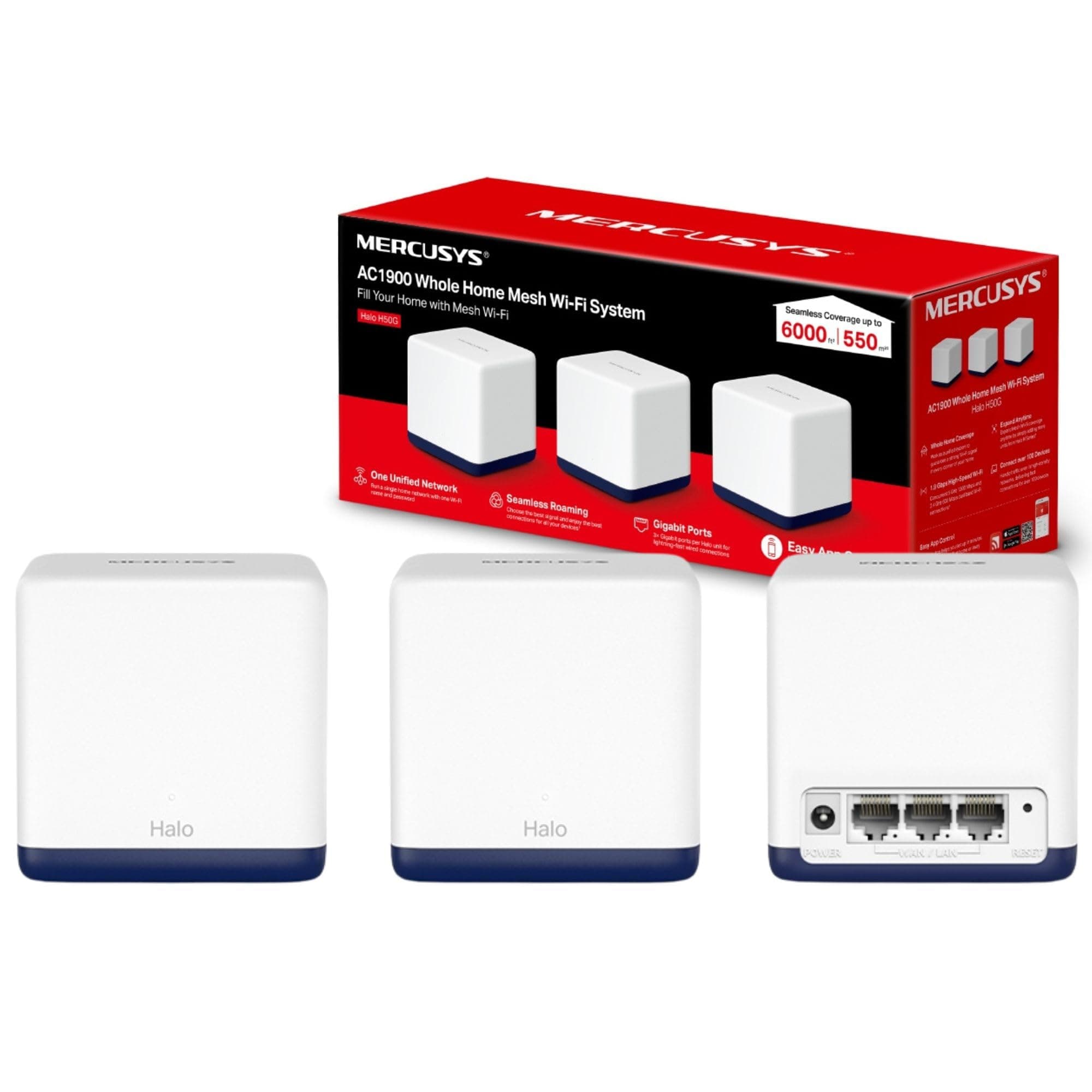
🚀 Elevate your home Wi-Fi game — never settle for dead zones again!
The MERCUSYS Halo H50G (3-pack) is a powerful dual-band mesh WiFi system delivering up to 1.9 Gbps speeds and seamless coverage across 6,000 ft². Featuring three gigabit Ethernet ports per unit, easy app-based setup and management, plus advanced security protocols, it’s designed to keep your entire home connected with fast, stable, and secure internet — perfect for busy households with multiple devices.


| ASIN | B09C7JDYJ1 |
| Antenna Location | Home |
| Best Sellers Rank | 3,539 in Computers & Accessories ( See Top 100 in Computers & Accessories ) 17 in Whole Home & Mesh Wi-Fi Systems |
| Box Contents | Halo H50G(3-pack) |
| Brand Name | MERCUSYS |
| Colour | Multicolour |
| Compatible Devices | Gaming Console, Personal Computer, Smartphone, Streaming Device |
| Connectivity Protocol | WiFi, Ethernet |
| Connectivity Range | 6000 Square Feet |
| Connectivity Technology | Ethernet |
| Control Method | App, Remote |
| Controller Type | Switch |
| Country of Origin | China |
| Coverage | 6,000 ft² (550 m²) |
| Customer Reviews | 4.4 4.4 out of 5 stars (1,066) |
| Data Transfer Rate | 1900 Megabits Per Second |
| Frequency | 5 GHz |
| Frequency Band Class | Dual-Band |
| Is Modem Compatible | Yes |
| Item Dimensions L x W x H | 8.9L x 8.8W x 8.9H centimetres |
| Item Weight | 1.06 Kilograms |
| LAN Port Bandwidth | 1000 Mbps |
| Manufacturer | MERCUSYS |
| Manufacturer Part Number | Halo H50G(3-pack) |
| Maximum Upstream Data Transfer Rate | 1900 Megabits Per Second |
| Model Name | Halo H50G |
| Model Number | Halo H50G(3-pack) |
| Number of Ports | 3 |
| Operating System | RouterOS |
| Other Special Features of the Product | Access Point Mode |
| Product Warranty | 3 year manufacturer |
| Security Protocol | WPA2-PSK, WPA3 |
| Unit Count | 3.0 count |
| Wi-Fi Generation | Wi-Fi 5 |
| Wireless Compability | 802.11ac |
B**K
Very good, decent app, not without faults.
Had these for a few months now and the experience overall has been very good. Coverage is excellent throughout the house and outside, which is a standard three-bedroom, ex-council property with 10m rear garden. Our set up is with two wired 'halos', one at the front of the house, another at the back and one running off WiFi in the middle. Speed is also very good in having no issues streaming video from various to phones or tablet, albeit at only 1080p. Though, sometimes the TV does lag a little bit and takes a while to run in 1080p, and I suspect this is connected to the halo which is not wired since that is the closest. Set up was pretty straightforward and app does a decent job of walking though the process, based on the premise that you are only connecting one halo by wire. It does not jump out at you if you're looking to connect multiple halos by cable... Which resulted in me creating a network loop and causing internet issues as I had connected two to the router, rather than daisy chaining them. The app does explain this, but you have to go searching for this information rather than it being presented to you during setup. Since then I've only had minor hiccups, where every other week or so, the internet will slow down considerably, and using the 'optimise network' function in the app will clear this up straight away. The management side of things in the app is nice, and having the ability to control the WiFi whilst I am not at home is a bonus. For those who finds this dials back to China, it is because the management of the network is cloud-based, with the cloud servers operating in china
A**B
Good Wi-Fi coverage at last
Having switched broadband providers, I found myself struggling to get Wi-Fi in all the rooms of the house. I nearly ordered a pod from the provider which would have cost £8 per month and would have to be returned at the end of the contract, but couldn’t get their system to order one. So, I decided to get my own solution. I starter by trying cheaper range extenders, which I couldn’t get to work. Then I stumbled on a report on mesh Wi-Fi systems, which it said were easier to install and better. The article was not wrong. This system comes with an app which provides literally step by step instructions. One of the three hubs is attached to the router and the other two plug in at different places in the house. It creates a new Wi-Fi system over the whole house and it was so easy to install. No more dead zones, strong signal everywhere and the extra cost is well worth it considering I would have been paying out every month for the internet provider pods and would never have owned them. Even if I switch again, I can simply plug the mesh system into the new router. I love these things!
J**R
You get more than what you pay for.
Ive spent 2 days setting this up. On day 1 I set up a Halo network based on the sequence of operations on the App, which worked fine but it wanted to work as a router. This was ok but my existing router network uses around 18 smart devices including bulbs, switches, thermostats, Alexas Roku devices and printers. I decided to use a separate Halo network name and SSID and password. It seems that these all need to be accessible around the house, and so I could either switch them individually to my Halo network or change the network to use the existing router as an access point. and set the Halo Network to the same SSID and password as my routers Network. The idea being that The router would handle IP addressing, and the Smart devices should just appear on the Halo network. On Day 2, I changed the Halo net name to my Routers SSID and Password. (easy) Then set the Halo net to work as an Access point (also easy - via the Mercury's App). Then optimised the network - again on the app. There was some conflict going on between the router Wifi and the Halo Wifi so I turned off the Router Wifi. Now I have 12 devices showing as online on the app. the other 6 devices show as offline. 2 are actually offline but 4 are not - These 4 are smart switches , and fortunately they work fine via both the smart life App and via Alexa. It's just that they show as offline on the Halo network. Not sure why . FAQ and the online manual don't help with this issue. I guess I need to try out their Tech support. Another issue is that my wifi printer is too old (10 years - Epson BX525WD) to connect to the Halo Network - :^((. It keeps showing Network connect fail incompatible wifi. So Im quite happy with the system. I could use a couple more Halo units to cover our conservatory and hopefully the garage, but will get used to the current system first. Pros: easy to setup. Works well once configured correctly. The Phone App is really good. Cons: range less than expected. Detailed configuration is complex. Interaction with existing wifi has conflicts. My biggest ask: It would help to have a setup manual or at least FAQs for how to apply to a smart device network. Pics : 1 - Connecting the main halo to a router. 2- The halo running after closing down the router wifi. 3- Main halo with some clients inc Smart Thermostat. Update after 1 month Use: 1. Upgraded 3 to 4 stars 2. Very reliable wifi at a min speed so far of 300 mbs (the more clients the lower the speed) 3. Printer working in the mesh by connecting it to a Halo in my upstairs office - working really quickly. 4. IoT smart switches seem to show as online if they are in a line of sight from a hub rather than behind objects. In the main they still work even if showing offline in the app. 5. Now planning to extend the mesh with a couple extra Halos
S**E
Works well without any issues. Easy to setup with the app. Only problem is not having an AU plug adapter.
M**O
Colis abimé
A**I
مساحة التغطية ، سرعة الاتصال بدون مشاكل اعداد للمره الأولى فقط ويستمر معك بدون اي انقطاع ،البنق منخفض جدا مقارب للراوتر الاساسي ،منافذ سريعة جداً انصح به
M**A
Bought the product to address internet issues in our newly shifted double story house. It works amazing and best value to money.
H**N
حبيته مستقر و يعطيك سرعات عالية وتغطيته واسعة
Trustpilot
1 month ago
1 week ago