🚀 Upgrade your home network to pro-level speed and stability—no rewiring, no compromises!
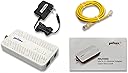
The goCoax MoCA 2.5 Adapter delivers a powerful 2.5Gbps Ethernet connection over existing coaxial cables, enabling ultra-fast, low-latency networking ideal for 4K/8K streaming, online gaming, and smart home setups. Designed for easy plug-and-play installation, it supports up to 16 devices on a single MoCA network and is fully compatible with Verizon FiOS setups, allowing users to maintain TV guide and On Demand services without relying on the ISP’s router. This adapter transforms your home’s coax infrastructure into a future-proof wired backbone, combining cost-effective upgrades with rock-solid performance.


| ASIN | B08XP8MMFG |
| Best Sellers Rank | #24 in Computer Network Adapters |
| Brand | goCoax |
| Color | White |
| Compatible Devices | Desktop |
| Customer Reviews | 4.4 out of 5 stars 3,339 Reviews |
| Data Link Protocol | MoCA |
| Data Transfer Rate | 2500 Megabits Per Second |
| Hardware Interface | Ethernet |
| Item Dimensions L x W x H | 5.47"L x 2.76"W x 0.71"H |
| Item Weight | 320 Grams |
| Manufacturer | goCoax |
| Mfr Part Number | MA01-0001 |
| Model Number | MA2500D |
| Product Dimensions | 5.47"L x 2.76"W x 0.71"H |
| UPC | 860006283209 |
| Warranty Description | 1 Year |
K**B
Perfect for Verizon FiOS – Keeps TV Guide Working Without Using the FiOS Router
I purchased the goCoax MoCA 2.5 Adapter with 2.5GbE specifically for my Verizon FiOS setup so I could use my own router and still retain full TV functionality, including the program guide and On Demand. It worked exactly as intended. Instead of being forced to use the FiOS router just for MoCA, this adapter provides the MoCA network over my home’s coax while my own router handles the internet. My FiOS TV boxes get guide data, updates, and On Demand services just like they would with the Verizon router, but without the monthly rental fee or network limitations. Setup was very straightforward. I connected the adapter to the coax near the ONT and my personal router, and everything came online quickly. The TV guide populated normally, channel data loaded fast, and there were no issues with DVR or interactive features. The 2.5GbE port is a big bonus, especially on a gigabit FiOS plan. Network speeds are extremely stable with low latency, and it provides a reliable wired backbone across existing coax lines in the house. It’s essentially the best of both worlds: full FiOS TV functionality plus the performance and control of a high-end third-party router. If you want to eliminate the FiOS router but still keep the TV guide, On Demand, and MoCA connectivity for your set-top boxes, this adapter is an outstanding solution. Rock-solid, fast, and a smarter long-term setup for FiOS households.
D**N
Fantastic, just do your homework beforehand
I'll start this review off by saying I'm super happy with my purchase. Setup took me, an IT professional, about an hour, but that will vary based on your local wiring. My biggest recommendation for any one purchasing is to do some homework first on setting up MoCa and what roadblocks you may run into. Below is a summary of my existing setup and a high level overview of the steps I took to get setup, along with my final thoughts. I include some basic latency testing and speed testing information near the bottom. For anyone interested in the MoCA splitter and filter I used, I have included links below. Background: I use an Asus AiMesh Wi-Fi system in a house built in the late 1800s. Basically every room was added on at some point by a person with some free time and spare lumber, so nothing is to code, or even remotely associated with any other room in the house. I've wanted to run Ethernet throughout the house since I moved in, but due to the inherent challenges of multiple, hard-to-access crawl spaces and no attic, I was left with very little options outside of my office other than a spotty mesh Wi-Fi system My goal: Having just upgraded to fiber, I had a house full of unused coax cable. I wanted to send Ethernet over this, and effectively "wire" in my access points. However, I wanted to ensure that if a future owner or myself wanted to return to copper/cable internet, that it wouldn't impact this setup. -- What I bought: - 2-pack of goCoax - 1 pack BAMF Coax MOCA-compatible Coax Splitter https://www.amazon.com/dp/B017T9KF1S - 1 pack PPC MoCA POE filter https://www.amazon.com/dp/B07SLD9QPH -- How I accomplished it: - OUTSIDE: First, I had to crack open the Spectrum box on the outside of my house. Inside, there were a bunch of disconnected coax runs and a single filter connection coming from the outside line to my internet line, along with another "filter"-type device that had a ground line connected to it. I removed their filter and ground connection, and replaced it with the BAMF 4 way splitter on the "In" connection. I also connected the PPC filter in between the outside line and the BAMF filter (so it looked like line from road -> PPC filter -> BAMF "in" port on 4 way splitter). Finally, and this is super important, I connected the ground wire I had removed from the Spectrum filter/bracket to the new BAMF splitter, which has two spots, one on each side, to connect the ground wire. While a ground wire isn't 100% required, it's very important to preserve your equipment. From there, I connected all of the coax runs I wanted to use to the "Out" ports on the BAMF splitter. I then made sure everything fit in the box and closed it up. - INSIDE: Took a two foot piece of Coax and connected it to the coax wall jack where my access point was. Powered up the goCoax unit, connected the two foot piece of coax to it, and ran the Ethernet line to my access point's WAN port. Where my cable modem was originally hooked up and my primary router was, I hooked up the other goCoax box, powered it up, and ran the Ethernet cable to a LAN port on my primary router. Power cycled my access point and waited. Within a few moments, the Ethernet and MoCA lights both lit up on both goCoax devices, and I ran some ping and speed tests. Was getting my max internet speed at the access point, with zero dropped packets. Pinging another device on my network, I averaged 3-4ms of latency with no jumps. Moved a large file between devices at 100MBps, not quite 1Gbps speeds but way, way faster than my Wi-Fi had been. That access point is now getting the fastest speeds I've ever had in that part of the house with super low latency, and I can use it as a jumping off point for additional Ethernet runs. -- SUMMARY: For $60 a piece, these devices are amazing. They required zero setup in terms of configuration, all plug and play, and the most time consuming part was prepping the existing coax setup in my home by adding the MoCA splitter and filtering the outside line. These two steps for essential for ensuring the coax was actually tied together, and that the MoCA signal was not escaping into the outside line. I have some other coax runs in my home and I'll absolutely be buying more of these goCoax units to equip there. I was skeptical at first, but now I'm a total believe in this product. If you have a house full of coax cable and want to put it to good use, this is absolutely the product to buy!
B**M
Vastly improved my network performance from my downstairs office, 300mbps w/wifi to 2100+mbps w/MoCA
tl;dr - get a coax explorer before buying to make sure you have a solid coax connection between the two rooms you wish to connect. This thing works as advertised with speeds up to 2135mbps achieved on a 2gbps internet plan. Just make sure all portions of your home network can handle these speeds or you'll have a bottleneck to slow you down. I might also update this review later if I purchase a third adapter for another room in the house for a roommate. Longer Review with context: I recently moved into a house I'm renting that has 0 ethernet wallports and needed to find a creative way to wire directly to my service provider's router (ziply). I bought a 2 pack of these and initially wasn't getting a signal through what I thought was a coaxial cable that would lead to a central coax hub back to the outlet in my office. Per the provided troubleshooting instructions, I tested the MoCA adapters by plugging each adapter on to either end of a disconnected coax cable and verified there was no issues with the adapters themselves. With that my worst fears were confirmed and I found that the coax cable I was hoping lead to my office was actually to the cable box outside. There were also 4 other cut coax cables in my network closet by the router upstairs which I've now assumed are home runs to each different coax port. I popped on over to home depot, got a "Coax Explorer 2 with Remote Kit" for testing and a "Coax Cable Installation Tool Set" in order to turn those cut wires into functional ones. NOTE: I'd highly suggest getting at least a Coax Explorer BEFORE buying this to test the coax connections you wish to connect to the adapters. Once I had working cables it was very easy to track down the correct cable to the correct outlet and BOOM my MoCA adapter was working perfectly! Reading all these reviews I didn't expect more than 1000mbps over one of these, however I was able to clock speeds up to 2100mbps which is at capacity for what I'm paying ziply for which is an advertised 2gbps. My roommate was so impressed they may also get an adapter to hook up their room. I'm still unsure if there will be any interference as I think these cables are just long coax cables run through the walls (not terminating anywhere to cause interference aka home run) but i've obviously been wrong before haha. I've attached a couple screenshots to this review. The first should be just a speed test while using the MoCA Adapter, the other is my speedtest history showing my switch from my Wi-Fi 6e Adapter to this wired connection setup. NOTE: You will only be able to get speeds over 1gbps by connecting to the interface on your router that is rated for faster than 1gbps. My router in particular has a 10gbps interface that I am connected to over the MoCA Adapter. You also need a network adapter capable of handling these higher speeds. You can find if your adapter has the capacity by opening the system information portion of windows. As you can see by my last screenshot, my Network Adapter can handle up to 2.5gbps. Overall I'm super happy with this purchase and the product itself has no issues. I'd say my headaches were entirely my fault due to a lack of preparation. I highly recommend this product if you've got a solid coax connection that can make it to your router.
R**.
Amazing product that lives up to its speed promises
These work phenomenally well in my house for my Wifi mesh backhaul. My mesh nodes only have gigabit ethernet ports and they basically always are hitting that in speed tests. There is no configuration required. Supposedly you can use uo to 16 nodes on a single coax network, but I just use them point to point to get the full speed over each coax cable. These are so amazing for those of us in older homes.
M**S
Great devices - But the devil is in the details
Update 2021-09-25 1 year later and the MoCA devices continue to operate flawlessly with zero maintenance. Update 2020-10-24 I retested my setup for packet loss and saw significantly better results than posted below. 0% loss at 10 Mbps, 0.001% 150 Mbps, 0.01% at 940 Mbps. This was in my current setup using mostly new coaxial over 50 ft long. Afterwards I replaced my cat5e ethernet cables with cat8 and saw a minor improvement. The devices have been reliable. I can't completely explain why I am see better results now - perhaps a reboot/update to my router. Still leaving a 4 star instead of 5 since I had one device with more drops that was replaced. However I am very satisfied with my current goCoax devices and performance. --------- This product isn't quite turn key, but once configured and tested it is amazing. The devices really can transmit at 900+ Mbps over non-ideal coaxial cable. The latency is very low. I have 3 total goCoax MoCA 2.5 devices. I'm using them as a backhaul for Asus AiMesh Wifi (and wired connection for xbox/tv). They all worked, but 1 device dropped UDP packets more frequently than the others. After some troubleshooting (iperf is your friend) I narrowed it down to one device. I exchanged the device quickly via amazon and the new device performs well. That being said, there is some packet loss between devices using UDP (games, streaming video, videoconferencing, voip, etc) but it isn't bad or unexpected. I ran tests with an ideal setup (short cables and devices side by side) and a using my house coaxial. The results weren't much different surprisingly. A 10 Mbps connection has 0 packet loss, 100-200 Mbps had on average 0.5% packet loss, and 900 Mbps had %0.1 packet loss. I'm not really sure why the mid range speed had more packet loss. The coaxial in my house isn't great. It was built in 2000. However these devices can really have a strong transmit signal or don't need very strong signal when receiving. The web admin GUI just have 0-10 transmit power with a default of 10 (not sure what units). I read MoCA 2.5 is suppose to auto negotiate the signal strength so I just left it as 10. The admin GUI is semi-useful, but could be better. Honestly for $60 per device the GUI was more than I expected. It would be really useful if the GUI displayed signal strength between devices. It does show PHY however and allows you to set a room location per devices and change IP address. I couldn't get DHCP to work so I assigned static IPs and configured my router to reserve the addresses. It was a bit annoying to have to factory reset my device to be able to access the admin GUI again, but not a big deal. The devil is in the details for MoCA. Make sure your splitter is MoCA 2.5 compatible (check frequency supported and note MoCA 1.0, MoCA 2.0, and MoCA 2.5 have different requirements). Also note that best practice for MoCA devices should all be on the OUT terminals of the splitter (not the IN). My biggest issue was my MoCA POE filter which caused issues with my Cox cable modem. The filter appeared to block 850-1024 Mhz signals which it shouldn't (verified with my cable modem spectral analysis). I think DOCSIS 3.1 and MoCA 2.5 can potentially have some frequency overlap depending on ISP but that is higher than 850 Mhz. This caused me a lot of problems until I realized what was happening. I installed the filter on the IN of the splitter and the MoCA devices and cable modem on the OUT terminals. After some analysis I saw loss of lock on the upper frequencies. Removing the filter from the splitter resolved the issue. As a solution, I completely separated my coaxial cables for my cable modem and MoCA network. No POE filter is necessary since the MoCA devices coaxial doesn't connect to the outside line. Luckily I could do this by drilling one hole in an outer wall and running a very short cable. So in summary, these devices are great. But be prepared to test them yourself. Be prepared to have a couple tries on splitter, filters, and wiring setups before you get it right! But it is worth it.
J**N
Reliable. Saved me lots of money.
MoCA adapters are a great way to add Ethernet connectivity to your household without having to spend money re-wiring the infrastructure. I’ve been using these for over a year and have not experienced any problems. The network speed did not degrade as a result of using this. The setup was quite easy. I was able to put the adapter on a VLAN while sending traffic for other VLANs through the device. The adapter is pricy, but it’s a great value for what you’re getting.
J**Y
You need these to get the most out of your internet connection.
If you're debating whether to get this, just order it and stop dealing with the hassle of bad wifi connections, unreliable extenders, and slow connections. I have 3 of these in my house to expand a 1Gb fiber connection between two wifi access points and an office computer. In a previous house I had two of these. So I've bought five of these total and it has always been worth it. -Very easy to set-up, just plug in and go. -Connection quality is amazing. My home office is connected through one of these adapters and gets 980+ Mbps on a 1Gbps connection. Practically no loss for reliable work, streaming, and gaming. I have used these with cable internet in the past, if you are, the results will be similar as long as you get a MoCA filter to install wherever your cable connection enters the house (before the first splitter).
A**N
This just does not work. Waste of money and huge waste of time
If you sell a supposedly brand new product, sell a brand new product. Ok to be fair, if it's a returned product for whatever reason, and if it's in new condition, I honestly don't care. But if your box has preconfigured set up from the returner, you should've brought back to factory setting. Somebody at your company has been lazy to do that. It took my precious 2.5 hours to try to figure out why your boxes kept blocking my wifi every time I connect the 2nd box. It would've been much easier if I only had 2 COAX outlets, router and modem. But my entire house is smart enabled meaning I had to deal with more than 10 devices to sort this out. Only after wasting so much time checking on each devices, reconnecting all splitters, tracing all coax cables outdoor to make sure nothing's loose, I decided to factory reset one of your boxes and it started working. What a frustrating experience. Most would've just given up and returned your item. Stop wasting people's time and show more respect. EDIT: 3/2/25 I decided to return this. This was my 2nd Moca I tried. This system simply doesn't work. I don't know such many people swear by this. I have a large house, 4000sf in 1.4 acre property. Do these people have even larger house than mine? I doubt it. Most don't. Still they want to use this for whatever reason. My reason was the access point (2nd mesh) doesn't get good connection from the main router. although direct distance is not that far. Mostly I didn't have issues. But I wanted it better. Hence I tried this. NOTHING BUT PROBLEMS.... you want me to share problems? Sure. 1. MoCa relies on COAX cable set up. You'd have to have cables connected throughout the house. If you're not handy, that's already a problem. I am handy. so not an issue. I didn't have existing cables. Hence I installed one where my access point is. If you don't do it yourself, you're talking another 100-200 hundred dollars probably per one COAX outlet. 2. It operates 1200-2600 Mhz frequency (about). My modem goes only up to 1100. This took me a great deal of research to find out after so many issues. Even to this date, I can't say this incompatibility in Hz was an issue. But based on my research, it is. By the time I figured this out, I decided to return this. 3. It constantly back feeds to modem and internet gets disconnected when it does. I don't understand how people deal with this. MoCa is connected to the router via Ethernet cable. Router gets internet from modem through ethernet cable. Moca gets the feed from main COAX cable via COAX cable using a splitter. Means from the splitter, one goes to modem and the other goes to MoCa. This creates a closed loop. Modem-router-coax-modem-router-coax, and so on. Of course, the COAX signal is supposedly one way. Internet service provider (ATT, Spectrum, Verison, etc) line to the source (modem). When you install Moca though, it has to pass the signal to the 2nd moca. If you look at their diagram, you will understand why this may create the havoc. Moca does not emit wireless signal. It has to pass the signal to the 2nd Moca through COAX cable. I suspect that's where the problem occurs. As it tries to back feed to 2nd Moca through COAX cable, it creates disturbances. Hence no internet. Mine has been cutting off sometimes a few seconds, sometimes for hours. I am sick of it. Then 2 d ago, internet completely went down. I disconnected everything. Connected modem directly to my desktop wired. Modem acted weird and I got only 12Mbps downstream, sometimes under 10. Lasted for hours. Called Spectrum. I plugged in everything (4 smart hubs, switch, router). Next day, it became normal for some reason. The service tech came today. He agreed with me that Moca tech is POS. He got rid of all splitters and re wired the whole COAX line just to be safe and got me a new modem. I suspect the Moca messed up my modem although I have no proof. 4. You'd have to have a mesh system in place before you attempt this one. That's another 300-several thousand dollars. The wifi extender thing does not work if you haven't tried. You have to have a mesh system. 5. Even if Moca somehow works for you, if you happen to lose/disconnect power to your modem, you will have to disconnect COAX cable and ethernet cable from the Moca before you boot up modem again. Then you will have to wait till the modem goes fully online before you reconnect the Moca. Otherwise modem will get confused and would not connect to the internet. Same issue with 2 different brand Moca's. I don't understand how nobody raises all these issues. If you have weak wifi somewhere in the house, just get mesh system. Avoid Google and ASUS. Bad brands. Eero has been the best for me. I use it in my business and no issues for the last few months. I used Google for a few years and ended up buying like 6 of them because of connection issues. Then I gave up. I've been using ASUS Zen wifi for the last 6 + months and am very unhappy despite very expensive price. I bought this based on the reviews and here I am. There are just so many lame people who post the review with lies. I wonder if they are all paid. In conclusion, unless you have a mansion, you should not have any issue with decent mesh system WITHOUT using this POS.
Trustpilot
2 weeks ago
1 day ago