Buy anything from 5,000+ international stores. One checkout price. No surprise fees. Join 2M+ shoppers on Desertcart.
Desertcart purchases this item on your behalf and handles shipping, customs, and support to Italy.
🚀 Own your speed, own your space — surf smarter with ARRIS SURFboard!
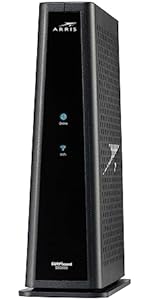
The ARRIS SURFboard SBG7600AC2 is a DOCSIS 3.0 cable modem and AC2350 dual-band Wi-Fi router combo, delivering up to 800 Mbps internet speeds. Compatible with major U.S. cable providers like Comcast Xfinity, Cox, and Spectrum, it features four 1 Gbps Ethernet ports and easy setup via the SURFboard Central App. Designed to boost home network performance while saving rental fees, this trusted device combines reliability, speed, and coverage in one sleek package.


| ASIN | B07H4VJHB9 |
| Antenna Location | Business, Gaming, Home |
| Antenna Type | Internal |
| Brand | ARRIS |
| Built-In Media | AC Power Adapter |
| Color | Black |
| Compatible Devices | iPhone, cell phone, Tablet, computer, streaming devices, smart TV, IOT devices |
| Connectivity Protocol | DOCSIS, Wi-Fi |
| Connectivity Range | 2200 Square Feet |
| Connectivity Technology | Ethernet, Wi-Fi, coaxial cable |
| Control Method | App |
| Coverage | 2,200 sq ft |
| Customer Reviews | 4.3 4.3 out of 5 stars (3,254) |
| Data Transfer Rate | 2350 Megabits Per Second |
| Frequency | 2.4 GHz |
| Frequency Band Class | Dual-Band |
| Global Trade Identification Number | 00612572215418 |
| Has Internet Connectivity | Yes |
| Is Modem Compatible | Yes |
| Item Dimensions L x W x H | 24.7L x 10.3W x 24.1H centimeters |
| Item Type Name | Cable Modem & Wi-Fi Router |
| Item Weight | 1.2 kg |
| LAN Port Bandwidth | 1000 Mbps |
| Manufacturer | CommScope |
| Maximum Upstream Data Transfer Rate | 121 Megabits Per Second |
| Mfr Part Number | SBG7600AC2 |
| Model Name | SBG7600AC2 |
| Model Number | SBG7600AC2 |
| Number of Ports | 4 |
| Operating System | Linux |
| Other Special Features of the Product | Access Point Mode |
| Router Firewall Security Level | Basic |
| Router Network Type | hybrid |
| Security Protocol | WPA2-PSK |
| UPC | 612572215418 |
| Unit Count | 1 Count |
| Voltage | 115 Volts |
| Wi-Fi Generation | 802.11ac |
| Wireless Compability | 802.11ac |
H**E
I had to rate this modem in order to post my comments, so I have no user experience with this combo modem, so I gave it 5 stars all around. I chose the Arris product because it uses less power and generates less heat than comparable Netgear and Motorola combo modems. I purchased two of these open box/refurbished combo modems, and had to return both of them. I don't think this was the fault of the modem combo, and probably, they were all functional. It's likely that the issue with these modems is that they had been previously activated with an ISP. What I eventually learned was that in order to have a previously activated modem reactivated, it needs to be "released" from the account of the original user, and this can only be done by that account holder. Xfinity clearly knew this but never revealed this to me. After seven trips to the Xfinity store attempting to activate four different modems combos, I watched an Xfinity rep search a modem database by modem serial number when I went in to the Xfinity store to activate my brand new modem combo. That's when I learned that every modem activated by anyone appears in a database (shared among the various ISP's), which shows the ISP that originally activated this modem, and if it has been released by it's previous owner. Perhaps Amazon doesn't know this. Several Xfinity reps (both in the store and on the phone) concealed this important fact from me, probably in attempt to rent me one for $15/ month. I finally bought a new modem combo (for quite a bit more money). Because it was new and had never been activated previously I was able to activate it without a hitch. Here's another interesting fact I came across. In addition to the modem combos, I was unsuccessful in activating a modem that I had previously used with another Xfinity account. I was eventually told that in order to use this modem with another Xfinity account, it had to be released from the old Xfinity account in order to activate it on my new account.
F**K
This cable modem would not connect to my security system, streaming tv, and leak detectors. I will be returning this item.
H**N
First off, it was super easy to install. I unplugged my old modem/ router combo that COX provided and plugged this one in. The system booted up and my computer recognizes the internet almost immediately. The only downside was trying to get COX to register the unit. I provided them will all be info and they said 30 minutes. It ended up taking over 2 hours on chat with them to get it squared and in their system for activation. Pro: Easy to install and the setup UI system is straight forward and makes configuring it a breeze. Connecting directly to the router itself is actually providing faster speeds than what I’m currently told I will get by my ISP. Can’t complain there. A con I’m seeing so far with this is the WiFi. It supports 2.4g/ 5g - i have my television in the living room downstairs right below where the router is and the signal strength is “marginal”. The speeds at 2.4g are quite slow given what my ISP provides. Good thing I don’t really need WiFi outside of small items in my home. I’m giving this a 4 as its easy to install and configure. I’ll update again once I’ve had more time with it.
K**.
I’ve been using the ARRIS SBG7600AC2 for just over a month now, and I can confidently say—it worked great from the moment I set it up. This all-in-one cable modem and router combo has been a solid upgrade for my home network. Installation was straightforward, and it synced with my Xfinity service without a hitch. Within minutes, I was up and running with fast, stable internet. The DOCSIS 3.0 modem technology combined with AC2350 dual-band WiFi gives me reliable speeds throughout my home. Streaming, gaming, video conferencing—everything runs smoothly, even with multiple devices connected at once. I consistently get speeds near the 800 Mbps max (as advertised), which is impressive for a device in this price range. The four 1 Gbps Ethernet ports are a great bonus, giving me flexibility for wired connections to my desktop, gaming console, and smart TV. It’s also great not having to pay monthly rental fees for ISP equipment anymore. Overall, this is a dependable, high-performing modem/router combo that delivers fast internet speeds and wide WiFi coverage. If you’re looking to simplify your setup while boosting your home network performance, the ARRIS SBG7600AC2 is absolutely worth considering.
P**Y
Candidly, I'm fresh off an unsatisfying support chat with Arris, and pretty frustrated, so they get 1 star. When the modem/combo router works, it's great. But mine started to fail after 9 months. It would restart or crap out 2-4 times a day. I would have to constantly restart it. The kind of behavior that you might expect from a router that is 5+ years old. It was within their 2 year warranty, so I contacted support. The first time I spent about an hour doing some troubleshooting steps and changing the Wi-Fi channel from Auto to Manual, to try to avoid interference from other devices in the area. I was hopeful this might address the issue. As another step, I also updated my DNS to use Cloudflare's instead of my ISP. Neither of those issues worked, so I went back to Arris. It took me over 2 hours to get a replacement claim going. It would take about 2-10 minutes between each message to receive a response from support. e.g. "Would you like me to start processing a claim for you?" "Yes" 5 min later "Ok, I will start processing the replacement" "Can you confirm your first and last name?" "Can you confirm your email address?" - rinse and repeat. I'm pretty sure the whole process is designed to make people give up out of frustration. Arris provided two options Standard Replacement and "Advanced." You can probably guess what the difference is. Standard requires you to send your defective product back, wait for them to confirm the return, then send you a replacement. i.e. you'd probably be without a router for 2-3 weeks. (A defective router that you have to restart 2-3 times a day is still better than no router). With "Advanced" - they send a replacement product while you get to keep your defective one. Once you receive the replacement product, you send your defective one back. Unsurprisingly, with Advanced, there's a fee. You have to pay shipping (which they charge $20 for ground shipping). They also put a hold on your credit card (MSRP - $255, which is double what I actually paid) while they wait for you to send the defective product back. I tried finding a copy of their warranty statement, but couldn't find it listed anywhere. So none of this is explicitly documented anywhere. When I asked for a copy, the support rep took 20min to discuss with the manager.
Trustpilot
3 weeks ago
2 weeks ago