Buy anything from 5,000+ international stores. One checkout price. No surprise fees. Join 2M+ shoppers on Desertcart.
Desertcart purchases this item on your behalf and handles shipping, customs, and support to Italy.
๐ค Power meets precision in a sleek, mod-ready tower youโll want on your desk.
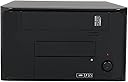
The Apex MI-008 Tower Black P4 Chassis is a compact, metal full tower case designed for Mini ITX builds, featuring a built-in 250W ITX power supply with SATA connectors. It supports custom cooling modifications including 120mm and 80mm fans for enhanced airflow, accommodates single-slot GPUs and standard optical drives, and offers quiet operation ideal for gaming or HTPC setups. Durable and space-efficient, itโs perfect for professionals seeking a customizable, reliable desktop case with solid thermal performance.
| ASIN | B001H0BA24 |
| Best Sellers Rank | #930 in Computer Cases |
| Brand | Apex Tool Group |
| Built-In Media | Case |
| Color | Black |
| Compatible Devices | Desktop |
| Customer Reviews | 3.9 out of 5 stars 205 Reviews |
| Enclosure Material | Metal |
| Global Trade Identification Number | 00835712004561 |
| Is Assembly Required | No |
| Item Type Name | Case |
| Item Weight | 7.2 Pounds |
| Manufacturer | APEX |
| Material | Metal |
| Mfr Part Number | MI-008 |
| Model Number | MI-008 |
| Mounting Type | Tabletop |
| Size | Full Tower |
| UPC | 809185311464 809385160862 102646015384 033585482848 835712004561 132018227664 804066531207 808111649794 191120059020 172304225585 |
| Unit Count | 1.0 Count |
| Warranty Description | 1 Year |
L**N
Great little case if you modify it some.
Hi there! Great little case if you had the right cooling. I'm using a 120mm fan on the side where the hard drive goes for an exhaust, just like a lot of people are saying. It pops right in and fits perfect! 120mm Coolermaster fans here at amazon do the job. I also put an 80mm fan UNDER the case beneath where the internal hard drive area is. I used a tool called a Nickel Plated Nibbling Tool that's actually sold here on amazon to cut out a 80mm hole. I don't know how to link the part numbers so I'm sorry about that. First you take an 80mm fan and mark the holes on the bottom of the case for the screw holes for the fan, then mount the fan and trace the INSIDE circle of the fan on the bottom of the case. Then take off the fan and drill a hole on the inside of the are you traced big enough to get the head of the nibbler in and nibble out the inside of the circle you traced. It does take a few minutes, but its worth it. Then just remount the fan on the inside of your case with the airflow going up inside. I have a "All in One Card Reader 3502B" bought here also. (all my stuff was bought here because I love the free shipping) It sits just above the 80mm fan and the airflow bounces off that and goes directly over the memory to CPU fan and power supply and is sucked out by the power supply and the 120mm exhaust. Once you install the rubber feet you have plenty of clearance for the fan underneath with a 80mm fan grill (make sure to pick one up) and nothing gets in the way. This would probably work if you had the case on its side too, as long as you don't block the fan. I also changed the fan inside the power supply with a ball bearing type. Coolerguys 80x80x15mm 12v sell them here on amazon. I had to cut the wires on them and I wired them to where the old fan was in the power supply and its the exact same size and works great. You probably don't have to do that, but with everyone talking about the sleeve bearing type being a bad investment so I went ahead and did it. The power supply was quiet before I did it and after so I can't tell you about the noise because really there was none before or after the the fan change. Just my peace of mind. I'm using a i3 2120 1155 on a Foxconn H61S Intel H61 motherboard also from amazon and it all works perfect! The power plug is in the perfect place for the 24 pin power plug on the motherboard where its below the DVD drive area. That way the 120mm fan on the side isn't hitting wires and the airflow exhaust isn't blocked. You can definitely only use single slot video card here if you need one. I'm using Sapphire 100357LP Radeon HD 7750 1GB Low Profile also bought here. Other single slot cards might fit, but I KNOW this one does and is is super quiet and requires no extra power. Works great on the provided 250 watt power supply. Also with the bottom fan mod it was kept cool. I game a little bit , just World of Warcraft and SWTOR kind of stuff. I'm on average at 95-100 frames per second and the lowest was 30 in a 25 man raid, but it never dropped below 30 and everyone was casting everything, so its good to go because I game for hours on end..not just 20 minutes. The Asus 24xDVD-RW Serial ATA Internal OEM Drive DRW-24B1ST (Black) fits just fine in this case. The power supply only has two SATA adapters, so if you have more then 1 HDD and the DVD drive you might want to buy and adapter for the four pin molex. I'm only using one HDD and the DVD so I'm good. I'm using a Western Digital WD Scorpio Black 750 GB SATA 2.5-Inch (from Amazon again) and I mounted it inside the case on the right side using a 2.5-inch SSD / HDD to 3.5-inch Bracket Mount Adapter. I took over the cover of the case and lined up the Bracket Mount Adapter and marked the two end holes and then drilled them out on the aluminum rail of the case. I then used normal hard drive screws to mount the laptop hard drive to the bracket, then mounted the bracket underneath with two regular hard driver screw from the top of the aluminum rail. Wish I had a way to take picture because it works perfect. The cover doesn't even hit the screws when it is installed because the screw heads are lower then the aluminum raised bumps for the cover. All in all here's what I bought here from Amazon or their sellers. MI-008 Tower Black P4 Chassis with 250W Itx Foxconn H61S Intel H61 Mini ITX DDR3 LGA 1155 Motherboard. Intel Core i3-2120 Dual-Core Processor 3.3 GHz 3 MB Cache LGA 1155 - BX80623I32120 Western Digital WD Scorpio Black 750 GB SATA 3 GB/s 7200 RPM 16 MB Cache Internal Bulk/OEM 3.5" Floppy-bit Multi-function Panel All in One Card Reader 3502B 2.5-inch SSD / HDD to 3.5-inch Bracket Mount Adapter (Nextronicus..its two pieces so you can do it twice!) Cooler Master 120mm Silent Case Fan 4-in-1 Value Pack - (R4-S2S-124K-GP) (good deal in case you want extras) Corsair Vengeance 8GB (2x4GB) DDR3 1600 MHz (PC3 12800) Desktop Memory (CML8GX3M2A1600C9) Low profile! Sapphire 100357LP Radeon HD 7750 1GB 128-bit GDDR5 PCI Express 3.0 x16 HDCP Ready Low Profile Video Card 2 x Coolerguys 80x80x15mm 12v Fan 3 pin CG08015L12B2-3Y. One for underneath the case mod and the power supply. Masscool FG-2P-80MM 80mm Fan Guard/Grill - 2-Pack by MassCool (for the bottom fan. Use one on both sides.) Amico 100 Pcs 13mm x 13mm x 4mm Self Adhesive Cable Tie Mount Base Holder ( great to zip tie wires up) TEKTON 6233 Cable Ties, 500-Piece. (way to many but wow, perfect size..you NEED THESE) Nickel Plated Nibbling Tool (search that and it comes up) Windows 7 64 that I had already. I also had my own cordless drill and drill bits to start the hole for the nibbler. Now I didn't use the stock fan from the I3, though it would fit perfect. My friend had a stock fan from his 1155 I7 that has a copper core center. I figured better cooling? Might not be needed for an I3. It does fit and with everyone complaining that the power supply touches the CPU fan, well it does sit right on top and doesn't impair operation at all. If fact it seem to add support to the power supply so it doesn't sag down and makes my power supply not have any "give" since its only mounted by the four screws to an aluminum back. I have no idea why someone said an I7 stock cooler doesn't fit because the one for 1155 does. Other coolers I don't know. Looks like AMD people are having issues with coolers. My I3 with the I7 cooler fits just right. I know this was long and most probably wont read it this far, but with the right layout and proper planning this is a PERFECT case for a small gaming system on a 250 watt power supply. This one is very quiet. I have had no problems with cooling the I3 at all, and I might even go up to an I5. Great for this build, probably even better for a HTPC. I'm very happy with how this build turned out and wanted to prove this great little case could be decently built in and gamed with. Idling CPU is 41C, 30 minutes on Prime95 both cores never went above 61C Idling GPU is 33C, 30 minutes on FurMark 1.11.0 never went over 71C Didn't go longer because I was bored. I hope this helps someone.
S**E
Great case (long)
*** UPDATE (2011/12/22) *** After about a year (and some months) of having this case (along with 2 other systems with this case) the first case I got (before I bought more) has started to get PSU problems. The system would only POST some of the time (rather than all), and I excluded all the other attached hardware (not much). If I use a different PSU from another system, the system boots without problems all of the time. If you are looking for a replacement PSU, be sure one is around the size of 5" x 4" x 2.5". The PSU in this case is probably super generic and probably isn't built for quality as much as the case. But most PSUs that come with cases are cheap generics anyway. With normal system load: > ~3.4V on SATA Orange (3.3V) > ~5.1V on IDE Red (5V) > ~12.46V on IDE Yellow (12V) Also spec wise, it is now completely different as everything was upgraded. The single Intel SSD is now in a bracket attached to another bracket attached to the 5.25" bay (for more airflow underneath). *** ORIGINAL REVIEW *** This case is pretty good. Specs: * Intel Desktop Board D510MO with integrated Intel Atom processor D510 - Motherboard - mini ITX - iNM10 - SATA-300 - Gigabit Ethernet - video - High Def * Kingston ValueRAM - Memory - 4 GB ( 2 x 2 GB ) - DIMM 240-pin - DDR2 - 800 MHz / PC2-6400 - CL6 - 1.8 V - unbuffered - non-ECC * 2 SNV425-64GBs, Kingston's cheap SSD thing. In a RAID0. Storage: I just got two SSDs dangling in the case, so hopefully they don't escape SATA cables and SATA power connectors. I also taped the CD drive bay shut so nobody tries sneaking a peek at the system. LEDs: The HDD LED (red) is super bright, bright enough when it flashes to give me nightmares where there are insane electrical storms causing with flashes (in the dark the red flash turns into a bluish white light), so yes LEDs give me nightmares. The HDD light also lights everything infront of it like a beam. Rumor has it that the power light is blue, but I got a green one thankfully. Blue LEDs should be banned as they are super bright and always illuminate half the room, so my green LED is nice. I thought the case had a dead power LED but it turns out that I just attached it wrong, the HDD and Power LEDs can swap + and - to provide multiple colors I think anyway, but I don't know if the case even does that since I never standby. Fans: This case has no fans (excluding the power supply) and no place for any fans but I got one anyway. I placed a 120mm fan in it anyway and made it fit, I won't be able to get it out though. I placed it on the right side at the front of the case and squeeze slided it as much as I could to the back of the case along the right case wall until the blades hit the rim of the fan, once I heard the clicking sound I moved it back a bit. So basically 1 inch of the fan is covered. In short, in a room that averages between 75F and 85F, my board and system temperature stay low. During the last day it remained at 40C (board) and 31C (cpu). Before I put a fan in at all the system went up to 60C and jumped wildly all over the place but a fan smooths out mountains nicely. Power Usage: Irrevelant to the article but if you were wondering, it draws maybe 20-30W? Durability: The case appears pretty durable and resisted my attempts to force technology into it. Somehow when installing the system the board connector plate thing that goes into the rectangular slot wouldn't fit, I then noticed that it was bent out (above), so I just pushed it back in and it fit fine. The primary case frame and the base is very strong though, you can just easily bend the areas full of holes since it's thinner metal. Noise: This case doesn't make any real noise at all even with a jamed in fan.
D**N
Not well made, not well thought out. Other than that, it's fine.
I used this case for my first Atom-based ITX machine. That machine failed recently, only booting intermittently. I'm pretty sure this was due to a connector working loose due to the cramped quarters (the cooling fins on the processor were pressing up against the data cable on the disk drive, for example). Aside from the poor layout, the case is pretty junky -- plastic and sheet metal. I just bought Lian Li PC-Q07 case for about the same money and transplanted the components into it (except for the PSU). The machine works reliably (I'm typing this on it) and what a difference in build quality and the thoughtfulness of the case layout. Given that, I'd strongly suggest looking at the Lian Li case and skip this one.
M**R
Good case, some design concerns
I've been building computers for a long time, dating all the way back to when the only cases you could buy were full-sized AT towers that were almost all tall as your desk. These mini-ITX cases are an interesting development, as they permit computers to exist in places that normally would be frowned upon (a living room, for example). I was in the market for such an installation type, as the internet connection in my apartment terminates in the living room (path of least resistance, and sets it up more for TV use than internet). I had an existing software router running an open source router distro (pfSense) which was ugly and noisy and chewed up a lot of power sitting idle most of the time. I chose this case to use along with the new D525 Atom board from Intel. I have experience with Micro-ATX cases, so I knew I was in for some layering of components and interesting cable routing. The price point, combined with the decent ventilation and (from the look of it) easy install, made this case a no-brainer. There are 2 major complaints I had with this case: 1) The Intel Atom Dual-Core D525/Intel NM10/DDR3/A&V&GbE/Mini-ITX Motherboard, Retail BOXD525MW is not exactly 100% compatible with this case. In fact, only 2 out of 4 screws were able to be installed. This is problematic as most motherboard manufacturers use the board screws as grounds to the chasis. It did not appear to cause a problem with the board, but Intel is quite good about sticking to specifications, so the case is most likely to blame for this. 2) The case is very short. Reading through other reviews, you will see that a majority of complaints is with installing optical drives, as they can be long enough to have installation problems. What most people don't seem to have an issue with is the hard drive tray is also placed a little too far back. On the intel motherboard linked above, the SATA cables come very close to the large heat sink for the processor & chipset. This could have been solved by rotating the hard drive tray 90 degrees, as there's enough width to install the HD that way. A minor complaint is there's no true option for a fan. As others have noted, the side vents holes line up perfectly for 80mm fans to be installed. However, this looks rather ugly with the fan screws sticking out the side. I purchased an Enermax fan from another reputable website to use with the intel board, and something none of the other reviews pointed out is you have to bend the case cover pretty far in order to fit it around the internal skeleton if you have a fan attached. It will work, but it was disconcerting to say the least. Overall the case works well enough, but could be better with some actual design testing. I have to wonder how much the case manufacturers actually test their designs before shipping them.
F**N
Compact, quiet ITX case - perfect for HTPC
This case is perfect as a HTPC case. Paired with a Zotac nVidia ION Atom 330 Dual Core mini ITX Intel Motherboard IONITX-G-E motherboard, there's still plenty of room for a standard 5 1/4" DVD and 3 1/2" hard drive (I actually am using an older Atom 230 version of the Zotac motherboard and have a 2 1/2" hard drive nested in the 3 1/2" drive space). There is room for mounting another 3 1/2" drive on its side. Shorter than the Shuttle Computer cases, it fit easily into my entertainment center. This case was reviewed on the SilentPC website, and they noted the included power supply was very quiet. I was skeptical, not because their reviews are biased, but because I thought perhaps they just "got lucky" with an abnormally quiet PSU. I was pleased to find the system very quiet, and my plans to use an external PSU were scuttled as soon as I turned the system on to test. There are plenty of power connectors from the PSU, a mixed blessing in such a small case. But I did find the extra cables nested comfortably in the space under the 3 1/2" drive. Wiring in small cases is a challenge, and the only "con" with this case is that the included SATA cables are 18" long. I purchased some 10" SATA cables similar to these - mod/smart 10in SATA II Cable w/Latch, 3Gb/s, Straight to Straight, UV Green - with FREE MATCHING HOLD DOWN CLIP - and felt better about the airflow inside the case. But otherwise, working in the small case is fine: the manufacturer has most of the sheet metal edges rounded and I didn't encounter any of the small scrapes and cuts you often get from sharp metal edges. I'm very happy with this case.
D**3
Build The Smallest/Cheapest HTPC......EVER!
My goal was to build the absolute smallest AND cheapest UBUNTU 12.10 64 bit HTPC/Web Browser box possible. I placed this mini ITX computer case in my cart (along with everything else for this build) and waited till the price came down on this case to 40bucks, yes 40 dollars, before I purchased everything.....INCLUDING: a $50 mini ITX main board from ECS Elitegroup w/ HDMI output. a $45 INTEL G540 Celeron Processor. (It has onboard HD graphics) 8 gigs of Kingston RAM. (I swapped out 4gigRAM from another PC and used it for this build. The 8gigs went into the other PC.) And a $12 16GB Cruzer FIT USB Flash Drive (I made it bootable and used it instead of a HDD or SSD for loading UBUNTU and some other freeware.) Everything here came in just under 200 bucks!!! (after adjusting for the price of the RAM) As for the case: The price is SUPER LOW!!! And it comes with a power supply (200 Watts) that's amazingly quite even when its fan is spinning. This is the quietest PC I think I've ever built. It's suited for HTPC use in this regard. Any shortcomings this case has from this point on are purely based on how (inexpensive) cheap it is, and...... Man, is it pretty cheap. The front panel is made of cheap plastic. It just screams CHEAP! There's one open slot for an Optical Drive that's hidden behind a flimsy flip-down door, and one open slot for another USB header or whatever you want there, and it has a another USB header hidden behind a flimsy push-and-click-open style flip-down door which holds 2 USB ports, and MIC and Headphone jacks. These flimsy doors make the case seem pretty cheap. And there is a Power ON/OFF button. I thought that it was rotated 90 degrees off to the 3 o'clock position, but from the pictures here on Amazon, this is the true position. CHEAP! It does not come with a reset button. But, did I tell you how cheap this case is? Here's where things go askew ..... The POWER ON LED light that surrounds the power button did not work on this case. I thought that I hooked up those tiny little power pins wrong on the motherboard, but it turns out that when I hook up the HDD LED it worked. Since I do not have a HDD, this was not a big deal. So now the HDD LED is actually the POWER ON LED on this case. CHEAP!! The LED lights are glued into place and I can't replace them easily without tearing things up. So, there are some QC problems going on with this case. BUT, did I tell you how CHEAP this case is? It is true from the other reviews that the INTEL FAN that comes with the Processor barely misses the bottom of the power supply. I had to bend the power supply up using quite a bit of force before I could get the fan, processor, and the motherboard to fit underneath it. I fear that the flip-down door that hides the USB ports is gonna break after some heavy use. Other reviewers haves stated this, too. BUT, did I tell how cheap this case is?? I'm still giving it four stars, because the price is RIGHT!! It's not an ugly case, really; it's just CHEAP!. I suggest that folks who can tinker around with things only buy this case; folks who are not afraid to "adjust" things to get it to work, if you get my meaning. Those who want better quality should look elsewhere. But, for me, I still enjoyed building this PC -- warts and all.
S**S
Pretty good little case
I purchased this MI-008 Tower Black P4 Chassis with 250W Itx Psu+sata Power Supply back in April of 2012 and thought it would be a good idea to write a review. I installed a brand new MSI E350IA-E45 as well as a Gigabyte Low Profile 6450 1GB Video Card. I also installed a Samsung DVD burner, two sticks of OCZ 2GB RAM, and a 60GB OCZ Agility SSD. Everything has worked well. I was a little uneasy about the lack of air flow in this small ITX form factor computer case....so guess what I did? I modified it! Yep, I installed one 80mm fan on the inside of one of the case sides so we would have an increase in air flow, thereby decreasing the temperatures of every component inside the case. It was very easy to modify. I simply drilled 4 holes in side of the case were you see those vent holes [fan wouldn't be able to do its job without the vent holes]. I used an Antec 80mm Tri-Cool fan with the 3 speed switch. I left the switch on high because my dad is hard of hearing and he didn't even know I installed an extra fan in this rig. How does everything work? Well, no complaints from my dad at all. He leaves this rig on 24/7 and uses it every day for stock market stuff. Would I purchase this case again? Well.... First, I would choose a CPU/MoBo that had more juice to it [I know, this has nothing whatsoever to do with this computer case I am reviewing]. Second, [and I believe this is important], I would definitely install two fans in the case for a much greater air flow. How would I configure such a set up? Real simple and real easy: Install an 80mm fan inside the case, pulling air out the side vent, and install an 80mm fan pushing air in from the other side vent. These two simple modifications will decrease the case temperatures as much as 10-15 degrees and that for me, is extremely important. Remember, the greater the air flow, the lower the temperatures, the greater the longevity of the computer components inside this tiny little computer case. I wish I could add a video review, but my dad lives two hours away, so I no longer have the computer case here in front of me. I will visit my dad next week for Thanksgiving, and I will do my best to do a video review and show the extra fans I installed, as well as how to do it right. Happy Thanksgiving everyone and have a wonderful rest of 2012! It's me, Soar
E**E
Compact and Practical
This case is a snug fit, but it's a great value, extremely functional, and unobtrusive. The trickiest part is that there isn't much clearance between the power supply and the CPU cooler. I used an I5 2500K with a Silverstone NT07-1156 ultra low profile, and there are but a few millimeters to spare. This also leaves a tight fit between the drives in front, the cables, and the CPU cooler. But it all fits. I've stacked an optical drive on top, 3.5 inch hard drive in the middle, and an SSD underneath. You can put also put a 120 mm case fan on the side, but I haven't needed it yet. If you temporarily remove the power supply before installing your components and plan your cabling intelligently, your build should be no problem.
A**D
Nice little compact tower
Nice little compact tower. Needs a special CPU low fan OR the OEM Intel fan. Full seize Video cards are Ok (Mine is an NVIDIA Quadro 2000K) Plenty of places for 1 or 2 SSD (maybe more, but I don't checked) There is no place for an additionnal fan. So the CPU and the Alim fan are doing all the cooling job. Anyway: nice buy for the price + shipping.
R**R
For anyone wanting a nice small HTPC mini-ITX case
For anyone wanting a nice small HTPC mini-ITX case, with the option to install a full-sized/standard Blu-ray/DVD player, ..., then this is perfect. - These APEX ITX cases have been around for quite awhile, but the price is great considering it "includes" an ATX12V/SFX 250W PSU. The only reason(s) I didn't give it 5-Stars: a.) It would've been really nice if APEX would've added (2) USB 3.0 ports in the front, since there's room enough beside the older (2) USB 2.0, and audio plugins. Unfortunately, I'll have to pickup a (2)-port-USB 3.0-for-3.5"-front panel bay. b.) The spring-loaded 5.25" bezel door, that swing's open with a DVD Player tray, is fine, BUT, it would've been better/simpler to have left the 5.25" bay fully open, with just an optional standard 5.25" bezel plate, and that way any (full-sized) BD/DVD player,..., can just be slid in/out from the front. c.) A "Reset" switch on the front would've optionally been nice feature to add.
M**R
Works but cheap
Plastic parts in front are not well made and have broken shortly after put together. If need low cost and don't mind if the plastic hinged parts don't last.
J**R
Meh. Not so good.
Not the most beautiful chassis out there, has the words CD-ROM printed on it but who is to say you're even going to install one, so that's kinda dumb. Only real advantage to this case is that it comes with a PSU, else there are much better choices that are close in price.
Trustpilot
1 month ago
1 month ago