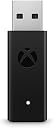
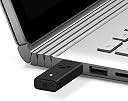


🎮 Elevate your PC gaming—wireless freedom, Xbox precision.
The Xbox Microsoft Wireless Adapter for Windows 10 lets you wirelessly connect your Xbox Wireless Controller to PCs and tablets, supporting up to 8 controllers simultaneously. It delivers high-quality stereo audio and in-game chat, includes a USB extender for flexible placement, and ensures a seamless gaming experience on Windows 10 devices, perfect for both PC gaming and Xbox game streaming.
| ASIN | B00ZB7W4QU |
| Best Sellers Rank | #2,761 in Videogames ( See Top 100 in Videogames ) #9 in Xbox One Cables & Adapters #623 in PC Consoles, Games & Accessories |
| Customer reviews | 4.4 4.4 out of 5 stars (15,851) |
| Is Discontinued By Manufacturer | No |
| Item model number | 1790 |
| Product Dimensions | 13.72 x 14.99 x 4.57 cm; 0.1 g |
R**T
game changer
I can finally plug my headphones in to my controller and it works flawlessly!!! also you can connect up to 8 controllers at once. at this price this is a steal buy it without any hesitation!!!
A**I
perfect
perfect
M**.
Happy with the buy
The product works perfectly!
A**R
Awful experience
This product is fake !!
H**A
Use your XBOX One controller wirelessly
The XBOX wireless adapter for Windows is the logical solution for those who want to use more comfortably the excellent XBOX One and/or XBOX One Elite controller for gaming. In my humble opinion, it deserves a five-star rating because ELIMINATES the annoyance of having a wired controller, at least when you are not charging the batteries. It’s simple, discrete, even elegant, and lightweight, in comparison with the wireless adapter of the XBOX 360 controller, which was bulkier and with an odd round shape, harder to accommodate somewhere in your computer case or surroundings. Besides, the extension cable is detachable, what is very convenient when you have almost or no room for this port in the front or back of the motherboard of your computer, in contrast with the 360 controller wireless adapter, in which the extension cable was included and permanently attached, and if the cord was not necessary, you must fold the excedent cable, in order to avoid the mess in front or back of your computer. The only complaint about this adapter is that takes more time to pair a device, and you must press the pairing buttons sequentially, in order to have a one-step device pairing. First the adapter, then the controller. I have another complaint, but I think is related more to Windows, rather than the device itself. Is the inability to recognize the paired controller in the XBOX Devices subprogram in Windows. You have to try several times for the proper recognition. Nevertheless, even if the subprogram cannot recognize the controller, you can use the controller as well. I recommend this device to anyone who wants to use the XBX One controller without more cables on the computer. It works well and serves the purpose… you won’t regret it.
V**V
Seems like a genuine product
Looks like the original product, maybe it is a very good copy, maybe it is a genuine one, I cannot understand. The label underneath hides the original barcodes, serial number and information, that date of manufacturing is "1016", which could mean October 2016. Windows recognized this dongle without a problem. Xbox controller was successfully connected via dongle,
A**I
.....
Really, the wireless Adapter is great and excellent.
U**A
Bluetoothtan iyi, xbox one kolunu pcde kullanmak istiyorsanız edinmekte fayda var.
Elimde xbox one siyah (klasik) ve xbox one s var ikisi de kolayca bağlandı, bluettothla xbox one s beyaz controller bağlıyordum ama kulaklık özelliğini kullanamıyordum ve bağlantıda sıkıntı olabiliyordu. bu aletle bu hem klasiği hem beyaz olanı tam fonksiyonla kullanabiliyorum.
C**.
Estou utilizando com meus dois controles sem Fio Xbox - Robot Branco.
Funcionou com meus controles perfeitamente! Chegou antes do prazo (que seria amanhã, 05/12) já estou jogando todos os meus jogos da "Game Pass". Só na hora me assustei que não havia acendido a luz do wireless quando apertei a primeira vez, tinha achado que estava "queimado". Cliquei no botão novamente e aí acendeu, com a luz acesa não tive problema algum de parear os dois controles para jogar.
Trustpilot
3 weeks ago
4 days ago