We remain fully operational. Our teams are working around the clock to ensure your deliveries continue safely.

DOWNLOAD THE APP


Customer Services
Copyright © 2025 Desertcart Holdings Limited
DOWNLOAD THE APP

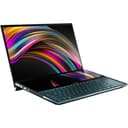


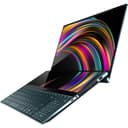
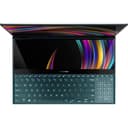
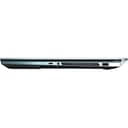
🚀 Elevate your multitasking game with the ultimate dual-screen powerhouse!
The ASUS ZenBook Pro Duo UX581 is a premium 15.6" 4K UHD touchscreen laptop featuring an innovative 14" 4K ScreenPad Plus for enhanced productivity. Powered by a blazing Intel Core i9-9980HK processor and NVIDIA GeForce RTX 2060 GPU, it boasts 32GB DDR4 RAM and a 1TB PCIe NVMe SSD for lightning-fast performance and storage. Designed for professionals who demand multitasking mastery, it includes a detachable palm rest, active stylus, and advanced connectivity with Bluetooth 5.0 and Wi-Fi 6, all wrapped in a sleek Celestial Blue chassis.
| ASIN | B07W5XJ21H |
| Audio Output Type | Speakers |
| Audio Recording | No |
| Automatic Backup Software Included | Windows 10 Pro |
| Available M2 Slot Count | 1 |
| Battery Cell Type | Lithium Polymer |
| Biometric Security Feature | Face Recognition |
| Bluetooth Version | 5.0 |
| Bluetooth support? | Yes |
| Box Contents | ASUS Pen Stylus, Power Adapter & Cord, UX581GV-XB94T ZenBook Pro Duo, User Guide, Wararnty Card |
| Brand Name | ASUS |
| CPU Model Generation | 9 |
| CPU Model Number | 9980HK |
| CPU Model Speed Maximum | 5 GHz |
| Cache Memory Installed Size | 16 |
| Camera Description | Infrared camera with Windows Hello support |
| Chipset Type | Intel HM370 |
| Colour | Blue |
| Compatible Devices | External displays, keyboards, mice, storage devices, printers, stylus input devices |
| Control Method | Touch |
| Customer Reviews | 4.2 4.2 out of 5 stars (225) |
| Display Technology | OLED |
| Display Type | OLED |
| Form Factor | Traditional |
| Global Trade Identification Number | 00192876325018 |
| Graphics Card Ram | 6 GB |
| Graphics Coprocessor | NVIDIA GeForce RTX 2060 |
| Graphics Description | Dedicated |
| Graphics Ram Type | GDDR6 |
| Hard Disk Description | SSD |
| Hard Disk Interface | Solid State |
| Hard Disk Rotational Speed | 10000 RPM |
| Hard-Drive Size | 1 TB |
| Hardware Interface | HDMI, Thunderbolt, USB |
| Has Color Screen | Yes |
| Human Interface Types | Touchscreen with Stylus Support |
| Item Dimensions L x W x Thickness | 35.8L x 24.6W x 2.3Th centimetres |
| Item Type Name | Ultrabook |
| Item Weight | 2.5 kg |
| Keyboard Description | Backlit |
| Keyboard Layout | QWERTY |
| LAN Port Bandwidth | 1000 Mbps |
| Lithium Battery Energy Content | 71 Watt Hours |
| Manufacturer | Asus |
| Maximum Display Resolution | 3840x2160 Pixels |
| Memory Clock Speed | 2666 MHz |
| Memory Speed | 2666 MHz |
| Microphone Form Factor | Array microphones" or "Dual-array microphones |
| Model Name | ZenBook Pro Duo |
| Model Number | UX581GV-XB94T |
| Model Year | 2019 |
| Native Resolution | 3840 x 2160 pixels |
| Network Connectivity Technology | Bluetooth, HDMI, USB, Wi-Fi |
| Notebook Pointing Device Description | Touchscreen |
| Number of Ports | 4 |
| Operating Systems | Windows 10 Pro |
| Optical Storage Device | No Optical Drive |
| Other Special Features of the Product | Screen Pad Plus |
| Power Device | Lithium-polymer battery |
| Processor Brand | Intel |
| Processor Count | 8 |
| Processor Series | Intel Core i9 |
| RAM Memory Installed | 32 GB |
| RAM Memory Slot Total Count | 1 |
| RAM Memory Technology | DDR4 |
| RAM Type | DDR4 SDRAM |
| Ram Memory Maximum Size | 32 GB |
| Refresh Rate | 60 Hz |
| Resolution | 3840 x 2160 |
| Screen Finish Type | Matte, Glossy |
| Screen Size | 15.6 Inches |
| Speaker Description | The product has built-in speakers, which is a common feature in laptops. |
| Specific Uses For Product | Business, Gaming, Personal |
| Supported Monitor Maximum Quantity | 1 |
| Total HDMI Port | 1 |
| Total Thunderbolt Ports | 1 |
| Total USB Ports | 3 |
| Touch Screen Type | capacitive |
| Touchpad Feature | true |
| UPC | 192876325018 |
| Video Output | HDMI |
| Video Processor | NVIDIA |
| Virtual Reality Ready | No |
| Voltage | 240 Volts |
| Warranty Type | Limited |
| Webcam Capability | No |
| Wi-Fi Generation | Wi-Fi 6 |
| Wireless Compability | 802.11ax, Bluetooth |
| Wireless Technology Type | Bluetooth |
Z**X
I love this laptop a lot and I find it a lot more useful than a 1 screen laptop. I am an artist and I like to use reference to make art. I am a gameDev as well and it is really nice to code while mapping to get the perfect coordinates ect. to where I want objects or events playing. This laptop is really good at playing games too. I only play COD Warzone and it runs so smooth and nice(way better than my xbox one), but this is my first time playing games on a computer, so I have no complete knowledge or experience in this area(note that this laptop is not a gaming laptop, but can be your gaming laptop.) This laptop plays way better than my best friend's gaming desktop. One thing though is I suggest you not to use the pen on the big screen because when drawing it felt as if I was going to damage the screen trying to make it work smoothly. The bottom screen is more solid for using your pen. Yes, this laptop is doable for linear art/drawing. Drawing is better than any other good drawing monitor that is $1k or less. Of course the top drawing monitors are better suited for drawing, but I think this laptop is good enough to make art and animations. 9/10 for art/animations, 10/10 for gameDev, 8/10 for gaming, 10/10 overall. There is one big problem I have though. The bottom screen usually flickers ONLY when I do a reset, but the flicker goes away after about 10 minutes. I literally use both screens for EVERYTHING, so get this laptop if you want something powerful and could be used for everything while having it be portable. Well another big problem is the battery life sucks ass, it only lasts about 2-6 hours. My suggestion is to turn off second screen if you have nowhere to charge the laptop. Last thing, people might be worried about facing the bottom screen and could be annoying, I think it is perfect. I actually watch Youtube a lot more on the bottom screen, sometimes I forget I am not using the top screen at all while watching Youtube on bottom screen lol. This laptop is for everything, but if you want to focus more on gaming then I suggest you just get the Asus Zephyrus Pro Duo. To me the Zephyrus would be useless for me. Zenbook has both screens touch and the bottom screen is perfect angle for art. Zephyrus has only bottom screen touch and it is angled for gaming. I could have bought the Zephyrus but I am not a hardcore gamer.
Z**J
I've had my Asus Zenbook Pro Duo for a little over a week. Having read the reviews here on Amazon, I'd like to point out a few things: Screenpad + is a matte finish. This was designed to cut down on glares from the overhead lights found in most public and workplaces. So, yes, it will look dim compared to the 4K OLED main screen. Quite frankly, it's not that distracting, especially when compared the purpose of those. I tend to use the main screen (which is larger) for videos, etc. I use the ScreenPad + for my editing tools, which I think was the purpose for this laptop. I can tell you this: The processor is powerful enough to run major software that tend to use up most of your processing power, and still leave enough to watch live shows or videos and check your email at the same time. The computer is built solidly. The weight and feel of the keys and touch pad (which also doubles as a numeric keypad with the touch of a button) is solid and feels it will last the life of the machine. I could go on to tell you more about the technical aspects, which, undoubtedly, you've done your homework by now. But for the aesthetic users, the color is gorgeous, especially if you are tired on light grey, dark grey, and black. It's also really cool that you can have different, but relating, background images on each screen. PLUS, you get a pretty decent Nvidia graphics card, 32 GB RAM, 1 TB SSD...All-in-all, I'm a fan! You won't be disappointed if you are well-informed!
R**I
I'm really happy with the computer. I do a lot of 3d work , photoshop , videogames and the computer is handling it verry smoothly . Pros : design , verry powerfull i9 9980, 32 ram , RTX 2060 , second screen . Cons : speakers , battery . I love it overall
J**E
Cons: new concept means growing pains. The first one began to "lock" up on the reboot and then the second screen would flicker. It would also do a random reboot and THEN get locked up on the reboot. This happened within two weeks of having it. Pros: The 4k screen is ludicrously gorgeous. The second screen is a game changer. The replacement laptop has been trouble free. When writing papers (doing a master's program) the built in second screen makes things infinitely better. You can have a lecture or video playing on it along with other source material while writing on the main screen. The integration and flow between the two is flawless. Gaming on it is top notch, especially considering that it is not marketed as a gaming laptop, the power it packs is undeniable. Four stars for needing a replacement, but zero regrets.
K**R
It’s very powerful and fast piece of technology. Small screen doesn’t always work as it is described, touchpad very sensitive and needed time to get used to for it. For sure the laptop should have more USB ports. Battery for now is working good but already charge only up to 97% after couple of moths.
Trustpilot
2 weeks ago
2 months ago