🚀 Elevate Your Connectivity Game!
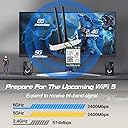
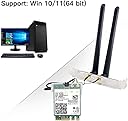
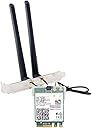
The AX210 WiFi 6E WiFi Card is a cutting-edge M.2 NGFF adapter that delivers lightning-fast wireless speeds of up to 5400 Mbps. With support for the latest WiFi 6E technology and Bluetooth 5.3, it ensures seamless connectivity for a variety of devices. Designed for compatibility with a wide range of desktop PCs, this compact card is perfect for anyone looking to future-proof their network and enhance their online experience.


| ASIN | B08PNMJYRW |
| Best Sellers Rank | #116 in Internal Computer Networking Cards |
| Customer Reviews | 4.4 4.4 out of 5 stars (366) |
| Date First Available | December 4, 2020 |
| Item Weight | 4.6 ounces |
| Item model number | AX210 desktop kit |
| Manufacturer | REKONG |
| Product Dimensions | 7 x 5 x 2 inches |
T**S
Very happy I got it. It's fast, and industry standard
I work on a lot of computers. This went into my personal machine that needed upgrading. A comparison shop to a number of different items. I selected this because it had all the brackets, high gain external antenna, and industry standard chipset. It was immediately recognized, drivers are regularly updated under Windows 11. It was easy to install, and it works reliably. The highest praise that I can give is that I never have to think about it. It just works flawlessly. Well worth it. The rest of the product description covers the tech. In practice I get great 802 11ac and 5 Ghz reception.
O**1
Dealer versus DIY
Ordered a small form factor desktop deal from "Doll". Great computer, but to get the wifi card option, I would have spent over $100 in option cost...kinda like when you get a car at a dealer. So, for less than 1/2 the cost, I ordered pretty much the same card, installed in about 10 minutes, drivers loaded and wifi configured in 10. Works as advertised, strong wifi pickup, latest wifi 6E standard, and still money in my pocket. The thing about solid state stuff, it usually either works out of the box, or doesn't. Hold the comments haters! So...quality is excellent (Intel stuff), functionality is excellent (works as it should), value is excellent (way less expensive than "dealer"), longevity not sure yet (it works, but?). I would recommend this as a buy for low cost, easy install, and works without drama!
J**W
Works great sans the mounting stuff.
I needed a WiFi / Bluetooth card for a new build and this looked to be a simple way to accomplish it. The Shuttle barebones box had mounting holes for two antennas and I only needed to pop out the break-off plugs so that was no problem. The M.2 fitment was no problem. Actually the most difficult thing was finding a way to route the tiny coax cable from the card to the antennas around the double-wide graphic card in a very very tight case but I finally found a way. The M.2 card uses a bog standard Intel signal unit so drivers were no problem and the performance is flawless. I've done a benchmark but sadly don't recall the actual number and can't be arsed to do it again but the speed was good otherwise I'd have been whinging about it. Makes me happy and I'm hard to please.
J**N
First impressions
Got this little gem today, install was a breeze. You get the tiny screw and screwdriver to install. It also includes a little plastic piece that snaps on over the lead connections. Super convenient. The back plate and antennae connections were also sturdy. It took longer to remove my gpu to get to the slot than to actually install it. I also forgot to pre download the drivers but windows 11 was ready and recognized it immediately. WiFi signals are strong, at least 50% faster than my old usb connection. Bluetooth connectivity also works like a champ. Rare to say but so far there are zero disappointments.
C**S
Great card, awkward installation
The card itself and the performance is really good at this price point. I’ve had no issues with connection to a 5G network or connecting my switch controllers, AirPods, keyboard and mouse all at once. However, the little antenna pins that connects to the card have been one of the worst experiences of my life to keep on and install. They just kept popping off and the M2 slot is positioned very awkwardly under my gpu.
T**I
Not getting anywhere near listed speeds
Installed on ASROCK z390 Extreme 4 Mobo windows 11 machine. My goal is to get better than gigabit on my local network. My ISP clocks at 450mbps down/20mbps up (wired and wifi devices achieve this). Install went OK. Wires were pre-attached to card. In hindsight: PCIe wifi card would have been easier since I have a slot open on MOBO. My install required removing graphics card and knocking out a slot cover on the case = not fun. There are pre-made holes in the IO section of my mobo, but it was not practical for an existing build to get the antenna wires to that location, nor would the antennas have actually fit with all the usb cords, etc in the same space. Win10 Drivers on included CD worked OK for win11 machine during first boot. Updated them to windows 11 drivers from the intel website noted in the listing after install. Windows update did not detect the newer drivers from the intel website as others have reported. Don't have a wifi 6 router yet to see full performance ability, but didn't need one to tell that the performance pretty much sucks. This thing is not showing anywhere near its rated speeds. I cannot get it to run faster than 100mbps to my 5GHz router 10 feet away. I attached an external antenna from my ASUS PCIe wifi card and managed to get it up to 200mbps. My existing (still installed) ASUS PCIe wifi 5 card reaches my ISP's full 450mbps, and faster on my local network. Will look for additional ability to configure, but not looking promising. This is basically an expensive bluetooth card for me. I'll try removing all drivers and device and starting over with 1) install win11 drivers & shut down, 2) check connections and install card (pain in the butt), 3) start machine and reconfigure the card again. Not optimistic. Already ordered a PCIe Wifi6e card just in case. Edit after a week of use: remove, check connections, reinstall, clean install drivers, no change. Went into device properties and forced AC mode, no change. My AC wifi pcie card still flies at 450mbps+ compared to this one's 100mbps. Will test with a wifi 6 router next.
M**E
Great cheap wifi BT for Asrock motherboard
Of course trying to connect the little antenna connectors to the card was a total pain in the butt. But, the card works as it should. Mounting the antenna leads to the motherboard back plane holes was a practice in patience, hand-eye coordination, and cursing. But, it works! NO issues so far. Connection is solid and great speed per specs and router ability. I would buy another one if I need it.
R**G
Improves BT connectivity
Improved Bluetooth communications measurably. Use care with the micro-contacts as the snaps on the connectors pop off easily.
K**Y
Works well.
V**R
Good
L**G
wifi card m.2 is ok cable wire came off unable to fix back. I've to buy another pair.
Trustpilot
1 week ago
2 weeks ago