We remain fully operational. Our teams are working around the clock to ensure your deliveries continue safely.

DOWNLOAD THE APP


Customer Services
Copyright © 2025 Desertcart Holdings Limited
DOWNLOAD THE APP


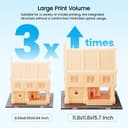
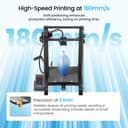

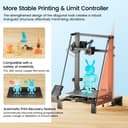
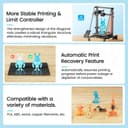


🚀 Elevate your 3D printing game with precision, power, and peace of mind!
The LONGER LK5 Pro 3D Printer offers a generous 300x300x400mm build volume housed in a stable triangular frame, ensuring high-precision prints. Equipped with ultra-quiet TMC2208 drivers and a vibrant 4.3-inch full-color touchscreen, it delivers a user-friendly experience. Features like resume printing and filament detection make it ideal for beginners and pros alike, combining reliability with advanced open-source customization.


| ASIN | B08JPFK2JB |
| Best Sellers Rank | #130,091 in Industrial & Scientific ( See Top 100 in Industrial & Scientific ) #143 in 3D Printers |
| Customer Reviews | 4.0 4.0 out of 5 stars (434) |
| Date First Available | September 22, 2020 |
| Item Weight | 29.2 pounds |
| Item model number | LK5 Pro |
| Manufacturer | Longer |
| Product Dimensions | 10 x 10 x 10 inches |
J**P
Perfect first 3D Printer for me
I have had my Longer LK5 Pro for over two months, and I have over a kilogram of filament and about 200 hours of print time on it. I love it. This is my first 3D printer, but I am impressed with the LK5 Pro’s print quality, the large full color touchscreen, and how easy it was to set up. I consistently make parts with tolerances down to 1/10th of the millimeter. The machine is large! I could not find any dimensions of the unit, outside of the build volume, when I bought mine. It’s outside dimensions are approximately 24” deep x 20” wide x 26.25” high without a spool of filament, so plan accordingly. In sort, I would recommend the LK5 Pro to anyone as a first printer, for someone looking for a larger build volume, or as a general workhorse production printer. The long story: This is not going to replace any six-figure commercial printers, and I know the Longer is an Ender clone. The quality of the machine and its prints are very good. The 300mm X 300mm X 400 mm build volume is worth the extra money. I watched dozens and dozens of review videos, and I had none of the small fit and finish issues the reviewers reported. (They must have had early production printers?) All of my wheels and bearings were tight from the factory, and I have only made small adjustments after many hours of printing. I took my time and spent an hour squaring the final assembly and tramming the print bed with a feeler gauge (not with paper). I used the included filament to print the “Benchy” file included on the micro SD card the same night I opened the box. (Go ahead and order up a spool of filament because the sample is all that comes with the printer, and you will want to make a lot more stuff right away!) I made no adjustments and used the factory settings. The test print quality was impressive compared to most 3D printed things I’ve had experience with. Longer appears to be making improvements and upgrades as their team and users find them. The Maker community is also busy making upgraded parts to print, so I don’t feel like I’m alone with my printer choice. I find 3D Printing to be like any other hobby I’ve had. People are quick to join a “tribe” and declare anything other than what they have to be junk and a wast of time and money. Like any piece of equipment, there is fine tuning and experimentation to get it dialed in. Every filament is a little different and you will need to tune the printer accordingly in your slicer software. (That is part of the fun and how you work toward being and expert in something.) No tech gadget is truly plug and play or set it and forget it. In the end, do your home work and get something you like so you can make something! My personal experience tells me the Longer LK5 Pro was a very good choice and has opened up a whole world of design and production to me.
M**U
Longer LK5 Pro is easy to use and set up. I love it!
Purchased the Longer LK5 Pro 3D printer a few days ago and it came fast. It has been a dream to use. I would definitely recommend this as a great printer for anyone starting out with 3D printing or even for veterans that want a more compact and reliable unit for it's large size. I am extremely impressed. SET-UP. The setup was straight forward. It took me about half an hour to have it fully setup and powered on as they advertise it being about 90% already set up. Well it's true. All the tools needed are provided with the unit to complete the full setup. There are a few great youtube videos on setting up that you can watch as well if you need a little extra help. OPERATIONS. Very easy to use. This is not my first 3D printer, so I do have a little bit of experience with them in general. But this was still a very easy printer to simply start using. Leveled the bed, loaded filament and printed the test print. It came out absolutely flawless on this LK5 Pro. I am very impressed. Like I said, I have had it for a few months now and it has been rock solid. I have not had a single issue. Just load filament and print. I've not even had to re-level my bed yet. QUALITY. The unit itself is very sturdy. The hardware used is good quality. Everything aligns very well. I do not foresee any issues with quality in the future. They run multiple test before shipping it out to you Quality is top notch. VALUE. You will not find a better printer for this price. This printer exceeded my expectations on every level and the volume is just a added bonus.
K**S
A good “base” to upgrade
This was my second 3D printer “project”. I have an Original Prussia MK3S+ with the MMU2 that I built from the kit, so I have a fair amount of experience with assembling and tuning 3D printers. The out of box assembly on this kit took about 20 minutes, and baring a bad power connector went without a hitch. The plug on the base of my unit had a bad connection between the fuse and the negative prong. I had to replace the power port right out of the box, but it was a $5 part on over-night from Amazon. The user interface is very basic, but in a good way. It’s a Color touch screen with very straight forward options and commands. Octoprint compatible without any special modifications. The levelling menu is a nice touch so you don’t have to manually move the X/Y axises to level each corner/Center. I found that I needed to level the bed after *EVERY* print (solution below). If you’re using Cura- just use the Alfawise U30 profile, as this is carbon copy the exact same machine. I made a series of upgrades to mine- mostly around trying to avoid manually levelling the bed every print. The product page lists that it’s compatible with ABL sensors, such as BL Touch, or the generic and (terrible) knock off 3D Touch. I had to message support to get the instructions for installing the BL Touch probe, and they sent me a YouTube Link that was very easy to follow. There is a firmware change involved (Base Merlin) and the touch screen will be inverted- which can be changed in the configuration. I spent 2+ weeks trying to get a print to even get past the first layer with ABL. I finally gave up, and reverted to the base firmware and unplugged the ABL. The problem I ran into was that the Z-offset in configuration was correct, but when printing I kept having prints dig the nozzle into the bed. Because of the ABL mess, I had to replace the build surface. I elected to go with a magnetic PEI steel sheet setup (much like the MK3S+). To remove the stock build tack, preheat the bed to 100°C and use the scrapper to remove the sheet and as much glue as you can. Follow up (AFTER IT COOLS DOWN!) with 99% ISP Alcohol to remove the residue. I found that the magnetic spring steel PEI setup (also purchased on Amazon for ~$30) was a lot better than trying to use the ABL. I haven’t had to level my bed after 20+ prints when using the spring steel plate. I believe this to be because the plate just pulls off the printer- so you’re not exerting force on the bed itself trying to get prints off. Skip the ABL and just go for a decent 2-part magnetic build plate. Upgrades: - Stepper Smoothers: $20. NOT at all worth it, made barely no difference in electric whine, but there was a MINOR improvement in print quality. - BL Touch Auto Bed Levelling Kit: ~$60. Not successful for me, though I’m sure there’s a way to get it fixed in the firmware. I removed mine. The firmware provided by support was last updated 2+ years ago. I may revisit this when I’m bored and looking for something to tinker with. - Magnetic bed kit: ~ $30. WORTH IT! Magnetic base and removable spring steel PEI sheet make levelling the bed on stock firmware a rare occurrence. - Speaker Isolation Feet: I had extra half-dome 0.75” silicone isolation feet meant to be used on speakers to stop them from resonating into the floor or shelf. I wanted to quiet this printer down, so I took a chance and threw 4 on this printer (one per corner) and it made a HUGE difference. Other general tips: - Cover the electrical contacts on the bed underside. They are 100% exposed, and will short if anything conductive touches them. I used high-temp rated (very important- read the packaging) electrical tape. - Check the Longer website for firmware updates. - My hot end reads a few degrees hot, so I had to adjust my slicer settings to drop them down about 5°. - Loading and Unloading filament takes *forever* using the touch screen. I used the extruder jog command in OctoPrint to speed the process up by about 10 minutes. I did about 500mm jog after preheating to load/unload. - This uses the standard e3D V6 (not V5, not V7, V6!) nozzles. Use a spanner wrench to hold the hot end. Never skimp on nozzles, sure there are $10 for a dozen options, but you get what you pay for. Cheap nozzles will eventually break off inside your hot end. Overall, for an exceptionally well priced printer, this is a great printer for someone who wants to make a few upgrades to get a great 3D printer.
Trustpilot
3 weeks ago
2 days ago