Buy anything from 5,000+ international stores. One checkout price. No surprise fees. Join 2M+ shoppers on Desertcart.
Desertcart purchases this item on your behalf and handles shipping, customs, and support to Italy.
💡 Light up your smart home game with effortless style and control!
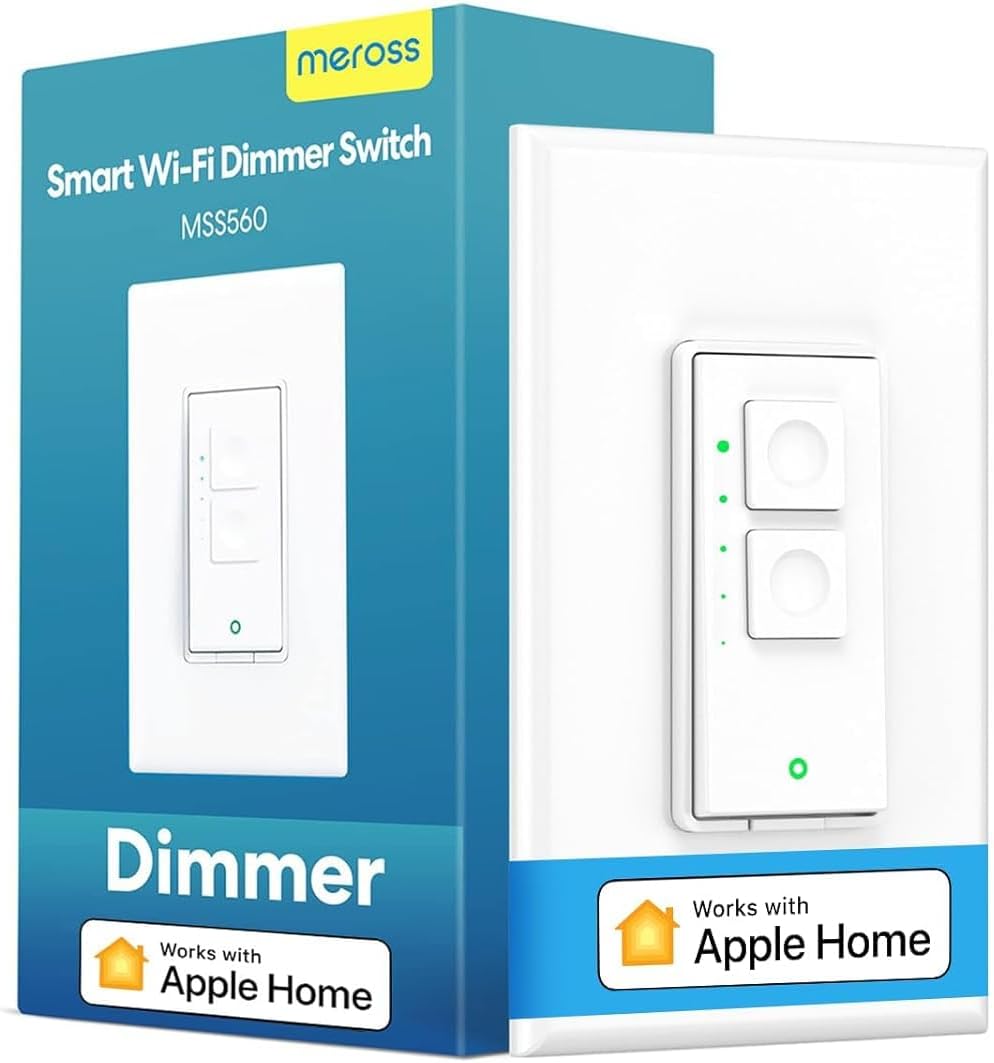
The meross Smart Dimmer Switch is a single-pole, 400W max dimmer designed for 2.4GHz WiFi networks, requiring a neutral wire. It supports voice and remote control via Meross app, Apple HomeKit, Alexa, Google Assistant, and SmartThings. Installation is quick and hub-free, featuring a tactile push-button design and a sleek screwless cover. Certified for safety with fire-retardant materials and overload protection, it enables precise dimming from 0-100% and scheduling with sunrise/sunset options, making it a reliable, stylish upgrade for modern smart homes.


| ASIN | B08GPBH5NK |
| Actuator Type | Push Button |
| Best Sellers Rank | #33,768 in Tools & Home Improvement ( See Top 100 in Tools & Home Improvement ) #99 in Dimmer Switches |
| Brand | meross |
| Brand Name | meross |
| Circuit Type | 1-way |
| Color | White |
| Connectivity Protocol | Wi-Fi |
| Connector Type | Clamp |
| Contact Material | Copper |
| Contact Type | Normally Open |
| Control Method | Voice |
| Controller Type | Amazon Alexa, Apple HomeKit, Google Assistant |
| Current Rating | 4 Amps |
| Customer Reviews | 4.1 out of 5 stars 851 Reviews |
| Global Trade Identification Number | 06973696566041 |
| Included Components | 1 x Quick Installation Guide |
| International Protection Rating | IP00 |
| Item Dimensions | 4.7 x 2.8 x 1.5 inches |
| Manufacturer | meross |
| Material Type | Plastic |
| Model | MSS560 |
| Mounting Type | Wall Mount |
| Number of Items | 1 |
| Number of Positions | 1 |
| Operating Voltage | 120 Volts |
| Operation Mode | ON-OFF |
| Specification Met | Fcc,ic,etl |
| Switch Type | single Pole Dimmer Switch |
| Terminal | Blade |
| Unit Count | 1.0 Count |
| Upper Temperature Rating | 40 Degrees Celsius |
| Warranty Description | 1 Year |
| Wattage | 400 watts |
M**S
Great switch, simple install and setup
I have bought many of these and nearly the entire house now uses Meross switches for lighting. These are relatively simple to install. You absolutely must have a neutral wire in any switch box in the wall in order to use these. While a neutral wire (typically white) is present in most switch boxes, one might not be present in older homes (built before 1985 or so). These will fit in a standard sized switch box, but if you have an unusually shallow switch box, they won't fit. The installations instructions are quite clear, and several videos available showing how to install this, some by Meross, and some by others. After installation, initially the device is connected to and controlled by the Meross app. It is very easy to connect the device to the Meross app by following the instructions in the app. Once you have connected it to the Meross app, you can follow instruction in the Meross app to integrate the device into Alexa. If you have already connected the Meross app to Alexa for previous Meross devices, the new device will immediately work with Alexa. You can even remove the Meross app from your mobile device and Alexa will still properly control the switch and other Meross devices. (This also works with Apple Homekit, but I have not used that and so I can't speak to that.) The switch and dimmer buttons work perfectly with my LED lighs. The dimmer requires some slight additional setup in the Meross app. The tactile click of the switch and the dimmer buttons is a major plus. I used to use a more expensive brand that did not have the click and I found it very annoying. Up to maybe twice a year, one of the switches seems to lose track of whether it is on or off. For example, if the light is off and I say "Alexa, turn on office light", Alexa responds, but the lights don't turn on. This is because the switch seems to think the lights are already on. To fix it, I just say "Alexa, turn off office light", followed by "Alexa, turn on office light". Then the lights turn on properly. Please note: some people will tell you that in lieu of a neutral wire, you can just use the ground wire. DO NOT USE GROUND IN LIEU OF A NEUTRAL. If you don't have a neutral wire in the switch box, have an electrician run one in the wall from the nearest outlet. No current should be flowing through your house ground. That could lead to electrical shocks or even a fire, and it is not legal. Pros: 1. Clear installation and setup instructions (including numerous videos available) 2. Nice tactile click when you press the switch or dimmer buttons. 3. Excellent quality - I have installed about 25 of these and every one worked right away and all are still functioning fine up to three years after install. 4. No hub needed when using with Alexa. 5. Much less expensive compared to other brands but device appears solidly made. 6. Comes with a fancy screwless cover plate for a smooth look. Cons: 1. Very rarely switch seems to lose track of its status, but easily fixed. 2. Cannot be installed in an unusually shallow switch box. 3. Requires a neutral wire which may not be available in older home switch boxes. I obviously recommend this switch as I keep buying more to add to the home.
M**Z
Finally, one that works reliably
I have been working with smart home stuff for awhile now and have not been extremely satisfied with much of it. I had another 'smart' dimmer wall switch before that was too 'fussy' and would work sometimes and not others. I am an Apple guy, but haven't been largely satisfied with stuff supposedly Apple compatible. I purchased the Meross switch knowing it was not compatible with Apple, but it is wonderfully compatible with my Amazon Echo (Alexa). I have been using this switch for sometime now and can say unequivocally that, in conjunction with my Alexa, it has been flawless. It just works! When I have visitors like my daughter, her husband or my girl friend who visit and are not familiar with vocal commands, the Meross can be operated manually with the little tap control at the top of the switch that varies brightness. As it happens this switch is used to control the chandelier over my dining room table and it is wonderful. As the dining mood changes, I can say "Alexa dim dining room to 35% or set dining room to 100% brightness". Installation requires connecting the neutral wire to the switch (as to many others) as well as the ground and the 'hot' side. This could present an issue in a tightly wired, small box, but the installation is straightforward. Again what I love most about this switch is that it is so reliable. I have never had it go offline or need to be reset. it is quite trustworthy and, as I said, fully compatible with the Amazon Echo.
A**L
Could have dimmed a bit more.
Installation was a breeze and works as described. I gave it 4 of 5 because I'm using it to replace an existing dimmer to match all my other meross switches and realized after the fact that dimming only has 3 settings. I was able to dim the lights much lower with previous smart dimmer. Even if I use the app and set it to 5-10% for example, it just sets it to the lowest dim which is still pretty bright. Not exactly a good "mood" setting or nightlight functionality. Planned on changing them all, but not so much now.
D**N
They Just Work
Had a few of these smart switches in my old house and they worked well, so I put them everywhere in my new build. Setup is straightforward, and then they just work. The app is great, and the integration with Alexa is very simple. The best part about these is setting up scenes, routines, and automations. I've got porch lights on at sunset and off at sunrise, bedroom light on at 6:30 AM, etc, closet lights to shut off after 5 minutes (for the kids that like to leave them on all the time). This is one piece of tech that can save money and adds such convenience!
A**S
Waste of Time and Money
Short version: Buy Lutron Caseta instead, as it is definitely worth the $10-20 extra per switch. Long Version: I have purchased eight meross switches over the course of the last eighteen months. Initially, I found them fairly easy to install and reasonably reliable though clearly made with fairly cheap materials. A new firmware patch was released last spring (2021), after which the switches behaved erratically. For example, we would find random switches turned on automatically in the middle of the night or simply flash on and off for a few seconds. This was particularly troublesome while asleep, creating temporary panic when the lights would flash on and off to wake my young children. It also made my spouse concerned about the potential fire danger of failing electronics in the wall, whether the concern was warranted or not. As an aside, the Reddit channel on meross has great descriptions of this same problem from multiple users. I did contact support several times and was repeatedly advised that a new firmware version was undergoing “testing” and would be available soon. Several months later, the aforementioned firmware was still not available and the switches continued to flash on and off at random. Further, they consistently became completely unresponsive - in the app, in HomeKit or via touching the actual switch such that all eight of them would require a manual reset every few days by pushing the reset button or flipping the breaker. To mitigate this issue, I did block the switches’ connection to the outside network on my router and that did decrease (but did not eliminate) the frequency of these events. However, this also made me wonder what was being shared from the switches in my home with meross servers far far away (again, discussed by other users in Reddit who have tracked the packets that these switches send out while installed on your local network). After support failed to provide a solution (or refund) despite their claims of standing behind their product, I removed all of the switches and replaced them with Lutron Caseta. Over a month of service, they have been completely solid as both physical switches and in HomeKit - in fact, the only thing in HomeKit that I have found to be 100% reliable. Again, this seems to be universal reading reviews of the Lutron Caseta products which all provide significant praise. In summary, would strongly recommend starting with Lutron Caseta rather than these meross switches. The amount of time and worry that the meross switches caused was well worth the extra $10 / switch spent on Lutron.
G**D
Good hardware - Fantastic tech support
Easy to install/configure like the rest of the Meross switches. I have a mixture of the Meross single pole dimmers, 3-way dimmers and standard smart switches and all work very well with HomeKit. A few weeks ago I started to run into some issues with the MSS560s and their operation via HomeKit, specifically once the switch was dimmed then powered off, the switch would not turn back on at 100% using HomeKit. Opened a case with Meross support via their app/email and after some back and forth with support, they were able to push an updated/beta/unreleased FW to all the 560 switches resolving the HomeKit synchroniztion issue. Meross support was fantastic and really easy to work with. Note: I was using the latest FW (4.3.6) and support was able to update all the single pole dimmers (560s) to 4.3.7 which install fixed all the HomeKit sync issues I was running into.
J**G
Affordable HomeKit Option
This a good switch if you are looking for an affordable HomeKit option to start your smart home set up. Installing was fairy simple, not too difficult. Linking it up to my wifi was a bit challenging at first using the app but I figured out I can link it up to my wifi faster and more effectively directly from Settings > Wi-Fi. It will show up in there and when you click on it, it will take you through the set up to link to wifi and then once it is set up in there you can wrap it up in the app and connect it to HomeKit with the code. Once I figured this out I was able to run through the set up quickly with the others I bought. Adding it to Alexa is also a breeze and it works great for that as well. The product itself is fine but does feel a little plasticky if that makes sense, but it still seems good. The features in the app itself are not that great and very basic and I only have the app for the set up process and never use it for anything. I use HomeKit exclusively to manage my light and switches and occasionally I shout a command to Alexa, which like I mentioned before, both works great. HomeKit recognizes it and functions well with it as well as Alexa. My one complaint about this dimmer is the lack of customization to the dimmer buttons. They are preset to dim at 75%, 50%, and 25% and then off. Personally on my light bulbs this does not really work that great and doesn't seem like it really dims that well. I don't know if this is the light bulb or the dimmer switch itself. I can dim it in HomeKit and it works great and I can get it as low as 1% with just barely enough light to light the room. But the buttons on the switch are not great. I had purchased TP-Link Kasa prior to Meross and really liked their switches and the app. The buttons on the switch were customizable in the app to the specific setting you wanted it to be. So I really like that option. I returned those because I wanted HomeKit functionality. The switch and app on the Meross is very basic and not customizable as other smart switches which is a bit disappointing but something I can live with since it is an affordable HomeKit option. I have had this dimmer switch installed a little over 30 days and I have installed 5 of these dimmers. Yesterday one of my dimmers stopped responding in the app. I tried everything to get working again, resetting, rebooting, pushing any and all buttons and nothing worked. I turned off the breaker to see if that would reset but nothing. It won't come back on and all lights on the switch are off. The thing is broken and just right after the return date! Not happy about that at all! These are affordable, but if they can't even last 30 days that is very concerning. I now have to go to Meross directly to get a replacement and I'm not too happy about that. We will see how that goes. I am hoping this is a fluke and I just got a dud and that my other switches don't follow suite and start crapping out on me as well. I'm giving this 3 stars due to one of my switches has already died. Before I would have given a 4 star based on the basic functions of the switch and app and affordability and it being HomeKit. If I can get my broken switch resolved quickly and painlessly with Meross I will give it a 4 star review.
S**Y
Setup Tricky, but a Good Product
Setting up the product presented two challenges. First, you need to correctly identify the line in and the line out, but both will typically be black wires without a clear identification of which end is which. If you get it wrong, the switch won't work and you'll simply need to reverse the wires. Second, the switch does not have a QR code on it, so both the Apple Home and Meross apps require you to identify specifically what switch you have, and then manually enter a code. This is not a big challenge, but the process could be so much easier if they simply included a QR code. Once installed, the product works flawlessly, and the ability to control on/off and brightness manually from the switch as well as through the app is a plus.
Trustpilot
1 week ago
2 weeks ago