We remain fully operational. Our teams are working around the clock to ensure your deliveries continue safely.

DOWNLOAD THE APP


Customer Services
Copyright © 2025 Desertcart Holdings Limited
DOWNLOAD THE APP
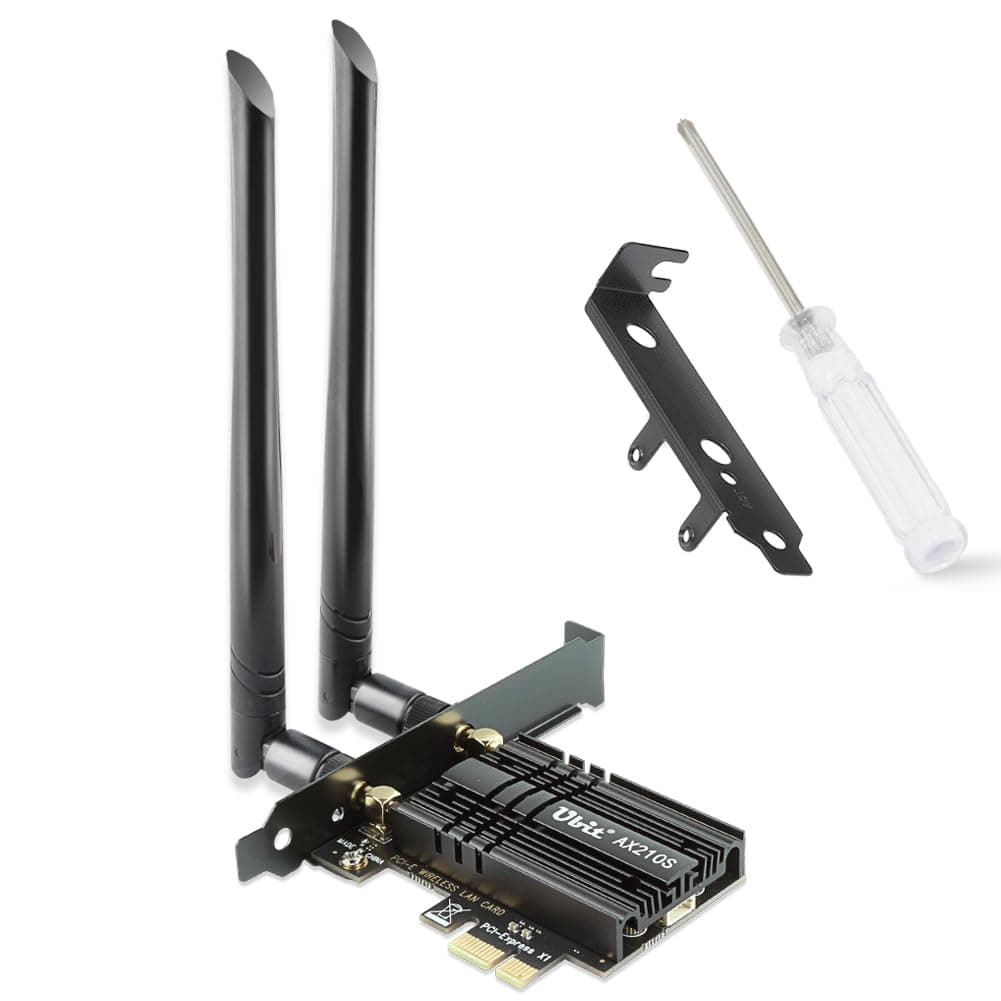
🚀 Upgrade Your Network, Own the Digital Space!
The Ubit WiFi 6E AX210S PCIe card delivers tri-band wireless speeds up to 5400Mbps, leveraging the latest WiFi 6E and Bluetooth 5.3 technologies. Designed for Windows 10/11 desktops, it ensures ultra-low latency, broad device connectivity, and stable long-range performance with advanced OFDMA and MU-MIMO features. Ideal for professionals demanding seamless streaming, gaming, and multitasking in busy network environments.


| ASIN | B08NVR8M8X |
| Best Sellers Rank | 8,234 in Computers & Accessories ( See Top 100 in Computers & Accessories ) 19 in Network Cards |
| Brand | Ubit |
| Brand Name | Ubit |
| Color | 5400Mbps+Bluetooth5.3(heat sink) |
| Colour | 5400Mbps+Bluetooth5.3(heat sink) |
| Compatible Devices | Desktop |
| Compatible Operating System Family | Windows |
| Compatible devices | Desktop |
| Country of Origin | China |
| Customer Reviews | 4.4 out of 5 stars 2,664 Reviews |
| Data Link Protocol | Bluetooth |
| Data Transfer Rate | 5400 Megabytes Per Second |
| Data link protocol | Bluetooth |
| Data transfer rate | 5400 Megabytes Per Second |
| Hardware Interface | PCIE x 1, PCIE x 16, PCIE x 4, PCIE x 8 |
| Hardware interface | PCIE x 1, PCIE x 16, PCIE x 4, PCIE x 8 |
| Item Weight | 0.2 Kilograms |
| Manufacturer | Ubit |
| Manufacturer Part Number | F11W-AX210S-Black |
| Minimum Required Operating System Version | Windows 10, Windows 11 |
| Model Number | Intel ax210 |
| UPC | 760627780883 |
R**S
Exceptional Performance and Connectivity with Ubit WiFi 6E Card
I recently upgraded my desktop setup with the Ubit Tri-Band 5400Mbps WiFi 6E PCIe card, and I must say, it's a game-changer. The installation process was straightforward, and the card fit perfectly into my PCIe slot without any issues. The first thing I noticed post-installation was the significant boost in my internet speeds. The WiFi 6E technology makes a noticeable difference, especially in bandwidth-intensive tasks like streaming 4K content, online gaming, and large file transfers. The tri-band functionality, including the new 6GHz band, provides a more reliable and less congested network, which is a massive plus for me as I work from home. Another feature that stands out is the integration of Bluetooth 5.2. It offers a stable and fast connection for all my Bluetooth devices, including headphones and peripherals. This dual functionality of WiFi and Bluetooth in one card is very convenient. The range and signal strength are impressive. I have my router on the bottom floor,of a 3 storey house yet the connection remains stable and strong on the top floor with no need for MESH. I haven't experienced any dropouts or significant speed drops, which was a frequent issue with my previous card. I was getting 120Mbps average now seeing 500Mbps+ In terms of compatibility, the AX210 chipset works seamlessly with my Windows 10 setup, and I didn't face any driver-related issues. It was pretty much plug-and-play, with the system recognizing the card instantly. Do download the drivers from www.evisionde.com. I followed the video and the driver didnt work. To sum it up, the Ubit WiFi 6E PCIe card is an excellent investment for anyone looking to upgrade their wireless connectivity. It offers superb speed, range, and reliability, making it ideal for various online activities. Highly recommended!
T**L
Works well
Nice and easy to set up. If you don’t have a disc drive, you can download the wifi and bluetooth drivers directly from Intel’s website. I’m getting very good speeds even though my PC is the furthest from the router in the house. Great value and works as expected.
A**R
Works with Bazzite Linux
Both the wifi and Bluetooth work out of the box with Bazzite Linux. Getting around 580mps wifi speed. Easy to install, good quality. Very happy
A**R
Would recommend.
Bought because another make failed to deliver good connection(same intel chipset). With the standard aerial it was not much better. With an external aerial and driver set to 5G only, it connects st 585Mb. Set to auto it defaulted to 2.4Ghz, good connection and laggy response. As now configured it is excellent and is faster than the broadband. Some complain the drivers are on CD. They work for me. I also am not sure Win 11 does not already have the drivers. Would recommend, but you may have to force it to use 5G/6G. I think all new WIFI cards can be problematic
A**M
Wifi worked straight out of the box, but still experience ping spikes
So the wifi chip is ax210, i heard stories about signal dying over time so will verify this in months time. So far the connection is stable no dropouts however i get ocassional ping spikes to 1000ms not sure whether this is due to wifi chip or my access point. The bluetooth i had to install driver, additionally i had to disable the bluetooth driver and re enable which requires computing experience, addressing this in the description would be an improvement, in terms of thermal performance i can verify this later with thermal camera overall a marginal improvement from my previous usb adapter wireless n. but we will see how it fairs in the future. sustainable hassle free packaging, excellent screwdriver(very high quality compared to rest) nothing much to say tbh
D**L
Manual leads to virus
The product works great but the user manual sends you to download a virus isn't of the drivers. It downloaded a trojan and made me log out of everything, so it could read the password I type in. DO NOT FOLLOW THE INSTRUCTION MANUAL
K**S
Great card for a cheap price
I've been using it for a month now in my new pc, it was the easiest thing to install and small enough to fit in an matx case and mono. Works great especially for the price and the WiFi connection doesn't jitter.
S**H
Great wifi card and really easy to install!
I installed this yesterday in a cyberpower pc on an ASRock A520M-HVS motherboard. I have never done this before or built my own pc so I was nervous, but the case just unclipped and once in this was super easy. Literally 2 screws, to insert unscrew the metal cover bit as per the video on this page. Clipped in the Bluetooth cable into the WiFi card, slotted it in the empty slot, screwed it in securely where I had taken the metal plate out. Then I plugged the Bluetooth cable into an empty USB socket (I was worried as I had to run the cable over the graphics card but it was long enough and turned out this was no problem). Then it was just a matter of clip the case back on and screw the antenna on and job done. The pc was running windows 11. It didn't work instantly because the drivers needed updating. Ironically it said they were up to date but because it didn't have Internet access it was wrong!! So I googled the device name and drivers on another computer and downloaded them onto a USB. Then on the pc, it was just a case of right clicking on the start menu to go to device manager, then finding the device under network adaptors, and clicking to update driver by browsing for file. As soon as the drivers were sorted this worked instantly. Just restarted the computer, put in the WiFi password and could use Bluetooth. Tested with a PlayStation controller and speaker and no problem connecting. WiFi speeds on a speed test were getting 70mbps, which is the top speed for my router and any other devices in the house. Really pleased with how simple the whole thing was to install both Bluetooth and WiFi!
Trustpilot
4 days ago
2 weeks ago