⌨️ Light up your creative genius with every keystroke!
The X-keys XK-60 is a 60-key programmable keypad designed for professionals in photography, 3D design, and creative software. Featuring individually addressable backlighting, grouped keys for intuitive use, and broad OS compatibility, it offers a customizable, efficient control panel that accelerates workflows and enhances productivity.


| ASIN | B0092SGI0C |
| Are Batteries Included | No |
| Brand | X-keys |
| Color | Black and Grey |
| Customer Reviews | 4.1 4.1 out of 5 stars (69) |
| Date First Available | 2 December 2013 |
| Hardware Platform | Laptop |
| Item Weight | 283 g |
| Item model number | XK-60 |
| Manufacturer | P. I. Engineering |
| Operating System | Linux, Windows 10 |
| Power Source | Corded Electric |
| Product Dimensions | 20.3 x 22.9 x 5.1 cm; 283 g |
| Series | X-keys XK-60 USB Keyboard |
B**Y
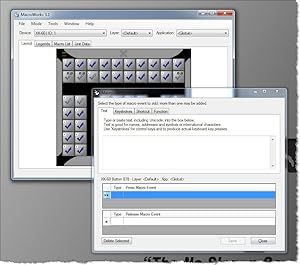
This programmable keyboard is amazing! The software is easy to download and install. Setting up the key binds is a bit challenging as some keys binds are specific. For example, if you wanted something to remain in the on position, such as a light, you would only set a (down) key bind, and not a (down and up) key bind. However, once you figure out what and how to bind, it works GREAT. Highly recommend.
A**R
Great Product
G**N
If you are spending a lot of time working with computer - as most of us do - you will find X-Keys and excellent tool to save time + be more productive. I save each day a lot of time, because instead of using mouse or looking for shortcut lists, I just press the button on my X-keys. But it also helps me to be more productive, because I can use software functionalities I was unable to use before. Simply because I added a lot of less known shortcut to the buttons of X-key. Actually, I was surprised how much it changed the way I work, well above my expectations. I use it all the days.
H**.
FANTASTIC
D**Y
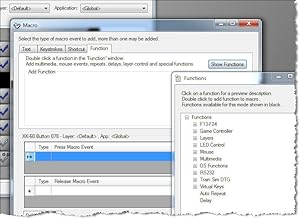
Bought for video gaming. Specifically Eve Online. Uses Macro functions to program keys. In some interactions wtih the game where holding the key down allows you to select a target and releasing the key then performs the function in a more general way, the device cannot interface well with the game as holding down the key on the device is not the same as holding down the key on a keyboard. On a keyboard it sends the signal repeatedly (spamming it) and the game understands. One the device it sends the signal once and the game waits for you to select a target which can lock you into that particular menu function. For many functions it works great (such as modules) but not for D-Scan, Warp, Jump/Dock ... however for targeted D-scan it works great because you can push the button once and then select item after item and not have to press again as the target lock remains on but you have to remember to press the button again for the macro to run and tell the game to release. Same can be helpful for selecting multiple targets in overview but again you ahve to remember that you ahve to press the button a second time to release the command. But it does give you the advantage of laying out sections for common function (combat/scanning/navigation/drones) and making responses fast once you get used to it. Can't really spam d-scan with it. but I use a blue tooth number pad as an extra interface and it works just fine as it isn't running macros but is actually just a a keyboard. Physical - durable, easy to label, feet that put it to an angle don't like to stay on. Programming - very easy to set up, program, and operate. Worth the money for Eve Online but just takes a bit of getting used to on D-scan, Jumping/Docking, and Targetting.
Trustpilot
2 weeks ago
3 weeks ago